Monday.com Too Expensive? $3K–$17K Over 3 Years, by Seats

If you're an 8-person team asking whether monday.com is too expensive, my answer is probably not, at least not on price alone. At 25 people on the Pro plan, it's a real question. Over three years, the subscription costs about as much as building and running an app you own.
That's the decision. Below are the numbers for both team sizes, a checklist to run before you cancel anything, the conditions that should keep you renting, and what to do next if the math says leave.
Is monday.com Too Expensive? What It Bills 8 People vs 25 People
These are monday.com's Work Management prices as I checked them on monday.com's pricing page in October 2026, billed annually:
- Basic: $9 per seat per month
- Standard: $12 per seat per month
- Pro: $19 per seat per month
monday.com has changed its prices and seat rules before, so check that page against your own invoice before you budget off my numbers.
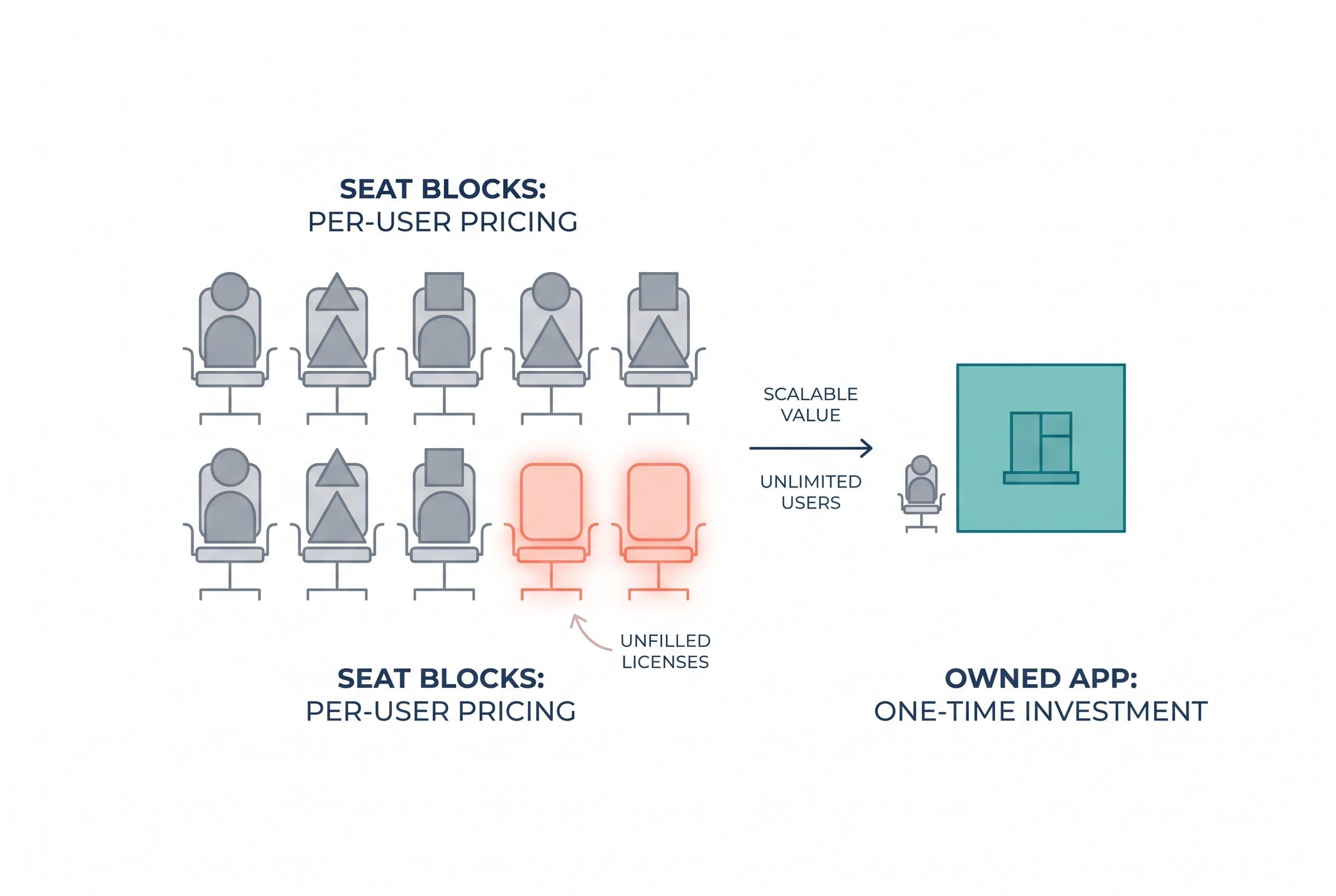
There's a catch most people miss until the invoice shows up. When I checked, paid plans had a 3-seat minimum and then sold in blocks of 5. You don't buy 8 seats. You buy 10. A 25-person team buys exactly 25, but your 26th hire pushes you to 30.
Here's the annual bill. The arithmetic is mine, from those listed prices:
| Plan | 8 users (billed as 10 seats) | 25 users (billed as 25 seats) |
|---|---|---|
| Basic ($9) | $1,080/yr | $2,700/yr |
| Standard ($12) | $1,440/yr | $3,600/yr |
| Pro ($19) | $2,280/yr | $5,700/yr |
So the 8-person team pays for two empty seats. That's 20% of the bill buying nothing. It's annoying, but at $1,080–$2,280 a year it's not a crisis.
At 25 people the picture changes. You're at $5,700 a year on Pro, and every new hire past 25 adds a block of five. Thirty seats on Pro is $6,840 a year. That's seat creep. The bill tracks your headcount, not how much you actually use the tool.
If you'd rather see that math for your whole stack (monday.com plus everything bolted onto it), this calculator does it without asking for an email:
Price your stack in two minutes
List the subscriptions you pay for and see what they cost over 3, 5 or 10 years next to owning the software. No email needed to see the number.
The Shelf-of-Workbooks Problem
The seat price is rarely what's actually wrong. Usually the problem is that a general-purpose board is standing in for a specific process, and people spend their week fighting it.
I've seen this up close at home. It's a real project of mine, built for my own family, so no client details are involved. My wife and I homeschool our four kids. We'd already taught two of them to read, so when our five-year-old was ready, we knew the process. It just meant working through more than a thousand pages of books and workbooks. That works, but it's scattered, slow, and hard to keep consistent.
So I built a web app that boils all of it down to 50 structured lessons on a 100% phonics approach. A parent and kid use it together for about 15 minutes a day. You add your kids and start each one wherever their skills already are. They read their first story by lesson two. It has more than a dozen activity types, 49 original stories that get harder as you go, and hundreds of audio files so nobody has to guess at a pronunciation. It replaced a shelf of workbooks with one clear path. I built it in weeks, and my family uses it every single day.
What does that have to do with monday.com? A flexible board is a shelf of workbooks. You can do anything on it, and nothing on it tells you what to do next. If your team runs one repeatable process (intake, then estimate, then schedule, then invoice), an app built around that process does more than save seats. It gets rid of the "where are we on this?" Slack threads.
When "monday.com is too expensive" really means "monday.com doesn't fit how we work," the seat math matters less than you think.
Three Years of Staying Put, in Dollars
This is where you make the call. I'll compare three years of monday.com at both team sizes against three years of a custom app: the build, hosting, and upkeep.
What I'm assuming (illustrative, not a quote):
- Build: $5,000–$10,000. That's a focused app replacing one or two boards with user roles and an integration or two, inside our published simple and medium ranges. It typically takes 1–4 weeks.
- Hosting: an illustrative $30–$75/month for something like Next.js on Vercel with a Supabase Postgres database, so $1,080–$2,700 over three years. Your real number depends on usage.
- Upkeep: I budget 15% of the build cost per year for changes and fixes. That's a planning number, not a price, and it comes to $2,250–$4,500 over three years.
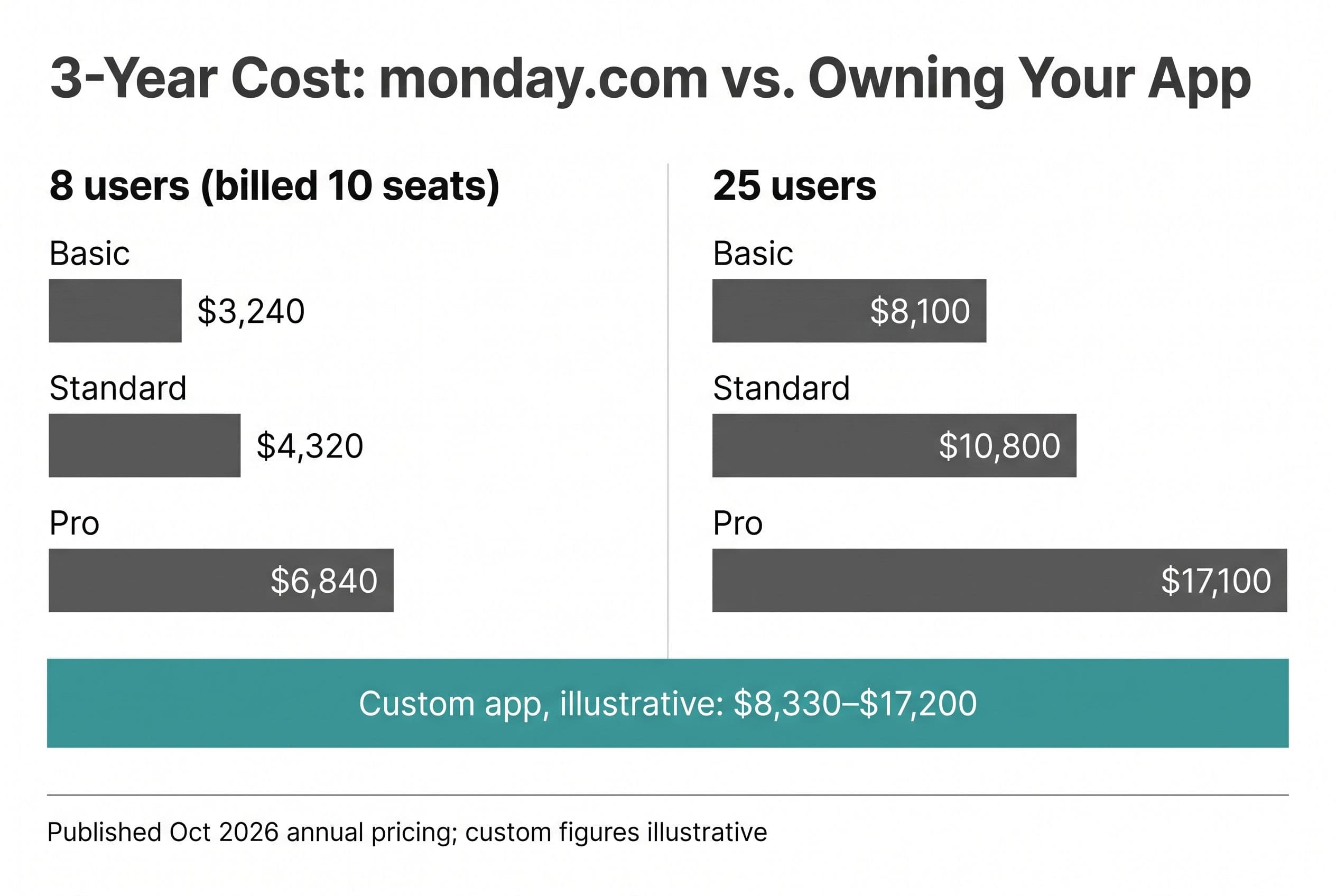
| 3-year total | 8 users | 25 users |
|---|---|---|
| monday.com Basic | $3,240 | $8,100 |
| monday.com Standard | $4,320 | $10,800 |
| monday.com Pro | $6,840 | $17,100 |
| monday.com Pro, growing to 30 seats in year 2 | — | $19,380 |
| Custom app (build + hosting + upkeep, illustrative) | $8,330–$17,200 | $8,330–$17,200 |
Read it straight:
- At 8 users, monday.com wins on price at every tier. A custom app doesn't pay back on seats alone. Not in three years, and not on Basic or Standard in five.
- At 25 users on Pro, three years of seats lands right at the top of the custom range. If your build comes in at the high end, it's a wash. If it comes in lower, owning is already cheaper. Either way, by year four the seat bill passes even the high end of the custom range, because the build is paid off and the seat bill isn't.
- At 25 users on Basic, keep paying. $8,100 over three years is a cheap tool.
- The custom row stays flat as you hire. That's the whole argument for owning. Your 31st employee costs you nothing extra.
There's one cost the table leaves out: workarounds. Zapier zaps that pipe monday.com items into QuickBooks. A separate form tool because the built-in one can't handle your conditional logic. And the person who spends Friday afternoons re-keying data between boards. Here's an illustrative example to plug your own numbers into: two hours a week of staff time at $30/hour is $3,000 a year, or $9,000 over three years. That's more than the 8-person team's entire Pro bill. If your team does a lot of copy-paste, that line matters more than the seat count.
Staying wins when the bill is small, monday.com already handles your workflow, and nobody's re-keying anything. If that's you, close this tab and get back to work. I'm also the wrong hire if you want an embedded developer on retainer for years. I scope, build, and hand off. I'm not a long-term in-house engineer.
If you can't tell which side you're on, send me the actual invoices. I'll tell you whether a replacement pays back, and I'll say so plainly if it doesn't:
Send us your software bill
Bring what you pay today. We'll tell you plainly whether a replacement would pay for itself, or whether you should keep renting.
The Checklist: Seven Questions Before You Cancel Anything
Go through these with your ops lead. If you get four or more yeses, the replacement math is worth running properly.
- Are you paying for 25+ seats, or will you be within 12 months? Below that, seat savings alone won't carry a build.
- Are you on Pro, or being pushed toward it for automations, time tracking, or formula columns?
- Does more than one person re-key data between monday.com and another system (QuickBooks, Xero, HubSpot, a spreadsheet)?
- Are you paying for a Zapier or Make plan mainly to patch monday.com's gaps?
- Do you have a repeatable process with the same steps in the same order every time? Custom software is great at this and bad at "everyone tracks things their own way."
- Do clients or field staff need access that you're paying full seats for, when all they do is check a status?
- Can you name the three screens your team actually uses? If you can, the scope is small. If you can't, you're not ready to build yet.
If question 7 tripped you up, start with a spreadsheet audit before anything else. I'd rather you spend an afternoon there than pay anyone, me included, to automate something nobody can describe.
Disqualifiers: Stay on monday.com If Any of These Are True
These aren't trade-offs. They're reasons to stop.
- Your 3-year monday.com bill is under roughly $8,000 and there's no meaningful workaround cost. No custom build pays back on that.
- Your team uses monday.com as a general workspace. If marketing, HR, ops, and sales each run their own boards with different logic, that's the flexibility monday.com is selling, and it's good at it. A purpose-built app replaces a process, not a whole company's worth of boards.
- You're deep in its ecosystem. If your client portals, docs, and dashboards all live in monday.com and the people who use them like them, the migration is the real cost, not the build.
- Nobody internal can make decisions for about 30 minutes a week during a build. If there's no owner on your side, the project stalls no matter who builds it.
For teams that clear these and sit well above 15 seats, I've worked through the full ROI math for larger monday.com teams separately. The short version: the bigger the team, the faster owning wins. If you're comparing monday.com against other options, here's my breakdown of monday.com alternatives.
Where Builds Like This Go Wrong, and Who Eats the Overrun
Plenty of software projects run late, blow the budget, or ship less than what was promised. Some never ship at all. That's the risk you're actually weighing against a predictable monday.com invoice, and it's fair to weigh it.
Most of that risk comes from two places: hourly billing and open-ended scope. An hourly contract with fuzzy scope means every surprise lands on your card, and senior developers aren't cheap by the hour. Agencies make it worse with a paid "discovery phase" that ends in a slide deck instead of a number.
Here's how I take that risk off you:
- Fixed price. If the build runs over, that's my problem, not yours.
- Your repo from day one. The code lives in source control you control, not on my laptop.
- Ownership transfers on final payment. The contract hands you the custom code and source. I keep only my generic reusable components, and third-party libraries and services keep their own license terms.
- Handoff documentation. Any competent developer can pick it up after me. No lock-in, including to me.
For the longer list of what to check before you hire anyone, me included, here's my guide on what to ask before you hire a developer.
If the Math Says Leave: The Next Four to Six Weeks
Here's what replacing monday.com looks like for a 25-person team with one core process. Most of your time goes into decisions, not meetings.
Week 0: decide with numbers. Export your current monday.com invoice and list your workaround tools. Use free project estimator to get a price range on screen before any form asks who you are. Compare it to the 3-year table above, using your own figures.
Week 1: scoping call. One call, about an hour. We go through those three screens, your roles (who sees what), and integrations: QuickBooks or Xero for invoicing, Twilio or SendGrid if you send texts or emails. You get a fixed quote back.
Weeks 1–4: build. You get a short weekly review on a staging environment, around 30 minutes, where you click through real screens and tell me what's wrong. Out-of-the-box, that's the bulk of your involvement.
Final week: test pass and migration. Your team runs a real week of work through the new app while monday.com is still live. Then we move your data over. Be realistic about what that means: your board items export to Excel and come across cleanly. Your monday.com automations, integrations, and dashboards don't. They get rebuilt in the new app (that's most of the build anyway). Update threads and attached files take extra handling, so we decide up front which ones move and which get archived. We check everything, and then you cancel the subscription. Not before.
The same playbook applies if monday.com isn't your only subscription that grows with headcount. I've run this math for CRM seats against owning your own code, and for teams that patched gaps with spreadsheets, the Airtable alternative breakdown covers moving from spreadsheets to an app. For the full pricing picture, start with what custom software actually costs.
What You'd Tell Your Partner
It probably comes down to one of two sentences.
"We're 8 people, monday.com runs us about two grand a year, and it works. We're keeping it." That's a good decision. Make it and move on.
Or: "We're paying for 25 seats, going to 30, still paying someone to copy data into QuickBooks every Friday, and the tool doesn't match how we work." If that's the one you'd say, stop guessing and get a number. The estimator at free project estimator is five questions and takes about ninety seconds. Your price range shows on screen before any form, and I'll send a fixed quote within one business day. Then you'll be comparing two real numbers instead of an invoice and a hunch.
P.S. The fastest payback usually isn't replacing all of monday.com. It's the one board that someone re-keys every week. Price that piece first.
Want a real number for your own project?
Answer a few questions and get an instant price range and timeline. No call required, no obligation.
Get your instant estimateTalk through your software project with MattFrequently asked questions
- Is monday.com too expensive for a small team?
- For most teams under 10 people, no. At published October 2026 annual pricing, an 8-person team is billed for 10 seats and pays $1,080 to $2,280 a year depending on plan. That's usually cheaper than building and running a custom app unless your staff lose a lot of time to workarounds.
- Why does monday.com charge me for more seats than I have?
- monday.com's paid plans have a 3-seat minimum and then sell in blocks of 5. An 8-person team buys 10 seats, and a 26-person team buys 30. You pay for the empty seats until you grow into them.
- How much does monday.com cost for 25 users per year?
- At published October 2026 annual pricing, 25 seats cost $2,700 a year on Basic, $3,600 on Standard, and $5,700 on Pro. Over three years, that's $8,100, $10,800, or $17,100.
- When is a custom app cheaper than monday.com?
- Usually when you're at 25 or more seats on Pro, growing, and paying for workarounds like Zapier plans or manual re-keying into accounting software. A focused custom app has a flat cost no matter how many people use it, so it typically starts winning around year three or four. Below that size, monday.com is usually the better deal.
- How do I get my data out of monday.com if I leave?
- monday.com lets you export board data, and that export is the starting point for migrating into a new system. Run the new app in parallel with monday.com for at least a week of real work, check the migrated data, and cancel the subscription only after that.
What would software built for your business look like?
Replacing a subscription, fixing software that fell short, or adding AI to your workflow? Talk through the scope with Matt.
Part of these guides
Matt Brody
Founder, BuiltInWeeks
I build custom software for small and mid-sized businesses — the kind you own outright instead of renting by the seat. Fixed price, delivered in weeks, source code handed over at the end.
More about how I workKeep reading

Cost to Replace Airtable: $5K–$15K + $40/Mo Hosting
Replacing Airtable with an app you own usually costs $5,000–$15,000, takes 2–4 weeks, and runs about $40 a month to host. For plenty of teams it still doesn't pay back. Here's the seat math, a pre-flight checklist, and the conditions that should keep you renting.
Read more
Monday.com Alternative: ROI Math for Teams Over 15
At 20 paid seats, Monday.com Pro works out to $4,560 a year using the published annual-billing rate. I walk through a quote-to-job workflow, the three-year replacement math, and the migration work that decides whether owning the software is worth it.
Read more
Housecall Pro Alternative for Small Plumbing Company: Build?
Most small plumbing shops should keep renting. A plumbing company with 8 or more users and workflows that don't fit the software should run the numbers. Here's the checklist I use, the conditions that rule a build out, and three years of seat math laid out so you can check it.
Read more