Housecall Pro Alternative for Small Plumbing Company: Build?

You hired your sixth tech, and your software bill went up $100 a month. If that's you, keep reading.
Short answer on whether you need a Housecall Pro alternative for plumbers: if you run one to five trucks and Housecall Pro handles your workflow, keep paying for it. A custom build won't beat that bill.
A build only makes sense in one situation. You're paying for eight or more users, your office still works around the software every day, and you're about to hire again. At 12 seats, a replacement scoped as a medium or advanced build ($5,000–$20,000) costs less over three years than another three years of seats, anywhere in that range. At 8 seats it's closer. The build has to come in under about $14,400 to win on cash.
The rest of this post is the checklist I'd walk a plumbing owner through on a phone call. It covers what rules a build out, what rules it in, the three-year math, and what to do Monday morning.
What Housecall Pro costs a plumbing shop at 1, 5, 8 and 12 users
Here's the pricing as listed on the Housecall Pro pricing page when I checked it in 2026:
- Basic: $59/month, billed annually, for 1 user.
- Essentials: $299/month regular price for 5 users, plus $100/month for each extra user.
That second line matters most. Five users fit inside the plan. Your sixth user costs $100 a month, and so do your seventh and your eighth.
One caveat. Housecall Pro changes plans, promos and billing terms often, and the Basic price above is the annual-billing figure while Essentials is the regular list price. So don't take my numbers over your invoice. Find the per-seat add-on on your last bill and use this formula: $299 + (your per-seat price × users over 5) = your monthly cost.
Below is illustrative arithmetic using those published numbers. I haven't included add-ons, payment processing, or promotional pricing, so your actual invoice will be different:
| Users on Essentials | Monthly | Per year | Over 3 years |
|---|---|---|---|
| 5 | $299 | $3,588 | $10,764 |
| 8 | $599 | $7,188 | $21,564 |
| 12 | $999 | $11,988 | $35,964 |
The software didn't get better between row one and row three. You hired four more people, and that's all that changed. Per-seat licensing grows with your headcount, not with how much you use the product. A plumbing company grows by adding techs, so the bill grows every time you staff a truck.
Pull up your last invoice and put your own seat count into that table before reading further.
Price your stack in two minutes
List the subscriptions you pay for and see what they cost over 3, 5 or 10 years next to owning the software. No email needed to see the number.
What "build it" means here (and a system I built to show the pattern)
Some people hear "custom software" and picture a two-year project run by a room full of consultants. That's not what I do.
I use AI-assisted development to ship focused production systems in weeks. The skill that matters is connecting several outside services into one system that does exactly one business's job.
The most recent example isn't a plumbing system. It's an automated content pipeline for a business that wanted steady SEO blog traffic without hiring a content team. It pulls Google Keyword data and ranks topic ideas. Claude writes the drafts, Grok, Gemini and ChatGPT review them, and Sapling.ai checks that each one reads as human-written. Then Zapier posts the finished pieces to Facebook and the Google Business profile. It publishes on its own, with no content team behind it. (This is a real client project. Details are generalized, and results vary.)
Why does a plumber care? Because a dispatch-and-invoicing system is built the same way: several outside services wired into one tool. Stripe for card payments, Twilio for "your plumber is 20 minutes out" texts, QuickBooks for the books, and a Postgres database underneath it all. Different services, same kind of work. That's the part I'd be doing for you.
Stay on Housecall Pro if any of these are true
These conditions rule out a build. Any one of them should end the conversation, and you shouldn't let a developer argue you out of it, including me.
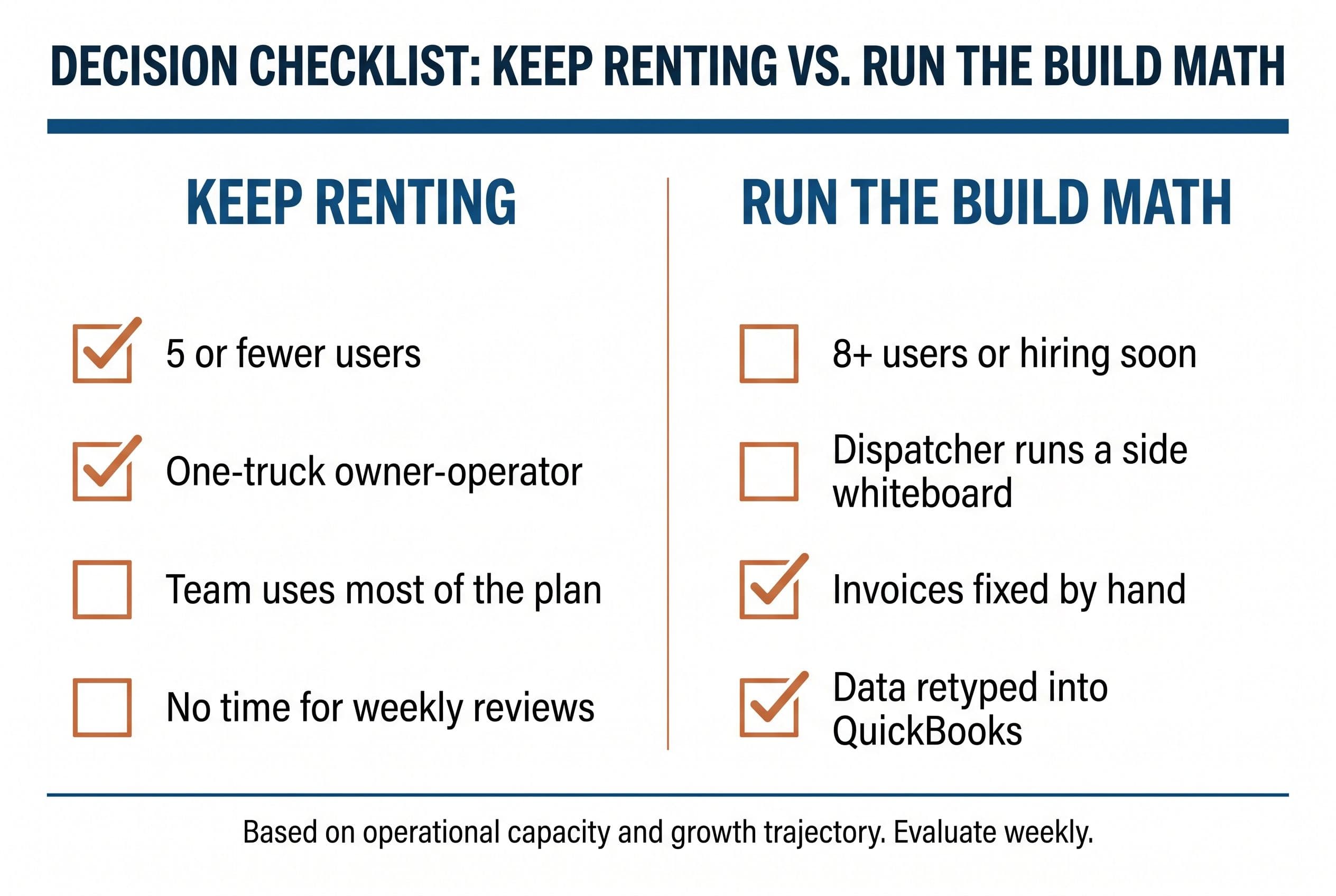
- You have five or fewer users. The Essentials plan covers them for $299/month. Even counting software you've paid off, a build won't come in under that by enough to be worth the switch.
- You're a one-truck owner-operator. At $59/month on Basic, three years costs $2,124. No custom build anywhere pays back against that. Keep renting it.
- Your team actually uses most of what's in the plan. If the office isn't fighting the software, nothing's broken.
- You don't have an hour a week for six weeks. I need someone who knows how your jobs flow to review progress weekly and test before go-live. If nobody can do that, wait.
- You want a developer on call indefinitely. I scope, build, hand off and leave. If you want someone embedded long term, hire one or keep a vendor relationship. I'm the wrong fit, and I'd rather say that now.
Other subscriptions work the same way. When I wrote about replacing Jobber for HVAC dispatch, that post landed in the same place for small crews: keep the subscription. That's fine. Jobber's entry plans are priced for small crews, and a small crew isn't going to build its way under that.
Look at a build if three or more of these are true
This is the other half of the checklist. Count how many apply to you:
- You pay for eight or more users, or you've stopped adding seats for office staff who need one.
- Your dispatcher keeps a second system on the side: a whiteboard, a shared spreadsheet, a group text thread. The software doesn't match how you assign emergency calls versus scheduled work.
- Your invoices need editing after they're generated. Flat-rate pricing, permit fees, water heater warranty registrations, multi-visit repipes. If someone reworks invoices by hand at the end of the day, the invoicing doesn't fit your work.
- Two systems don't talk. Jobs live in one place, the books in QuickBooks, and someone retypes data between them.
- You can't easily get all your data out, including job history, customer equipment records and photos, in a form another system can use. Vendor lock-in is a real cost. You only notice it when you try to leave.
- You're hiring within the year. Every new tech moves you down that table.
Three or more means it's worth an hour to run the numbers. Fewer than three means stay put and go fix your process instead.
Three more years of seats vs. building it once: the actual numbers
This is the section where you make the call. Doing nothing still costs money; you just pay it monthly.
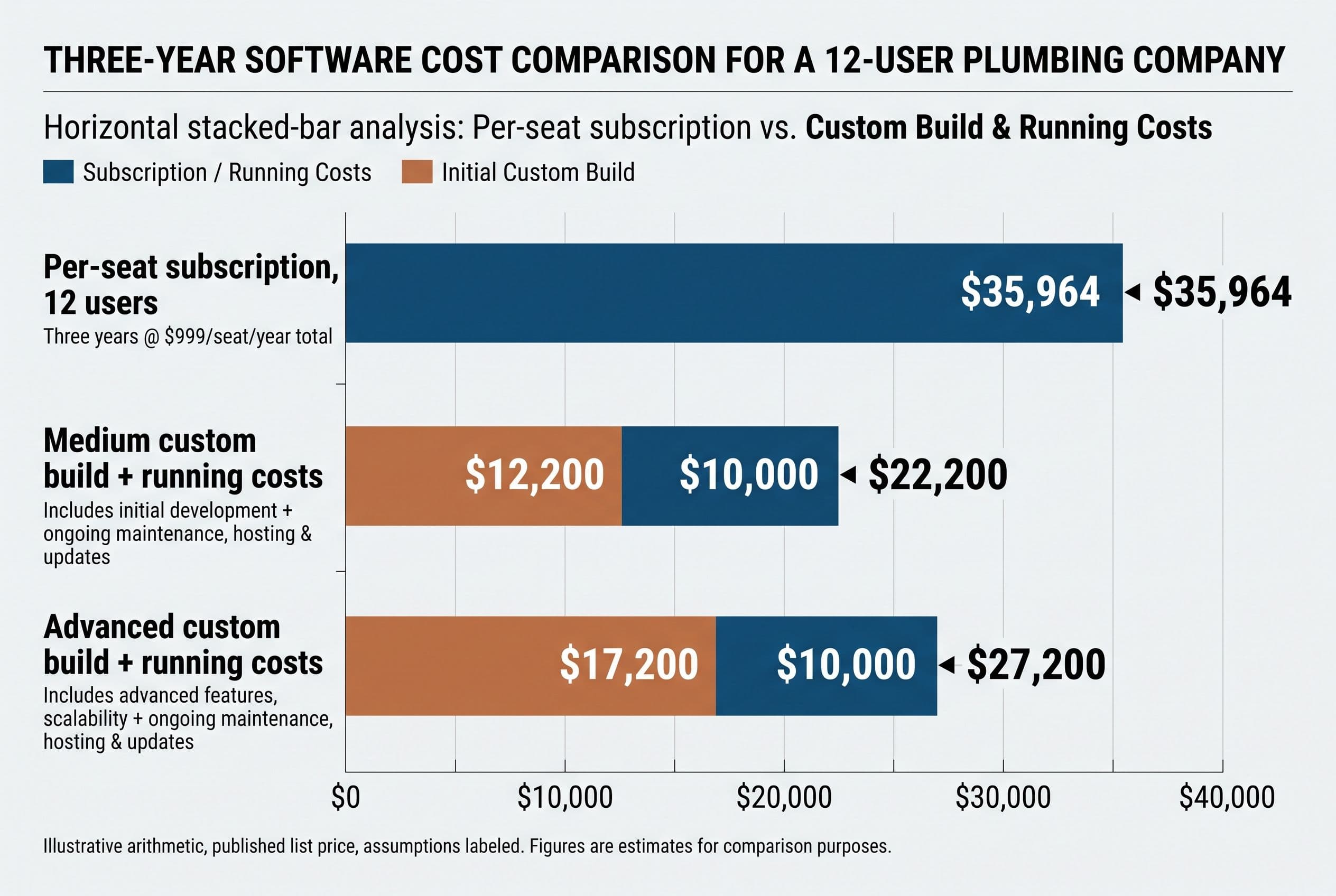
Here's the same illustrative arithmetic on both sides over three years. Assumptions, clearly labeled: the subscription side uses published Essentials pricing with nothing extra. The build side uses my fixed-price ranges. Data migration from your current system is included in the build scope. I've budgeted an assumed $200/month for running costs: Vercel and Supabase hosting, Twilio's per-message charges, transactional email, and a reserve for small changes. That $200 is a planning placeholder, not a quote. Card processing fees apply on both sides, so I've left them out.
| Three-year cost | 5 users | 8 users | 12 users |
|---|---|---|---|
| Housecall Pro Essentials (published price) | $10,764 | $21,564 | $35,964 |
| Custom build, medium scope ($5K–$15K) + $7,200 running costs | $12,200–$22,200 | $12,200–$22,200 | $12,200–$22,200 |
| Custom build, advanced scope ($10K–$20K) + $7,200 running costs | $17,200–$27,200 | $17,200–$27,200 | $17,200–$27,200 |
At 12 users, every build scenario costs less than renting, even at the top of the advanced range. A build would have to cost more than about $28,700 to lose. Your thirteenth hire doesn't change the build cost at all.
At 8 users, the line sits at about $14,400 of build cost. Most of the medium range comes in under that, so a medium build usually wins. Most of the advanced range doesn't. At the top of advanced, renting wins by about $5,600. If you're in the advanced range, the question becomes whether the daily workarounds (the whiteboard, the retyping, the invoice fixes) cost enough in office hours to close that gap. Only you know that number.
At 5 users or fewer, stay. Even the cheapest build in the table costs more than three years of Essentials.
Whichever way the math lands, the price doesn't move once it's set. It's fixed, so if the build runs over, that's my cost. More on that below.
One more point of comparison. The traditional agency route usually costs several times more than these ranges and takes months with a team. Moving up to ServiceTitan is a different scale entirely: it prices per technician, with implementation fees and an annual contract. I've broken that down in what ServiceTitan really costs per tech. If someone has told you to "move up" to ServiceTitan, run that math first. The ServiceTitan alternatives page lays out the options side by side.
If you'd rather someone else read your bill, send it to me.
Send us your software bill
Bring what you pay today. We'll tell you plainly whether a replacement would pay for itself, or whether you should keep renting.
What goes into plumbing dispatch software for a small company
A focused replacement doesn't copy every feature Housecall Pro ships. It copies the parts your crew actually uses and fixes the two or three that don't fit. Here's how I'd scope a typical v1:
Dispatch board. Jobs by tech and by day, drag to reassign, emergency calls flagged at the top. If you want the board to update live when a tech marks a job done, that's a real-time feature, and it moves the project from medium to advanced.
Job records. Customer, address, equipment on site (water heater age, fixture types), photos, notes. Every past visit is searchable when the same customer calls back in two years.
Plumbing invoicing app. Your flat-rate price book, your permit fees, and your multi-visit job logic, built in so invoices come out right the first time. Techs collect payment on site through Stripe.
Customer texts. Appointment confirmations and on-the-way alerts sent through Twilio, which charges per message instead of per user. Business texting in the US needs A2P 10DLC registration, and carrier review can take days or weeks. I start that on day one because it runs on the carriers' clock, not mine.
Books sync. Paid invoices go to QuickBooks automatically. Nobody retypes them. QuickBooks Online also needs an app connection set up and approved on Intuit's side before it goes live, so that starts on day one too.
Roles. Owner, office, tech. Techs see their own jobs, and the office sees everything.
Where this lands in the range: dispatch, job records, invoicing, texts and roles is a medium build. Live board updates, QuickBooks sync, and moving years of job history and photos are what push it toward advanced. The full list above usually lands in the advanced range, so use that row when you do your 8-user math. You get one fixed number, in writing, after the scoping call.
Underneath, I'd typically use Next.js, TypeScript and Postgres on Supabase, deployed on Vercel, with a staging environment so you test changes before your techs see them. The Supabase and Vercel accounts are set up in your company's name, so the database is yours. Their terms and usage-based pricing apply, same as Stripe and Twilio. The stack matters less than where it lives: the code is in your company's repository from day one.
For a version of this in a different trade with simpler scheduling, I wrote up what a Housecall Pro replacement looks like for a cleaning business. Recurring visits are easier to build than emergency dispatch, and that shows in the scope. There's a broader look at what custom software looks like in your industry if you want to compare trades.
Your next five steps, in order
If you made it through the disqualifiers and checked three or more boxes, here's what to do:
- Export your data from Housecall Pro now, before anything else. Customers, jobs, invoices. Then check what comes out and what doesn't. That tells you how locked in you really are, and it tells me how much migration work is in the quote.
- Write down the three things your office does around the software. Not features, workarounds: "Maria re-enters permit fees on every invoice," "dispatch runs off the whiteboard after 2pm." Those three items are your scope.
- Count seats you'll need in twelve months, not today. Put that number into the table above.
- Get a range before you talk to anyone. The free project estimator asks five questions and shows a price range on screen before it asks for your name or email. Calculators that hide the number until you hand over your email are collecting leads. They aren't giving you prices.
- Get a fixed quote in writing, not an hourly estimate. Hourly billing pays a developer more for working slowly. An "offshore" quote at a low hourly rate only looks cheap until you add up the hours and the rewrite.
Here's how much of your time the build takes: one scoping call, a 30-minute review each week, and a final test pass with your dispatcher before go-live. A medium build (dispatch, records, invoicing, texts and roles) takes two to four weeks. Add QuickBooks sync, the live board or a big migration and it's an advanced build, which takes four to six. Either way, A2P carrier review and Intuit's app approval can push go-live for texting and QuickBooks past the build itself, and what Housecall Pro lets you export decides how long migration takes. You keep running on Housecall Pro until the new system has been tested on real jobs, then you cancel.
Risk, plainly: it's a fixed price, so if the build takes longer than I planned, that cost is mine. The code lives in your repo throughout. On final payment, the contract transfers ownership of the custom code and source to you. I keep only my generic reusable components, and third-party services like Stripe, Twilio, Supabase and Vercel keep their own terms. You also get handoff documentation, so any developer can take it over later. You aren't locked into me either.
If you want to see how Housecall Pro compares to other off-the-shelf tools before deciding, the Housecall Pro alternatives page covers the options, including Jobber's alternatives if you're comparing both.
Turn your seat count into a real number
Run the free project estimator now. It's five questions and about ninety seconds, and the range shows up on screen before any form asks who you are. If the number works against your three-year seat math, send it over and you'll get a fixed quote within one business day. After that, your next hire doesn't add anything to your software bill.
P.S. The fastest payback is usually invoicing, not dispatch. If your office fixes invoices by hand every evening, scope that piece first.
Want a real number for your own project?
Answer a few questions and get an instant price range and timeline. No call required, no obligation.
Get your instant estimateTalk through your software project with MattFrequently asked questions
- How much does Housecall Pro cost for a plumbing company?
- As published on housecallpro.com in 2026, the Essentials plan positioned for plumbers is $299/month regular price for 5 users, with each extra user at $100/month. The Basic plan is $59/month billed annually for one user. An 8-user plumbing shop on Essentials pays $599/month before add-ons and processing fees.
- Is it cheaper to build custom plumbing software than pay for Housecall Pro?
- Only above a certain size. Under five users, Housecall Pro is almost always cheaper. At 12 users, illustrative three-year math puts Essentials near $36,000, while a fixed-price custom build of $5,000–$20,000 plus running costs usually lands well below that. At around 8 users it's close, and the answer depends on your scope.
- What is a good Housecall Pro alternative for a small plumbing company?
- For one to five users, another subscription like Jobber, whose entry plans are priced for small crews, is often the cheapest switch. Check their pricing page for current numbers. For shops with 8 or more users and workflows the software doesn't fit, a custom dispatch and invoicing system you own can cost less over three years, and its cost doesn't grow with headcount.
- How long does it take to build plumbing dispatch software?
- A medium build covering a dispatch board, job records, invoicing with Stripe payments, customer texts and roles takes two to four weeks. If you add QuickBooks sync, a live-updating board or a big migration of job history and photos, it becomes an advanced build and takes four to six weeks. A2P carrier review for texting and Intuit's app approval for QuickBooks can push go-live past the build itself. You keep using Housecall Pro until the new system's been tested on real jobs.
- Can I get my data out of Housecall Pro if I switch?
- Export your customers, jobs and invoices before you plan anything, then check what actually comes out and in what format. That export shows how locked in you are, and it's the starting point for any migration, whether you move to another subscription or a custom build.
What would software built for your business look like?
Replacing a subscription, fixing software that fell short, or adding AI to your workflow? Talk through the scope with Matt.
Part of these guides
Matt Brody
Founder, BuiltInWeeks
I build custom software for small and mid-sized businesses — the kind you own outright instead of renting by the seat. Fixed price, delivered in weeks, source code handed over at the end.
More about how I workKeep reading

Cost to Replace Airtable: $5K–$15K + $40/Mo Hosting
Replacing Airtable with an app you own usually costs $5,000–$15,000, takes 2–4 weeks, and runs about $40 a month to host. For plenty of teams it still doesn't pay back. Here's the seat math, a pre-flight checklist, and the conditions that should keep you renting.
Read more
Housecall Pro Alternative for Cleaning Business: $5K–$15K
I'd replace Housecall Pro only after checking whether a cheaper subscription handles your cleaning schedule. Here's the decision checklist, a $5,000–$15,000 custom V1 scope, and the three-year arithmetic that separates a useful build from an expensive detour.
Read more
Jobber Alternative for HVAC Contractors: Fix Dispatch
I'd replace the dispatch rules before I'd replace your entire field-service system. Here's my checklist for deciding whether to keep Jobber, add a focused scheduling tool, or build software you own.
Read more