Cost to Replace Airtable: $5K–$15K + $40/Mo Hosting

Most Airtable teams shouldn't replace it. But if you're paying for 20+ seats, you've bolted on Zapier and a portal tool, and clients or crews need their own logins, the cost to replace Airtable with a custom app you own is $5,000–$15,000 for most small-business bases. That build takes 2–4 weeks, and hosting runs about $40 a month after that. A simple setup (one or two core tables, an intake form, a dashboard) lands at $2,500–$10,000 and ships in 1–2 weeks. Client portals with separate logins per customer, real-time updates, or complicated approval rules push it to $10,000–$20,000, and the timeline stretches with the scope.
That's the build. Whether it pays back is a different question, and for a lot of Airtable teams the answer is no. Airtable is cheap per seat next to most of the software I help people rip out.
So this isn't a pitch. It's a checklist: what you're paying now, what owning costs over three years, the conditions that should keep you renting, and what to do next if the numbers say go. (If you'd rather skip straight to your own number, the project estimator at the bottom of this post gives you a range in about ninety seconds.)
Keep renting or own it: the decision on one page
Before any math, check which column sounds like your business. These are rules of thumb from scoping these builds, not laws.
| Signal | Stay on Airtable | Replace it |
|---|---|---|
| Seat count | Under ~10, flat | 20+ and climbing with every hire |
| Workflow fit | Tables and views cover it | You've bolted on Zapier, a form tool, and a portal tool to fill gaps |
| Who needs access | Internal staff only | Clients, subs, or field crews need their own logins |
| Limits | You rarely hit record or automation caps | You hit them monthly and upgrade tiers to get room |
| Where the data needs to live | Fine inside Airtable | Next to accounting, reporting, or a customer-facing app in Postgres |
If you're mostly in the left column, close this tab and keep paying Airtable. Seriously. If you're mostly in the right column, keep reading, because that's where the costs pile up without anyone noticing.
Three things up front, so you're not hunting for them later. The price is fixed, so if a build runs over, that's my cost, not yours. The code sits in your own repository from the first commit, so if I disappear, another developer can pick it up. And the estimator shows your range before it asks who you are, so checking costs you nothing. I don't offer a guarantee on payback. That part depends on your numbers, which is why the rest of this post is math.
What Airtable per-seat pricing adds up to
Airtable's Team plan is $20 per user per month, billed annually, as published on airtable.com (July 2026). That looks harmless until you multiply it out. Illustrative arithmetic, Team plan only, no add-ons:
| Seats | Per month | Per year | Over 3 years |
|---|---|---|---|
| 10 | $200 | $2,400 | $7,200 |
| 25 | $500 | $6,000 | $18,000 |
| 50 | $1,000 | $12,000 | $36,000 |
The license line isn't the whole bill, though. Per-seat licensing grows with your headcount, not with how much you actually use the tool. The ops coordinator who edits three records a week costs the same as the person who lives in the base all day. Higher Airtable tiers are priced per seat too, so moving up for more records or automation runs makes every seat more expensive.
Then there's what sits around it. The Zapier or Make account billed on task usage. The form tool. The portal tool you added so clients could see their own records. (Airtable does sell its own Portals for external users now, but it sits on the higher tiers and costs extra on top of your seats, so check current pricing on airtable.com before you count it as free.) The spreadsheet someone exports to every Friday because the reporting view can't do what accounting needs. None of that shows up on the Airtable invoice. All of it is part of what Airtable really costs you.
If you've never added those lines up side by side, this is a good time to do it:
Price your stack in two minutes
List the subscriptions you pay for and see what they cost over 3, 5 or 10 years next to owning the software. No email needed to see the number.
The build that sets my payback bar
The project I use as my benchmark for a replacement build wasn't an Airtable job. It's the same decision with bigger numbers, and that's why it's useful here. (A real client project; details generalized, results vary.)
A sales team was paying for Kixie, a popular power dialer, and the annual bill was a big one. They kept running into its limits: not much customization, clunky workflows, and a price that kept going up. I built them a custom power dialer in React with unlimited users, lead lists assigned to any rep, Zapier webhooks to trigger follow-ups, SMS templates, one-click voicemail drops, and real analytics on connect rates and rep performance.
The one-time build cost less than a single year of the licensing it replaced, so it paid for itself well inside the first year. They own it and pay no monthly licensing fee.
Most Airtable bills are a small fraction of what that team was paying Kixie. That's exactly why you should run your own numbers instead of borrowing mine. Fast payback is what a big, overpriced contract looks like. A 15-seat Airtable base without much bolted on might never get close. And because this isn't an Airtable job, treat the three-year table further down as a model, not a client result.
The pre-flight checklist before you leave Airtable
Answer these eight honestly before you talk to any developer, me included. If you can't answer one, that's the first thing to find out.
- What's the full monthly number? That's Airtable plus every automation, form, portal, and sync tool that only exists to cover an Airtable gap. Use your actual invoices, not a guess.
- How many seats will you have in 18 months? Seat creep is what makes this pay back. If headcount is flat, the math rarely works.
- Which three screens does your team actually live in? Usually a grid view, an intake form, and one dashboard. That's your v1. The other 40 views in the base are mostly leftovers.
- Who outside your company needs access? External logins are where Airtable gets awkward (or expensive, if you go the Portals route) and where a custom app earns its keep.
- What breaks every month? Hitting the automation cap, a Zapier run failing silently, a linked-record mess after someone deletes a row. List them. That's your requirements doc.
- What has to talk to it? QuickBooks, Stripe, an email tool, a phone system. Each integration is a line item.
- Who owns the data relationship today? If one person built the base and is the only one who understands the formulas, write that down. That's risk whether you build or not.
- Would you accept "good enough" on day one? A focused v1 that replaces the 80% your team uses ships in weeks. Trying to rebuild every view ever made is how a medium project drifts into the $10K–$20K complex range.
Disqualifiers: stop here if any of these are true
- Your all-in bill is under a few hundred dollars a month and stable. The payback runs past three years. Keep renting.
- Your team builds its own views and fields every week and loves it. Airtable's real strength is letting non-developers change the schema. A custom app trades that flexibility for structure. If that flexibility is the product for you, stay.
- You're deep in an ecosystem you can't leave, like a parent company that standardizes on Airtable, or a client who requires shared bases.
- There's no one in your business who can make decisions about the workflow. I can build fast, but I can't decide for you how intake should work.
Three years of Airtable vs. three years of owning it
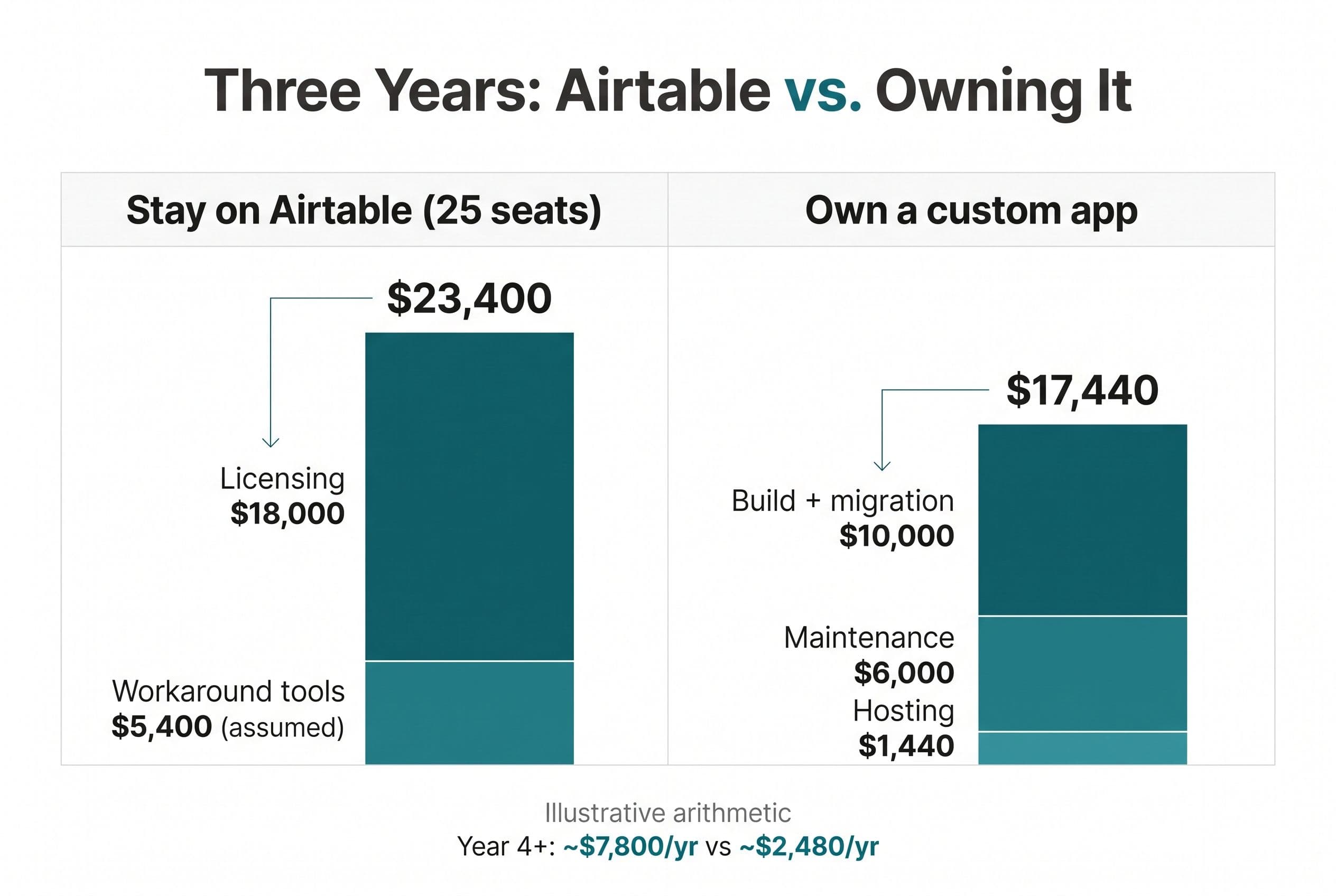
This is what doing nothing costs, laid next to what owning costs. Illustrative arithmetic, a model rather than a client result. Assumptions: 25 seats on the Team plan at the published $20/user/month, an assumed $150/month in workaround tools (automation, forms, portal), a $10,000 build (the middle of our $5K–$15K medium range), $40/month hosting, and maintenance at 20% of the build per year. That 20% is my own budgeting assumption for upkeep on a small internal app, not a published benchmark, so swap in your own number if you've got a better one.
| Cost line | Stay on Airtable (25 seats) | Own a custom app |
|---|---|---|
| Licensing, 3 years | $18,000 | $0 |
| Workaround tools, 3 years (assumed) | $5,400 | Mostly absorbed into the build (see below) |
| Build + data migration | $0 | $10,000 |
| Hosting, 3 years | Included | $1,440 |
| Maintenance, 3 years | Included | $6,000 |
| 3-year total | $23,400 | $17,440 |
| Year 4 onward, per year | ~$7,800 | ~$2,480 |
At 25 seats with some tools bolted on, owning wins by roughly $6,000 over three years, and then wins by around $5,000 every year after that. At 50 seats, the Airtable side doubles while the custom side barely changes, because Postgres doesn't charge you per employee.
That "absorbed" line is the generous part of the model, so be honest with yourself about it. The form and portal tools usually go away completely. A Zapier account sometimes stays for a few zaps, and anything beyond basic transactional email can cost a bit extra. If half your workaround spend has to stay, owning still comes out ahead at 25 seats, just by less. Rerun the table with your own invoices before you trust my version.
Now run the same math at 10 seats with nothing bolted on: $7,200 over three years on Airtable, against $17,440 to own. Keep renting. Airtable wins that one easily, and anyone who tells you otherwise is selling you a build.
That $40 a month isn't a made-up number either. On DigitalOcean's published pricing (August 2026), a small app service starts around $5 a month and a managed Postgres production database around $15 a month. Add a development database at about $7 for a staging environment and you're under $30. I budget $40 to leave room for file storage and transactional email. Heroku's Eco dyno and Postgres Mini plans, at $5 a month each, can come in lower for very light internal tools. It grows if you add paid monitoring, keep backups beyond what the database plan includes, or host on Vercel Pro, which bills per team member. None of that is required for a small internal app, but it's your bill, so know what moves it.
One more thing, said plainly. If what you really want is a developer on call every week to add fields and tweak views forever, don't hire me. I quote fixed scopes, ship them, and hand them off. A part-time contractor on retainer is a better fit for that, and probably cheaper.
If you'd like someone else to check your numbers against this table before you decide:
Send us your software bill
Bring what you pay today. We'll tell you plainly whether a replacement would pay for itself, or whether you should keep renting.
Where $5K–$15K goes on an Airtable migration
An Airtable to custom database migration doesn't mean rebuilding Airtable. It means building the narrow app your team actually uses, on a stack you own. For most of these I use Next.js and TypeScript on the front, Postgres (often through Supabase) underneath, and hosting on Vercel or DigitalOcean.
| Line item | What it covers | What pushes it up |
|---|---|---|
| Schema design | Linked records become real foreign keys; rollups and formulas become SQL views or code | Formulas nested five deep that nobody remembers writing |
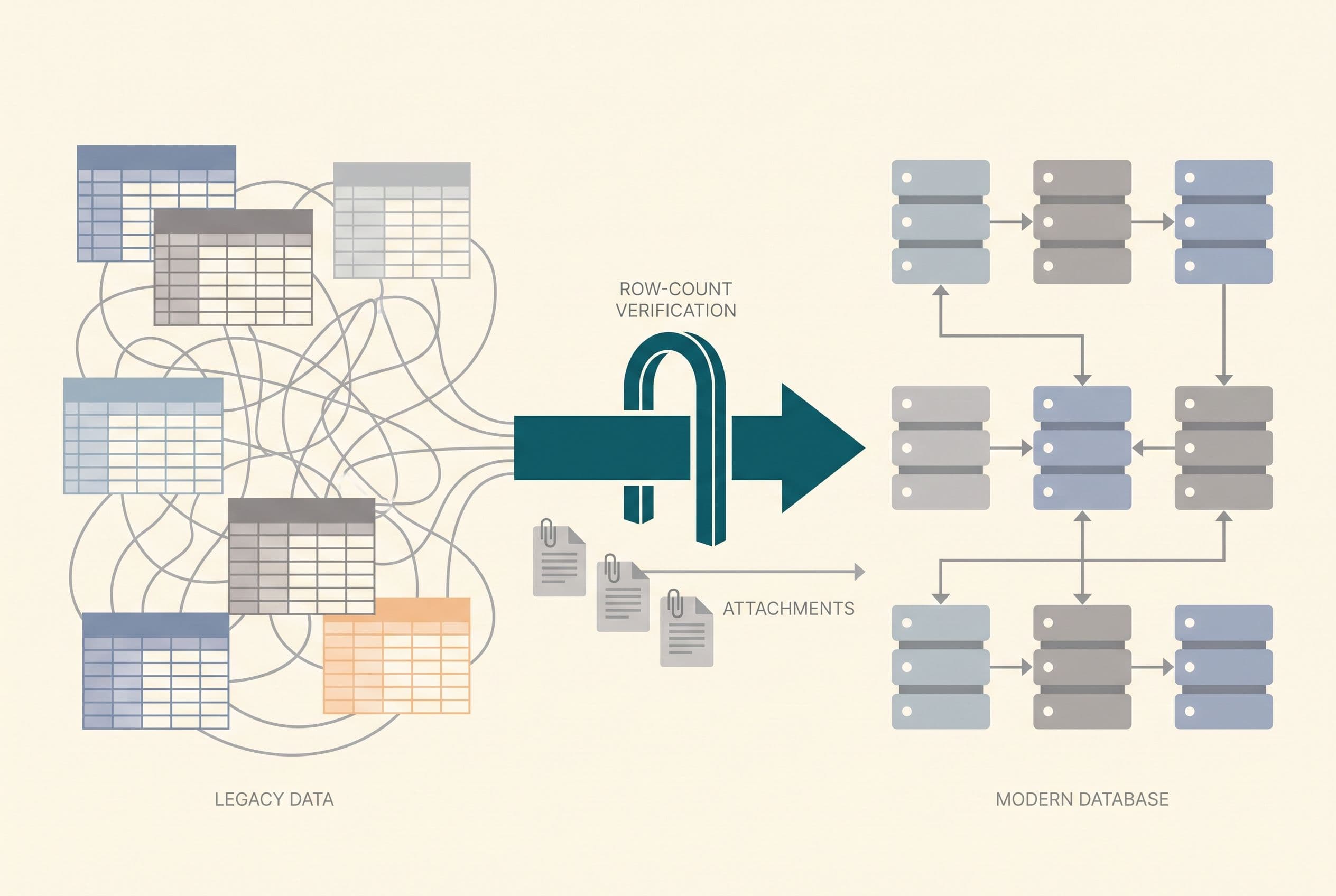
| Data migration | Script that pulls every table through the Airtable API, copies attachments, and checks row counts | Messy data like duplicate records or free-text fields that should be dropdowns |
| The core screens | The three to five views your team actually works in | Asking for every view that exists today |
| Users and roles | Logins, permissions, and separate access for clients or crews | Multi-tenant portals where each customer sees only their own records |
| Automations | Airtable automations and Zapier zaps rebuilt as webhooks and scheduled jobs | Long chains with branching logic |
| Integrations | QuickBooks, Stripe, SendGrid, Slack notifications | Two-way sync with anything |
| Handoff | Source control, staging environment, handoff documentation | Nothing. This is always included |
What keeps it cheap: one team, one workflow, internal users only. What blows it up: client portals, real-time features, and "while we're at it" requests. If you were using Airtable's AI fields to classify or check incoming records, rebuilding that adds about a quarter to the range. I walked through one version of that in a piece on AI checks for intake forms.
What the same money buys elsewhere
- A traditional agency. Agencies usually quote higher and run longer than a fixed-scope build, and a paid "discovery phase" often comes before you ever see a number. Most of them bill by the hour, and hourly billing pays them more the slower they work.
- Another no-code platform. Retool, Bubble, and similar tools are good. But you're swapping one per-seat or platform-fee bill for another, and you still don't own the code. That's the same trap I lay out in the ROI math for teams over 15 seats, just with a different logo.
- An in-house hire. That's a salary every year to maintain a tool a fixed-scope build would have finished in a month.
Why weeks and not quarters? AI-assisted development has made real builds faster. In my own work, the boilerplate, migration scripts, and first-pass screens that used to eat most of a project now go a lot quicker, which leaves the time for the parts that actually need thinking. Narrow scope plus that tooling is how a medium build fits in 2–4 weeks. If you want the wider breakdown across project types, I keep a running guide to what custom software actually costs.
Getting your data out of Airtable without losing a week
This is where Airtable migrations go wrong. It's rarely the app. It's the data move. Here's how I run it:
- Inventory before export. List every table, every linked field, every formula, and every automation. Half of them turn out to be dead. Delete those first.
- Export through the API, not CSV. CSV exports from a view flatten linked records into display text and lose the IDs that connect tables. The API keeps them. Airtable enforces API rate limits, so the migration script runs in batches. Plan for an afternoon, not a minute.
- Copy attachments, don't link them. The file links Airtable gives out are temporary. Every file gets downloaded and stored in your own storage bucket, or it'll vanish later.
- Check the counts. Rows in should equal rows out, table by table, before anyone logs in.
- Run both systems in parallel for a week. The team works in the new app while Airtable stays read-only as a safety net.
- Cancel the seats after a clean month. Keep one export archived. Then stop paying.
Your time on the whole project is small: one scoping call, a 30-minute review each week while it's being built, and a final test pass before go-live. That's it.
On risk, the contract spells out what I said up top. On final payment, ownership of the custom code and source transfers to you. I keep only my generic reusable components, and third-party libraries and services keep their own license terms. With the source and the handoff documentation, a competent developer who knows the stack can take it over. That's the whole argument for owning your software instead of renting it: nobody can raise a license fee on code you own. Hosting and third-party services still bill you, and their prices can move, but that's a $40 line you can shop around, not a per-seat tax on every hire. If you're still comparing tools rather than builds, my breakdown of Airtable alternatives covers the rent-another-tool options too.
Your move this week: pull the bill, name three screens
Don't start with a vendor call. Here's the sequence, once:
- Pull your last three months of invoices (Airtable plus every tool propping it up).
- Write down the three screens your team actually opens every day. That's a 20-minute job, and it's 90% of what anyone needs to scope this honestly.
- Open the project estimator and enter both. You'll see your price range in about ninety seconds, before it asks who you are.
If you want it firmed up, you get a fixed quote back within a business day, and you'll know whether owning beats renting before you've spent anything.
Want a real number for your own project?
Answer a few questions and get an instant price range and timeline. No call required, no obligation.
Get your instant estimateTalk through your software project with MattP.S. If your Airtable bill turns out to be the smaller number, look at whichever tool next to it charges you the most per seat. That's usually where the faster payback is.
Frequently asked questions
- How much does it cost to replace Airtable with custom software?
- For most small-business bases, a custom replacement runs $5,000–$15,000 and takes 2–4 weeks. Simple setups can come in at $2,500–$10,000 in 1–2 weeks, and builds with client portals or real-time features run $10,000–$20,000. Hosting afterward is typically around $40 a month.
- Is Airtable too expensive for a small business?
- Not always. At $20 per user per month on the Team plan, a 10-person team pays about $2,400 a year, which is usually too small for a custom build to pay back. It gets expensive when seat counts climb past 20 and you're paying for extra automation, form, and portal tools to cover gaps.
- How long does an Airtable migration take?
- The data move itself is scripted: export through the API, copy every attachment, then check row counts. Airtable's API rate limits mean it runs in batches, so plan for an afternoon, not a minute. The full replacement app typically ships in 2–4 weeks, followed by about a week of running both systems in parallel before cutover.
- What does it cost to host a custom Airtable replacement?
- On DigitalOcean's published pricing, a small app service starts around $5 a month and a managed Postgres production database around $15 a month, with a development database for staging at about $7. Budgeting about $40 a month leaves room for file storage and email. Very light internal tools can run cheaper on Heroku's $5 plans.
- When should I keep using Airtable instead of building my own?
- Stay on Airtable if your total bill is a few hundred dollars a month or less and stable, if your team relies on building its own views and fields, or if a client or parent company requires it. In those cases the three-year math favors renting.
What would software built for your business look like?
Replacing a subscription, fixing software that fell short, or adding AI to your workflow? Talk through the scope with Matt.
Part of these guides
Matt Brody
Founder, BuiltInWeeks
I build custom software for small and mid-sized businesses — the kind you own outright instead of renting by the seat. Fixed price, delivered in weeks, source code handed over at the end.
More about how I workKeep reading

Monday.com Alternative: ROI Math for Teams Over 15
At 20 paid seats, Monday.com Pro works out to $4,560 a year using the published annual-billing rate. I walk through a quote-to-job workflow, the three-year replacement math, and the migration work that decides whether owning the software is worth it.
Read more
Airtable Alternative for Small Business: AI Intake Checks
I'd replace the document workflow before replacing every Airtable base. Here's how I decide whether AI intake deserves a custom build—and what has to stay under human control.
Read more
CRM for Small Business: Seat Costs vs. Owning Your Code
I'd keep a cheap CRM that does its job. But when every new rep adds another subscription and your team still copies leads between systems, I'd price the workflow—not another seat.
Read more