CRM for Small Business: Seat Costs vs. Owning Your Code

A CRM for small business doesn't need replacing just because it charges per seat. I'd replace it when the subscriptions and broken handoffs cost more than owning the workflow. My fixed-price builds start at $2,500–$10,000 for a focused app; integrations and user roles usually put the scope in my $5,000–$15,000 medium-build range.
That isn't a promise to rebuild Salesforce for a few thousand dollars. It's a reason to separate the work your team needs from the platform you've been paying to carry around.
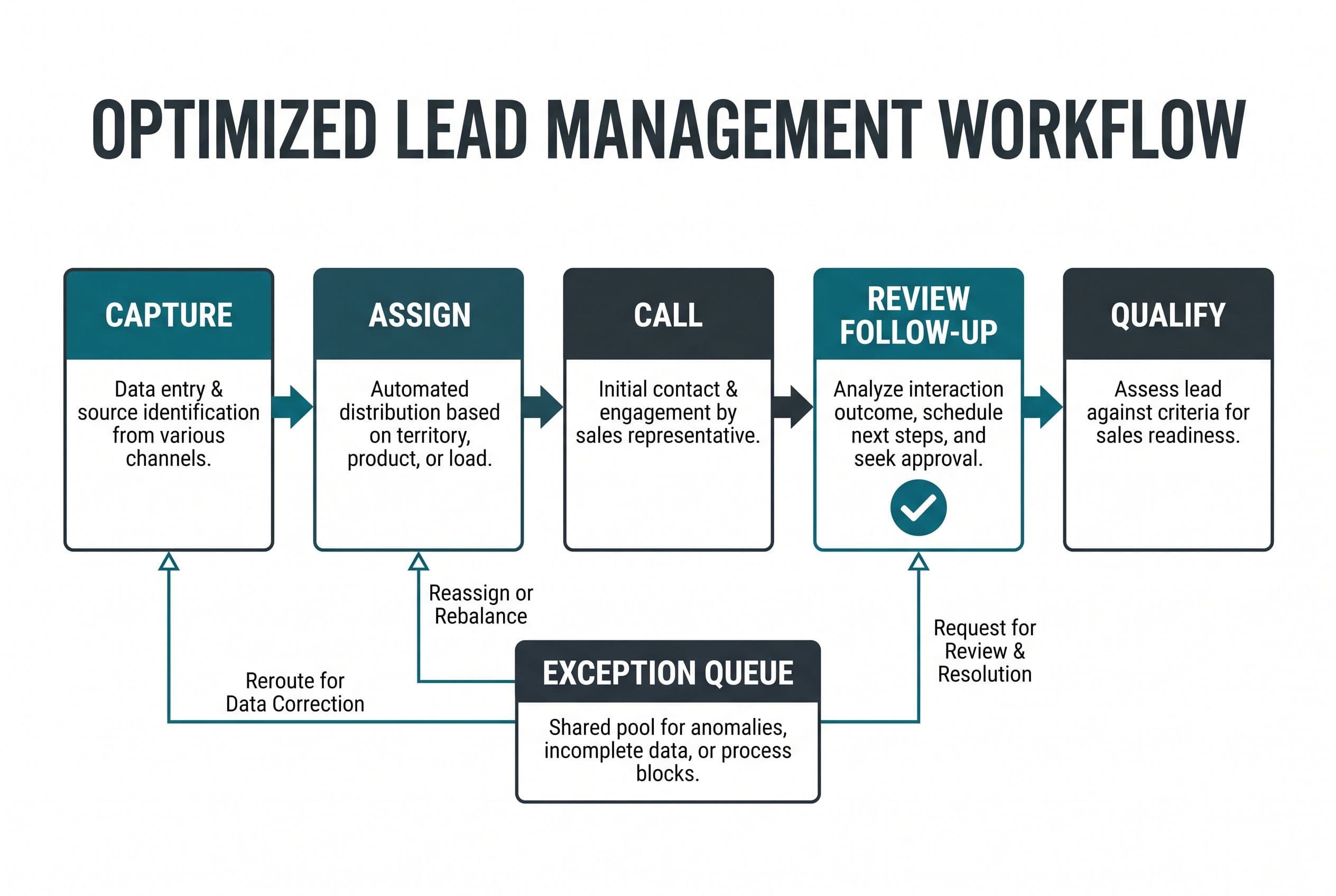
I'll walk through one clearly illustrative workflow: a new lead arrives, gets assigned, receives a call, gets a follow-up, and becomes a qualified opportunity. That's where I'd test whether your CRM earns its bill.
1. I'd compare renting the CRM with owning the lead workflow
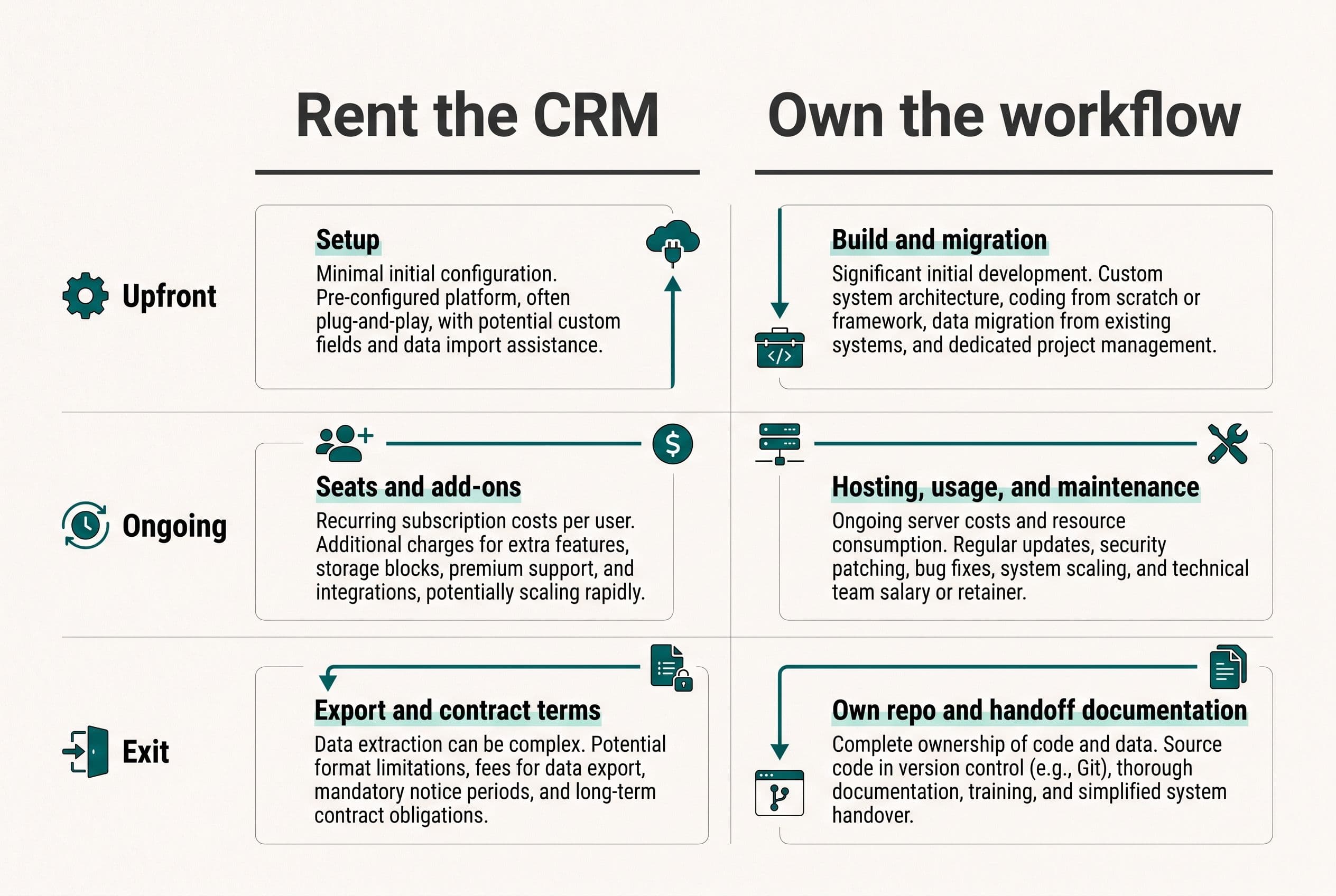
Buying business CRM software means renting a maintained product: contacts, pipeline stages, permissions, and whatever integrations your plan includes. The vendor handles the product's development. You handle fitting your business into it.
A custom replacement means I build an agreed workflow that you own. Hosting, maintenance, messaging, and other usage costs still exist. No monthly software licensing fee doesn't mean no operating costs.
There's also a middle option: keep the CRM and replace the expensive or disappointing part beside it. That's often the better decision.
I built a custom power dialer that replaced a business's roughly $30,000-a-year Kixie contract. Limited customization, clunky workflows, and a climbing price were getting in the way of outbound sales.
The React build cost $10,000—a third of one year of the licensing it replaced. Against that licensing bill, it paid for itself in about four months. That's a real client project, not a constructed example: I've generalized the details and rounded the numbers, and your results will vary.
Reps could call one lead or dial up to 10 lines at once, connecting when someone picked up. It included unlimited users, assigned lead lists, SMS templates, voicemail drops, missed-call and message management, analytics, and Zapier webhooks for follow-ups and updates to other systems.
Built in weeks. Owned outright. Zero monthly licensing fees, with reps spending less time clicking and more time closing.
That was a dialer replacement, not a complete CRM replacement. My breakdown of alternatives to Kixie covers that narrower decision. The lesson for choosing a CRM for small business is the same: I don't need to replace everything to remove the expensive bottleneck.
2. I'd judge the CRM by five handoffs, not its feature count
Before comparing prices, I'd name the criteria: reliable lead capture, clear ownership, useful activity history, controlled follow-up, and a clean exit.
Here's the illustrative workflow I'd use to evaluate a small company CRM. These are diagnostic failure modes, not claims about a particular vendor or another client.
| Handoff | What I'd test in the current CRM | What I'd scope if it fails |
|---|---|---|
| Inquiry becomes a lead | Does the record arrive once, with its source intact? | Validated intake and duplicate detection |
| Lead gets an owner | Can the team see who's responsible? | Assignment rules and an unassigned queue |
| Rep makes contact | Does the outcome return to the contact record? | Dialer connection and recorded call outcomes |
| Follow-up gets prepared | Can someone review it before it goes out? | Templates, approval status, and a send queue |
| Lead becomes an opportunity | Does the next person get the history? | Required handoff fields and a visible activity trail |
A long feature checklist won't answer those questions. A test lead will.
I'd trace that lead through each screen and system, including the places somebody copies information manually. If a rep logs a call in one tool, updates a spreadsheet, and then changes a CRM stage, you're paying for software without getting the handoff you bought it for.
My wider guide to what custom software actually costs puts those connections and permission rules into the budget. They're scope, not miscellaneous technical details.
The best small business CRM software is the one that handles your actual handoffs at a defensible total cost. I'd take a plain interface with reliable assignments over a polished dashboard built on missing records.
3. The missed-call follow-up is where I'd tear the workflow apart
Suppose a new inquiry arrives while every rep is busy. In this illustrative workflow, the business needs an owner assigned, a call attempted, and the next action visible if nobody answers.
Here's how I'd scope that sequence.
Capture and assignment must survive a failed connection
I'd give each incoming inquiry a unique event identifier. If the source retries the same webhook, the system should recognize the retry rather than create another lead.
Assignment would follow an explicit rule—not an assumption buried in code. An inactive rep, missing territory, or incomplete inquiry should send the record to a visible exception queue.
Someone owns that queue. Otherwise, you've just automated the disappearance of leads.
The rep approves the customer-facing judgment
After an unanswered call, the system could prepare an approved SMS template and a follow-up task. I'd keep the rep in control of whether the message fits the situation, especially when the lead has asked a specific question.
If AI belongs anywhere here, I'd use it to draft a summary or suggest the next action. I wouldn't let it invent a quote, promise availability, or independently decide a lead's qualification.
An uncertain or incomplete draft stays unsent. A human sees the source inquiry, edits the suggestion, and approves it; a rules-based template remains available if the AI service fails.
For CRM businesses evaluating AI add-ons, that's the distinction I'd make: assistance inside a controlled workflow, not another subscription attached to an unchecked send button.
Failed sends need a state, not a silent shrug
I'd track messages as pending, sent, or failed. Before retrying an uncertain delivery, the system needs to reconcile the provider's status so it doesn't send the same follow-up twice.
API rate limits need a queue and controlled retries. Persistent failures need a visible alert and a manual next step. Consent and opt-out status belong in the send checks, not a note somebody hopes the rep reads.
The same design applies when a qualified lead moves downstream. My approach to stopping repeated data entry between business systems starts with deciding which system owns each field and what happens when an update fails.
I'd fix these handoffs before buying another analytics package. Reporting on an unreliable activity trail just makes the uncertainty look official.
4. I'd put the seat bill beside the replacement scope
The CRM per seat pricing trap isn't that every seat charge is dishonest. It's that a reasonable entry price can distract you from paid access, plan upgrades, adjacent tools, and the work the subscription still leaves behind.
For a CRM for small business, I'd start with the supplied published entry-plan figures below. These are budgeting inputs, not a live checkout quote; plan names, entitlements, and availability need checking before purchase.
The totals are illustrative arithmetic: ten paid users, twelve months, annual billing, unchanged rates, no extras.
| Product and plan | Published annual-billing rate | Illustrative annual seat total |
|---|---|---|
| HubSpot Sales Hub Starter | $15/user/month | $1,800 |
| Zoho CRM Standard | $14/user/month | $1,680 |
| Freshsales Growth | $9/user/month | $1,080 |
The supplied sources include Forbes Advisor's HubSpot pricing breakdown, Method's Zoho cost guide, and EmailTooltester's Freshsales pricing review.
Those are modest bills. If an entry-level CRM handles your workflow and the team uses it, don't hire me to replace it just to avoid seat fees. The payback may be poor, and you'd take on responsibility for software you didn't need to own.
When the workflow does justify a build, here's my published pricing—not a separate, inflated CRM price list.
| Build scope | Fixed-price range | Delivery window | CRM-sized interpretation |
|---|---|---|---|
| Simple | $2,500–$10,000 | 1–2 weeks | Focused contact app or basic dashboard |
| Medium | $5,000–$15,000 | 2–4 weeks | Multiple features, integrations, user roles |
| Advanced | $10,000–$20,000 | 4–6 weeks | Complex rules or real-time features |
AI features multiply the applicable range by 1.25; my overall pricing envelope is $2,500–$25,000. AI-assisted development is how I build, not a reason to add AI features you don't need.
Your custom CRM cost depends on which rows of the workflow need replacing, the condition of your data, and the connections that must work at launch. A complicated migration isn't automatically included because the contact screen looks simple.
5. I'd run three-year math without pretending ownership is free
For a CRM for small business, I'd compare the full operating cost—not a subscription against a build price with everything inconvenient left out.
My rental calculation includes:
- Seats at today's headcount and planned headcount.
- Required tiers, dialers, messaging, and automation tools.
- Setup, administration, and integration maintenance.
- Manual work, recorded separately unless you've measured it.
My ownership calculation includes the build, migration, hosting, backups, communications usage, maintenance, and later changes. I'd also count the overlap period when both systems are running.
Using the supplied HubSpot Starter rate, illustrative arithmetic puts ten seats at $5,400 over three years. Twenty seats would be $10,800 over the same period, assuming unchanged pricing and no extras.
That doesn't automatically justify a custom CRM. A $10,000 build still has operating costs, and HubSpot may already do the job well.
Now compare the actual dialer project: the replaced contract was about $30,000 annually and the build was $10,000. That's a very different starting point. The roughly four-month payback describes the build against avoided licensing; it isn't a claim that calls, hosting, or future changes are free.
For your own calculation, I'd use:
Payback months = upfront replacement costs ÷ monthly net savings.
Monthly net savings means avoidable subscription spending minus the replacement's operating costs. If that number isn't positive, there isn't a subscription-savings payback.
My three-year build-versus-buy comparison and exit checklist goes deeper on the costs that belong on both sides. That's the useful part of owning your software instead of renting it: ownership changes the bill and the responsibilities, not just the name on the invoice.
6. I'd migrate one lead path before switching off the old CRM
A CRM for small business can look finished and still fail on Monday morning because nobody moved the open tasks correctly.
I'd make migration part of the scope from the start:
- Define the records that matter. Contacts, companies, deals, notes, open tasks, activity history, consent, and attachments need explicit decisions. Export availability varies; I'd verify it before quoting the move.
- Map fields and owners. I'd agree on pipeline stages, required fields, duplicate rules, and who owns records belonging to former employees.
- Rehearse in a staging environment. I'd import a representative sample and check relationships, dates, permissions, and record counts. A successful file upload isn't a successful migration.
- Run the actual workflow. A business reviewer would capture a lead, assign it, log a missed call, approve a follow-up, and hand off an opportunity. I'd also test failed sends and unavailable integrations.
- Cut over with a fallback. I'd define the final export, treatment of late changes, and the point at which the old system becomes read-only. Only one system should control live follow-up sending.
- Cancel after reconciliation. I'd retain the agreed exports and confirm that critical records, open work, and access are correct before ending the old subscription.
Your involvement is a scoping call, a short weekly review, and a final test pass. I'd also need a named person to resolve data questions; messy records don't clean themselves because development is fast.
I use AI-assisted development to ship production software in weeks instead of quarters. That doesn't remove testing, migration checks, or your sign-off on how the business works.
Fixed price means overruns on the agreed scope are my problem, not yours. Added scope gets a separate decision. The code lives in your own repo from day one. My contract spells out your ownership of the custom code, which transfers to you on final payment; third-party libraries and services keep their own license terms. I'd prepare the handoff for another suitably qualified developer—not pretend repo access alone is enough. They'd need deployment and infrastructure access, service-account access, environment documentation, and operational notes covering the business rules, alongside readable code and tests.
7. I'd replace the expensive handoff before rebuilding the whole CRM
My default choice for a CRM for small business is the smallest change that fixes the economics and the workflow.
I'd keep the rented CRM if it handles the job cheaply. I'd wire up a missing handoff if the core system is sound. I'd replace the dialer, follow-up tool, or lead-routing layer if that's where the bill and friction live.
I'd build the CRM itself when those problems run through the core workflow and a narrow replacement can cover what the business actually uses. Deep dependence on a vendor's ecosystem may make staying put the better trade, even with an irritating bill.
I don't think you should pay for months of discovery slides before someone will show you a range. And a calculator that hides its answer until you surrender an email address is a lead form wearing a calculator costume.
My free project estimator shows the range on screen before it asks who you are. That's enough to start the decision without pretending an estimate is already a scoped contract.
“We need to know what it'd cost to own the part we're paying for every month.”
Settle that with free project estimator: answer five questions in about ninety seconds, see the range before any form, then submit your project details for a fixed quote back within one business day.
There's a longer answer to that in Integrated Business Management Software.
The follow-on question here is covered in Client Management Software for Small Business.
Worth reading next: Cost to Replace Airtable, which takes the same question from the other end.
Want a real number for your own project?
Answer a few questions and get an instant price range and timeline. No call required, no obligation.
Get your instant estimateTalk through your software project with MattFrequently asked questions
- What is the best CRM for small business?
- I'd choose based on your lead workflow, total subscription cost, integrations, and ability to export your data. An entry-level CRM is often the better buy if it handles the work without extra tools or repeated manual updates. Custom software makes more sense when a specific, expensive bottleneck has a defensible replacement scope.
- How much does a CRM cost for a small business?
- The supplied published annual-billing rates include Freshsales Growth at $9, Zoho CRM Standard at $14, and HubSpot Sales Hub Starter at $15 per user per month. I'd verify current plan terms before purchasing and budget separately for required add-ons, setup, and usage. My custom builds range from $2,500–$20,000 before the AI-feature multiplier, with an overall envelope of $2,500–$25,000.
- Is building a custom CRM cheaper than paying per user?
- Sometimes, but a small entry-plan bill usually isn't enough to justify it. I'd compare the avoidable subscription costs against the build, migration, hosting, usage, and maintenance costs. Replacing one expensive connected tool can make more financial sense than replacing the entire CRM.
- How long does it take to build a custom CRM?
- My published delivery windows are 1–2 weeks for a simple build, 2–4 weeks for a medium build, and 4–6 weeks for an advanced build. The applicable scope depends on features, integrations, permissions, and migration requirements. I'd agree on those before committing to a delivery window.
- Can I migrate CRM data without losing customer history?
- I'd first verify what the current platform lets you export, including notes, activities, attachments, and record relationships. Then I'd rehearse the import in staging and have a business reviewer check representative records and open tasks. I'd keep the old system available until reconciliation and cutover checks are complete.
What would software built for your business look like?
Replacing a subscription, fixing software that fell short, or adding AI to your workflow? Talk through the scope with Matt.
Part of these guides
Matt Brody
Founder, BuiltInWeeks
I build custom software for small and mid-sized businesses — the kind you own outright instead of renting by the seat. Fixed price, delivered in weeks, source code handed over at the end.
More about how I workKeep reading

Small Business Helpdesk Software: Build vs Zendesk
I'd buy Zendesk for standard support and build when resolving tickets means fighting your other systems. Here's the workflow, three-year arithmetic, and migration plan I'd use to make that decision.
Read more
CRM Software for Startups: Build or Buy? $0–$25K, Compared
Every startup needs a CRM eventually, but the decision isn't just 'which SaaS.' It's whether to rent someone else's workflow or build the one that fits yours. Here's the real cost breakdown and when each path makes sense.
Read more
Monday.com Too Expensive? $3K–$17K Over 3 Years, by Seats
At 8 users, monday.com probably isn't too expensive. At 25 users on Pro, the 3-year bill is in the same range as building your own app. Here's the seat math, the checklist I'd run before canceling anything, and the conditions where you should just keep paying.
Read more