Business Software Integration: Stop Triple Order Entry

I'd connect the order before replacing the software
If you're entering the same order into your CRM, scheduling tool, and invoicing system, I'd fix that handoff first. Replacing all three tools is a bigger bet—and it might leave you with the same broken process inside a different interface.
The decision isn't simply whether you need business software integration. It's whether a built-in connector, an automation service, or one small custom app can move the order without making someone babysit it.
Here's my starting checklist:
- Keep and connect: Each tool does its own job well; people are just copying information between them.
- Replace one piece: One subscription mostly exists to hold an order list or display a schedule.
- Fix the process first: Nobody agrees on when an order is approved, completed, or ready to bill.
- Pause the build: A required system doesn't provide usable API access or a dependable data export.
For a scoped custom app with integrations and user roles, my published medium-build range is $5,000–$15,000, delivered in 2–4 weeks. That isn't a quote for connecting any three systems. Access restrictions, accounting rules, and historical cleanup can change the scope.
My closest personal lesson about scattered workflows isn't an integration case study. It's the phonics reading app I built for my family.
My wife and I homeschool our four kids. We'd already taught two to read, but teaching our five-year-old still meant working through more than a thousand pages of books and workbooks. I distilled that into 50 structured phonics lessons, built in weeks, for a parent and child together for about 15 minutes a day. My family uses it every day.
I don't have a dollar-payback figure for that project. What it supports is a narrower point: one clear path can replace a pile of scattered materials without trying to replace everything around it. That's how I'd scope an order workflow, too.
One order needs field owners, not three competing copies
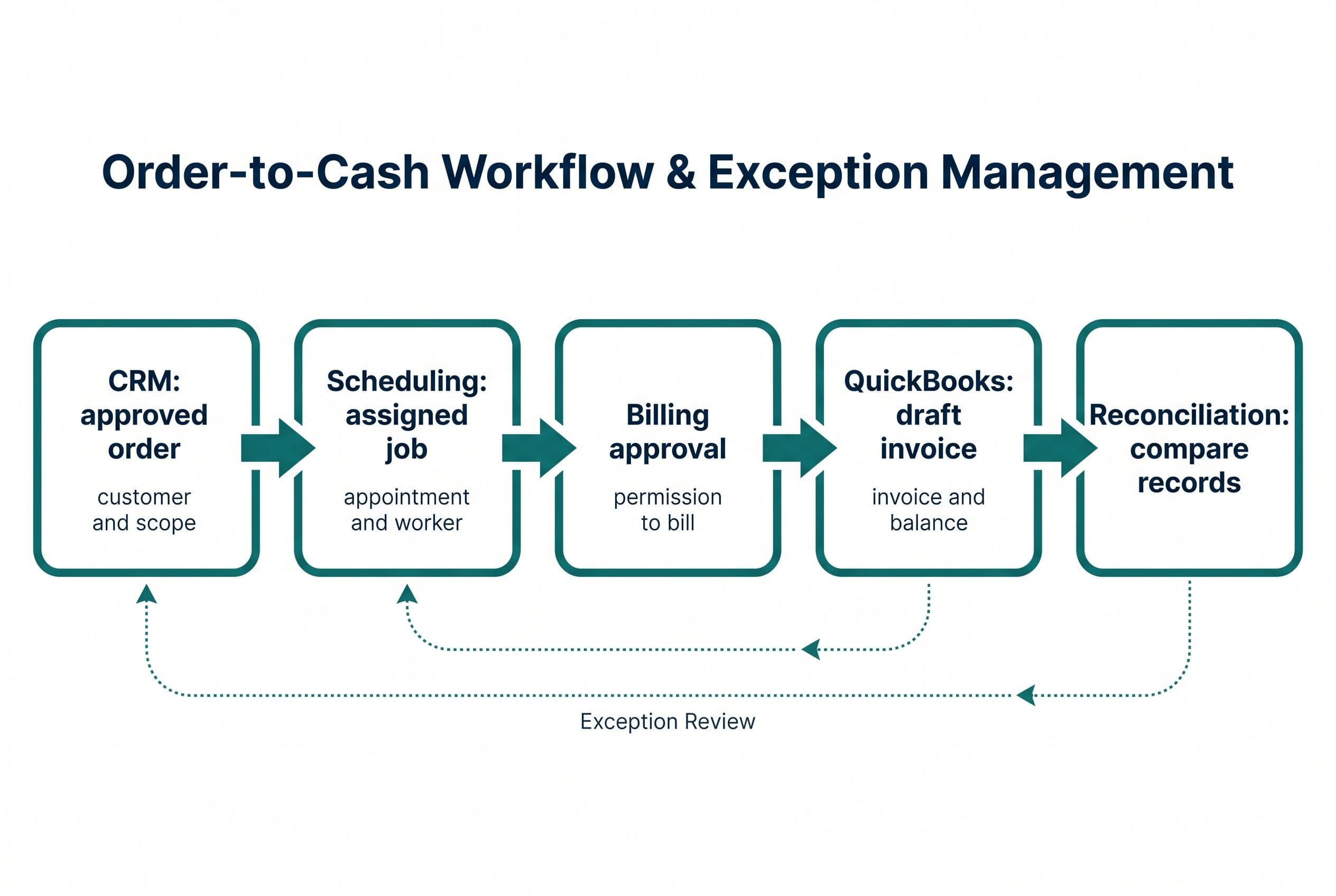
I'd trace a single order from approval to payment before picking the technology. For this illustrative workflow, suppose you use HubSpot for sales, a separate scheduling tool, and QuickBooks for invoicing.
The CRM marks the order approved. The integration creates the scheduling job. Once the job is completed and approved for billing, the integration creates a draft invoice in QuickBooks.
Notice the distinction: approved for billing, not merely scheduled. A calendar event shouldn't accidentally become a demand for payment.
Business software integration breaks down when every application can overwrite everything. I'd assign ownership at the field level:
| Information | Authoritative system in this example | What the other systems receive |
|---|---|---|
| Customer contact and approved order details | CRM | Customer reference, service address, approved scope |
| Appointment and assigned worker | Scheduling tool | Appointment time and scheduling status |
| Completion and billing approval | Defined operational approval step | Permission to prepare the invoice |
| Invoice number, balance, and payment status | QuickBooks | Accounting references and status updates |
| Cross-system record IDs and sync history | Integration layer | Links and failure information for operators |
I'd give the order a stable identifier and store each application's matching record ID. Matching by customer name isn't enough. Two orders can belong to the same customer, and names change.
I'd also write down amendment rules. If someone changes the service address after dispatch, who gets notified? If the scope changes after invoicing, does accounting need a revised draft or a credit-and-rebill process?
A source of truth isn't a slogan. It's the answer to “Which value wins when these systems disagree?”
If the CRM itself is the questionable subscription, my approach to deciding whether to keep a CRM or build a smaller one helps separate a bad tool from a bad handoff.
My checklist starts with the order that goes wrong
A successful demo proves very little if it only shows a new customer placing a clean order. I'd test the business software integration against the records your staff currently has to untangle.
Access and data checks
- API access: Does your current subscription permit the required reads and writes? “Has an API” doesn't mean your plan includes it.
- Webhooks: Can the application notify another system when an order changes, or must the integration check periodically?
- Stable IDs: Can I distinguish an existing order from a new one without comparing names and addresses?
- Required fields: Does invoicing require tax codes, payment terms, or item references that the CRM doesn't hold?
- Permissions: Can the integration use restricted credentials rather than someone's full administrator login?
Business-rule checks
- Duplicate event: The same approval arrives again. Does it create another job?
- Partial completion: Part of the order is finished. Is partial billing allowed?
- Cancellation: The appointment disappears. Should the order be canceled, rescheduled, or left for review?
- Changed amount: Someone edits an approved order. Who can accept the new total?
- Existing records: Are there already jobs or invoices that must be matched rather than recreated?
I wouldn't quote automatic tax handling from a screenshot of an invoice. I'd need the actual rules and an accounting decision-maker to approve them.
Don't hire me to automate a process your team can't agree on. I can't turn conflicting billing rules into reliable software by writing more code.
I'd also stop if a vendor blocks the necessary access and the only workaround is a fragile imitation of someone clicking through its website. Sometimes the right first move is negotiating access or replacing that one tool—not building around a locked door.
Retries prevent outages; reconciliation catches missing orders
The happy path is straightforward. An order changes, a webhook arrives, and the next system accepts the update.
Production business software integration needs a plan for everything after “accepts” fails.
I'd save the event before processing it. That gives the integration a durable work queue instead of relying on one request finishing while every vendor is available.
Then I'd separate temporary failures from business errors:
- Temporary outage or API rate limit: Retry later, with increasing delays and respect for the vendor's retry instructions.
- Invalid customer or missing tax code: Stop and put the order in a review queue. Repeating the same bad request won't fix it.
- Expired credentials: Alert the person responsible for restoring access.
- Uncertain result: Check whether the destination already created the record before trying again.
That last case matters. QuickBooks might accept an invoice while the connection drops before the integration receives confirmation. A blind retry can create a duplicate.
I'd use idempotency controls: a repeat request should resolve to the same business action, not a second invoice. Where a vendor doesn't support an idempotency key, I'd design duplicate checks and recovery around its available identifiers and lookup capabilities.
Retries aren't reconciliation. Retries handle known failures. Reconciliation compares systems to find work that never entered the queue, or records that drifted apart afterward.
I'd run a scheduled comparison of approved orders, scheduling jobs, and invoice references. Exceptions would appear in an operator view, with Slack or email alerts where appropriate. The action needs to be specific: reconnect credentials, correct a field, approve a mismatch, or retry a failed step.
This is where a cheap integration quote becomes expensive. If it excludes failure handling, someone on your payroll becomes the failure-handling system.
A connector, an automation service, or a small app?
I'd choose the smallest option that passes those checks. Custom isn't automatically better.
| Path | I'd choose it when | The trade I'd check |
|---|---|---|
| Built-in connector | Its supported objects and direction match the workflow | Limited field mapping, status rules, and failure visibility |
| Zapier or Make | The flow is short and the exception rules are manageable | Usage charges, branching complexity, and account ownership |
| Integration platform | Several systems need centrally managed connections | Platform fees plus setup and ongoing administration |
| Small custom app | Staff need one order screen, explicit approvals, and a shared exception queue | Hosting, maintenance, and responsibility for vendor API changes |
I'd price an integration platform's subscription separately from setup and ongoing administration. A monthly connector allowance isn't a quote for your finished workflow.
I'd distinguish the platform's allowance from the connected vendor's limits. If a pricing page advertises “unlimited” calls or storage, I'd check fair-use terms, production workload limits, history retention, log storage, and alerting before budgeting. Unlimited calls on an integration plan don't remove another application's API rate limits or subscription requirements.
Zapier and Make can be good choices for a focused handoff. I wouldn't hire myself to replace a working, inexpensive automation just to claim ownership of a few steps.
A small custom app becomes more interesting when another subscription would mainly provide an order form, status board, and approval button. I'd consider a Next.js interface with Postgres holding order IDs, approval state, and sync history—while leaving accounting in QuickBooks.
That's own the missing piece, not “rebuild an accounting package.” My wider guide to owning your software instead of renting it covers that boundary.
I'd check API-access fees, automation usage, hosting, monitoring, and maintenance before comparing costs. Owning the code removes a particular form of vendor lock-in; it doesn't make servers or connected SaaS accounts free.
I'd ship one approved-order path before importing everything
For the common case—working tools, repeated typing, accessible APIs—I'd scope business software integration around one controlled release.
- Map one real order. I need its CRM record, scheduling record, and invoice, with sensitive information handled appropriately. We identify repeated fields and the approval point.
- Write the field and status rules. I document who owns each value, which changes travel downstream, and which require review.
- Build in a staging environment. I test duplicate events, missing fields, cancellations, outages, and permission failures without sending real invoices.
- Compare before enabling writes. Where practical, the integration first shows what it would create. Your operator checks that against the current process.
- Release a limited workflow. I start with the agreed order type and define exactly when staff should use the old manual fallback.
- Hand off operation and recovery. You get the source code, setup instructions, monitoring access, and the procedure for resolving failed orders.
I wouldn't mix years of historical cleanup into that first release unless it's required for the workflow to function. Backfilling old records introduces matching problems that new orders may never encounter.
My published ranges are $2,500–$10,000 in 1–2 weeks for a simple build, $5,000–$15,000 in 2–4 weeks for a medium build, and $10,000–$20,000 in 4–6 weeks for an advanced build. A basic handoff and a multi-system order app aren't interchangeable scopes.
For your involvement, I'd plan a scoping call, a short weekly review, and a final test pass. You'll also need someone who can grant access and answer billing-rule questions. I won't pretend that part happens without you.
Fixed price means overruns on the agreed scope are my problem, not yours. New requirements get a separate scope decision. The code lives in your own repo from day one, so you own it throughout and another developer can take over.
I don't treat repo access as the whole handoff: I'd also document deployment and infrastructure access, who owns the third-party accounts, where secrets live outside the repo, and how credentials get handed over securely.
I describe the warning signs behind those commitments in my checklist for hiring a small-business software developer. Hourly billing that rewards slow work and paid discovery that produces only a slide deck are bad substitutes for a defined deliverable.
Put the duplicate-entry bill next to the build range
I'd judge business software integration by the work it removes, not the number of apps it connects.
Manual entry costs money, but I wouldn't use a broad industry figure as your savings forecast. I'd start with your order volume and actual handling time.
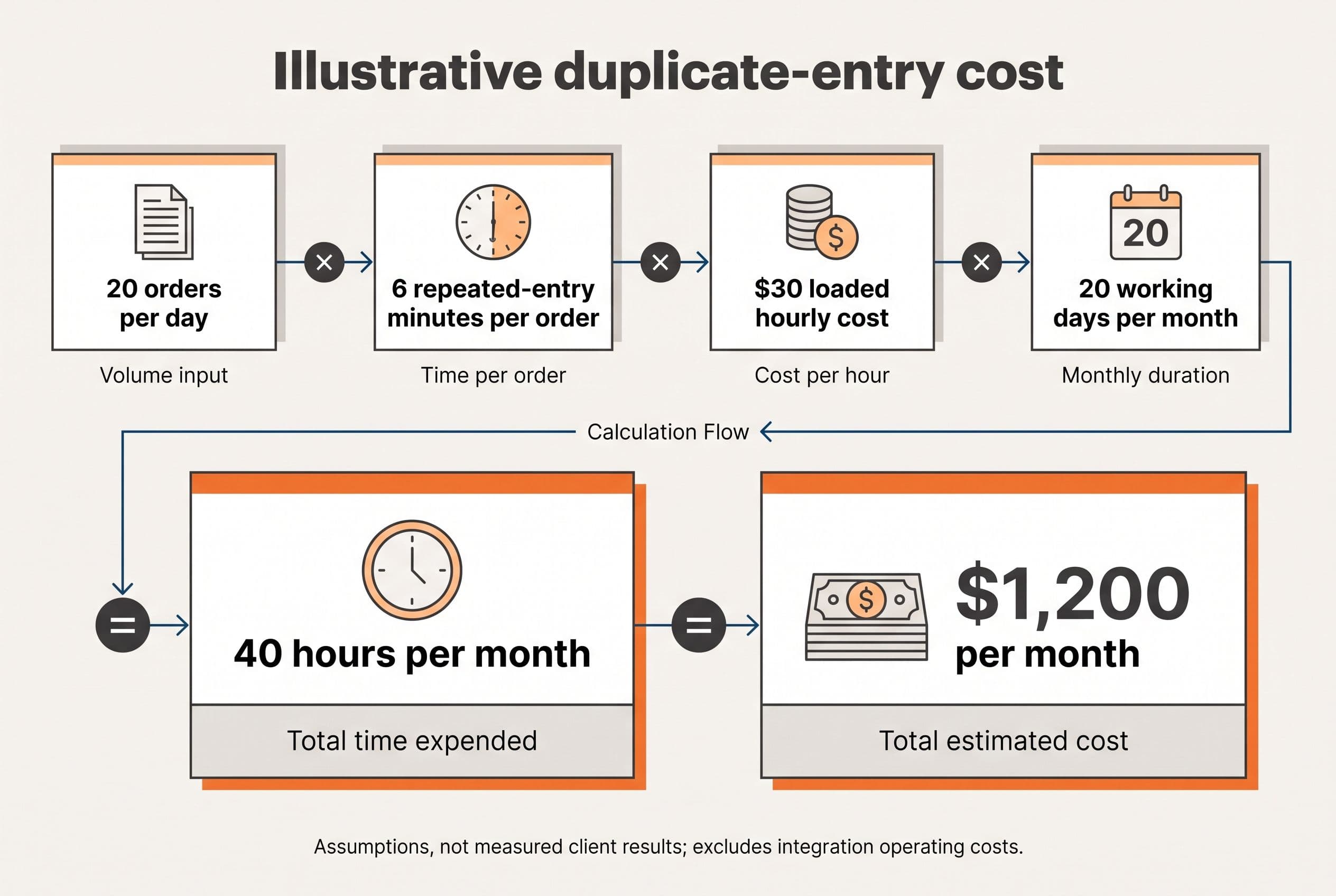
Here's illustrative arithmetic, not a client result or a measured industry benchmark:
- 20 orders per working day.
- 6 minutes of duplicate entry per order, excluding legitimate approval work.
- $30 per hour in loaded labor cost.
- 20 working days per month.
That's 40 hours and $1,200 per month, or $14,400 per year, spent re-entering orders.
Against my $5,000–$15,000 medium-build range, simple labor-only payback would be roughly 4–13 months, assuming all that duplicate entry disappears. Hosting, maintenance, API fees, and remaining exception work extend the payback. Canceled subscriptions could shorten it, but I'd count them only after confirming you can actually cancel them.
Recovered hours aren't automatically cash savings. They become financial value when they reduce paid overtime, avoid added capacity, or free someone to do work the business needs.
For a useful quote, I'd need the three tool names and plans, sample order fields, monthly volume, billing trigger, known exceptions, and your measured re-entry time. Those inputs separate a price range from a guess.
My free project estimator at free project estimator shows the range before it asks who you are. No hidden number held hostage for an email address.
I wrote up Custom Client Portal separately — that's the version with the numbers in it.
Want a real number for your own project?
Answer a few questions and get an instant price range and timeline. No call required, no obligation.
Get your instant estimateTalk through your software project with MattPut your current duplicate-entry cost beside the $5,000–$15,000 build range and run the estimator. It'll do the same sum for your own build in about ninety seconds, with the range on screen before any form. If the arithmetic lands, submit that same form for a fixed quote within one business day.
Frequently asked questions
- What is business software integration?
- Business software integration moves agreed information between applications so people don't have to enter it repeatedly. I'd start with one workflow, such as an approved CRM order becoming a scheduling job and then a draft invoice. Each system should have defined ownership of fields and statuses.
- How much does business software integration cost for a small business?
- My published medium-build range is $5,000–$15,000 over 2–4 weeks for a multi-feature app with integrations and user roles. The actual scope depends on API access, field mapping, approval rules, and failure handling. Vendor subscriptions, hosting, and ongoing maintenance also belong in the budget.
- Should I use Zapier or build a custom integration?
- I'd use Zapier when the workflow is short, the required actions are supported, and exceptions are manageable. I'd consider custom software when staff need a shared order screen, explicit approvals, durable retry handling, or reconciliation across systems. I wouldn't replace an inexpensive automation that already works.
- How do integrations prevent duplicate invoices?
- I'd store stable order identifiers and destination record IDs, then use idempotency controls so repeated events don't create repeated business actions. If a request times out, the integration should check whether the invoice already exists before retrying. Reconciliation provides a separate check for missing or mismatched records.
- Can I integrate my CRM and accounting software without replacing them?
- Yes, if their available APIs or supported connectors expose the records and actions your workflow needs. I'd keep the CRM responsible for agreed customer and order details and leave invoice balances and payment status in accounting. Restricted API access or missing write capabilities can rule out the intended workflow.
What would software built for your business look like?
Replacing a subscription, fixing software that fell short, or adding AI to your workflow? Talk through the scope with Matt.
Matt Brody
Founder, BuiltInWeeks
I build custom software for small and mid-sized businesses — the kind you own outright instead of renting by the seat. Fixed price, delivered in weeks, source code handed over at the end.
More about how I workKeep reading

Zoho Power Dialer: 3-Year Costs for Rental Callbacks
At the published rates cited here, 20 Zoho Voice Basic seats with the power dialer add-on total $31,680 over three years before other charges. I break down what a rental callback replacement would have to cost—and actually replace—to beat that.
Read more
Launch27 Pricing: $5K–$20K to Own a Multi-Crew Booking App
Launch27 starts at $75/month; replacing it isn't automatically a better deal. I walk through a recurring cleaning booking, the migration risks, and the three-year math behind owning a multi-crew app.
Read more
Zendesk Alternative for Small Business: AI Triage V1
I'd start with AI that sorts support tickets—not AI that sends customers unchecked answers. Here's how I'd scope the workflow, handle failures, and compare three years of subscription costs against a system you own.
Read more