AI Workflow Automation: Quotes With Human Approval

Keep control of the quote. Stop copying it between systems.
I'd use AI workflow automation to prepare quotes—not to invent prices or approve discounts. The decision is whether your existing software can handle that handoff reliably, or whether you're paying subscriptions while your staff still moves everything manually.
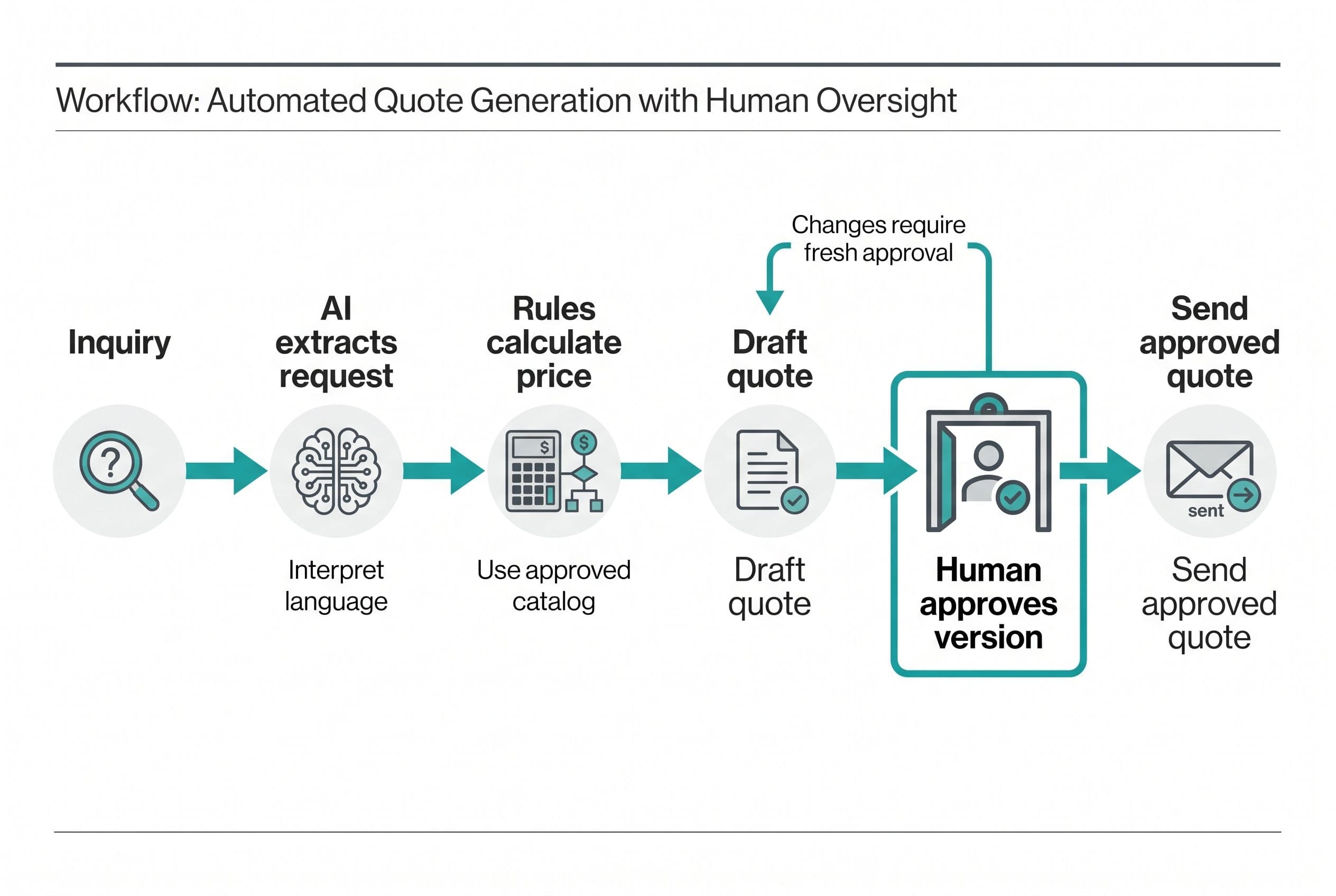
Here's the workflow I'd scope: an inquiry arrives, AI extracts the request, code checks it against your catalog and pricing rules, and a person approves the finished quote before anything goes out.
For a medium build with integrations, user roles, and AI features, my published range is $6,250–$18,750, delivered in 2–4 weeks. That's the medium-build range with the AI-feature multiplier applied, not a quote for an unseen project.
I'd start with one intake channel, one pricing source, and one approval path. Replacing your entire CRM isn't part of that first scope.
The useful question isn't “Can AI write a quote?” It can write something that looks like one. The question is whether your system can prove where every price came from, who approved it, and which version the customer received.
Let AI interpret the request, not authorize the sale
I separate this workflow into three kinds of work:
- AI interprets: extract requested services, quantities, dates, and missing information from an inquiry.
- Rules calculate: match approved catalog items, apply authorized pricing, calculate totals, and route exceptions.
- People authorize: resolve ambiguity, approve commercial terms, and release the quote.
That separation is the useful part of AI workflow automation. A model handles language; it doesn't become your pricing authority.
I built an automated SEO blog platform around explicit stages like these. It generates a dozen topic ideas from Google Keyword data, ranks opportunities, and uses Claude to write drafts against a custom voice profile. Grok, Gemini, and ChatGPT review each draft for SEO; when any two agree on a change, Claude implements it.
The platform also runs posts through Sapling.ai, generates images, supports immediate or scheduled publishing, and uses Zapier to push posts to Facebook and the Google Business profile. It publishes on autopilot without a content team behind it.
The payoff there is content production without standing up that team. I don't have a build price or a labor-cost baseline to give you a defensible dollar payback for that project, and it isn't a quote-approval case study.
What carries over is the architecture: generation, review, and release are separate steps with explicit conditions. What doesn't carry over is the approval policy. Two models agreeing on a discount doesn't make that discount authorized.
For quotes, I'd use Claude to propose structured fields and draft wording. I'd keep arithmetic, permissions, and approval decisions outside the model.
Check whether your quoting problem needs AI at all
Before I quote AI workflow automation, I'd run through this checklist with the person who actually prepares estimates—not just the person buying software.
- The input needs interpretation. Requests arrive as emails, notes, or attachments rather than clean catalog selections.
- There's an approved source of prices. Someone owns the catalog, rate sheet, or calculation method.
- Approval authority is written down. Staff know who can approve standard work and who handles exceptions.
- The handoffs repeat. People copy the same customer details and line items between systems.
- The systems are accessible. We can use an API, webhooks, or a supported data export without violating access restrictions.
- Someone will own the exceptions. Failed requests won't sit in an unattended inbox.
If customers already select standard items in a structured form, I'd use rules and skip the AI extraction. Adding a model to clean inputs creates another bill and another failure mode without doing useful work.
If each quote depends on an estimator's judgment about unfamiliar work, I'd automate intake and document preparation only. The estimate itself stays with that estimator.
Don't hire me for a custom build if your current subscription already handles this reliably, or if quote volume is too low to repay the build. I'd also pause if nobody can agree on the pricing rules. Software won't settle a commercial policy argument.
For an owner whose real problem is scattered customer records, the build-or-buy decision for the CRM underneath the workflow comes first. Otherwise, I'd risk automating a handoff into another unreliable record system.
Compare a connector workflow with a system you own
I see three sensible ways to ship this. The right choice depends on approval complexity, access to your existing systems, and how much control you're missing today.
| Path | Where I'd use it | What I'd watch |
|---|---|---|
| Existing CRM or quoting software | It already has usable quote approvals and accessible pricing data | Plan restrictions, per-seat licensing, and whether edits invalidate approval |
| Zapier or Power Automate | A short workflow connecting stable systems with straightforward exceptions | Task or credit consumption, retry behavior, and scattered approval records |
| Custom application | Quote versions, permissions, exceptions, and ownership need one accountable system | Upfront build cost, ongoing operation, and responsibility for maintenance |
I wouldn't dismiss connectors just because I build custom software. I'd use Zapier Professional at $19.99 per month, billed annually, for 750 tasks as a budgeting example, then confirm the current price and task allowance on Zapier's official pricing page before committing. A modest workflow may be a better purchase than a custom application.
But one inquiry isn't necessarily one billable task. Extraction, record creation, notification, and follow-up can each add work; I'd map the actual steps before estimating consumption.
Microsoft's Power Automate pricing page lists Premium at $15 per user per month, paid yearly, and Process at $150 per bot per month, paid yearly. Those aren't interchangeable licenses, and neither headline number is a complete AI operating budget. Microsoft's AI Builder licensing documentation is part of that check.
For custom AI workflow automation, my medium range is $6,250–$18,750 over 2–4 weeks. Complex rules or multi-tenancy can put it in my advanced AI range of $12,500–$25,000 over 4–6 weeks. External access requirements can delay a start or force a narrower scope.
I break out the broader cost drivers in what custom software actually costs. For this workflow, integration access and approval complexity move the price more than the length of the AI prompt.
The fixed-price breakdown behind the app estimator also separates build complexity from feature count. Five screens with difficult permissions can be more work than a larger, straightforward dashboard.
Build the inquiry-to-approval path around quote versions
Here's how I'd implement the common case: an inbound request becomes a draft quote, an authorized employee approves it, and the approved version is sent to the customer. Customer acceptance is a separate event—not something I'd blur into internal approval.
Intake and extraction
I'd start with a web form or a connected mailbox, not every channel at once. The application records the original request and assigns it a stable inquiry ID.
AI returns structured fields: customer details, requested work, quantities, timing, and unresolved questions. I'd show the source passage beside each extracted field so the reviewer can check the interpretation.
Missing information stays missing. If a customer asks for “the usual service,” the system doesn't quietly substitute a catalog item.
I'd also treat inquiry content as untrusted data. Instructions inside an email or attachment can't change approval rules, reveal other customer records, or authorize a tool action.
Pricing and draft preparation
The application matches the extracted request to approved catalog entries. Code calculates totals using the applicable pricing rules and rounding method; the model doesn't do the financial arithmetic.
I'd snapshot the catalog prices used for that draft. A later rate-sheet update shouldn't silently change a quote somebody already reviewed.
AI can write the scope description from those approved inputs. Unsupported promises about availability, warranties, or delivery dates stay out.
For the application itself, I'd consider Next.js and TypeScript with Postgres for inquiry records, quote versions, and approval history. That's a proposed stack for this workflow, not a claim about the SEO platform's implementation.
Approval tied to an exact version
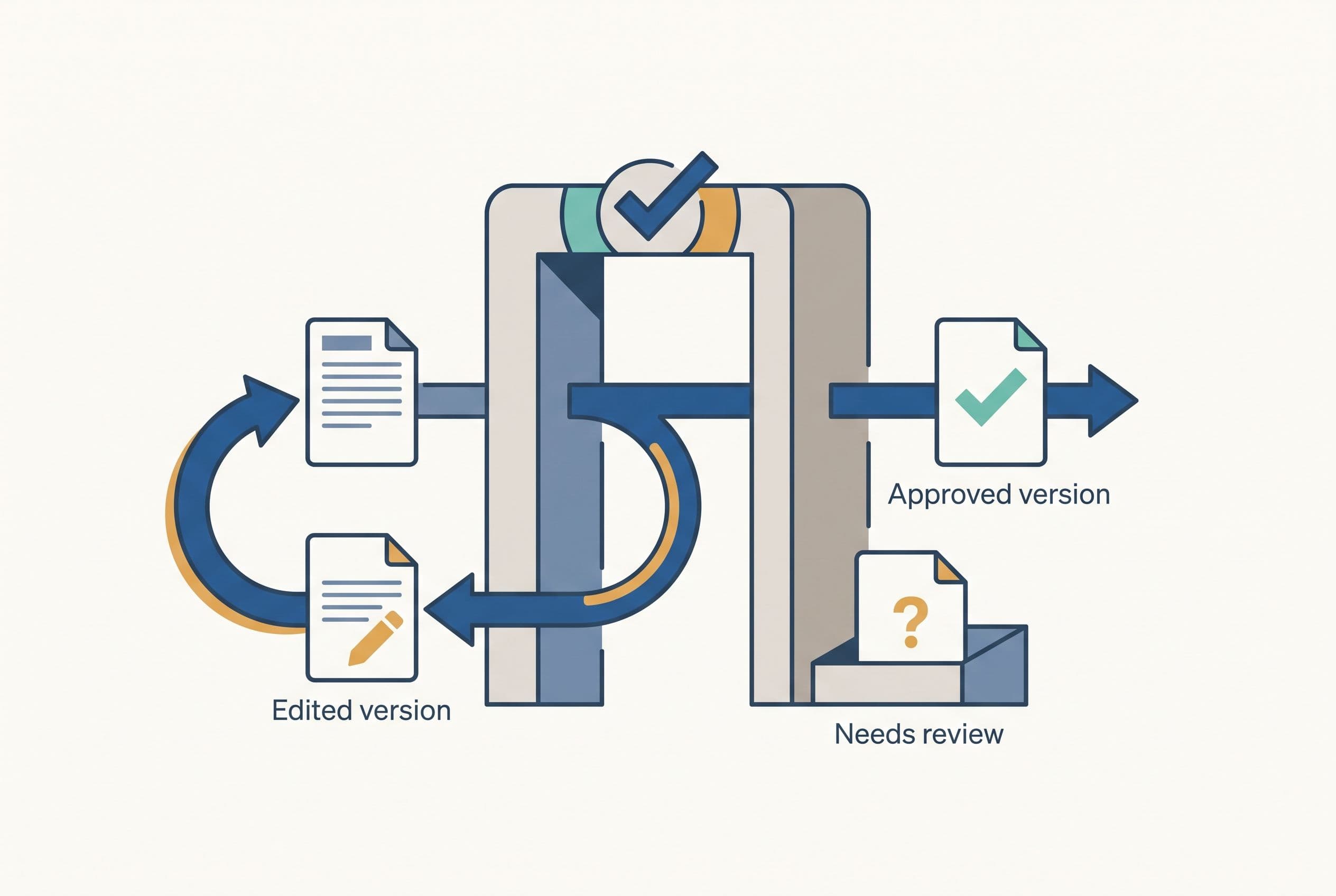
Approval belongs to a quote version, not just a customer record. I'd record the approver, timestamp, line items, total, and terms together.
Any later change to price, quantity, scope, or terms creates a new version and requires fresh approval. Otherwise, an employee can accidentally send a different offer under an old approval.
Slack or email can notify a manager, but I'd keep the approval action inside an authenticated application. A forwarded notification isn't permission to approve company pricing.
Exceptions and delivery
I wouldn't ship AI workflow automation without visible exception handling:
- Unknown catalog item: stop draft completion and ask an estimator to resolve it.
- Missing quantity or conflicting instructions: flag the exact field and retain the original request.
- AI timeout or invalid output: use bounded retries, then offer manual entry.
- Expired or unauthorized approval: block release and route it to an authorized person.
- Duplicate webhook: recognize the event ID and avoid creating another quote.
- Delivery failure: retain the approved version, record the failed attempt, and expose a controlled retry.
I'd separate “approved,” “queued for delivery,” and “sent.” Database transactions keep internal records consistent; they don't guarantee exactly-once delivery through an external API. I'd record the delivery job alongside the approved version in a transactional outbox, then process it through a queue with replay-safe workers and provider idempotency keys where supported. A timeout can mean the provider accepted the send but the response never arrived. I'd reconcile the delivery log against provider records and flag unresolved attempts instead of blindly sending again.
No mystery spinner. The operator needs to see what failed and what they can do next.
Measure handling time before claiming automation savings
I wouldn't justify AI workflow automation with a market-growth chart. Your baseline is the work your staff does today.
Here's a before/after worksheet I'd use. Every number below is illustrative, not a client result or a promised improvement. The target becomes a result only after a live measurement.
| Measure | Before: illustrative baseline | After: proposed target | How I'd check it |
|---|---|---|---|
| Quotes per month | 80 | 80 | Count completed quotes over comparable periods |
| Staff handling time per quote | 25 minutes | 10 minutes | Include checking, corrections, and exceptions |
| Monthly handling time | 33.3 hours | 13.3 hours | Volume × minutes ÷ 60 |
| Inquiry-to-approval elapsed time | Record actual baseline | Compare after launch | Use timestamps; keep this separate from labor time |
| Quotes needing correction | Record actual baseline | Compare after launch | Count changes caused by extraction or pricing errors |
| Failed or duplicated sends | Record actual baseline | Compare after launch | Reconcile delivery logs with quote records |
Under those assumptions, the workflow returns 20 staff hours per month. At an assumed loaded labor cost of $40 per hour, that's $800 in monthly capacity—not automatically $800 removed from payroll.
Suppose the fixed build quote were $12,000 and you allowed $200 per month for incremental operation. The illustrative net benefit is $600 per month, giving a 20-month simple payback. If the saved hours aren't useful elsewhere, I'd discount that benefit rather than pretend it's cash savings.
I'd budget ongoing AI workflow automation costs in separate buckets:
- Hosting, database storage, backups, and monitoring.
- Model usage, including document processing and retries.
- Email delivery and any retained connector subscriptions.
- Maintenance, dependency updates, and changes to pricing rules.
The $200 allowance above is an arithmetic assumption, not a provider price or a maintenance quote. Actual operation needs a usage estimate and a support scope.
I'd set usage alerts and limits, then compare provider bills with completed quotes. Cost per completed quote is more useful than celebrating a cheap model call while retries multiply in the background.
Hand over the rules before handing over the workflow
To turn this into a fixed scope, I'd need representative inquiries, the current pricing source, sample quotes, approval permissions, and the awkward cases your staff already knows about.
I'd also ask for system names, API access details, required retention periods, and a clear boundary around customer data sent to an AI provider. Credentials belong in secure account access—not pasted into a planning document.
Your involvement should be concrete: a scoping call, a short weekly review, and a final test pass. I'd have you test an ordinary quote, a missing-detail request, a pricing exception, an edited approval, and a failed send before go-live.
I use AI-assisted development to ship in weeks, but speed doesn't excuse skipping permissions or release tests. Agencies that staff five people on a two-person job don't make this safer, and hourly billing that rewards slow work doesn't make the outcome clearer.
For the agreed scope, fixed price means overruns are my problem, not yours. Scope additions get discussed separately instead of appearing as surprise hours.
The code lives in your own repo from day one. You own it throughout the build, and another developer can take over; handoff documentation should cover deployment, credentials, pricing rules, exception recovery, and operating costs. Owning the code doesn't eliminate third-party service bills, but it means your business logic isn't trapped inside my account.
I cover that distinction further in the hiring red flags that put software ownership at risk.
The decision I'd want you to be able to say to your partner is: “I want the copying and chasing gone, but I still want us approving every quote—and I want to know whether owning this pays.”
Use the free project estimator at free project estimator to settle the build-cost side: five questions, about ninety seconds, and a range visible before any form. Then request a fixed quote back within one business day, so you've got a number to compare against your current workload. Unlike calculators that hide the number to harvest emails, it shows the range before asking who you are.
The follow-on question here is covered in Software Project Rescue.
If that's the decision you're actually making, Business Software Integration goes deeper on it.
If that's the decision you're actually making, ServiceTitan Pricing in 2026 goes deeper on it.
There's a longer answer to that in Document Assembly Software.
If that's the decision you're actually making, Zendesk Alternative for Small Business goes deeper on it.
I wrote up Airtable Alternative for Small Business separately — that's the version with the numbers in it.
Want a real number for your own project?
Answer a few questions and get an instant price range and timeline. No call required, no obligation.
Get your instant estimateTalk through your software project with MattFrequently asked questions
- What is AI workflow automation for quotes?
- I'd use AI to interpret an inquiry and prepare draft wording, while ordinary code applies approved pricing rules. A person reviews and approves the exact quote version before it's sent. AI helps with messy language; it doesn't get authority over prices or discounts.
- How much does a custom AI quote-approval workflow cost?
- My published medium-build range with AI features is $6,250–$18,750, delivered in 2–4 weeks. Advanced AI builds with complex rules or multi-tenancy fall at $12,500–$25,000 over 4–6 weeks. The fixed scope depends on integration access, approval requirements, and exception handling; ongoing service costs are separate.
- Can I build quote approval with Zapier or Power Automate?
- Yes, and I'd consider that first when the workflow is short and the connected systems already support the necessary controls. I'd check licensing, task consumption, retries, and whether approval stays attached to the exact quote version. A custom application becomes more useful when those controls are scattered or missing.
- How do I stop AI from making up quote prices?
- I'd keep the pricing source and calculations outside the model. AI proposes structured request details, and code matches them to authorized catalog entries. Unknown items or missing quantities go to a person rather than triggering a guessed price.
- How do I calculate the ROI of AI workflow automation?
- I'd measure quote volume and staff handling time before and after launch, including corrections and exception work. Multiply the hours returned by your loaded labor cost, subtract incremental operating costs, and compare that monthly benefit with the build price. Time returned is capacity, not guaranteed payroll savings.
What would software built for your business look like?
Replacing a subscription, fixing software that fell short, or adding AI to your workflow? Talk through the scope with Matt.
Part of these guides
Matt Brody
Founder, BuiltInWeeks
I build custom software for small and mid-sized businesses — the kind you own outright instead of renting by the seat. Fixed price, delivered in weeks, source code handed over at the end.
More about how I workKeep reading

Launch27 vs ZenMaid: Flat $150/mo or Per-Cleaner Fees?
Launch27 charges a flat monthly fee. ZenMaid charges a base fee plus a fee for every cleaner you add. Here's a checklist for choosing between them, the three-year math on each, and the specific cases where owning your own booking system beats both.
Read more
Airtable Alternative for Small Business: AI Intake Checks
I'd replace the document workflow before replacing every Airtable base. Here's how I decide whether AI intake deserves a custom build—and what has to stay under human control.
Read more
Zendesk Alternative for Small Business: AI Triage V1
I'd start with AI that sorts support tickets—not AI that sends customers unchecked answers. Here's how I'd scope the workflow, handle failures, and compare three years of subscription costs against a system you own.
Read more