Build vs Buy Software: 3-Year Costs and an Exit Checklist

Build vs buy software: my three-year example—$21,300 to build versus $30,200 to keep renting
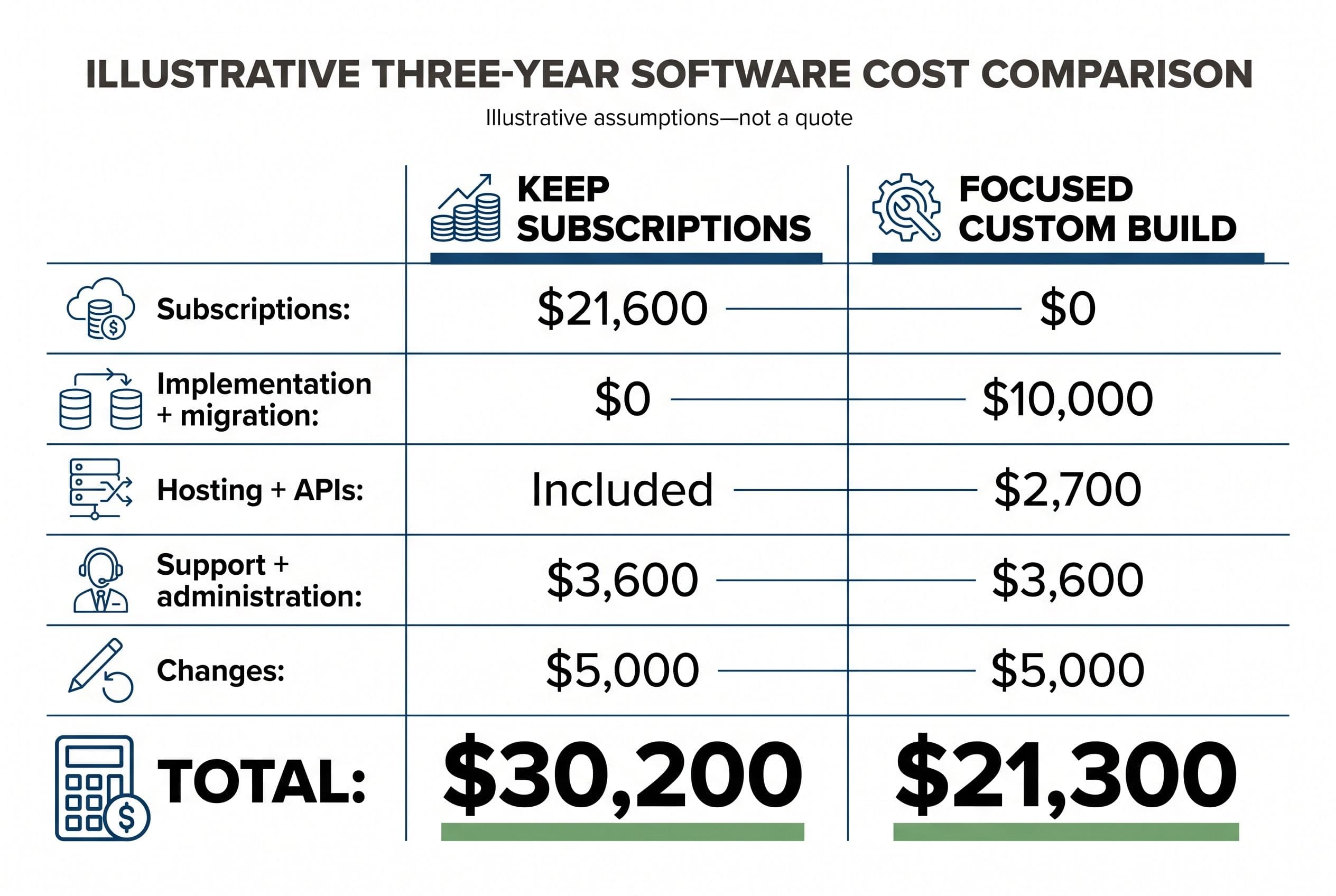
In the illustrative budget below, a focused custom workflow costs $8,900 less over three years. That's not a forecast for your business. It's a build vs buy software calculation with the assumptions exposed—including the expenses that custom-software pitches tend to leave out.
I'm comparing an existing subscription stack with a replacement for one stable workflow: capturing a request, assigning it, tracking its status, and handing completed work to accounting. I'm not pricing a replacement for an entire accounting platform or enterprise CRM.
Every number in this table is a hypothetical planning assumption, not a third-party product price or a quote. The implementation and migration figures are allocations within an illustrative $10,000 fixed-price build; ongoing expenses are budgeting allowances, not published BuiltInWeeks support fees.
| Cost over 36 months | Keep the subscription stack | Build the focused replacement |
|---|---|---|
| Subscription fees | $600/month × 36 = $21,600 | $0 for the replaced subscriptions |
| Initial implementation | $0; already running | $7,500 |
| Migration and cleanup | $0; no move | $2,500 |
| Hosting | Included in assumed subscription | $50/month × 36 = $1,800 |
| Metered APIs | Included in assumed subscription | $25/month × 36 = $900 |
| Support, maintenance, or administration allowance | $100/month × 36 = $3,600 | $100/month × 36 = $3,600 |
| Later workflow changes | $5,000 allowance | $5,000 allowance |
| Three-year total | $30,200 | $21,300 |
Here's the arithmetic: renting is $21,600 + $3,600 + $5,000. Building is $7,500 + $2,500 + $1,800 + $900 + $3,600 + $5,000.
The comparison assumes the old subscriptions can actually be canceled, no parallel subscription period, no financing costs, and no price increases. If you still need read-only seats, accounting access, or required add-ons, I'd put those bills back into the build column—the $0 assumes none remain. It excludes taxes and your team's project time, which I cover below. I haven't assigned dollar savings to faster work or fewer mistakes.
That makes the result conditional, not inevitable. If the old stack costs $200 a month instead of $600, keeping every other assumption unchanged brings its three-year total to $15,800. Buying wins by $5,500.
For the scope bands behind a build budget, I've already broken down how the fixed-price calculator separates simple, medium, and advanced work. The wider guide to what custom software actually costs covers the pricing questions beyond this comparison.
The workflow matters more than the feature count
I don't start a build vs buy software decision with a list of everything the current platform can do. I start with the job that needs doing.
My own family's phonics app is a useful example of that distinction—not a subscription-savings case study.
My wife and I homeschool our four kids. We'd already taught two to read, so when our five-year-old was ready, we knew the process. Following it meant working through more than a thousand pages of books and workbooks: effective material, but scattered and hard to stay consistent with.
I built a web app that distilled the process into 50 structured lessons using a 100% phonics approach. It's for a parent and child together, about 15 minutes a day—not handing a kid a screen.
It includes 49 original stories, more than a dozen activity types, and hundreds of audio files. Children can start where their skills already are, and they're reading their first story by lesson two.
I built it in weeks. My family uses it every day, and it replaced a shelf of workbooks with one clear path toward independent reading.
I don't have a dollar payback figure to attach to that project. The concrete return is a single, usable path for a recurring task. The equivalent business question is whether custom software removes a daily coordination problem—not whether it can reproduce every menu in the product you're leaving.
If a ready-made product already gives you that path, I'd buy it. A larger feature list isn't a reason to build, and neither is a general dislike of subscriptions.
The three assumptions that can erase the savings
The build vs buy software spreadsheet is easy. Defending its inputs is the work.
Migration isn't just importing a CSV
My illustrative migration allocation assumes a usable export, a manageable cleanup job, and a defined set of records to move. Attachments, activity histories, duplicate customers, and relationships between records can change that scope substantially.
Before I quote migration, I'd want a sample export—not a salesperson's assurance that export is supported.
I'd also separate active work from archive material. Moving open jobs into the replacement while keeping an accessible historical archive can be a better trade than recreating every old screen and record relationship.
Integrations need to survive ordinary failures
A button that sends an invoice isn't the whole accounting integration. I'd need to define what happens when a request fails, a webhook arrives twice, or someone changes the customer record in QuickBooks.
For payments, I'd use Stripe's documented APIs rather than build payment processing from scratch. Owning the workflow doesn't mean owning the banking infrastructure.
API rate limits, retries, and reconciliation belong in the scope. Leaving them out makes the demo cheaper, not the production system.
The API allowance in my table is deliberately separate from hosting. Usage-based messaging, payment transactions, and other metered services don't disappear because you own the code. In a real comparison, I'd also distinguish fees you already pay from genuinely new expenses.
I haven't tied the $25/month placeholder to a usage volume, so I wouldn't treat it as a cap or a production estimate. I'd replace it with expected usage × the service's unit price—per text, per billable call, or per payment transaction, including percentage fees where they apply. Messaging and payment volume can push that bill well past $25/month.
Maintenance and changes are different bills
Maintenance keeps the agreed system running: dependency updates, monitoring, backups, and compatibility fixes. Changes add or alter behavior: another approval stage, a new integration, or different reporting rules.
I wouldn't accept a proposal that treats those as one undefined promise of “ongoing support.” I'd want responsibilities, response expectations, exclusions, and pricing stated separately.
The equal allowances in my example aren't claims that both options need equal work. They're placeholders to replace with a support proposal and an honest estimate of your current administration burden.
The exit checklist I'd complete before canceling anything
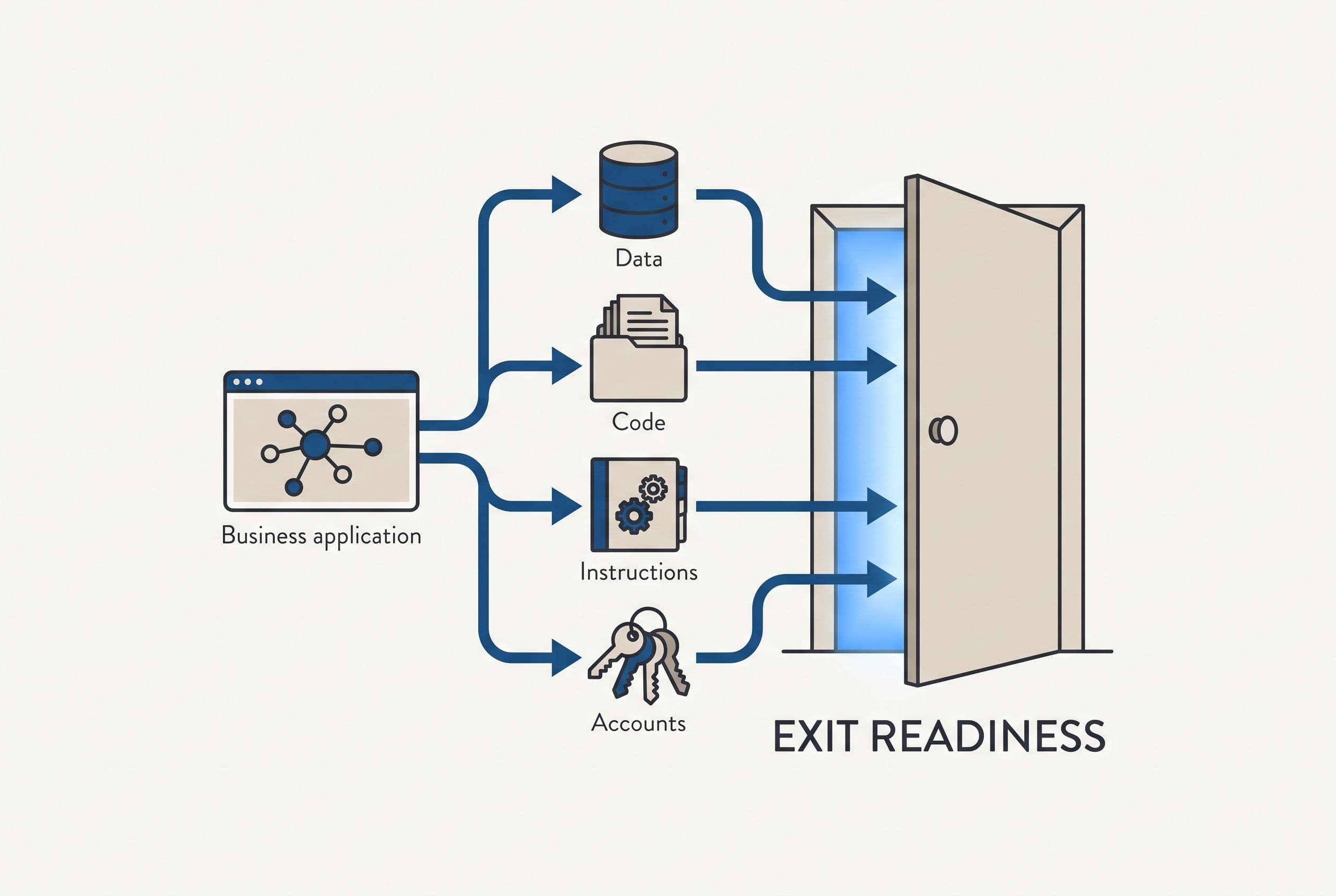
An export button isn't an exit plan. This is where build vs buy software becomes a question of control rather than monthly price.
I'd check both the product you're leaving and the system you're considering:
| Exit check | Evidence I'd want |
|---|---|
| Records and relationships | A sample export showing stable IDs and how customers, jobs, invoices, and notes connect |
| Files and history | A clear answer on attachments, messages, activity logs, and anything the standard export omits |
| Timing and restrictions | Contract renewal date, cancellation notice, export limits, and the data-retention policy after cancellation |
| Infrastructure control | Named owners for the domain, hosting, database, email delivery, and payment accounts |
| Code and deployment | Client-owned source control, setup instructions, and a repeatable deployment process |
| Recovery and transfer | A tested backup restore and handoff documentation another developer can use |
I wouldn't cancel the old account until the new system passes a representative test with real records and the archive has been checked. If that requires an overlap period, the subscription overlap gets its own budget line. It isn't in the opening example.
For a custom build, I prefer ordinary, well-documented components such as Postgres. That doesn't eliminate technical debt or vendor lock-in by itself. It gives the next developer a familiar foundation rather than a proprietary system they first have to decipher.
At BuiltInWeeks, the code lives in your own repo from day one. You own the custom code throughout the project, not after the last invoice. Any developer can take over; useful handoff documentation makes that right practical.
Third-party services still have their own terms and bills. My broader case for owning your software instead of renting it is about controlling the application and your exit—not pretending you can stop depending on infrastructure.
What buying, configuring, and hiring buy you instead
I'd compare four paths before approving a replacement. “Build” and “buy” alone leave out the option that often needs the least disruption: keeping the core product and fixing the awkward handoff around it.
| Path | What I'd use it for | The cost or limitation I'd watch |
|---|---|---|
| Keep the existing SaaS | Standard work the team already handles well | Seat creep, unused add-ons, renewal terms, and manual work outside the product |
| Configure or extend it | A useful core product with one missing step | Platform restrictions, API access, and fragile automation chains |
| Build a focused replacement | Stable rules, meaningful recurring costs, or persistent workflow mismatch | Upfront spend, maintenance responsibility, and migration |
| Hire an embedded developer | A changing product with continuing development needs | Ongoing management and employment or contract costs |
For a concrete buying benchmark, Zoho CRM Standard is published at $14 per user per month, billed annually; Method's Zoho CRM pricing breakdown provides supporting pricing context. Ten users would be $1,680 a year in base license fees, before add-ons or implementation.
That's a very different starting point from the hypothetical $600 monthly stack. I wouldn't sell you a replacement by quietly treating those as equivalent.
Don't hire me to replace an inexpensive product that already fits your workflow. If the problem is just underused settings, I'd keep it and fix the setup. If you want a long-term embedded developer managing a constantly changing backlog, my fixed-scope delivery model is the wrong purchase.
For customer management specifically, the same distinction guides whether a startup should buy a CRM or build its own. Standard contact and pipeline tracking rarely justify rebuilding an entire platform.
I also wouldn't rip out QuickBooks just to avoid entering the same job details twice. I'd scope the connection first.
The enemy isn't SaaS or agencies. It's per-seat licensing that punishes growth without adding value, hourly billing that rewards slow work, and quotes that hide necessary migration or testing until you're committed. A cheap hourly rate doesn't protect you from paying for a rewrite.
My build vs buy software decision worksheet
I'd put this worksheet beside the cost table before making the decision. Blank answers are scope risks, not details to fill in after signing.
| Decision input | What I'd write down |
|---|---|
| Workflow boundary | The starting event, finished outcome, users, and explicit exclusions |
| Avoidable spend | Only subscriptions and add-ons that can actually be canceled |
| Implementation evidence | Sample records, screen examples, business rules, and acceptance tests |
| Recurring costs | Hosting, API usage, maintenance, support, and internal administration |
| Change budget | Likely new requirements during the next three years |
| Exit evidence | Tested export, account ownership, source control, backups, and handoff requirements |
| Decision owner | One person who can settle scope questions and approve the final test |
My calculation is:
Three-year ownership cost = implementation + migration + 36 months of running costs + planned changes + transition costs.
For buying, I'd substitute subscription fees and setup costs, then include the same categories where they apply. Already-paid implementation fees are sunk costs; they don't belong in the forward comparison.
I'd keep time savings in a separate column. Hours recovered can mean more capacity or less overtime, but they aren't automatically cash savings. A credible build vs buy software case shouldn't depend on pretending every recovered minute reduces payroll.
Then I'd rerun the budget with a smaller subscription saving and a larger operating allowance. If the decision flips easily, I'd narrow the build or keep buying. If it holds without speculative revenue gains, there's a stronger reason to proceed.
Turning one replacement workflow into a fixed quote
For this kind of build vs buy software decision, I'd start with one workflow and one measurable acceptance test. “Replace our software” isn't a scope. “Move a request from intake through approval and accounting handoff without re-entering it” is a useful starting point.
My published delivery bands run from 1–2 weeks for simple builds, 2–4 weeks for medium builds, and 4–6 weeks for advanced builds. Integration access and migration evidence determine which band is defensible; they aren't things I'd guess past to win the job.
For this replacement, I'd only use those bands with a narrow workflow boundary and timely access and decisions. Complex roles and permissions, approval rules and audit trails, difficult migration, multi-system integrations, background jobs and retries, or long stakeholder reviews can push the schedule beyond 6 weeks. I wouldn't squeeze that work into a band just because the label says “advanced.”
For a focused project, I'd plan your involvement around a scoping call, a short weekly review, and a final test pass. You'd also need to provide account access, sample data, and timely decisions. I wouldn't promise a total hour count before seeing whether the data needs cleanup.
I use AI-assisted development to shorten implementation, not to skip testing. The fixed quote covers the agreed scope: if that work takes me longer, the overrun is my problem, not yours. New requirements get a separate scope decision before extra work starts.
Those terms, repo ownership, and clear acceptance tests are among the hiring checks I'd make before paying a developer. A months-long paid discovery phase that produces a slide deck instead of a usable scope isn't the answer to a focused replacement.
The free project estimator at free project estimator shows its range on screen before asking who you are. I don't think a calculator should hide its answer to harvest your email.
Run the estimator: five questions, about ninety seconds, and your range appears before any form asks who you are. If the number works, send it over to get a fixed quote inside one business day.
Worth reading next: AI Workflow Automation, which takes the same question from the other end.
If that's the decision you're actually making, Software Project Rescue goes deeper on it.
Want a real number for your own project?
Answer a few questions and get an instant price range and timeline. No call required, no obligation.
Get your instant estimateTalk through your software project with MattFrequently asked questions
- Is it cheaper to build or buy software for a small business?
- I compare three-year costs rather than a build quote against one month's subscription. Buying usually wins when the product is inexpensive and fits the workflow; building can win when avoidable subscriptions and manual work justify implementation, migration, hosting, APIs, maintenance, and changes. The article's illustrative comparison comes to $21,300 for a focused build versus $30,200 for an assumed subscription stack—not a forecast or quote.
- What costs should a build vs buy software analysis include?
- I'd include subscription fees, implementation, migration, hosting, metered APIs, support, maintenance, future changes, and transition overlap. I'd also track internal staff time separately and count only subscription spending that can actually be canceled. Already-paid setup costs shouldn't influence the forward calculation.
- What should I check before replacing business software?
- I'd test a sample export for records, relationships, files, and history, then check cancellation terms and post-cancellation data access. For the replacement, I'd require clear ownership of the code and infrastructure accounts, backup recovery, and handoff documentation. I wouldn't cancel the old product before testing the replacement and checking the archive.
- When should I keep SaaS instead of building custom software?
- I'd keep SaaS when it already handles the workflow well, the bill is too small to support the replacement math, or leaving would break valuable ecosystem connections. Configuration or a focused integration may solve the problem without replacing the core product. Constantly changing requirements can also favor buying or hiring an ongoing developer instead of commissioning a fixed-scope build.
What would software built for your business look like?
Replacing a subscription, fixing software that fell short, or adding AI to your workflow? Talk through the scope with Matt.
Part of these guides
Matt Brody
Founder, BuiltInWeeks
I build custom software for small and mid-sized businesses — the kind you own outright instead of renting by the seat. Fixed price, delivered in weeks, source code handed over at the end.
More about how I workKeep reading

Launch27 vs ZenMaid: Flat $150/mo or Per-Cleaner Fees?
Launch27 charges a flat monthly fee. ZenMaid charges a base fee plus a fee for every cleaner you add. Here's a checklist for choosing between them, the three-year math on each, and the specific cases where owning your own booking system beats both.
Read more
Housecall Pro Alternative for Small Plumbing Company: Build?
Most small plumbing shops should keep renting. A plumbing company with 8 or more users and workflows that don't fit the software should run the numbers. Here's the checklist I use, the conditions that rule a build out, and three years of seat math laid out so you can check it.
Read more
Cost to Replace Airtable: $5K–$15K + $40/Mo Hosting
Replacing Airtable with an app you own usually costs $5,000–$15,000, takes 2–4 weeks, and runs about $40 a month to host. For plenty of teams it still doesn't pay back. Here's the seat math, a pre-flight checklist, and the conditions that should keep you renting.
Read more