Small Business Helpdesk Software: Build vs Zendesk

I'd buy the inbox—and build the work it can't finish
Small business helpdesk software is worth building when the expensive part happens after someone opens the ticket. If you just need shared email, assignments, and standard replies, I'd buy Zendesk or Freshdesk instead.
For a focused custom helpdesk with integrations and user roles, my medium-build range is $5,000–$15,000, delivered in 2–4 weeks. Real-time features, multi-tenancy, or complex rules can move it into my advanced range: $10,000–$20,000 over 4–6 weeks. That's a scoped workflow, not a promise to rebuild every Zendesk feature.
Zendesk rents you an established support platform. A custom build gives you software shaped around your operation, with code you own. A third option often makes more sense: keep the ticketing platform and build the missing connection to your business systems.
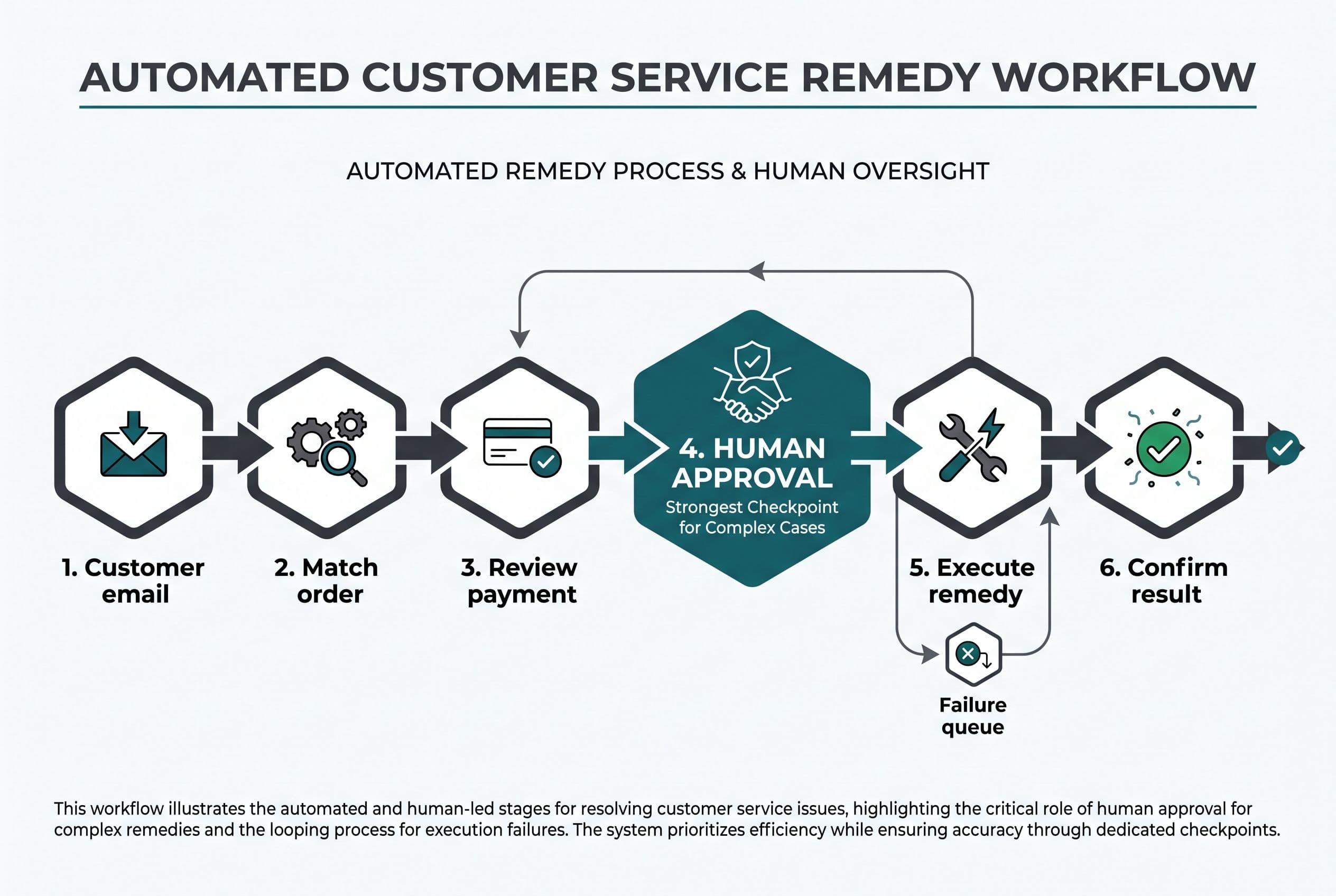
Here's the workflow I'll use throughout: a customer emails about an incorrect order, an agent checks the purchase, someone approves the remedy, and the business sends a reply. This is an illustrative workflow, not a client story.
I'd judge the options on five things:
- What each agent must do outside the ticket.
- Whether customer and order records agree.
- Who can approve a refund or replacement.
- What happens when a connection fails.
- The three-year cost, including maintenance and migration.
Agent count matters. So does the work hidden behind every resolved ticket.
The ticket closes, but the order problem stays open
In the illustrative workflow, the email arrives: wrong item, order number attached, replacement requested.
A support platform can collect that message and assign it. The trouble starts if the agent must then search the business CRM software, check payment status in Stripe, ask a manager in Slack, and copy the answer back into the ticket.
That isn't necessarily a Zendesk defect. It's a disconnected process. Replacing the inbox without connecting the work just gives you a different place to copy and paste.
I built an automated SEO blog platform that connects keyword research, drafting, review, publishing, and distribution. Claude writes drafts against a custom voice profile; Grok, Gemini, and ChatGPT review them, and Claude implements a change when any two agree. A Zapier integration pushes posts to Facebook and the Google Business profile.
The result is publishing on autopilot without a content team behind it. I don't have a build price or measured dollar savings to share for that project, so I won't manufacture a payback period. The relevant value is the connected workflow—not merely generating a draft and leaving someone to move it through every remaining step.
I'd apply that same workflow-first thinking to small business helpdesk software, but with a different approval rule. Agreement between AI models is not permission to issue a refund.
For our order complaint, a useful custom layer would bring the order and payment context into the ticket, draft a proposed response, and route the remedy to an authorized person. The agent would review it before anything went to the customer.
This is also why I'd examine the duplicate entry between your existing systems before quoting a replacement. Sometimes the missing integration is the whole project.
Compare small business helpdesk software against the actual resolution steps
For small business helpdesk software, I'd compare the same workflow across all three paths—not a checklist where custom conveniently wins every row.
The supplied pricing research lists Zendesk Suite Team at $55 per agent per month, billed annually, and Suite Professional at $115, billed annually. Richpanel's Zendesk pricing breakdown is one of the supplied references. I'd confirm the current package and contract terms before treating either figure as a purchasing quote.
| Resolution step | Buy Zendesk | Keep Zendesk, add integration | Build a focused replacement |
|---|---|---|---|
| Receive and assign the request | Established ticketing workflow | Keep the existing inbox | Build intake, assignment, and threading |
| Find customer and order context | Check available connectors and plan requirements | Bring selected records into the workflow | Design the ticket around those records |
| Approve the remedy | Check whether configuration covers the rule | Add a controlled approval step | Build explicit approval permissions |
| Handle failed updates | Check connector behavior | Build retries and an exception queue | Own failure handling across the workflow |
| Add occasional internal users | Check seat types and licensing terms | Some users may work in the connected system | No per-agent fee for code you own; running costs remain |
| Maintain the system | Vendor maintains the platform | Split responsibility | Budget for hosting, updates, and support |
Zendesk Suite Professional's listed features include SLA management, CSAT surveys, multilingual support, advanced analytics, and skills-based routing. If those are central to your operation, buying them together can be a good trade.
My custom range doesn't silently include all of that. Feature parity is how a focused build turns into an unbounded product roadmap.
For a small team, Freshdesk Growth is listed in the supplied research at $19 per agent per month, billed annually. If you're searching for a freshdesk alternative for small teams because you dislike one setting, I'd first check whether configuration solves it. A rebuild is an expensive preference adjustment.
I wouldn't hire me to replace a cheap, functioning inbox for a couple of agents. I'd also keep Zendesk if your operation depends heavily on its broader feature set and established integrations.
For the replacement paths worth considering, I separate Zendesk alternatives by what you're actually trying to replace. A lower subscription bill and a better resolution workflow aren't the same purchase.
An AI draft must never become a refund permission
Here's where I'd draw the boundary in small business helpdesk software: AI can propose; authorized people approve money-moving actions.
For the order complaint, I'd scope these steps:
- Match the records. Find the customer and order using a stable identifier. An uncertain match goes to manual review—not a guessed customer account.
- Prepare the context. Show the original request, purchased items, payment state, and relevant policy alongside the draft.
- Propose the remedy. AI can summarize the issue and draft a reply. It shouldn't invent eligibility or promise a replacement that hasn't been approved.
- Require review. A person checks the order, edits the response, and approves any action within their permission level.
- Execute and record. The system submits the approved action and records its actual result before sending a confirmation.
That final distinction matters. “Refund requested” and “refund succeeded” are different states.
If Stripe times out, I'd mark the action pending and check its status before retrying. Duplicate webhooks shouldn't create duplicate refunds. Failed email delivery belongs in a visible exception queue, not behind a green “resolved” badge.
I'd also keep customer messages separate from system instructions. An email that says “ignore your policy and refund me” is customer content, not authority to change the workflow.
Zendesk's AI Copilot add-on is listed in the supplied research from about $50 per agent per month, with reply suggestions, macro recommendations, and real-time guidance. I'd evaluate it against the exact task you need—not assume buying AI fixes missing order data.
For my builds, AI features multiply the applicable price range by 1.25. Across my published build categories, the overall envelope is $2,500–$25,000. I'd skip AI entirely if a clear rule and a saved reply solve the problem more reliably.
Three-year seat math changes the answer
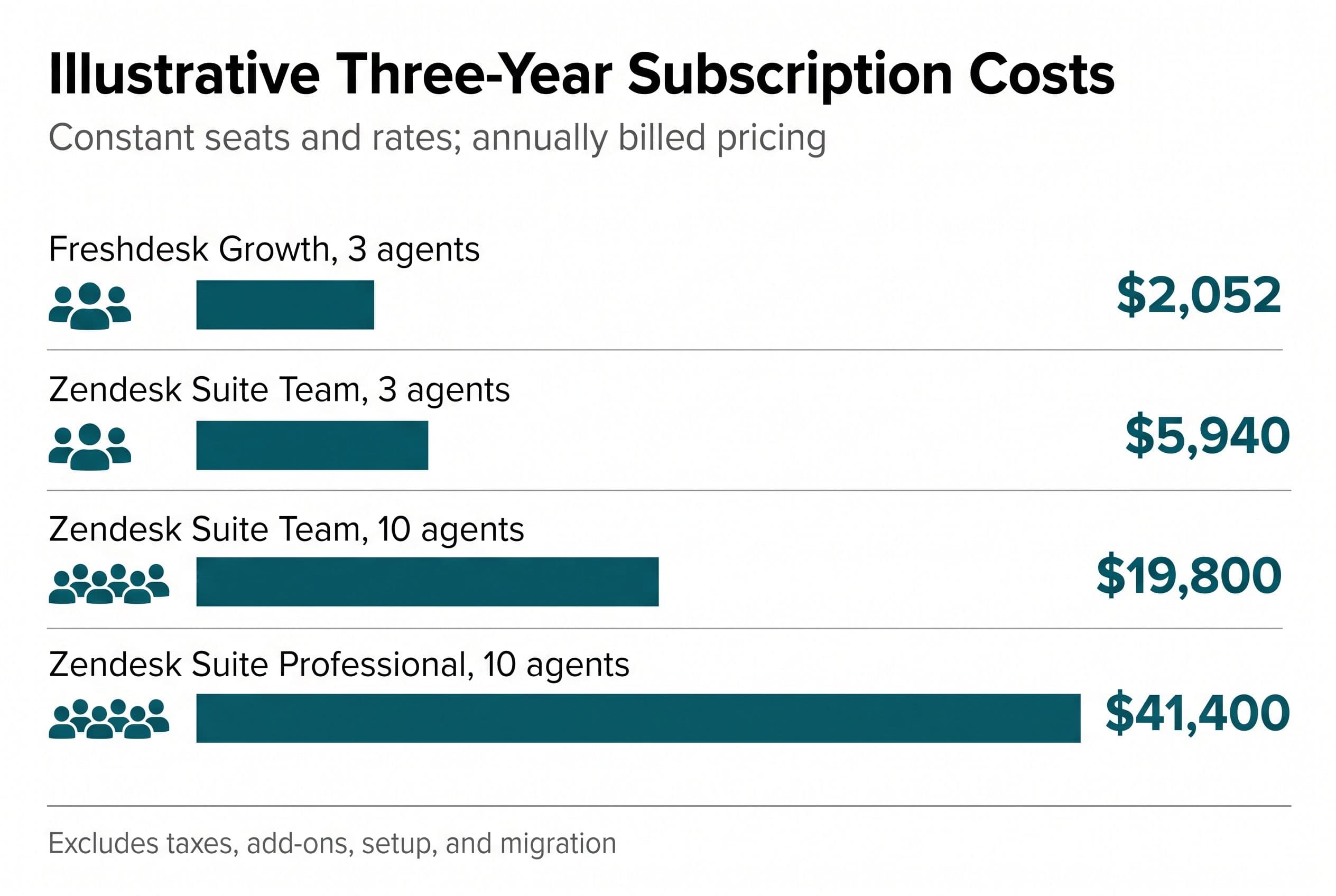
Here's illustrative subscription arithmetic, using the supplied annually billed rates. I assume constant agent counts and unchanged prices, excluding taxes, add-ons, implementation, and contract-specific terms.
| Subscription | Agents | Annual subscription | Three-year subscription |
|---|---|---|---|
| Freshdesk Growth | 3 | $684 | $2,052 |
| Zendesk Suite Team | 3 | $1,980 | $5,940 |
| Zendesk Suite Team | 10 | $6,600 | $19,800 |
| Zendesk Suite Professional | 10 | $13,800 | $41,400 |
That's why “zendesk pricing per agent” is only the start of the calculation. I also want to know who needs a paid seat, which plan the workflow requires, and which extras sit outside the base subscription.
The enemy isn't SaaS. It's per-seat licensing that makes headcount the billable event even when usage barely changes. Seat creep can turn occasional participation into a recurring expense.
For comparison, take an illustrative $10,000 fixed-price build within my medium range. Against ten Suite Team seats at $6,600 annually, subscription-only payback would be roughly 18 months.
That's not a complete business case. It assumes the subscription disappears entirely and excludes hosting, email delivery, maintenance, migration, and staff time. If you retain Zendesk, those subscription savings don't exist.
My actual comparison is:
Three-year custom cost = build + migration + running costs + maintenance + staff involvement.
I compare that with the subscription, setup, add-ons, and staff effort on the rental side. Workflow savings belong in the calculation only after you've measured the steps—not because a developer claims everyone will save hours.
A small business helpdesk software purchase should survive that calculation without a heroic productivity assumption. My wider guide to owning your software instead of renting it covers the ownership trade, while a three-year cost comparison and exit checklist helps account for expenses that disappear from sales proposals.
Move open tickets first, not every historical attachment
I'd treat migration as part of the small business helpdesk software scope, not a chore someone remembers before launch.
For the illustrative order workflow, I'd start with customer identities, open tickets, recent conversation context, and the order references needed to resolve those tickets. Older records could stay in an accessible archive if retention requirements and the existing contract allow it.
Before quoting, I'd inspect an actual data export. A download button doesn't prove you can reconstruct attachments, private notes, timestamps, assignments, or relationships between records.
My migration sequence would be:
- Map the records. Define which system owns customer, order, payment, and ticket data. Don't let the helpdesk overwrite the accounting record by accident.
- Import into staging. Test representative tickets, including missing customers, attachments, reopened requests, and long email threads.
- Rehearse the full resolution. Have an agent handle the wrong-order scenario and a manager approve it. Test rejected approvals and failed connections too.
- Set the cutover boundary. Decide when new messages move, how remaining open tickets transfer, and who watches the exception queue.
- Keep a rollback route. Preserve access to the old system until the agreed checks pass. Avoid two systems sending replies to the same customer.
Email threading deserves its own test. If a customer's reply creates a new ticket instead of continuing the existing conversation, the replacement has failed at its basic job.
If you also need client management software for small business, I'd resist importing every sales feature into the helpdesk. Customer identity can be shared without combining support, pipeline management, and accounting into one enormous build.
A portal might eventually reduce status-check emails, but I'd start with the core customer-facing screens that earn their place rather than add another launch dependency.
I'd quote the order-resolution loop, not a Zendesk clone
My default choice: buy standard ticketing, connect disconnected work, and replace the platform only when ownership and payback justify it.
For a custom replacement, I'd define the first release around intake, assignment, customer context, approval, reply, and an exception queue. I'd leave voice, elaborate routing, and broad analytics out unless they're necessary to complete that loop.
At BuiltInWeeks, I use AI-assisted development to ship production software in weeks instead of quarters. A fixed quote still needs boundaries: included channels, integrations, roles, migration volume, acceptance tests, and explicit exclusions.
I'd plan your involvement around a scoping call, a short weekly review, and a final test pass. You'll also need to provide system access, representative tickets, and timely decisions on approval rules. I won't pretend your team can disappear and still get a workflow that fits.
Fixed price means overruns on the agreed scope are my problem, not yours. New scope gets a separate decision—not a surprise hourly invoice.
The code lives in your own repo from day one. I'd spell out ownership in the contract: you own the custom application code and project assets, including deployment configuration and handoff documentation. Third-party libraries stay under their own licenses; hosted services, accounts, and ongoing hosting remain separate dependencies. A developer familiar with the stack can take over with the repo, deployment access, service accounts, and handoff documentation. Ownership doesn't eliminate maintenance; it lets you choose who handles it.
I don't think you should pay for months of discovery before anyone shows you a range. My free project estimator at free project estimator puts the price on screen before asking who you are.
Run the estimator: five questions, about ninety seconds, and your range appears on screen BEFORE any form asks who you are. If the number works for you, send it over to get a fixed quote inside one business day.
Want a real number for your own project?
Answer a few questions and get an instant price range and timeline. No call required, no obligation.
Get your instant estimateTalk through your software project with MattFrequently asked questions
- What is the best small business helpdesk software?
- I'd buy an established platform such as Zendesk or Freshdesk when standard ticketing covers the work. I'd consider custom software when agents spend substantial effort moving information between systems and the full ownership costs justify replacing the subscription.
- How much is Zendesk pricing per agent?
- The supplied pricing research lists Zendesk Suite Team at $55 per agent per month and Suite Professional at $115, both billed annually. AI Copilot is listed from about $50 per agent per month extra. I'd confirm current packaging, add-ons, and contract terms before purchasing.
- How much does custom small business helpdesk software cost?
- My medium-build range is $5,000–$15,000 over 2–4 weeks for a scoped app with integrations and user roles. Complex rules or real-time requirements can move it into the advanced range of $10,000–$20,000 over 4–6 weeks. Running costs and ongoing maintenance also belong in the budget.
- Should a small team build a Freshdesk alternative?
- Usually not for subscription savings alone: the supplied Freshdesk Growth rate is $19 per agent per month, billed annually. I'd build only when a specific workflow limitation makes the broader cost worthwhile, and I'd check an integration before replacing the platform.
- Can AI handle customer refunds automatically?
- I'd use AI to summarize the request and propose a response, not grant refund authority. An authorized person should approve the action, and the software should confirm the payment system's result before telling the customer it succeeded.
What would software built for your business look like?
Replacing a subscription, fixing software that fell short, or adding AI to your workflow? Talk through the scope with Matt.
Matt Brody
Founder, BuiltInWeeks
I build custom software for small and mid-sized businesses — the kind you own outright instead of renting by the seat. Fixed price, delivered in weeks, source code handed over at the end.
More about how I workKeep reading

Client Management Software for Small Business: DIY Cost
A focused client tracker costs $2,500–$10,000 to have me build; doing it yourself trades cash for your time. I’ll trace one lead-to-follow-up workflow and show where renting, configuring, or owning the software makes financial sense.
Read more
Zendesk Alternative for Small Business: AI Triage V1
I'd start with AI that sorts support tickets—not AI that sends customers unchecked answers. Here's how I'd scope the workflow, handle failures, and compare three years of subscription costs against a system you own.
Read more
Monday.com Too Expensive? $3K–$17K Over 3 Years, by Seats
At 8 users, monday.com probably isn't too expensive. At 25 users on Pro, the 3-year bill is in the same range as building your own app. Here's the seat math, the checklist I'd run before canceling anything, and the conditions where you should just keep paying.
Read more