Client Management Software for Small Business: DIY Cost

A DIY client tracker costs more than its subscription
I quote $2,500–$10,000 and 1–2 weeks for a focused client tracker. Client management software for small business with multiple features, integrations, and user roles falls in my medium range: $5,000–$15,000, delivered in 2–4 weeks.
Doing it yourself can mean less cash leaving the business. It doesn't mean less work. Somebody still has to clean the client list, decide who can see what, wire up follow-ups, and fix the automation that stops running on Friday afternoon.
Here's how I separate the choices:
| Route | Starting cost basis | What you're taking on |
|---|---|---|
| Configure an existing CRM yourself | Subscription plus your setup time | Fields, imports, permissions, training, and workarounds |
| Build your own tracker | Your time plus hosting and service costs | Software development, testing, security, and ongoing repairs |
| Have me build a focused tracker | $2,500–$10,000; 1–2 weeks | A scoping call, short weekly review, and final test pass |
| Have me build an integrated client app | $5,000–$15,000; 2–4 weeks | Workflow decisions, access to existing systems, and acceptance testing |
For a DIY budget, I'd assign your time a dollar value before comparing anything. Illustrative arithmetic, not a delivery estimate: 40 hours at an assumed $75 an hour is $3,000 of owner time, before subscriptions or maintenance.
That isn't necessarily a bad trade. If you like configuring software and the workflow is straightforward, DIY can win. If you're already the bottleneck for quotes and customer follow-ups, taking on another technical job deserves a harder look.
For the broader budget picture beyond this tracker, I cover what custom software actually costs separately. Here, I'm pricing one workflow—not a miniature Salesforce.
Follow one inquiry until somebody owns the next action
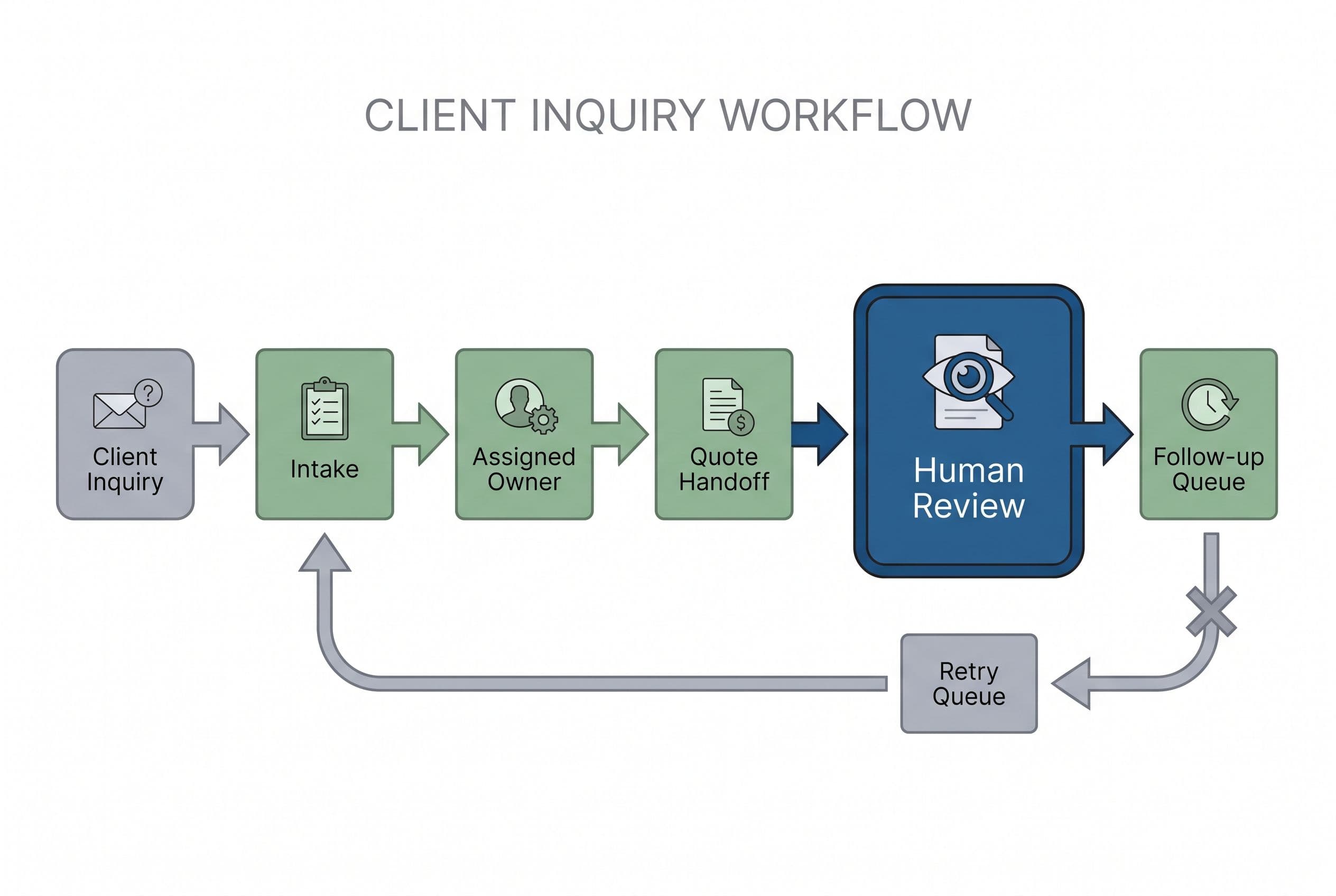
I'd scope client management software for small business around this clearly hypothetical workflow: a new inquiry arrives, an employee qualifies it, a quote goes out, and somebody follows up.
The record needs a client name, contact details, assigned employee, status, last interaction, and next action. Useful client database software connects those fields to work. A database full of phone numbers isn't enough.
Here's where I'd look for failure:
- Inquiry received: someone copies the details from an email into the CRM, potentially creating a duplicate.
- Employee assigned: the owner forwards a message, but the CRM still shows an unassigned record.
- Quote sent: the quote lives elsewhere, so another employee follows up without knowing its status.
- Follow-up due: an automation sends a reminder even though the customer already replied.
I wouldn't replace the whole stack to fix that. I'd first identify which system owns the client record and which owns the next action. Two systems both claiming authority over the same status will create trouble, however attractive the screens are.
A real project shows why that distinction matters. I built a custom React power dialer for a business replacing an approximately $30,000-a-year Kixie contract. This was a real client project; the client is unnamed, the subscription figure is approximate, and results vary.
The replacement included custom lead lists assigned to reps, built-in automations, Zapier webhooks, SMS templates, voicemail drops, and missed-call and message management. Reps could call one lead or dial up to 10 lines at once, connecting when someone answered.
The build cost $10,000 and paid for itself in about four months against the licensing it replaced. It shipped in weeks, with unlimited users and zero monthly licensing fees. That doesn't mean operating software is free; it means the replacement didn't carry that recurring software license.
The lesson isn't that every CRM needs a dialer. It's that replacing an expensive, awkward workflow can beat rebuilding every feature in a subscription. For that particular workflow, my Kixie replacement breakdown is the closer comparison.
Keeping the current CRM for three years has a price, too
Before I recommend a replacement, I price leaving things alone. The subscription is one line. Add-ons and repeated manual work are separate lines—not invisible overhead.
The supplied 2026 pricing research lists HubSpot Starter Customer Platform at $10 per seat per month on month-to-month billing. It also lists a limited-time $7 rate with upfront payment and an annual commitment. I'd verify the offer before budgeting and use the month-to-month figure for this example.
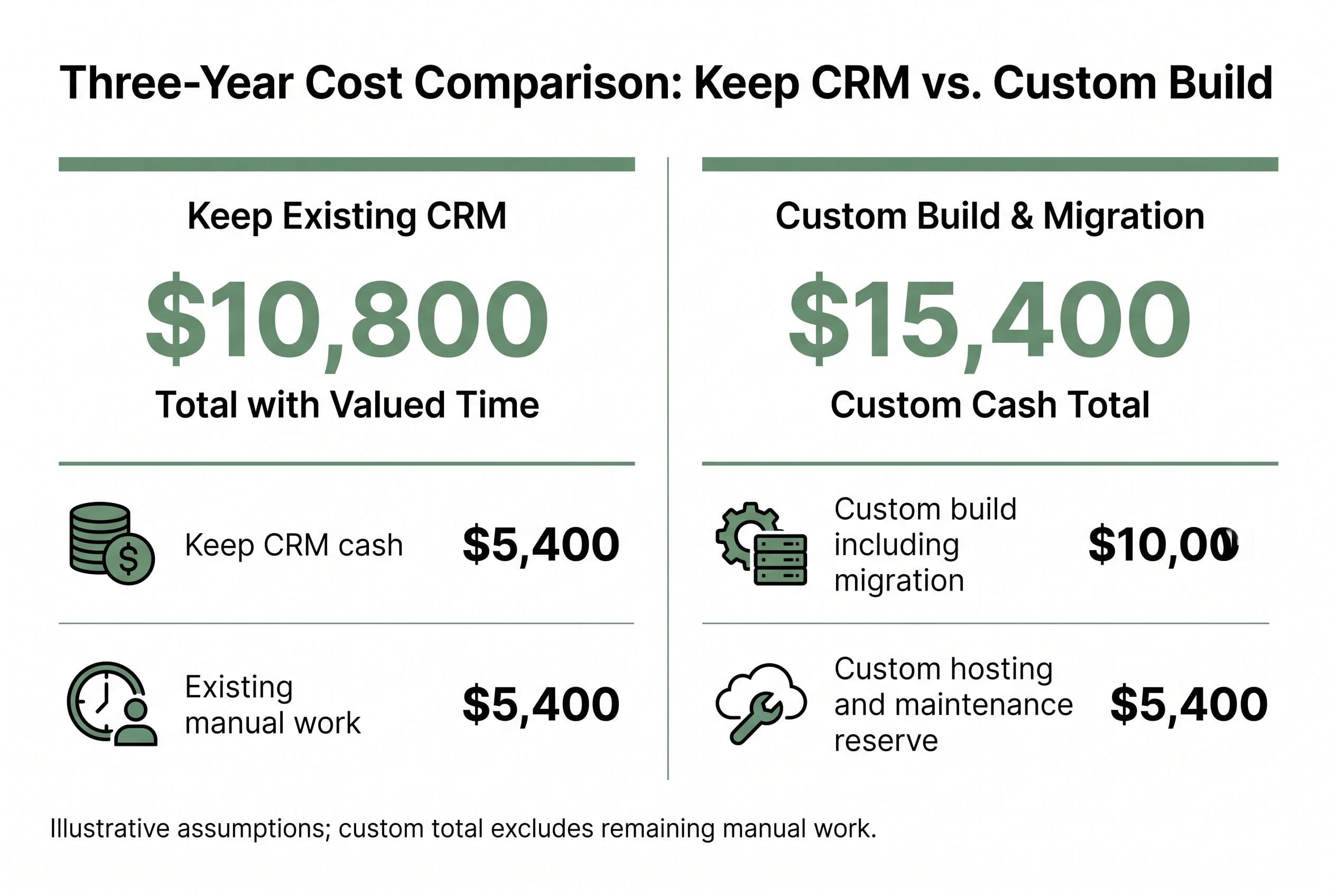
The following is illustrative arithmetic, not a client result or a quote. Assume five users, no price increases, an existing add-on costing $100 monthly, and three hours of avoidable copying and checking each month valued at $50 an hour.
For the custom side, assume a $10,000 medium build with migration included, $50 monthly for hosting and services, and a $100 monthly maintenance reserve. Those operating allowances aren't named-provider prices or a BuiltInWeeks maintenance offer. Real usage and support requirements need their own budget.
| Three-year cost | Keep the hypothetical stack | Custom replacement budget |
|---|---|---|
| Core CRM: 5 × $10 × 36 months | $1,800 | Included in build |
| Assumed existing add-on: $100 × 36 | $3,600 | Replaced within agreed scope |
| Build and migration | $0 | $10,000 |
| Hosting and services: $50 × 36 | Included in subscription assumption | $1,800 |
| Maintenance reserve: $100 × 36 | Included in subscription assumption | $3,600 |
| Cash budget | $5,400 | $15,400 |
| Manual work: 3 hours × $50 × 36 | $5,400 | $0 only if that work is fully removed |
| Cost including valued time | $10,800 | $15,400, plus any remaining manual work |
I'd keep renting in this example. Even the optimistic assumption that the build removes all that manual work doesn't make replacement cheaper over three years. Don't hire me to replace an inexpensive CRM that already handles your workflow, or an ecosystem your business can't reasonably leave.
The dialer project had different economics: approximately $90,000 in displaced licensing over three years before considering replacement operating costs. Its $10,000 build addressed a much larger recurring expense. That's not the economics of a five-person starter CRM.
I also wouldn't count owner hours as guaranteed cash savings. They become financial value only if you use the recovered time productively or avoid an actual expense. My build-or-buy comparison for a lean CRM explores that same distinction before a subscription stack gets complicated.
How I price client management software for small business
When I price client relationship management software for small business, three things move the number most: how many systems exchange data, how complicated permissions are, and how messy the existing records are.
A small business client tracker can have a simple interface and still hide a difficult migration. Five screens don't tell me whether a customer has three conflicting records across two exports.
Here's how I'd break down the inquiry-to-follow-up scope. These are scope lines inside the project quote, not extra charges invented after work starts.
| Scope line | First version I'd quote | What pushes the work up |
|---|---|---|
| Client record | Contacts, owner, status, notes, next action | Multiple related companies, locations, or conflicting ownership rules |
| Inquiry intake | One agreed intake route with duplicate checks | Several sources with different formats |
| Quote handoff | Quote reference and status from the existing system | Rebuilding pricing, approvals, invoicing, and accounting |
| Follow-up queue | Due tasks and reviewed message templates | Complex campaigns across several channels |
| Access | Clearly defined employee and manager permissions | Multiple businesses with isolated data |
| Migration | Agreed fields from a reviewed export | Missing history, inaccessible attachments, unreliable identifiers |
| Handoff | Source control, deployment notes, export instructions | Undocumented external dependencies |
My published advanced range is $10,000–$20,000 over 4–6 weeks for work such as multi-tenancy, real-time features, or complex rules. AI features multiply the applicable range by 1.25; my overall build envelope is $2,500–$25,000.
I'd leave accounting in QuickBooks if it already works there. The client tracker needs the relevant status, not a second accounting engine. My approach to stopping duplicate entry between business systems starts with deciding which application owns each piece of data.
That's how I keep scope down: fewer competing records, not fewer safeguards.
A failed follow-up needs a queue, not a silent shrug
The tempting DIY version is simple: when a status changes, send a message. The production version has to answer what happens when that message fails—or when the status was wrong.
For this workflow, I'd build around explicit failure states:
- Duplicate inquiry: flag a possible match for human review rather than silently merging two people.
- Missing contact details: create a correction task instead of pretending the follow-up ran.
- Failed webhook: retain the failed event, show its status, and allow a controlled retry.
- Repeated event: recognize it so a retry doesn't send the same message twice.
- Customer reply: pause pending follow-ups when that reply is available to the workflow, and flag uncertainty when it isn't.
API rate limits matter here. Zapier webhooks can connect systems, but a connection alone doesn't provide a complete recovery process. I'd want an employee to see what failed and know whether retrying is safe.
If I add AI, I'd use it to draft a follow-up or summarize notes—not approve a quote or invent a promise to a customer. The employee reviews the proposed message and its supporting client details before sending. If the AI service fails, the task remains available for a manual response.
I'd also test permissions directly. Hiding another employee's accounts from a screen isn't enough; the server must reject access that the user isn't allowed to have.
Migration gets the same treatment. I'd map the old fields, run a sample import in a staging environment, review duplicates with the business, and compare record counts and spot-check histories. Then I'd agree on a cutoff for edits, import the final changes, and retain a rollback path until acceptance.
I wouldn't cancel the old subscription just because the new login works. Data export, attachments, open tasks, and responsibility for the next follow-up all need checking first.
A cheap subscription can beat both DIY and an agency
My default isn't “build.” It's “buy the least complicated thing that does the job without trapping the business.”
The supplied pricing research lists Zoho CRM Standard at $14 per user monthly, billed annually, and Pipedrive Lite at $14 per user monthly, billed annually. Neither entry price proves the plan includes your required automations, integrations, or permissions. I'd check those against the workflow before comparing totals.
| Option | Where I'd choose it | The trade I'd watch |
|---|---|---|
| Existing CRM | Standard contacts, tasks, pipeline, and reporting | Per-seat licensing and paid feature upgrades |
| DIY configuration | Straightforward workflow and an owner with setup time | The business becomes dependent on whoever configured it |
| Fixed-price custom build | Expensive recurring friction with a bounded replacement scope | Upfront spend and ongoing operating responsibility |
| Hourly agency | Work that genuinely needs a larger delivery team | Paying for staffing and open-ended scope |
| Offshore firm | Clear specifications and strong technical review | Coordination, testing, and potential rewrite costs |
| In-house developer | A continuing backlog requiring daily product decisions | An ongoing employment commitment rather than a project purchase |
For a U.S. agency comparison, I'd price the team against the actual scope—not just compare hourly rates. VanHack's June 2025 comparison lists offshore firms at $30–$80 an hour. That hourly figure doesn't tell you the final bill.
Hourly billing rewards slow work when the contract pays for time without holding anyone to a defined result. Agencies staffing five people on a two-person job don't fix that. Nor does a cheap offshore quote if nobody has priced testing and handoff.
I use AI-assisted development to ship production software in weeks, but I'm still responsible for reviewing the code, testing the workflow, and delivering the agreed scope. The tool isn't the risk reversal. The contract is.
Settle the price of your inquiry-to-follow-up workflow
To turn this into a fixed quote, I need the actual handoffs: where inquiries arrive, who assigns them, where quotes live, and what should stop a follow-up. A redacted export and examples of failed handoffs are more useful than a long feature wish list.
I'd also document the acceptance checks before building: a new inquiry gets an owner, a duplicate is flagged, a failed message remains visible, and an unauthorized employee can't retrieve another user's restricted records. Those checks make “done” something you can test.
Your involvement is a scoping call, a short weekly review, and a final test pass, plus providing access and resolving data questions. Dirty records can require additional business-side cleanup; I wouldn't hide that inside a promise that you won't have to do anything.
Fixed price means overruns on the agreed scope are my problem, not yours. The code lives in your own repo from day one. The contract transfers ownership of the custom code and source on final payment; I keep only generic reusable components, and third-party libraries and services retain their own license terms.
With the source and handoff documentation, another developer can take over. You aren't buying a permanent dependency on me.
“I just want to know whether we should keep paying for this or own something that fits.”
Settle it with the free project estimator at free project estimator: answer five questions in about ninety seconds, see the range before any form, then submit your details for a fixed quote back within one business day. I don't hide the number to harvest your email.
Want a real number for your own project?
Answer a few questions and get an instant price range and timeline. No call required, no obligation.
Get your instant estimateTalk through your software project with MattFrequently asked questions
- How much does custom client management software for small business cost?
- I quote $2,500–$10,000 for a focused tracker delivered in 1–2 weeks. A multi-feature client app with integrations and user roles falls in my $5,000–$15,000 range over 2–4 weeks. Migration complexity, permissions, and system handoffs determine the scope.
- Can I build a small business client tracker myself?
- Yes. I'd start with client details, an assigned owner, status, interaction history, and a next-action date. Budget your setup and maintenance time alongside subscriptions, and test imports, permissions, and failed automations before relying on it.
- Is it cheaper to build or buy CRM software for small businesses?
- I'd usually keep a low-cost subscription when it already handles the workflow. A custom replacement becomes worth considering when displaced subscriptions and avoidable work justify the build, migration, hosting, and maintenance costs. Compare those over three years without treating every saved hour as cash.
- Should a small business use AI for client follow-ups?
- I'd use AI for drafts or summaries when there's enough value to justify the added scope. An employee should review customer-facing messages and commitments before sending. If the AI service fails, the underlying follow-up task should remain available for manual completion.
- Who owns the custom client management software you build?
- The code lives in your own repo from day one, and my contract transfers ownership of the custom code and source on final payment. I retain generic reusable components, while third-party libraries and services keep their own license terms. Source access and handoff documentation let another developer take over.
What would software built for your business look like?
Replacing a subscription, fixing software that fell short, or adding AI to your workflow? Talk through the scope with Matt.
Part of these guides
Matt Brody
Founder, BuiltInWeeks
I build custom software for small and mid-sized businesses — the kind you own outright instead of renting by the seat. Fixed price, delivered in weeks, source code handed over at the end.
More about how I workKeep reading

Small Business Helpdesk Software: Build vs Zendesk
I'd buy Zendesk for standard support and build when resolving tickets means fighting your other systems. Here's the workflow, three-year arithmetic, and migration plan I'd use to make that decision.
Read more
CRM for Small Business: Seat Costs vs. Owning Your Code
I'd keep a cheap CRM that does its job. But when every new rep adds another subscription and your team still copies leads between systems, I'd price the workflow—not another seat.
Read more
CRM Software for Startups: Build or Buy? $0–$25K, Compared
Every startup needs a CRM eventually, but the decision isn't just 'which SaaS.' It's whether to rent someone else's workflow or build the one that fits yours. Here's the real cost breakdown and when each path makes sense.
Read more