Monday.com Alternative: ROI Math for Teams Over 15

Over 15 seats? I’d check the workflow before buying a monday.com alternative
At 20 paid seats, Monday.com Pro costs $4,560 a year using the reported $19-per-seat monthly rate, billed annually. That’s enough to investigate a monday.com alternative. It isn’t automatically enough to justify building one.
TaskRhino’s March 2026 pricing breakdown reports that rate; I’d verify it against Monday.com’s official pricing page and your own invoice before budgeting. My arithmetic assumes exactly 20 paid seats; your invoice, seat bundles, discounts, taxes, and add-ons decide the actual spend.
I’d compare three choices: keep Monday.com and fix the workflow, move to another subscription, or build the narrow system your team actually needs. A focused dashboard falls in my $2,500–$10,000, 1–2 week simple-build range. A multi-feature replacement with integrations and user roles falls in my $5,000–$15,000, 2–4 week medium-build range.
For this workflow, I’d use those ranges only with a single-tenant app, limited roles, no complex permissions matrix, one integration, a limited migration set, and no SOC 2 or HIPAA requirements. Deeper permissions, migration, integration work, or security review can push delivery past those bands.
The word narrow matters. I wouldn’t quote those ranges for recreating all of Monday.com.
My own family’s reading app is a useful example of narrowing a system. My wife and I homeschool our four kids, and we’d already taught two to read. For our five-year-old, the process meant working through more than a thousand pages of books and workbooks.
I built a web app with 50 structured phonics lessons, designed for a parent and child together for about 15 minutes a day. It replaced that shelf with one clear path, was built in weeks, and my family uses it every day.
That’s workflow proof, not subscription-payback proof. I don’t have a licensing-savings figure for it. The relevant lesson is that I built the path we needed—not a digital version of every workbook. I’d apply that same scope discipline to a project management replacement.
The workflow I’d put under the microscope: request to scheduled job
For this teardown, I’m using an illustrative U.S. service business, not a client story. Its office team receives work requests, prepares quotes, gets approval, and schedules crews.
Before comparing tools, I’d name the decision criteria: duplicate entry, approval control, failure visibility, reporting effort, migration risk, and total cost. Pretty boards don’t settle any of those.
Monday.com can support forms, automations, and integrations. The failure I’m examining isn’t “Monday can’t do this.” It’s a particular setup where people still carry information between systems and nobody owns the exceptions.
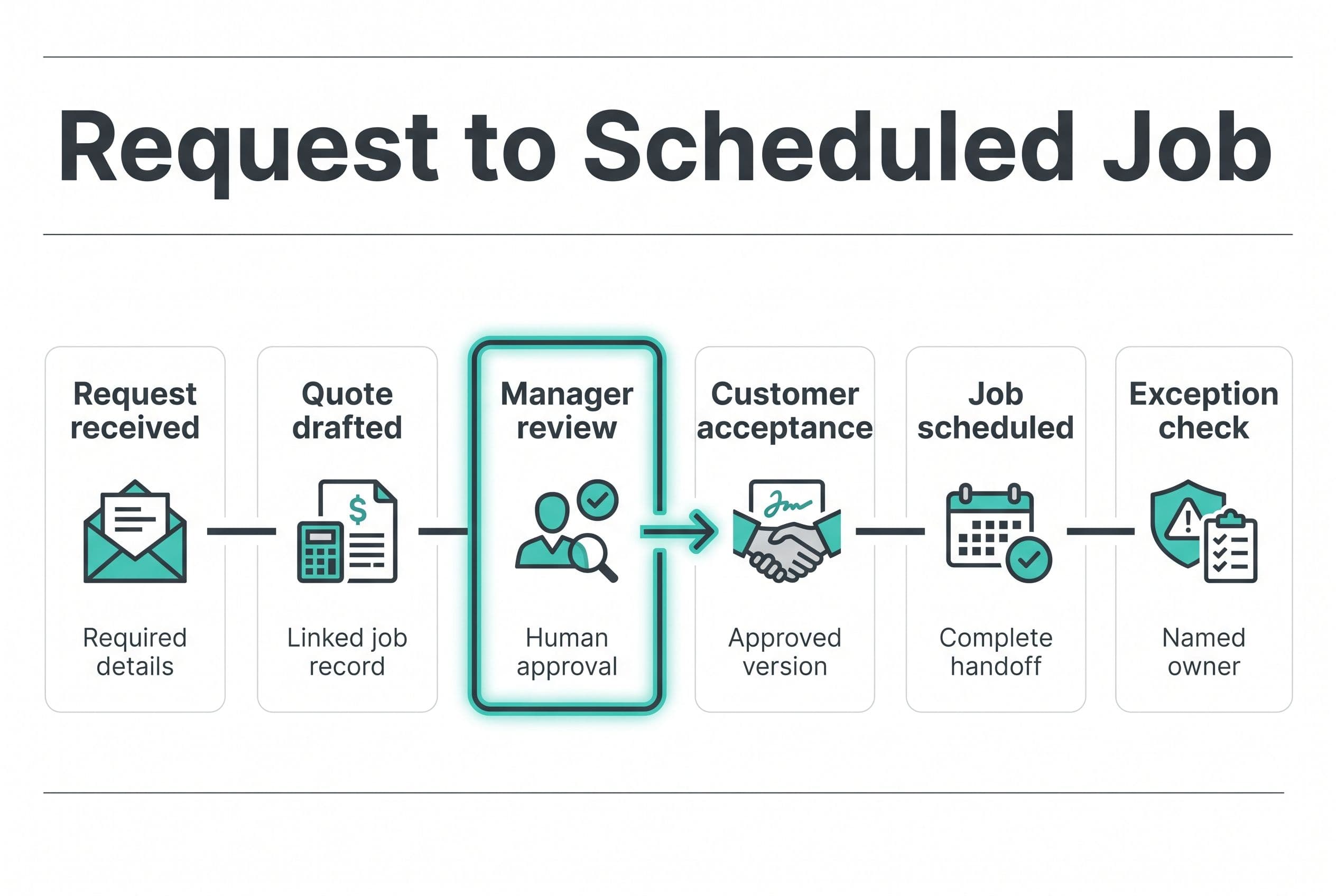
| Workflow step | Where this hypothetical setup breaks | What I’d require from any replacement |
|---|---|---|
| Customer requests work | An email becomes a board item through manual entry | One intake record with required fields and a customer match |
| Office prepares a quote | Scope gets copied into QuickBooks and back again | A quote draft connected to the same job record |
| Manager reviews the quote | A status changes, but nobody checks margin or scope | A named reviewer, approval history, and a hold for missing details |
| Customer accepts | Office staff manually update several places | An acceptance event linked to the approved quote version |
| Dispatcher schedules the job | An incomplete handoff reaches the crew | A scheduling gate for approval, address, and required job details |
| Owner checks progress | Someone reconciles boards and accounting records | An exception queue plus a dashboard of jobs needing action |
I’d start by watching one request pass through that entire chain. Every copy-and-paste, clarification message, and status correction becomes a scope candidate—not an automatic feature.
If the real problem is duplicate entry into QuickBooks, a monday.com replacement may be unnecessary. My breakdown of connecting business systems without triple entry covers that narrower decision.
A project management software alternative earns its keep when it removes a handoff or makes a bad handoff impossible. Moving the same manual work onto a different-colored board doesn’t count.
Keep Monday.com, switch subscriptions, or own the job dashboard?
I’d compare these options against that workflow, not a feature checklist with hundreds of rows. My Monday.com alternatives comparison covers the wider choice; here, I’m interested in what happens between the request and the scheduled job.
| Decision criterion | Keep and repair Monday.com | Switch to another SaaS tool | Build a focused application |
|---|---|---|---|
| Initial work | Repair boards, rules, and integrations | Remap the workflow and migrate records | Define the workflow, build it, test it, migrate |
| Cost model | Per-seat licensing plus any extras | Usually another recurring subscription | Fixed build price plus ongoing operating costs |
| Approval rules | Work within available configuration | Check whether the new tool handles the actual rules | Put the agreed rules directly into the application |
| Failure handling | Configure alerts and exception views | Test integration failures before committing | Build retry states, an exception queue, and audit history |
| Ownership | You don’t own the platform’s code | You don’t own the platform’s code | You own the application code and can move developers |
| Main risk | Paying to preserve a clumsy setup | Recreating the same problems after migration | Building too much or leaving upkeep undefined |
For a lower-cost rental comparison, Carly AI’s July 2026 ClickUp pricing breakdown reports ClickUp Business at $12 per user per month, billed annually. I’d verify that against ClickUp’s official pricing page and your own quote or invoice before budgeting, too. At 20 paid users, that’s an illustrative $2,880 a year before extras, compared with $4,560 for Monday.com Pro.
That’s $1,680 in annual subscription savings, not evidence that the plans are functionally equivalent. I’d test the approval and accounting handoff before letting the cheaper sticker price decide.
Don’t hire me to replace Monday.com if your team uses its broad collaboration features well and the bill is your only complaint. A plan change, seat cleanup, or cheaper subscription is the better trade.
For the custom route, I’d consider Next.js, TypeScript, and Postgres for the application and data, with QuickBooks connected where the workflow needs it. That removes per-seat licensing for the project-management app itself; it doesn’t remove hosting, support, or third-party charges. I’d still check adjacent tools—SSO, communications, and support—for per-user fees, plus any user-tiered or usage-based infrastructure costs.
The enemy isn’t SaaS. It’s seat creep without added value, and selling a migration as savings before counting the work it creates.
The quote must stop before approval—not after a bad invoice
This is the part of a monday.com alternative I’d spend real scoping time on: what happens when something goes wrong?
A dashboard that shows happy-path statuses is easy to demonstrate. A system that catches an incomplete quote before it reaches a customer is more useful.
Human review stays at the money boundary
I’d let the system gather request details and prepare a draft. A manager would still review scope, price, exclusions, and customer identity before anything gets sent.
If incoming requests are mostly free-form emails, an AI feature could suggest structured fields. I’d treat those suggestions as drafts, with uncertain or missing details flagged for review. The model wouldn’t get permission to approve the quote or invent a price.
I’d skip AI entirely if a well-designed intake form solves the problem. My AI-feature pricing multiplier is 1.25, so it needs to buy something beyond a more interesting demo.
Failed integrations need a visible owner
Suppose QuickBooks is temporarily unavailable after a manager approves a quote. The app shouldn’t display “sent” just because someone clicked the button.
Here’s how I’d scope that behavior:
- Separate states: approved, queued, successfully sent, or failed.
- Safe retries: repeated attempts mustn’t create duplicate accounting records.
- External record IDs: the app stores which QuickBooks record belongs to which job.
- Exception ownership: a named person sees failures in the app; Slack can notify them, but isn’t the only record.
- Reconciliation: I’d have the app check for missing or inconsistent updates, whether it’s using webhooks or polling. Neither is proof that the records agree.
I’d put API rate limits, expired credentials, failed polling runs, and repeated webhook deliveries (where supported) in the test plan. They aren’t obscure technical trivia. They’re ways a quote gets stuck while everyone thinks somebody else handled it.
I’d also define who can change an approved quote and whether that change requires approval again. Otherwise, the approval history tells you who approved a document that no longer exists.
Three-year ROI: where 20 seats barely pays and 40 starts to work
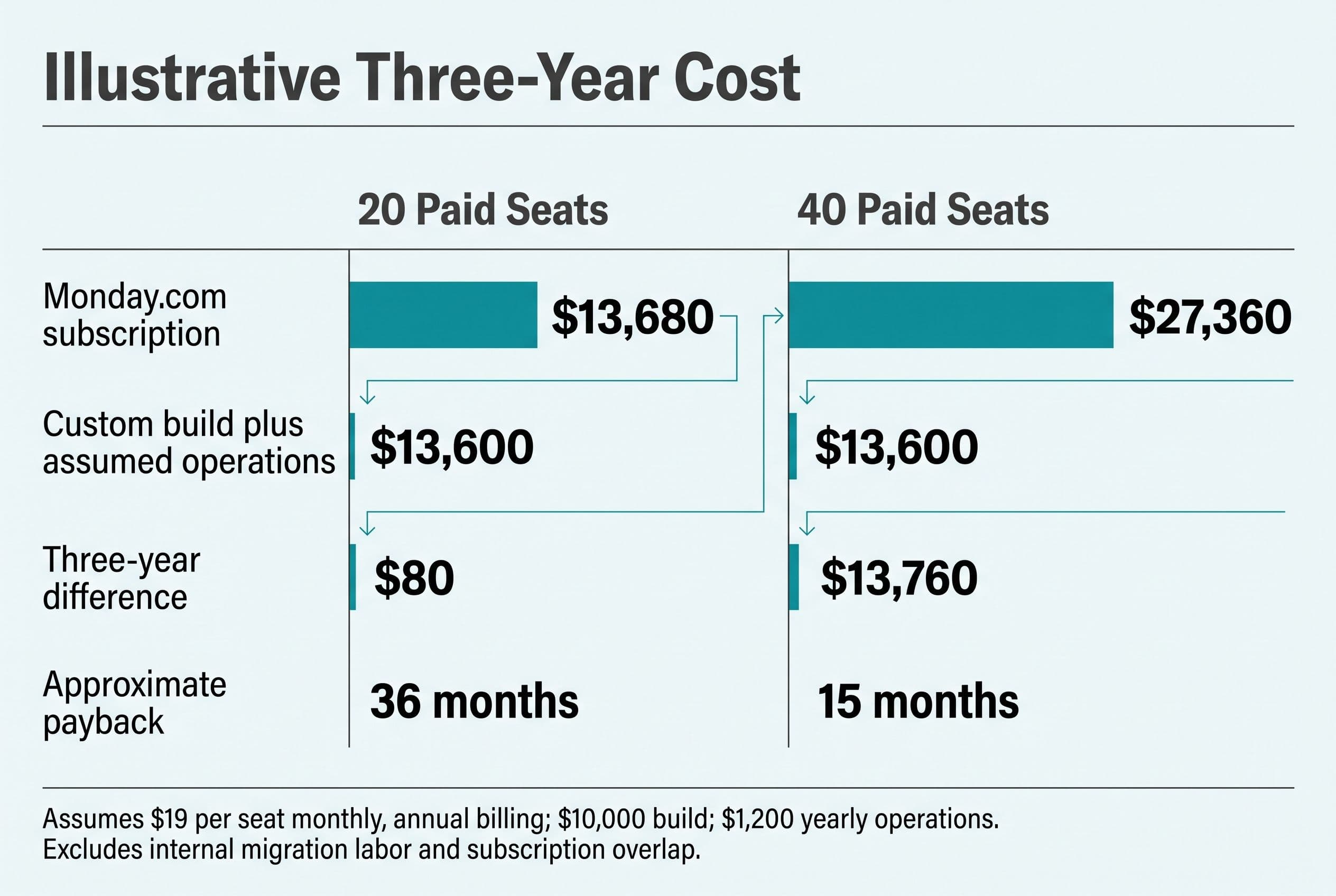
Here’s the subscription-only math for a monday.com alternative. Everything below is illustrative arithmetic, not a project quote or a claimed customer result.
I’m assuming:
- Monday.com Pro stays at the cited $19 monthly rate, billed annually.
- Paid seat counts stay constant, with no discounts, taxes, or add-ons.
- The scoped custom build costs $10,000, within my medium-build range, including the agreed migration and testing work.
- The owner budgets $1,200 a year as an illustrative operating allowance for hosting, backups, and maintenance. That’s a planning assumption, not my support quote; actual needs could exceed it.
- Monday.com can be fully retired for these users. Temporary overlap and internal migration labor aren’t included.
| Three-year comparison | 20 paid seats | 40 paid seats |
|---|---|---|
| Monday.com annual subscription | $4,560 | $9,120 |
| Monday.com over three years | $13,680 | $27,360 |
| Illustrative custom build | $10,000 | $10,000 |
| Three years of assumed operating costs | $3,600 | $3,600 |
| Custom three-year total | $13,600 | $13,600 |
| Subscription savings after custom costs | $80 | $13,760 |
| Approximate simple payback | 36 months | 15 months |
I calculate simple payback as build cost ÷ monthly net savings, after the assumed operating costs. This ignores financing and the time value of money.
At 20 seats, $80 over three years isn’t a convincing reason to migrate. One unexpected maintenance task wipes it out. At 40 seats, there’s room to investigate—but only if the same scoped application supports the larger team without substantial extra work.
The other half is your team’s time. Suppose, purely for planning, removing re-entry saves three hours a week across 50 working weeks at an assumed loaded labor cost of $40 an hour. That’s $6,000 of annual capacity value.
It isn’t automatically $6,000 back in the bank. I’d count it as cash savings only if it reduces an actual expense; otherwise, it’s capacity for more jobs, quicker responses, or less overtime pressure.
This is why per-seat project management pricing deserves a review as headcount grows, but “over 15” isn’t a magic break-even point. My three-year build-versus-buy cost and exit checklist digs into the costs that subscription-only comparisons leave out.
I’d migrate one job path before retiring the boards
For this workflow, I’d aim for a medium build only if the scope stays bounded: intake, job records, quote review, scheduling handoff, an exception dashboard, and the agreed integration.
Complex rules, real-time features, or multi-tenancy can move the work into my $10,000–$20,000 advanced range, delivered in 4–6 weeks. I’d still scope the permissions, migration, integration breadth, and security requirements before committing to that band; deeper work can run beyond it. A custom project dashboard cost estimate means little until those boundaries are written down.
I’d make migration part of the build plan:
- Inventory what exists. Boards, columns, attachments, comments, automations, integrations, users, and permissions. Mark what must survive and what can remain archived.
- Test the data export. Check what it actually contains. Don’t assume relationships, attachments, and history arrive in a convenient format.
- Map the job record. Decide which system owns customer details, quote status, and scheduling information. Document the field mapping and exceptions.
- Import into a staging environment. Compare records, inspect attachments, check permissions, and run both normal and failed handoffs.
- Pilot the complete workflow. Choose a controlled set of jobs and define the authoritative system for each field. Two writable sources of truth create reconciliation work.
- Cut over with a rollback plan. Reconcile final changes, archive the old data, and retire seats only after the acceptance checks pass.
Your involvement isn’t a second job, but it isn’t zero. I’d scope it around a scoping call, access and data preparation, a short weekly review, and a final test pass with whoever handles quotes and scheduling.
Fixed price means overruns on the agreed scope are my problem, not yours. New scope gets a separate decision—not a surprise invoice disguised as progress.
The code lives in your own repo from day one. You own it at every moment, and another developer can take over with the source control history, deployment access, and handoff documentation. I’d include how to restore backups and retry failed integrations in that handoff.
For the wider hiring checks behind those commitments, I explain what to ask before you hire a developer. Ownership shouldn’t depend on whether you keep paying the original builder.
I’d replace the handoffs—not rebuild Monday.com
My pick depends on what the teardown finds. If Monday.com already handles the job well, I’d keep it. If one accounting connection is broken, I’d fix that connection. If the office is repeatedly moving the same job through boards, messages, and accounting screens, I’d price a focused monday.com alternative against the measurable waste.
I wouldn’t fund a months-long discovery phase just to receive a slide deck and a price range. Nor would I mistake an hourly quote for a budget; hourly billing rewards more hours, not a shorter route to go-live.
The useful question sounds more like something you’d say to your partner:
“Are we paying for a tool that runs the work, or paying our people to keep the tool updated?”
Settle it with my free project estimator at free project estimator: five questions, about ninety seconds, and the range visible on screen before any form asks who you are. Submit the project details afterward for a fixed quote back within one business day, so you can compare a defined build against the bill and handoffs you have now.
The follow-on question here is covered in Monday.com Too Expensive? $3K.
I wrote up Leaving monday.com separately — that's the version with the numbers in it.
Want a real number for your own project?
Answer a few questions and get an instant price range and timeline. No call required, no obligation.
Get your instant estimateTalk through your software project with MattFrequently asked questions
- What is the best monday.com alternative for a team over 15?
- I’d choose based on the workflow, not headcount alone. Keep Monday.com if it already supports the work well, compare another subscription if price is the main issue, and consider custom software if repeated handoffs and manual entry create measurable waste.
- How much does a custom Monday.com replacement cost?
- My focused dashboards fall in the $2,500–$10,000 simple-build range, delivered in 1–2 weeks. A multi-feature application with integrations and user roles falls in my $5,000–$15,000 medium-build range, delivered in 2–4 weeks. Complex rules can move the scope into the $10,000–$20,000 advanced range, delivered in 4–6 weeks; these ranges aren't quotes for copying all of Monday.com.
- Is building a Monday.com alternative cheaper than paying per seat?
- Not automatically. Using the cited $19-per-seat monthly rate, billed annually, 20 paid seats cost $13,680 over three years. An illustrative $10,000 build plus $1,200 in annual operating costs totals $13,600, leaving almost no subscription-only savings before migration labor or unexpected upkeep.
- Can I move my Monday.com data into custom software?
- I’d first test the available export and check records, relationships, attachments, comments, and history against what the new system needs. Then I’d map fields, import into staging, reconcile the results, and pilot the workflow before cutting over. I wouldn't retire the old subscription until the agreed acceptance checks pass.
- Can AI automate quotes in a Monday.com replacement?
- I’d use AI to suggest structured details from incoming requests only when that solves a real intake problem. A person would still review customer identity, scope, and price before sending the quote. Missing details, failed integrations, and uncertain suggestions need visible review states rather than silent automation.
What would software built for your business look like?
Replacing a subscription, fixing software that fell short, or adding AI to your workflow? Talk through the scope with Matt.
Part of these guides
Matt Brody
Founder, BuiltInWeeks
I build custom software for small and mid-sized businesses — the kind you own outright instead of renting by the seat. Fixed price, delivered in weeks, source code handed over at the end.
More about how I workKeep reading

Monday.com Too Expensive? $3K–$17K Over 3 Years, by Seats
At 8 users, monday.com probably isn't too expensive. At 25 users on Pro, the 3-year bill is in the same range as building your own app. Here's the seat math, the checklist I'd run before canceling anything, and the conditions where you should just keep paying.
Read more
Leaving monday.com: $5K–$15K Build, and Who Owns the Code
Most monday.com replacements I'd scope come in as a $5K–$15K fixed-price build over 2–4 weeks. The price is the easy part. If your contract doesn't assign the code to you, the developer keeps it. Here are the line items, the three-year math, and the handover checklist.
Read more
Cost to Replace Airtable: $5K–$15K + $40/Mo Hosting
Replacing Airtable with an app you own usually costs $5,000–$15,000, takes 2–4 weeks, and runs about $40 a month to host. For plenty of teams it still doesn't pay back. Here's the seat math, a pre-flight checklist, and the conditions that should keep you renting.
Read more