Jobber Too Expensive? $10,764 Over 3 Years for 6 Trucks

Here's the number most owners never actually work out: Jobber's Grow plan costs a 6-truck plumbing shop $10,764 over three years. That's $299 a month, billed annually, for up to 10 users, as published on Jobber's pricing page.
If you searched "jobber too expensive," that subscription probably isn't what's hurting you. More likely it's the card fees, the other tools bolted on around Jobber, or the hours your office manager spends typing the same job into three places every week. Those are different problems with different fixes. One of the fixes is "keep Jobber."
This post is for plumbing shop owners who pay for Jobber and are wondering whether to build their own system. If your office isn't fighting the software, skip to the P.S. and keep Jobber.
I build custom software for a living. I'll still tell you up front that for a lot of 6-truck plumbers, building a replacement is a bad trade. Here's the math so you can see which group you're in.
$299 a month vs. a $30,000 contract: why payback math decides this
The clearest build-vs-rent decision I've worked on had nothing to do with plumbing. A business was paying about $30,000 a year for Kixie, a sales dialer. They kept running into its customization limits and clunky workflows, and the price kept going up. I built them a custom power dialer in React: unlimited users, up to 10 lines dialing at once, SMS templates, voicemail drops, Zapier webhooks and real analytics. The build cost a fraction of one year of Kixie and paid for itself within months. (That's a real client project. I've generalized the details and rounded the numbers, and your results will vary.)
That's a different trade and a much bigger bill than yours, and that's exactly why I'm using it. Now put a build like that up against Jobber Grow at $3,588 a year. Before you count a single dollar of hosting or maintenance, it takes years, not months, to break even on licensing.
That's the whole story behind "is Jobber too expensive." Software pays back when the bill is big. A $30K contract is a big bill. A $299 subscription usually isn't, unless something else is piled on top of it.
Is Jobber too expensive? Where a 6-truck plumber's bill actually comes from
Here's an illustrative shop. These are my assumptions, not your numbers, so swap yours in:
- 6 techs, 1 office manager, 1 owner = 8 users
- Average ticket: $450
- 3,000 invoices a year paid by card
- Office manager spends 5 hours a week re-keying jobs into QuickBooks, a spreadsheet, or a second tool, at an assumed $30/hour loaded cost
| Line item | How it's priced | Illustrative annual cost |
|---|---|---|
| Jobber Grow subscription | $299/mo billed annually, up to 10 users | $3,588 |
| Card processing | 2.9% + $0.30 per card payment (Jobber's published rate) | $40,050 |
| ACH processing (if used instead) | 1% per bank payment | $13,500 |
| Office workarounds | 5 hrs/week × $30 × 52 | $7,800 |
| Other tools around Jobber | Call tracking, dialer, Zapier, etc. | Your number |
(Vendors change pricing often, so check the current pages before you lean on any of these.)
Two things stand out. First, at 8 users you're inside Grow's 10-user cap, so seat creep isn't biting you yet. Second, the subscription is the smallest real line on the page.
The seat math changes when you grow. Hire two more techs and a CSR and you're at 11 users, which is past Grow's cap. You'd move up a tier, and that tier's current price is on Jobber's site. This is the standard field service software per user cost trap: the bill scales with your headcount, not with how much work the software actually does. If that's where you're headed, put your real seats and tools into the calculator below before you assume anything.
Price your stack in two minutes
List the subscriptions you pay for and see what they cost over 3, 5 or 10 years next to owning the software. No email needed to see the number.
Card fees are the bigger number, and leaving Jobber doesn't make them go away
This is the part most "Jobber alternative" articles skip.
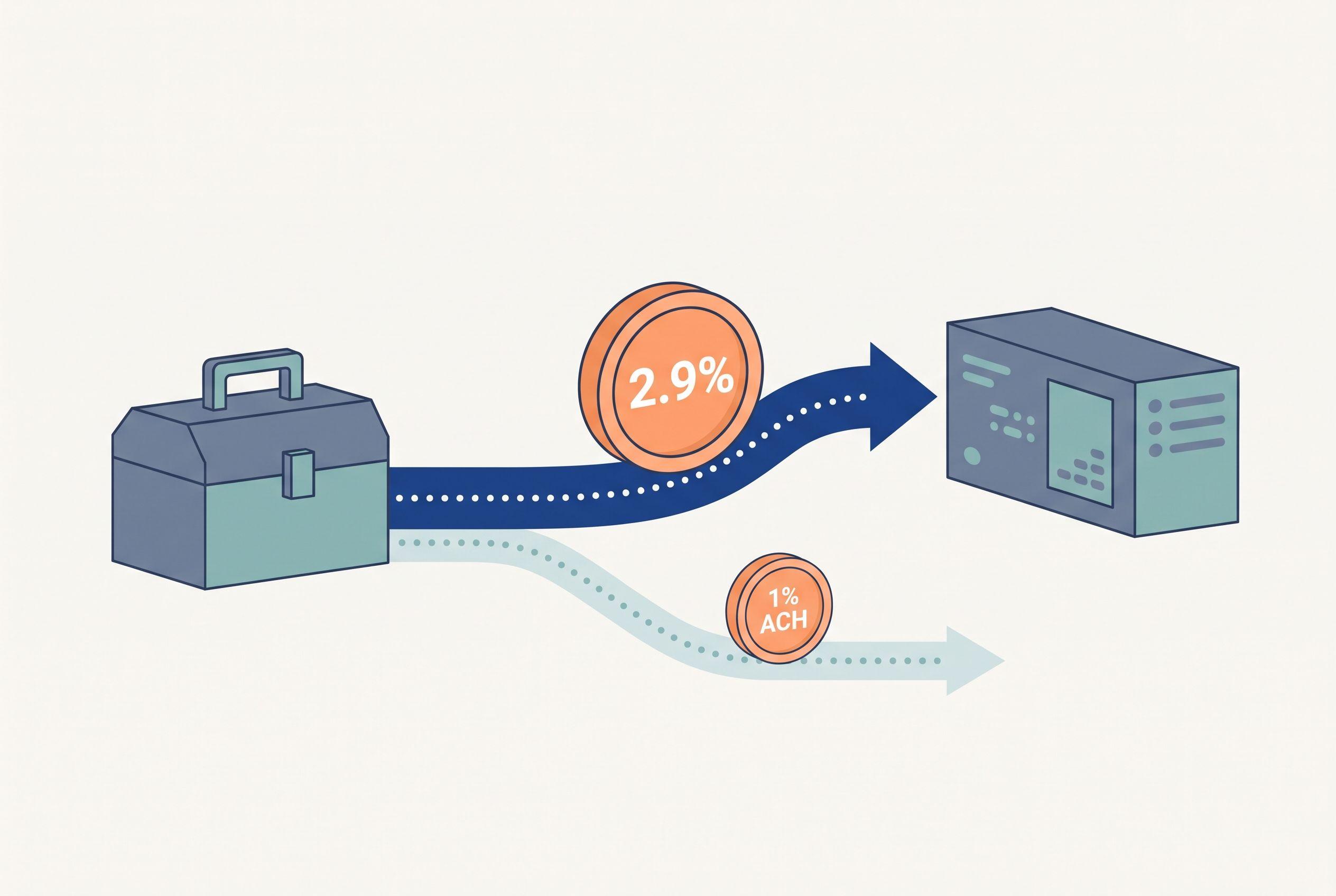
On a $450 invoice, Jobber's card rate costs you $13.35. The same invoice paid by ACH at 1% costs $4.50. Over my illustrative 3,000 invoices, that's the gap between $40,050 and $13,500 a year. It's more than seven times the subscription.
But processing fees don't stay behind when you leave. Switch to Housecall Pro and you pay its published rates instead (these were current when I wrote this, so check their pricing page): 2.59% in person, 2.99% on online invoices, 3.49% for keyed-in or Amex, 1% for ACH. Build your own system on Stripe and you pay Stripe's rates. The fee moves with you.
So the cheapest move available to most plumbers is boring. Push ACH on your big tickets, like water heater swaps, repipes and sewer lines. You can do that inside Jobber this week. No developer required.
Three years of Jobber vs. a custom build, priced out
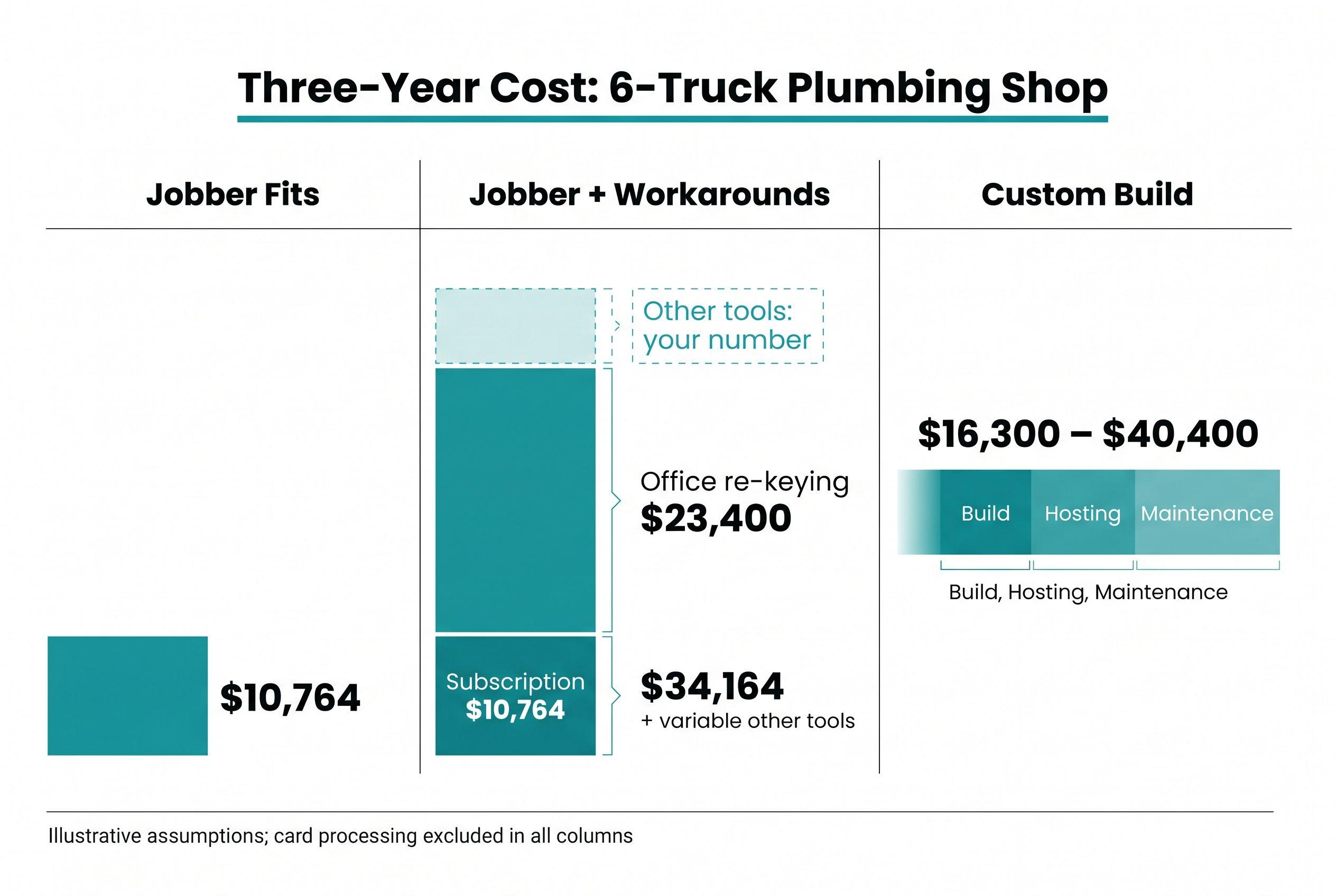
This is where the decision actually gets made. Here are two versions of the same shop, next to a custom build. I left processing out of every row because, as above, you pay it no matter what.
Custom build assumptions (illustrative): the build is one flat fee, quoted after a short call (more on scope below). Hosting, database and SMS usage are assumed at $50–$150/month. Maintenance uses 15–25% of build cost per year, which is my own planning assumption for post-launch work, not a number from a study.
| 3-year cost | Shop A: Jobber fits | Shop B: Jobber + workarounds | Custom build |
|---|---|---|---|
| Subscription | $10,764 | $10,764 | $0 |
| Build (includes migration from Jobber) | — | — | Flat fee, quoted after a short call |
| Hosting, database, SMS | — | — | $50–$150/mo for 36 months |
| Maintenance | — | — | 15–25% of the build fee per year |
| Office re-keying labor | ~$0 | $23,400 | ~$0 if the build kills it |
| Other bolted-on tools | — | Your number × 36 | Folded in, if scoped |
| Total | $10,764 | $34,164 + your tools | Flat fee + hosting + maintenance |
Read that honestly. Shop A should keep Jobber. If you're under 10 users, Jobber already handles your workflow, and your office isn't fighting it, a custom build costs more over three years. And no, I'm not the right hire for that shop. It also applies if you're deep in an ecosystem you can't realistically leave, or if what you really want is a developer on payroll for years. A fixed-price build won't give you that.
Shop B is roughly a coin flip on labor alone. It tips toward a build when two or three other subscriptions disappear along with the re-keying, or when you're about to cross the 10-user line and move up a tier. It also tips when Jobber simply doesn't model a workflow the way you run it (maintenance agreements, multi-stop commercial jobs, a sales pipeline for replacement work). That's the profile where a build makes sense. I made the same argument about seat-priced project tools that get expensive as you hire, and it holds here too: the tool around the tool is usually what costs you.
Here's the rule I'd use. Add up three years of re-keying labor plus every tool you'd cancel. Add the $10,764 in Jobber you'd stop paying. Put that total next to a fixed quote for the build plus three years of hosting and maintenance. If it clears that comfortably, build. If it doesn't, keep Jobber. If it's close, it comes down to your actual scope.
Optional: if you can't tell whether you're Shop A or Shop B, send me the actual invoices. Otherwise the estimator at the end is the faster route.
See your software before you pay for it
Tell me what you run today on a short call. I build a demo of your replacement, free, and walk you through it. The price is fixed in writing before you pay anything.
The cost to replace Jobber, line by line
Say you're Shop B and the math works. Here's how I'd scope a Jobber replacement for a small plumbing company and where the dollars go. The price is one flat fee for the agreed scope, quoted after a short call and fixed in writing; the table shows what moves it.
| Component | What's in it | Where it puts you |
|---|---|---|
| Core jobs, scheduling, customer records | Postgres database, tech and office user roles, calendar | Medium, 2–4 weeks |
| Quotes, invoices, payments | Stripe-hosted invoices, card plus ACH links | Inside medium |
| SMS reminders and "on my way" texts | Twilio, templates | Inside medium |
| QuickBooks sync | Invoices pushed one way, automatically | Inside medium (this is what kills most of the re-keying). Payment sync and reconciliation push you toward advanced |
| Data migration | Jobber CSV and report exports of active clients, properties and invoices | Scoped into the build. Notes, attachments and visit history may need extra work |
| Live dispatch board, complex membership rules | Real-time updates, rule logic | Advanced, 4–6 weeks |
| AI features (call summaries, auto-drafted quotes) | Optional | Priced into the same flat fee |
Build. Most single-location plumbing shops land in medium. Add a live dispatch board, complicated agreement billing or a full two-way QuickBooks sync and you're in advanced. Be clear-eyed about the schedule, too. QuickBooks and migration are the two items that stretch it. A medium build with both in scope sits at the long end of 2–4 weeks, not the short end.
Migration. Jobber lets you export clients, properties and invoices as CSVs and reports. Notes, attachments and full visit history don't always come out clean, and those can need an API pull or some manual stitching. I bring over active customers and a sensible window of job history, not every record since you opened. Clean data costs less to move.
Hosting and APIs. Next.js on Vercel, Supabase for the database, plus Stripe and Twilio billed per use. The $50–$150/month above is an assumption. Your SMS volume is what moves it.
Maintenance. Budget about 15–25% of build cost per year. That's my planning number, not an industry study. Some years you'll spend less. Don't budget for zero.
What your time looks like: one scoping call, a short weekly review, and a final test pass where one or two of your techs run real jobs on it. That's it.
The risk sits with me. The price is fixed, so overruns are my problem, not yours. The code lives in your own repo from day one. On final payment, the contract transfers ownership of the custom code and source to you. I keep only my generic reusable components, and third-party services like Stripe keep their own terms. With the source and handoff documentation, any developer can take it over.
What the same money buys you elsewhere
A traditional agency. From what I see, US agencies bill blended hourly rates that add up fast, and even a lean custom MVP usually lands well into five figures. Small-business internal tools tend to get quoted higher and take months, not weeks. A big chunk of that isn't code. It's discovery, project management and process overhead. That's how you end up with five people staffed on a two-person job. At those prices, Shop B's math never works.
Switching to Housecall Pro. When I wrote this, its MAX plan was $299/month, billed annually, for up to 8 users for plumbers (check their pricing page for the current number). That's the same sticker as Jobber Grow with two fewer seats. If price is your only complaint, switching saves you nothing on the subscription and costs you a migration. I went through that comparison in more detail when looking at whether a small plumbing company should build instead of moving to Housecall Pro.
Moving up to ServiceTitan. Different weight class, priced per tech plus setup. Before you treat it as the answer to "Jobber's too small," read what ServiceTitan actually costs per tech in 2026.
Extending Jobber instead of leaving. This is often the best option. If the pain is one specific gap (a dialer for replacement leads, a custom report, a QuickBooks step that keeps breaking), a small, simple build wired in through Zapier or webhooks fixes that gap and leaves Jobber doing what it does well. HVAC shops hit the same fork, and I covered fixing dispatch without ripping out Jobber for that reason.
If you want the full rundown of what a replacement handles, the Jobber alternative page lists it.
What blows up a Jobber replacement quote, and what keeps it small
What blows it up:
- Trying to clone every Jobber feature, including ones you've never opened
- A customer portal, online booking and financing, all in version one
- Offline-first mobile for techs in basements with no signal (doable, but it moves you up a tier)
- Multiple locations with separate pricing and crews
What keeps it small:
- Building only the workflows your shop actually runs every day
- Using Stripe-hosted invoices instead of custom payment screens
- Migrating active customers plus recent history, not everything
- Keeping QuickBooks as the accounting system and syncing to it rather than rebuilding it
The cheapest version of this project is the one that replaces Jobber plus the two tools and the spreadsheet around it, and nothing more. For the wider context on what custom software actually costs, or what custom software looks like in your industry for trades shops in particular, the hub pages go deeper.
Keep Jobber or build: settling it before your next renewal
You've seen the numbers now. Jobber Grow is $10,764 over three years. Card fees are bigger than that and follow you wherever you go. A build only wins once the workarounds and bolted-on tools are part of the bill.
So it probably comes down to one sentence you'd say to your partner: "Jobber's fine. It's the three other tools and the Friday spreadsheet that are killing us. Let's price one system and see if it beats eleven grand."
Settle it with the estimator: five questions, about ninety seconds. If you want it, a fixed quote comes back within one business day.
And if you do hire me, here's what you're signing up for. The price is fixed, so if the build runs long, that's my cost, not yours. The code sits in your repo from day one and it's yours on final payment.
P.S. The fastest payback here doesn't involve software at all. Send your next three big-ticket invoices as ACH links. On a $450 job that's $4.50 instead of $13.35, and the gap grows with every repipe.
Worth reading next: ShopVOX Alternative, which takes the same question from the other end.
See a free demo of your replacement software
Book a short call and tell me what you run today. I build a demo of the replacement for free and show it to you on Zoom. The price is a flat fee, fixed in writing before you pay anything, and you own the code.
Book the callOr answer a few questions for a flat quoteFrequently asked questions
- How much does Jobber cost per month for a plumbing company?
- Jobber's Grow plan is $299 per month, billed annually, and covers up to 10 users, as published on Jobber's pricing page. Over three years that's $10,764. Card processing is charged separately at 2.9% + $0.30 per card payment or 1% for ACH, and for most plumbing shops it adds up to more than the subscription.
- Is Jobber too expensive for a small plumbing business?
- Usually not on subscription alone. A shop with 6 trucks and 8 users fits inside Grow's 10-user cap. Jobber gets expensive when you pass the user cap, pay for several other tools on top of it, or spend office hours re-keying data into QuickBooks or spreadsheets. Card processing fees are typically the biggest line, and switching platforms doesn't remove them.
- What does it cost to replace Jobber with custom software?
- At BuiltInWeeks, a core Jobber replacement with scheduling, invoicing, Stripe payments, SMS and a QuickBooks sync is one flat fee, quoted after a short call and fixed in writing, and is typically delivered in 2–4 weeks. A live dispatch board or complex membership rules make it a bigger, advanced build. You'll also pay for hosting, and you should budget about 15–25% of build cost per year for maintenance. That's my planning number, not an industry study.
- Is Housecall Pro cheaper than Jobber?
- Not on the sticker price. Housecall Pro's MAX plan is $299 per month billed annually for up to 8 users for plumbers, the same price as Jobber Grow with two fewer seats. Its card rates differ: 2.59% in person, 2.99% online, and 1% for ACH. Run your own invoice mix through both fee schedules before switching.
- How do I lower my Jobber costs without leaving?
- Push ACH payments on large tickets. At 1%, a $450 invoice costs $4.50 to process instead of $13.35 by card. After that, look for the one workflow gap forcing extra tools or manual re-entry. A small custom add-on connected through Zapier or webhooks often fixes it for far less than replacing Jobber outright.
What would software built for your business look like?
Tell me what you run today on a short call. I build a demo of your replacement, free, and show it to you before you pay anything.
Part of these guides
Matt Brody
Founder, BuiltInWeeks
I build custom software for small and mid-sized businesses — the kind you own outright instead of renting by the seat. Fixed price, delivered in weeks, source code handed over at the end.
More about how I workKeep reading

Housecall Pro Alternative for Small Plumbing Company: Build?
Most small plumbing shops should keep renting. A plumbing company with 8 or more users and workflows that don't fit the software should run the numbers. Here's the checklist I use, the conditions that rule a build out, and three years of seat math laid out so you can check it.
Read more
Buildertrend Too Expensive? Build Just the Change-Order Half
If Buildertrend costs you $299–$499 a month and change orders are the part you actually rely on, you don't have to replace the whole platform. Here's a checklist for when to build only the change-order half, when to switch to a cheaper tool, and when to keep paying, with three years of costs side by side.
Read more
Housecall Pro Too Expensive? Under 5 Users, Keep Paying
If you run five or fewer users on Housecall Pro, a custom build almost never pays for itself. I build custom software for a living, and I'd still tell you to keep paying. Here's the checklist I use to decide, the three-year math against Jobber and ServiceTitan, and the point where building actually wins.
Read more