Housecall Pro Too Expensive? Under 5 Users, Keep Paying

You just got the Housecall Pro bill and typed "too expensive" into Google. Here's the short answer: if you have five or fewer users on Housecall Pro's Essentials plan, building your own system almost certainly won't pay for itself. Keep paying.
Essentials is $149 a month, billed annually, for up to five users (Housecall Pro's pricing page, as of September 2026). Over three years that's $5,364. A real field-service replacement covers scheduling, dispatch, estimates, invoicing, payment links and customer records, and that's a medium build at one flat fee, quoted after a short call. Add three years of hosting and upkeep on top. The math doesn't work.
So why am I, a guy who builds custom software for a living, writing a post that talks you out of it? Because when someone types "Housecall Pro too expensive," the subscription usually isn't the real problem. And the real fix is often cheaper than hiring me.
The decision you're actually making
You aren't choosing between Housecall Pro and custom software. You're choosing between four things:
- Stay put and cut the bill from the inside (change tiers, move payment methods, stop paying for features nobody uses).
- Switch to another subscription. Jobber is the usual one, ServiceTitan if you're growing fast.
- Build a narrow tool that fixes one gap and keep Housecall Pro for everything else.
- Replace the whole thing with software you own.
For most small shops, option 4 is the wrong call. Here's how I decide when it isn't.
Builds that pay back are replacing something expensive. The most involved thing I've built recently is an automated SEO blog platform: keyword research goes in one end and a published, reviewed post comes out the other, with nobody writing or posting by hand. (That's a real client project, with details generalized. Results vary.)
That build made sense because the alternative was standing up a content team: salaries, not a $149 subscription.
That's the bar. You're either replacing headcount or a large per-seat bill, or you need a workflow no product handles. A five-person plumbing shop on Essentials usually clears neither one.
Where the Housecall Pro bill really comes from
Before you price a replacement, figure out which line on your statement actually hurts. It usually isn't the subscription.
Card processing. Housecall Pro's card rates start at 2.59%. Here's some illustrative arithmetic: if your customers pay $40,000 a month by card, 2.59% comes to about $1,036 a month. That's roughly seven times the Essentials subscription.
Building custom software doesn't make that fee go away. I'd wire your invoices to Stripe or another processor, and you'd pay that processor's rates instead. If fees are your pain, push large commercial invoices toward bank transfer or check and compare processor rates. You don't need a new system for that.
Seats. This is the cost that grows. Essentials covers up to five users. Past that you're on a higher tier, and every tech you hire turns into a pricing question. Jobber works the same way: $29 a month for one user on Core, plus $29 for each additional user (Jobber pricing, as of September 2026). Jobber has historically pushed bigger teams onto higher tiers, though, so check that page yourself before you lean on my five-user Jobber numbers. Per-seat licensing grows with your headcount, not with how much you actually use the software. That's seat creep, and it's the only line on your statement a custom build really erases.
If you want to see your own seat math laid out before you read any further, run your current plan through the calculator below. It takes a minute and doesn't ask for your email.
Price your stack in two minutes
List the subscriptions you pay for and see what they cost over 3, 5 or 10 years next to owning the software. No email needed to see the number.
Workarounds. This means the spreadsheet your office manager keeps next to Housecall Pro, the Zapier zaps patching gaps, and the hours spent re-entering data. They're real costs, but they rarely show up on an invoice.
Disqualifiers: don't build if any of these are true
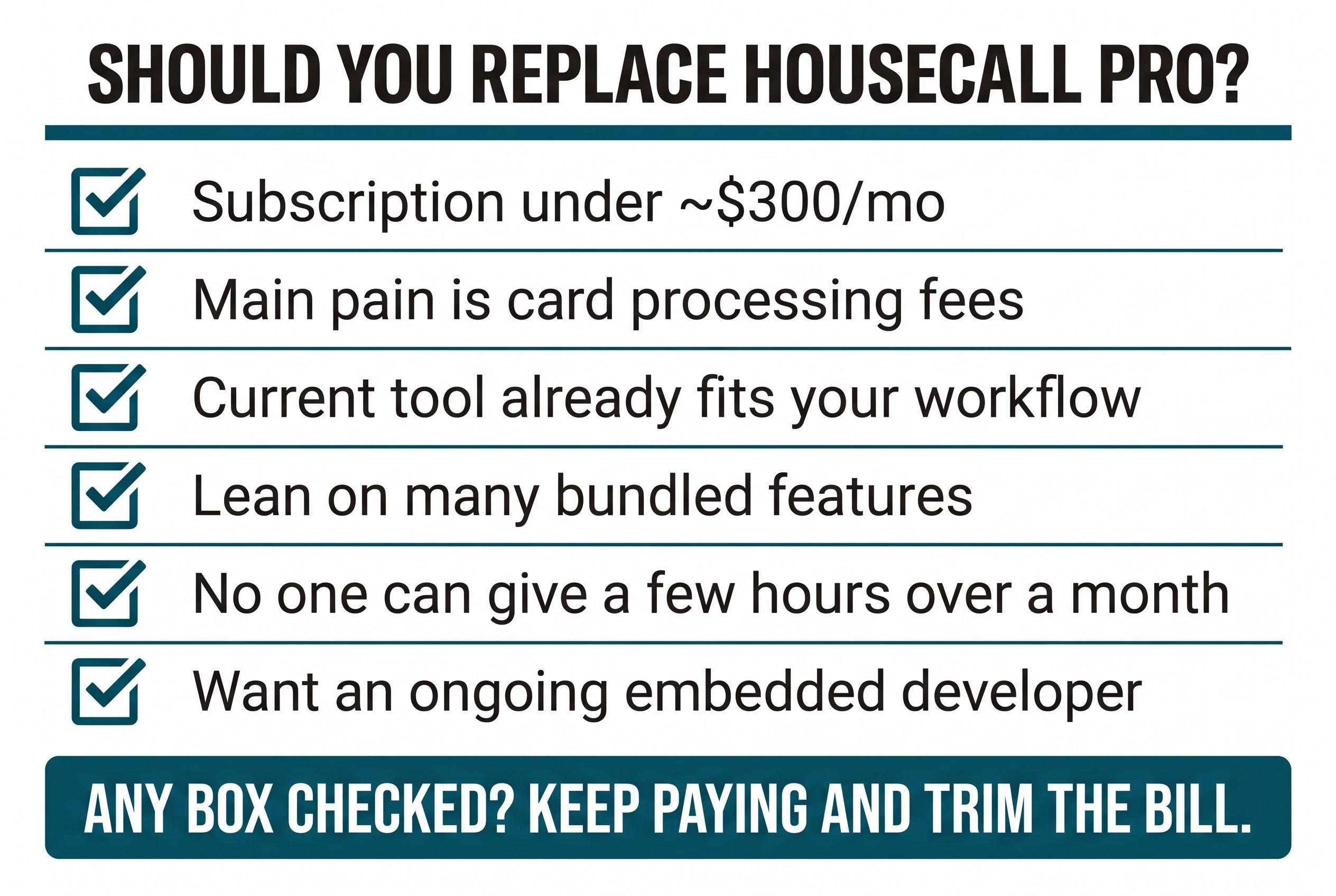
This is the checklist I'd go through with you on a call. If even one box is checked, I'd steer you away from a full replacement.
- Your all-in subscription is under about $300 a month. That's a rough rule of thumb, not a law. At $300 a month, three years is $10,800. Below that line, a build plus maintenance and hosting breaking even inside three years gets unlikely fast (see the table below).
- Your real complaint is processing fees. As covered above, you'd still pay a processor.
- Housecall Pro already fits how you work, and you're just annoyed at the price. Annoyance isn't a business case. If dispatch, scheduling and invoicing all work, renting is the cheap option.
- You rely on a lot of bundled features. Every feature you actually use turns into a line item I have to rebuild or replace with another service. Ten "small" features add up to a big build.
- No one in the business can give a few hours over a month. My builds need a scoping call, a short weekly review and a final test pass. If no one owns that, the project will drift.
- You want an ongoing developer, not a project. I'll say it plainly: if what you really want is someone embedded in your shop every week for years, hire that person or keep the SaaS. I scope, build, hand off and step back.
If you checked nothing, keep reading. If you checked something, skip down to the cheaper moves.
Three years of doing nothing vs. three years of owning it
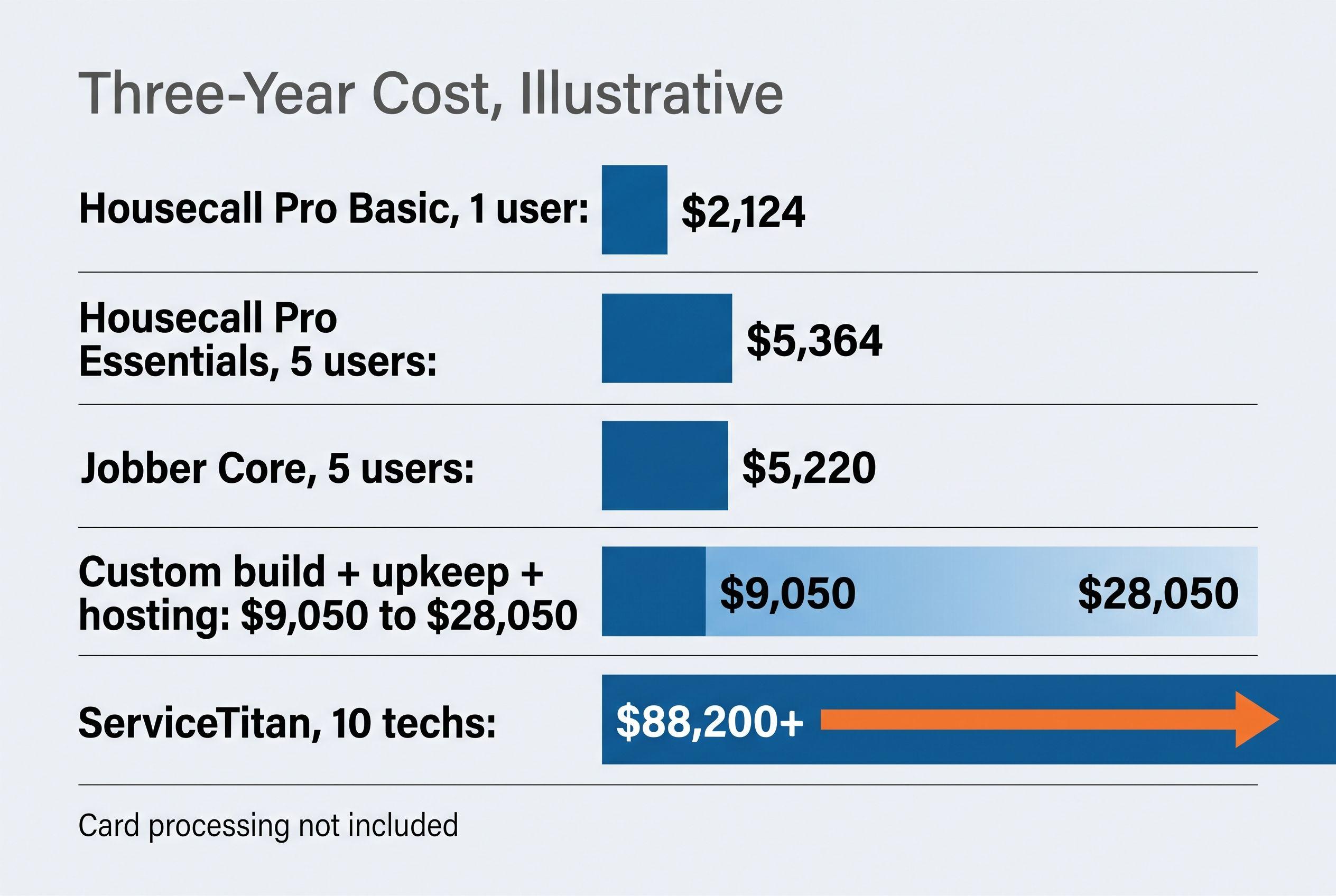
This is where it turns into a real decision. Every row below is illustrative arithmetic over 36 months. Housecall Pro and Jobber prices come from their pricing pages as of September 2026. ServiceTitan doesn't publish pricing (it's quote-based), so that row uses user-reported figures I haven't been able to verify. Treat it as a ballpark, not a quote.
The custom row is simple math: the build itself (one flat fee, quoted after a short call), plus three years of maintenance at 15–25% of the build cost each year (my own planning assumption for upkeep), plus an assumed $50 a month for hosting, which is $1,800 over three years.
| Option | Monthly | 3-year cost | Notes |
|---|---|---|---|
| Housecall Pro Basic, 1 user | $59 | $2,124 | Plus card processing from 2.59% |
| Housecall Pro Essentials, up to 5 users | $149 | $5,364 | Plus card processing from 2.59% |
| Jobber Core, 5 users | $145 | $5,220 | Cards 2.9% + $0.30, ACH 1%. Confirm Core still allows add-on users |
| ServiceTitan, 10 techs (low reported rate) | $2,450 | $88,200 + $5,000–$50,000+ implementation | Unverified user reports of $245–$500/tech/mo, 12-month minimum. Pricing is quote-based |
| Custom build (medium) + maintenance + hosting | ~$50 hosting + upkeep | Flat build fee + 15–25% a year upkeep + $1,800 hosting | You still pay a payment processor |
Read it straight. A small Housecall Pro or Jobber account beats a build on cost every time. If you're on Basic or Essentials and the software handles your day, staying put is the right answer, and I'd rather tell you that now than take a project that never pays back.
The picture flips at the bottom of the table. Ten techs on ServiceTitan at the low end of reported pricing comes to $88,200 over three years before implementation fees. At the $500 end, it's $180,000. Next to that, an owned system at one flat fee plus upkeep is a very different conversation. (I go deeper on that end in the ServiceTitan alternatives breakdown.)
The same per-seat logic shows up in every subscription category. The Monday.com three-year seat math follows exactly the same curve. For the broader picture of build pricing, I've written up what custom software actually costs across every build size.
If your real bill doesn't look like any row above (add-ons, extra seats, a second tool bolted on), send it to me. I'll read it and tell you whether replacing it pays back, including when the answer is no.
See your software before you pay for it
Tell me what you run today on a short call. I build a demo of your replacement, free, and walk you through it. The price is fixed in writing before you pay anything.
Where building does win
The disqualifiers above cover most small shops. These are the shapes where I'd actually quote a build:
- Your headcount is pushing you up the pricing ladder. Housecall Pro vs ServiceTitan is a common question once a shop passes ten trucks, and that's exactly where per-technician pricing gets heavy.
- Neither Housecall Pro nor Jobber handles a core workflow. Think multi-day commercial jobs with progress billing, maintenance contracts with odd renewal rules, or a dispatch rule only your business uses. If your crew works around the software every single day, that's a fit problem, not a price problem.
- You're running a second system just to cover the gaps. If Housecall Pro sits next to Airtable and a stack of Zapier zaps, you're paying for two tools plus the labor that glues them together.
- You need your data out. Data export from any field-service platform covers what the vendor chooses to export. When you own the code and the Postgres database underneath it, every record is yours to query.
On risk, here's how I handle it. I quote a fixed price, so overruns are my problem. Your code lives in your own repo from day one, so you can see every line as it gets written. When you make the final payment, the contract transfers ownership of the custom code and source to you. I keep only my generic reusable components, and third-party services like Stripe or Twilio keep their own terms (you're their customer, not mine). Handoff documentation comes with the build, so any developer can pick it up later.
Compare that to the rest of the industry. Agency-built custom software routinely takes many months and costs many times what a fixed-scope build does, and big projects blow past their timeline and budget so often it's practically expected. A lot of that comes from hourly billing that pays for slow work and discovery phases that end in a slide deck. A medium build with me takes 2–4 weeks. Your part is one scoping call, a 30-minute weekly review and a final test pass.
That 2–4 weeks covers the core back-office scope. Price and timeline follow three things: how many workflows we rebuild, how many outside services we connect, and how many user roles you need. A tech-facing mobile app, migrating years of Housecall Pro data, SMS notifications through Twilio or a QuickBooks sync each push the build longer and the price up. I'll tell you on the scoping call which of those you actually need, before you see a price.
Cheaper moves to try before you replace anything
If the checklist said "don't build," these are the things that actually lower the bill.
Housecall Pro vs Jobber, on price alone
Switching subscriptions feels like progress. For a small shop it often isn't.
| Housecall Pro | Jobber | |
|---|---|---|
| Solo operator | Basic, $59/mo | Core, $29/mo |
| 5 users | Essentials, $149/mo | Core + 4 users, $145/mo |
| Card processing | From 2.59% | 2.9% + $0.30 |
| ACH | Check your plan | 1% |
If you're solo, Jobber's entry tier is cheaper. At five users, assuming Core still takes add-on users, the subscription cost is basically the same. And Jobber's 2.9% card rate is already higher than Housecall Pro's 2.59% before the $0.30 per transaction kicks in, so it can cost you more if your customers mostly pay by card. Compare on fit, not sticker price. If you're seriously weighing it, my rundown of Jobber alternatives covers where each tool falls short.
Shrink before you switch
- Audit seats. Former employees and office logins nobody uses still cost you money.
- Step down a tier if the features you're paying for aren't being used.
- Steer big invoices toward lower-cost payment methods.
- Replace one bad workflow with a narrow tool (a simple build at one flat fee, since it's one workflow and maybe one integration) and leave Housecall Pro handling everything else.
That last option gets overlooked. Plenty of owners don't need a full replacement. They need one thing the platform won't do.
Your next three moves this week
- Pull 12 months of statements. Separate subscription, seats, add-ons and processing. For most card-heavy shops, processing is the biggest number. Remember the $40,000-a-month example: that's about $1,036 in fees against a $149 subscription.
- Run the disqualifier checklist honestly. If anything is checked, use the cheaper moves above and stop there.
- If nothing is checked, write down the one workflow that hurts most. That's your scope. Before you migrate anything, read how I'd sequence a move off Housecall Pro without breaking how customers pay you. Plumbers in particular should look at the small plumbing company version of this decision, because the trade-offs change with truck count. My full Housecall Pro alternatives page lays out the other options side by side.
Then run the free project estimator now. It's five questions and takes about ninety seconds. Then book a short call and you'll get one flat price, fixed in writing. If it doesn't, keep paying Housecall Pro and don't look back.
P.S. The quickest payback usually isn't a replacement at all. It's the one narrow tool covering the workflow your crew fights every day, while Housecall Pro keeps doing the rest.
If that's the decision you're actually making, Jobber Too Expensive? $10,764 Over 3 Years for 6 Trucks goes deeper on it.
See a free demo of your replacement software
Book a short call and tell me what you run today. I build a demo of the replacement for free and show it to you on Zoom. The price is a flat fee, fixed in writing before you pay anything, and you own the code.
Book the callOr answer a few questions for a flat quoteFrequently asked questions
- Is Housecall Pro too expensive for a small business?
- For most shops with five or fewer users, no. Essentials is $149 a month billed annually for up to five users, or about $5,364 over three years, which is less than a custom build plus maintenance and hosting would cost. The bigger cost is usually card processing, which starts at 2.59%, and switching platforms or building your own doesn't make processing fees go away.
- How much does it cost to replace Housecall Pro with custom software?
- A field-service replacement covering scheduling, dispatch, invoicing, payment links and customer records is one flat fee, quoted after a short call, and takes 2–4 weeks. Add annual maintenance (commonly 15–25% of the build cost) and hosting. Over three years that only pays back if your current bill is substantially bigger than a small Housecall Pro plan.
- Is Jobber cheaper than Housecall Pro?
- For a solo operator, yes: Jobber Core is $29 a month versus $59 for Housecall Pro Basic. At five users the subscriptions are nearly the same ($145 vs $149 a month), and Jobber's card rate of 2.9% + $0.30 can cost more than Housecall Pro's rate, which starts at 2.59%. Compare the two on fit, not just price.
- When does it make sense to switch from Housecall Pro to ServiceTitan or a custom build?
- Once you're past roughly ten technicians, or you have a core workflow neither Housecall Pro nor Jobber handles. ServiceTitan's reported pricing of $245–$500 per technician per month plus implementation fees adds up fast at that size, and that's usually where a custom build you own becomes the cheaper option over three years.
What would software built for your business look like?
Tell me what you run today on a short call. I build a demo of your replacement, free, and show it to you before you pay anything.
Part of these guides
Matt Brody
Founder, BuiltInWeeks
I build custom software for small and mid-sized businesses — the kind you own outright instead of renting by the seat. Fixed price, delivered in weeks, source code handed over at the end.
More about how I workKeep reading

Cost to Replace ServiceTitan: One Flat Fee, Plus ~$150/Mo
Replacing ServiceTitan with software you own costs one flat build fee, quoted after a short call, and roughly $150 a month to run. Here's the line-by-line arithmetic, the three-year comparison against per-tech licensing, and the shops that should keep paying for it (or switch to Jobber).
Read more
Housecall Pro Alternative for Small Plumbing Company: Build?
Most small plumbing shops should keep renting. A plumbing company with 8 or more users and workflows that don't fit the software should run the numbers. Here's the checklist I use, the conditions that rule a build out, and three years of seat math laid out so you can check it.
Read more
Housecall Pro vs ServiceTitan: $13K vs $93K+ Over 3 Years
For most shops under ten people, Housecall Pro is the cheaper, simpler pick. ServiceTitan only earns its per-tech price if you'll use the depth. Here's the 3-year math on both, a checklist to run before you sign, and the cases where owning your own system beats both.
Read more