Switching From Housecall Pro: Rebuild Payment Links First

A customer taps a payment link you texted three weeks ago. The page doesn't work. They don't pay. They wait for you to chase them. That's what happens when you cancel Housecall Pro with invoices still open.
So before you cancel anything, you need to decide this: do you switch while invoices are still open, or wait until your receivables clear?
My answer is usually to wait for the receivables, but not for the switch. Build the new payment flow now, run it in parallel, and let the old links age out. Cancel Housecall Pro only after the last open invoice is paid or reissued.
This is for shops paying Housecall Pro for several users, a few add-ons and real card volume. If your whole bill is the $59 Basic plan for one user, the math further down says stay. I'll show you why.
Why your old payment links stop working when you cancel
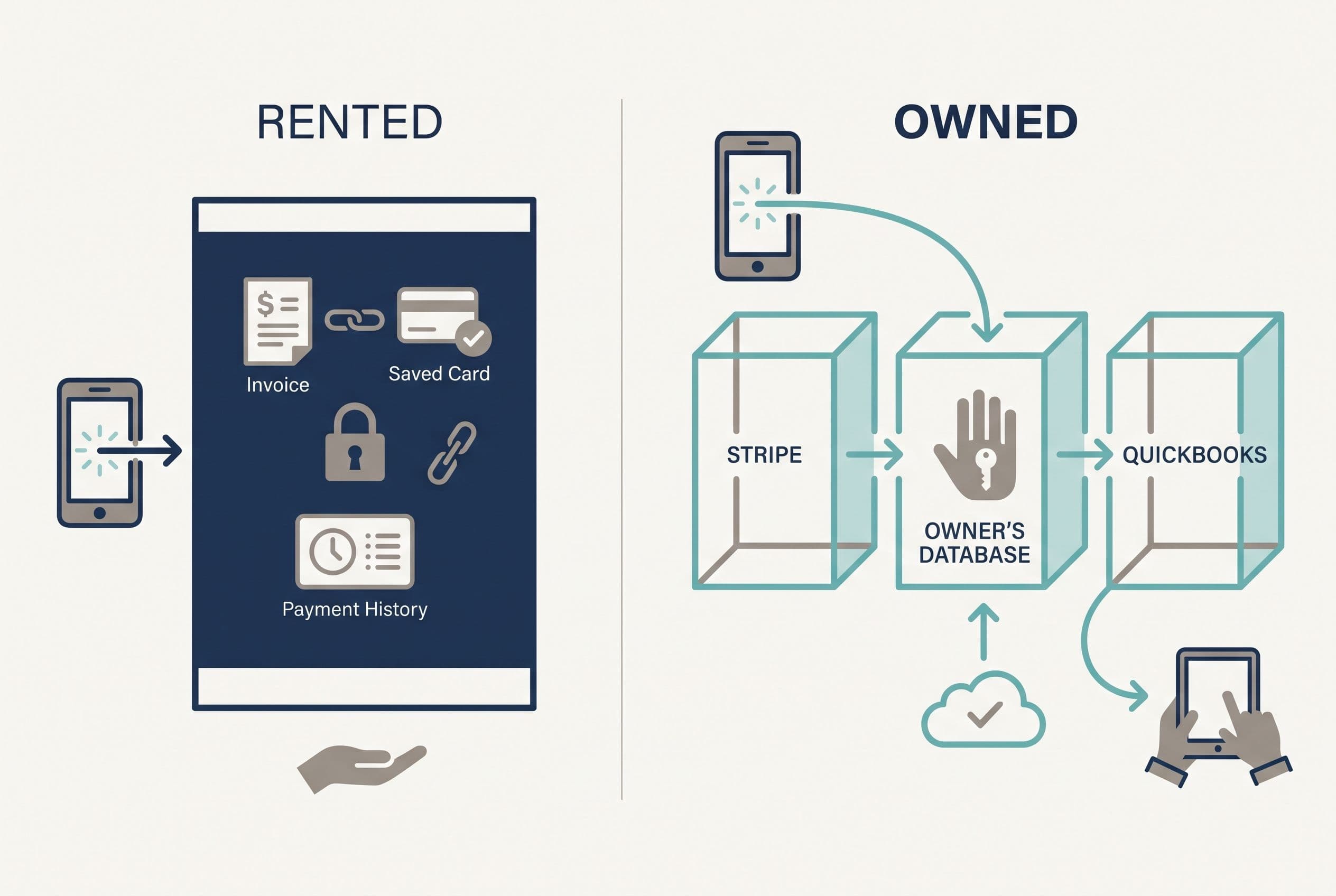
A payment link sent from a field service platform isn't really yours. The platform generated it, the platform hosts the checkout page, and in most setups the platform's payment arrangement processes the card. So the link only works while your account is active and in good standing.
When you're switching from Housecall Pro, three things are tied to that account:
- Open invoice links. Every unpaid invoice you've texted or emailed points at a page you don't control.
- Saved cards and autopay. Card-on-file tokens belong to whoever processes your payments. They aren't a column in a spreadsheet you can export.
- Payment history. You need it to reconcile against QuickBooks or Xero, and to handle any chargeback that shows up after you leave.
Don't assume what happens on cancellation. Ask Housecall Pro support in writing what happens to unpaid invoice links, stored cards, pending payouts and dispute handling after cancellation, and keep the reply. Their answer sets your timeline.
This is the same reason I build systems where the client controls every connection. On one real project of mine, an automated SEO blog platform, the owner holds the accounts and API keys, so if one vendor changes its terms, they swap that piece out instead of losing the whole system. Payments should work the same way. The merchant account, the webhooks and the invoice records should be yours.
Start with your fee math, not your subscription
Most owners think switching from Housecall Pro is about the subscription. For a small shop it often isn't. Once you're running real card volume, processing often costs more than the software.
The published numbers as of 2026 (pricing pages change, so check them the day you decide):
| Option | Published rate | Fee on a $400 invoice (illustrative) |
|---|---|---|
| Housecall Pro | "As low as" 2.59% (housecallpro.com/pricing) | $10.36 at the lowest rate |
| Stripe, standard online card | 2.9% + $0.30 (stripe.com/pricing) | $11.90 |
| Square Invoices, free plan | 3.3% + $0.30 per online invoice payment (from Square's published pricing; confirm before you compare) | $13.50 |
Note the "as low as." Pull your actual statement and divide total fees by total volume to get your real rate. If you really are paying 2.59%, moving to standard Stripe pricing raises your per-transaction cost. At an illustrative 100 card payments a month averaging $400, that's about $154 more a month.
So before you touch anything, put your seat count, plan, add-ons and real processing rate side by side.
Price your stack in two minutes
List the subscriptions you pay for and see what they cost over 3, 5 or 10 years next to owning the software. No email needed to see the number.
If processing turns out to be the bigger line, the case for switching rests on control, workflow and seat costs, not on fees. That's a perfectly good reason to switch. It just needs to be the one you actually make the decision on.
The Housecall Pro pre-cancellation checklist
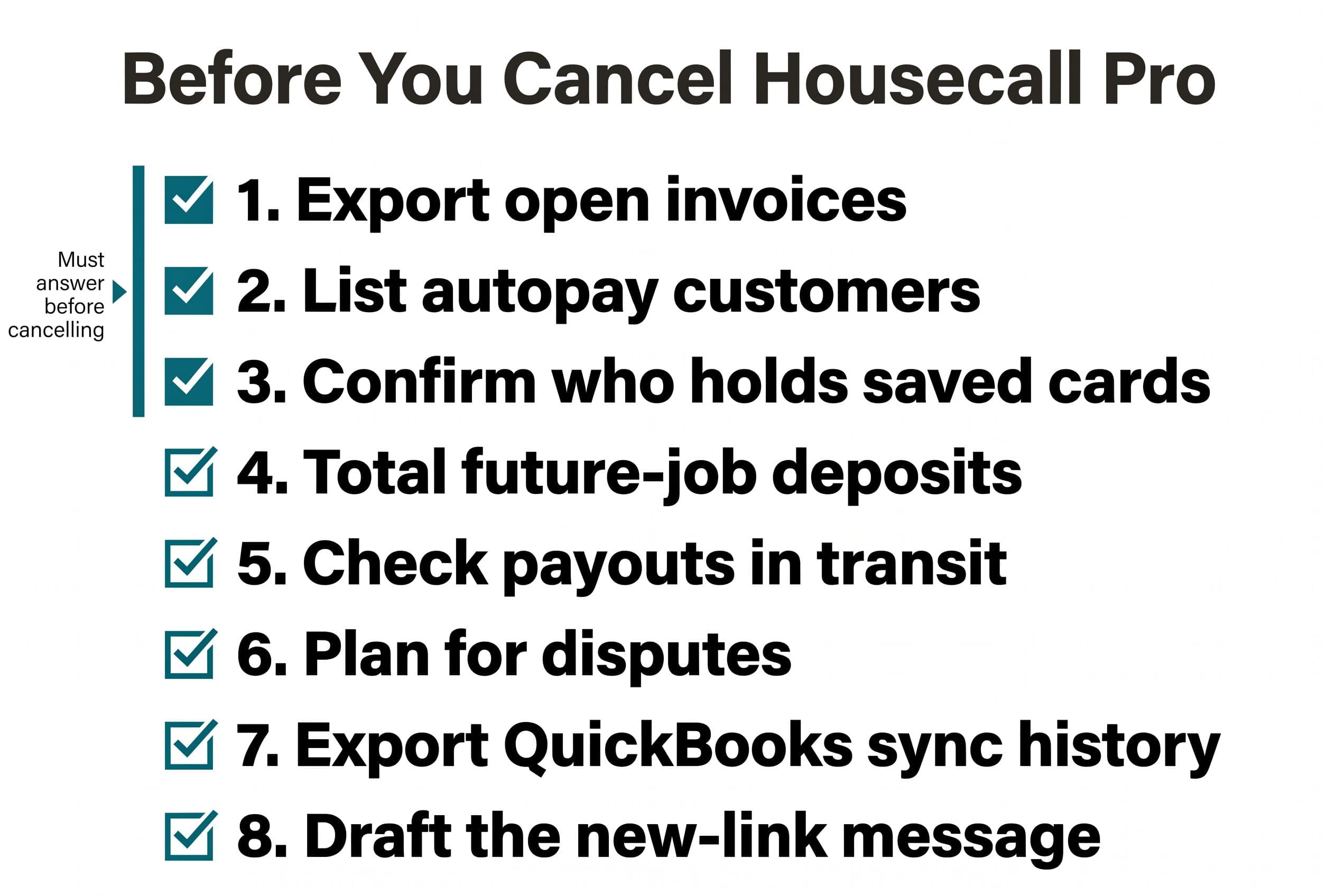
Run this before you give notice. Each item is a question you need answered in writing or in an export.
- Export your open invoices. You want invoice number, customer, amount, due date and the date the link was sent. This is your outstanding invoice reconciliation list.
- List every customer on autopay or a recurring service plan. This is your highest-risk group, because their payments run without anyone touching them.
- Find out who holds your saved cards. Ask whether the processor will release card data to a new PCI-compliant processor. Stripe documents a process for importing card data from another processor (docs.stripe.com). Whether your current processor will release it is a separate question.
- Total up deposits collected for future jobs. That's money you owe work against. It has to show up in the new system as a credit, not disappear.
- Check payouts in transit. Get the settlement schedule. The Federal Reserve Banks' 2024 Report on Payments found that firms collecting through a third party rank slow payments and delays in getting their funds as their biggest obstacles. A cutover is the worst possible time to make that worse.
- Plan for disputes. A chargeback can show up after you cancel. Know how you'll see it and respond to it.
- Export your QuickBooks or Xero sync history. You'll need it to match old payments to old invoices once the sync stops.
- Write the customer message. It's one SMS and one email that say the old link is retired and give the new one. Twilio and SendGrid both handle this. One catch: texting US customers through Twilio means registering for A2P 10DLC first, and approval can take days to weeks. Start that registration now. It often sets your go-live date for SMS.
If you can't fill in items 1–3, you aren't ready to cancel. You can start building, though.
Hold off on cutover if any of these apply
Some situations say wait. They don't say never, just not yet:
- You're heading into peak season. Don't change how money comes in during your busiest six weeks.
- A large share of revenue runs on autopay and you can't port the saved cards. Every one of those customers will have to re-enter a card. Some won't. Plan a re-enrollment campaign before cutover, not after.
- Your open receivables are unusually high. Collect first, then switch. Old links that break on overdue balances are how those balances end up never paid.
- You haven't decided where you're going. Moving from one rented platform to another just postpones this same project.
This matters for cash. A messy payment migration delays money at exactly the moment you can least afford it. If your bank balance is thin, collect first. A dead link on a big invoice costs you more than another month of subscription.
Three years of staying vs. three years of owning it
This is where you make the decision. Everything below is illustrative arithmetic. Replace my numbers with yours.
The smallest published plan is Housecall Pro Basic at $59/month billed annually, for one user. That's $708 a year, or $2,124 over three years. If that's your whole bill, stay. No custom build pays back against $2,124. I'd tell you that on the phone, and I'll say it here. Staying also makes sense if your team depends on features of the platform you'd have to rebuild, or if the product already fits how you work and the bill doesn't bother you.
Now take a bigger shop. Say an illustrative $500/month once you add more users, add-ons, and the extra tools you've bolted on to cover gaps.
| Three-year cost (illustrative) | Keep renting | Own a replacement |
|---|---|---|
| Subscription at $500/mo | $18,000 | $0 |
| Build (Simple payment-and-invoice module, fixed price) | — | $2,500–$10,000 |
| Migration of customers, invoices, cards | n/a | Customers and invoices are scoped into the build. Cards move only if your processor releases them; otherwise plan a re-enrollment campaign. |
| Hosting + maintenance (assumed $100/mo) | — | $3,600 |
| Processing fees | Your current rate | Stripe rate (check the gap above) |
| Total before processing | $18,000 | $6,100–$13,600 |
At $500 a month, a focused module comes in under three years of rent at both ends of the range. The low end pays back fast. Push the scope into a Medium build ($5,000–$15,000) and the total becomes $8,600–$18,600, so the high end only roughly breaks even. That's why scope matters more than anything else here. Keep it small, a focused payment-and-invoice module, and the numbers work. Rebuild the whole platform for a five-person crew and they might not.
What does that $100/mo assumption actually buy? Hosting on Vercel and Supabase, keeping up when Stripe or QuickBooks change their APIs, and bug fixes. It also needs a name attached. If a webhook fails and a paid invoice still shows open, Stripe will retry, but somebody has to get the alert and fix it. Before you sign anything, know who that person is: me on a maintenance arrangement, or whichever developer you hand the repo to.
Workarounds belong in this table too. Somebody spends time re-keying payments into QuickBooks or chasing customers whose links expired. Count those hours. They cost you whether or not you ever put them on a spreadsheet.
For the bigger rent-vs-own picture beyond payments, here's our wider guide on owning your software instead of renting it.
Send us your software bill
Bring what you pay today. We'll tell you plainly whether a replacement would pay for itself, or whether you should keep renting.
Three ways to replace your payment links, and which one breaks at 200 invoices
Move to another platform
Jobber and others will take your invoices and process payments. It's the fastest path. It's also the same arrangement with a different name on it: your links, tokens and payment history still sit inside someone else's account. If you're weighing that route, our breakdown of Housecall Pro alternatives covers the options.
Stripe Payment Links or Stripe Invoicing, no code
Stripe Payment Links lets you create a hosted checkout link without writing code. Out of the box, a basic link doesn't know which invoice it's for. You can add a client_reference_id parameter to the URL so each payment carries an invoice number, but somebody has to set that up on every link.
Stripe Invoicing is the better no-code fit for most shops. Each invoice gets its own hosted payment page, so payments match to invoices without anyone doing it by hand. Pair either one with a Zapier step that logs payments into QuickBooks, and an owner-operator might be done.
Where it runs out: tying a payment to the actual job, not just the invoice; custom rules for how payments post in QuickBooks; and re-enrolling autopay customers in batches. At 20 invoices a month, you can live with those gaps. At 200, they're someone's whole week.
A small custom payment module
This is what I'd build for a shop that has outgrown the first two. It's a Next.js app on Vercel with Postgres (through Supabase) for invoices and customers, and Stripe for payments. When a customer pays, a Stripe webhook marks the invoice paid in your database and pushes the payment to QuickBooks. Twilio sends the link by text. Each invoice gets its own link, tied to its own record and its own job. That's what kills manual matching.
A focused build like that, with invoices, links, webhooks and a single QuickBooks sync, is a Simple build: $2,500–$10,000, delivered in 1–2 weeks. It lands at the low end if you have one invoice type and one QuickBooks sync. It moves up for every extra invoice type, user role or recurring plan we have to migrate. Add user roles, recurring service plans and customer re-enrollment, and it becomes a Medium build: $5,000–$15,000 over 2–4 weeks. The price is fixed once you approve the quote.
One honest caveat on those timelines. They assume two approvals don't hold things up: Intuit's production-key review for the QuickBooks connection, and Twilio's A2P 10DLC registration for texting. Neither one is in my control. Both get started on day one of the build, because they gate go-live.
If you're replacing scheduling and dispatch as well, read how we scoped a full Housecall Pro replacement for a small plumbing shop before you size anything. And if you run a residential cleaning crew rather than trades, the cleaning-business version of this math is worth five minutes.
Three things protect you. The price is fixed. Hourly billing pays the developer more the longer the job takes, whether that's a US agency or a cheaper offshore team. With a fixed price, an overrun is my problem, not yours. The code goes into your own repo from day one, and the contract transfers ownership of the custom code and source to you on final payment. We keep only our generic reusable components, and Stripe, Twilio and the other services keep their own license terms. And if I vanish tomorrow, any developer can take it over from the source and handoff documentation. If you'd rather have a developer on staff tweaking the system every week for years, that isn't me. Hire in-house.
Switching from Housecall Pro: cutover week, in order
Here's the sequence for the most common case: a shop with open invoices, some autopay customers, and QuickBooks.
- Go live in parallel. The new system issues every new invoice from day one. Housecall Pro keeps collecting on the old ones.
- Reissue overdue invoices. Anything past due gets a fresh link from the new system and a short message saying the old link is retired.
- Re-enroll autopay customers in batches. Start with your most loyal customers. They'll forgive a hiccup.
- Reconcile every day for two weeks. Match Stripe payouts against invoices marked paid, and check that QuickBooks agrees.
- Let current invoices age out. Once the old open-invoice list hits zero, export everything one last time.
- Cancel, and keep the exports. Store the payment history somewhere you control, for disputes and for taxes.
Your time on this is a scoping call, a short weekly review, and a final test pass where you pay a real invoice with your own card and watch it land in QuickBooks. That's about it.
What you hand the developer decides whether this goes smoothly: the open-invoice export, the autopay list, your processor's written answer on card portability, a sample QuickBooks entry showing how payments should post, and your three most common invoice types. With that, a fixed quote is easy to defend.
Your one job this week
Don't book a call yet. Do this today: pull your open-invoice report and last month's processing statement out of Housecall Pro and write two numbers on a sticky note: how much is outstanding, and what you really paid in fees. Those two numbers tell you whether to switch now, switch after collections, or stay.
Then run the free project estimator. It takes ninety seconds and shows a price range on screen before it asks who you are. Submit it and you'll get a fixed quote back within a business day. No call needed.
P.S. The fastest payback is almost never the full platform replacement. It's usually the payment-and-invoice module alone. Price that first.
Want a real number for your own project?
Answer a few questions and get an instant price range and timeline. No call required, no obligation.
Get your instant estimateTalk through your software project with MattFrequently asked questions
- What happens to my unpaid invoices when I cancel Housecall Pro?
- Payment links sent from Housecall Pro are generated and hosted by the platform, so assume they stop working once your account is closed. Ask Housecall Pro support in writing how unpaid links, stored cards and pending payouts are handled after cancellation. The safe move is to run the new system in parallel and cancel only after old invoices are paid or reissued.
- Can I move saved customer cards from Housecall Pro to Stripe?
- Card-on-file data belongs to the payment processor, not to a spreadsheet you can export. Stripe documents a process for importing card data from another processor through a PCI-compliant transfer, but your current processor has to agree to release it. If it won't, plan a re-enrollment campaign for your autopay customers before you cut over.
- Is Stripe cheaper than Housecall Pro for card processing?
- Not always. Housecall Pro publishes rates as low as 2.59%, and Stripe's standard online card rate is 2.9% + $0.30. Divide your total fees by your total volume on a real statement to find your actual rate before you assume switching saves money on processing.
- How much does it cost to rebuild payment links outside Housecall Pro?
- A focused build with per-invoice Stripe links, webhooks that mark invoices paid, and a QuickBooks sync typically falls in our Simple range of $2,500–$10,000 over 1–2 weeks. Adding user roles, recurring service plans and customer re-enrollment moves it into the Medium range of $5,000–$15,000 over 2–4 weeks.
- When should I not switch away from Housecall Pro?
- If you're a single user on the Basic plan at $59/month billed annually, a custom build won't pay back against roughly $2,124 over three years. Also hold off during peak season, while receivables are unusually high, or if most revenue runs on autopay and you can't port saved cards yet.
What would software built for your business look like?
Replacing a subscription, fixing software that fell short, or adding AI to your workflow? Talk through the scope with Matt.
Matt Brody
Founder, BuiltInWeeks
I build custom software for small and mid-sized businesses — the kind you own outright instead of renting by the seat. Fixed price, delivered in weeks, source code handed over at the end.
More about how I workKeep reading

Housecall Pro Alternative for Small Plumbing Company: Build?
Most small plumbing shops should keep renting. A plumbing company with 8 or more users and workflows that don't fit the software should run the numbers. Here's the checklist I use, the conditions that rule a build out, and three years of seat math laid out so you can check it.
Read more
Housecall Pro Alternative for Cleaning Business: $5K–$15K
I'd replace Housecall Pro only after checking whether a cheaper subscription handles your cleaning schedule. Here's the decision checklist, a $5,000–$15,000 custom V1 scope, and the three-year arithmetic that separates a useful build from an expensive detour.
Read more
Cost to Replace GoHighLevel: $10K–$25K, Then the Cutover
Replacing GoHighLevel with software you own costs $10K–$25K and takes 2–6 weeks to build. The build isn't the hard part. Getting your data, conversation history and phone numbers out is, and some businesses shouldn't leave at all. Here's the checklist, the three-year math, and the cutover plan.
Read more