Buildertrend Too Expensive? Build Just the Change-Order Half

Last month your lead said "yeah, go ahead" in a customer's driveway, and nobody wrote it up. If that sounds familiar, and Buildertrend is billing you somewhere around $299–$499 a month while the only feature your team would actually miss is change orders, here's the decision: you don't have to replace the whole platform to stop paying for it. You can move to a cheaper project tool, or drop one altogether, and own the one workflow that affects your margin.
It isn't always the right call. If your crew and clients live in Buildertrend's portal, selections and scheduling every day, this probably isn't for you, and I'll say exactly where that line is below.
Three ways out of a Buildertrend bill (most owners only see two)
When a remodeler tells me Buildertrend is too expensive, they usually see two choices. Keep paying, or move everything to a competitor. There's a third.
- Stay, but get requoted. Buildertrend prices by annual construction volume. If your volume has dropped since you signed, ask for a new quote before renewal. It costs you one phone call.
- Switch to a cheaper all-in-one. JobTread, Contractor Foreman, and CPro360 all publish prices well below Buildertrend's estimated range (the three-year table further down uses rough figures for the first two, so check their pricing pages for current numbers and user limits). If you're weighing those, I keep a broader list of Buildertrend alternatives and where each one fits.
- Split it. Run scheduling and daily logs in a cheap tool (or a shared calendar and a spreadsheet), and own the change-order workflow as a small custom app.
Most of this post is about option three, because it's the one nobody pitches you. No vendor makes money telling you to buy less software.
Buildertrend pricing for small builders in 2026, worked out to the year
Buildertrend doesn't list prices on its website. Third-party pricing roundups as of October 2026 estimate the Essential/Standard plans at $299–$499 per month, often with a promotional first month around $99–$199, plus onboarding fees of $400–$1,500. Your quote depends on your annual construction volume.
Pay attention to that last part. Volume-based pricing means the bill grows with your revenue, not with how much of the software you use. A good year gets you a bigger invoice.
Here's the Buildertrend cost per month turned into years (illustrative arithmetic, using the estimated range):
| Low end ($299/mo) | High end ($499/mo) | |
|---|---|---|
| One year | $3,588 | $5,988 |
| Three years | $10,764 | $17,964 |
| Three years + onboarding (if new) | $11,164 | $19,464 |
Buildertrend probably isn't the only subscription on your books, so see how the whole stack adds up. The calculator below does it without asking for an email.
Price your stack in two minutes
List the subscriptions you pay for and see what they cost over 3, 5 or 10 years next to owning the software. No email needed to see the number.
The clearest example of this math I've worked through wasn't in construction. A sales team was paying about $30,000 a year for Kixie, a popular sales dialer, and they kept running into its limits: not much customization, clunky workflows, and a price that kept going up. I built them a custom power dialer in React. The build cost a fraction of one year of the licensing it replaced, so it paid for itself within months. They got unlimited users, Zapier webhooks, SMS templates and real analytics, and no monthly licensing fee. (This is a real client project. Details are generalized, numbers are rounded, and results vary.)
Now the honest part. Your Buildertrend bill isn't $30,000 a year. At $3,588–$5,988 a year, rebuilding all of Buildertrend takes years to pay back, and I wouldn't recommend it to a small remodeler. A narrow build aimed at the part of the business that leaks money is a different trade. That's why the advice is "build the change-order half" and not "build Buildertrend."
Why change orders are the half worth owning
A change order is basically document assembly. You pull the original scope, add line items from your price book, apply markup, note the schedule impact, get a signature, collect a deposit, and update the contract total and the invoice. That's seven steps. If even one of them happens in a text thread instead of a system, money goes missing.
It happens in two ways:
- The extra gets built and never billed. The homeowner said "yeah, go ahead" on site, your lead did it, and nobody wrote it up.
- It gets billed and then disputed. There's no signature and no timestamp, so you're relying on memory.
Shinpo Capital's 2026 report on small business operating problems lists quoting and pricing accuracy, manual paperwork, and disconnected tools among the seven problems taking up owners' time. It also notes that small businesses are often stuck adapting software stacks built for much larger companies. Buildertrend isn't enterprise software, but a three-person remodeling crew that uses schedules, bids and change orders is often paying for a lot of platform it never opens.
To be fair to every vendor here: all of these all-in-ones have a change-order module. What matters is whether it matches how you price. That means your markup tiers, your allowance reconciliation, your contract language, and the way your clients actually approve (usually a text from the driveway, not logging into a portal).
The checklist: build the change-order half, or don't
Go through this honestly. It takes five minutes and can save you either a build or another year of subscription.
Signs the change-order half is your real problem:
- You write change orders on most jobs, several a month.
- At least once this year, work got done on a verbal yes and was either never billed or argued over.
- Your pricing has rules a generic form doesn't handle, like tiered markup, allowance overages, or different rates for subs and in-house labor.
- Clients want to approve on their phone in under a minute.
- Someone re-types every approved change into QuickBooks by hand.
- You barely use the rest of Buildertrend (selections, daily logs, client portal), or a cheaper tool would cover it fine.
Disqualifiers. If any of these is true, stop here:
- You write a handful of change orders a year.
- Your crew and your clients use Buildertrend's portal, selections and scheduling every day. Moving off it means retraining everyone, and that cost is real.
- You want one vendor to call when something breaks, and you don't care what it costs.
- Your quote is near the bottom of the range and a cheaper tool's change-order form would do the job. Just switch. You don't need me.
Four or more checks and no disqualifiers? Keep reading. If it's mixed and you think you might need more than change orders, I've written about scoping a lean v1 that covers the rest of the job too.
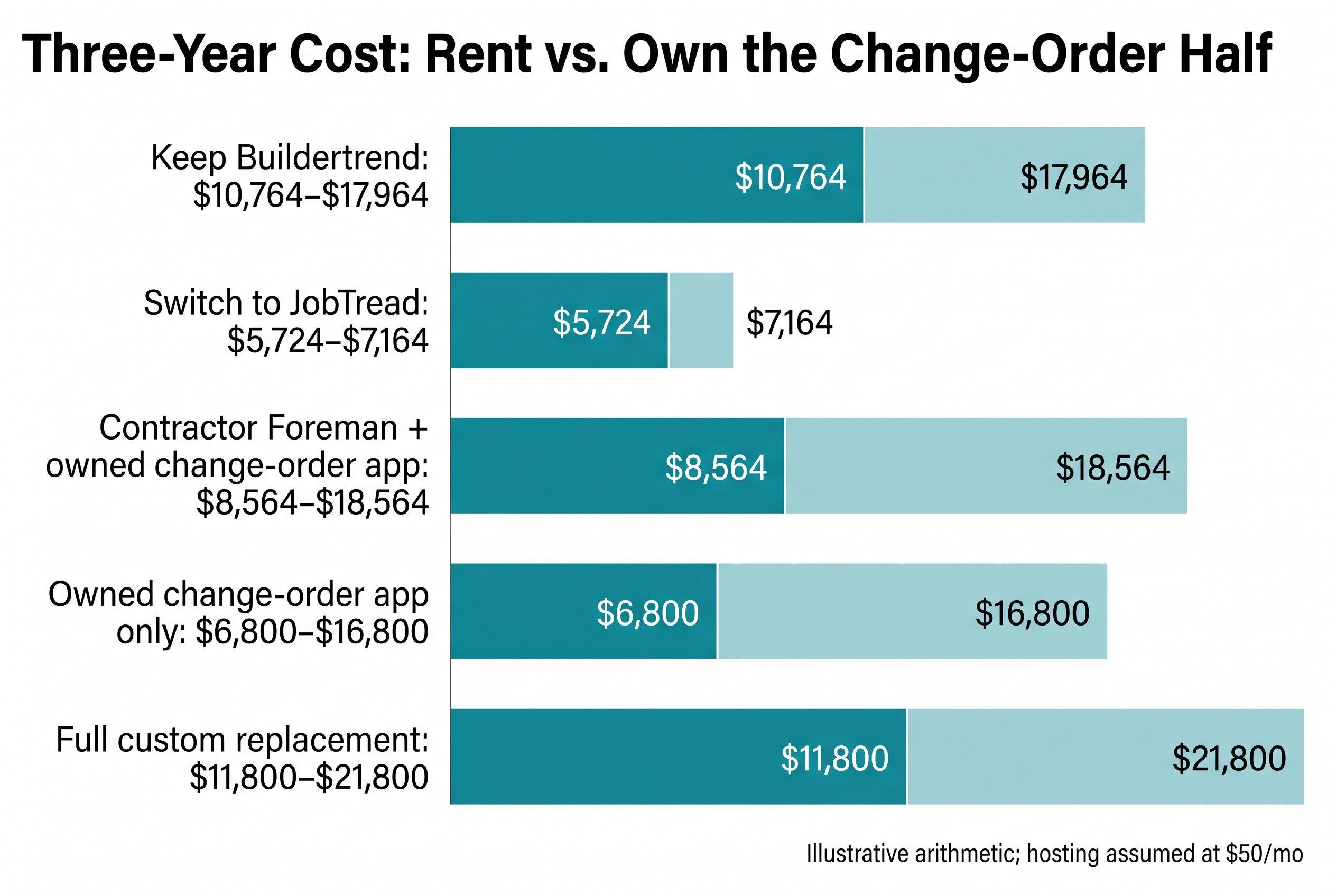
Three years of doing nothing, priced out
This is where most owners make the decision. Every row below is illustrative arithmetic. Buildertrend figures come from the estimated range above. JobTread and Contractor Foreman figures are rough published-price estimates, so check them against the vendors' current pricing pages. Every build is one flat fee, quoted after a short call, so the build rows show that instead of a number. For hosting and small fixes I've assumed $50 a month ($1,800 over three years). That's my planning number for the baseline, not a vendor price (more on what it doesn't cover in a minute).
| Path | Upfront | 3-year subscription | 3-year hosting & upkeep | 3-year total |
|---|---|---|---|---|
| Keep Buildertrend | $0 (onboarding already paid) | $10,764–$17,964 | included | $10,764–$17,964 |
| Switch to JobTread | $0 | $5,724–$7,164 (more as you add users) | included | $5,724–$7,164 |
| Contractor Foreman (~$49/mo) + owned change-order app | Flat fee, quoted after a short call | ~$49/mo × 36 | $50/mo × 36 | Flat build fee + subscription + hosting |
| Owned change-order app, no PM tool | Flat fee, quoted after a short call | $0 | $50/mo × 36 | Flat build fee + hosting |
| Lean custom replacement (a core-workflow v1, not every Buildertrend feature) | Flat fee, quoted after a short call | $0 | $50/mo × 36 | Flat build fee + hosting |
Let me be plain about what that table says. On subscription money alone, the split doesn't win by much, and it can cost more. Pair a bigger build with Contractor Foreman and you can land above Buildertrend's high end. Pair any build with a low Buildertrend quote and you lose. The split only comes out ahead in three years if your build stays narrow, your Buildertrend quote sits toward the top, or you count the money in the next section. I'd rather show you that than hide it.
The split pays off for three reasons the table doesn't capture:
- Year four. Buildertrend keeps billing, and on volume-based pricing that bill can grow. The build is paid for. You're left paying hosting.
- Recovered change orders. Illustrative only: say getting a signature before work starts catches one $1,500 extra per quarter that would otherwise have been absorbed. That's $18,000 over three years. Don't use my number, use yours. Open your last 12 months of jobs, count the changes that got built without a signed change order, and multiply by your average extra. That's what the habit cost you. If you can't think of a single change you ate last year, this argument doesn't apply to you.
- No re-keying. Approved changes go straight into QuickBooks, so nobody spends Friday afternoon copying them over.
About that $50 a month: it covers the baseline (Vercel and Supabase on small plans, plus minor fixes). It doesn't cover usage-based charges. Twilio bills per text, Stripe takes a fee on every deposit, and if you outgrow the small Vercel or Supabase plans, those go up too. Those costs scale with how many change orders you send, so they're small for a small shop, but they aren't zero.
When staying with the SaaS wins: if your quote is near $299, your team uses Buildertrend's scheduling and client portal every day, and change orders rarely slip, keep renting. Or move to JobTread and keep the difference. Building would be a bad trade for you.
I'm also the wrong hire if what you want is a developer on call every week adding features indefinitely. I quote fixed scope, ship it, and hand it off.
Not sure which row you're in? Send me the actual invoice and I'll tell you straight whether a build pays back.
See your software before you pay for it
Tell me what you run today on a short call. I build a demo of your replacement, free, and walk you through it. The price is fixed in writing before you pay anything.
What change-order software for remodelers looks like when you own it
Here's how I'd scope the change-order half for a small remodeler. It's deliberately narrow.
- Change-order builder that pulls line items from your price book (a Postgres table you control) and applies your markup rules automatically.
- PDF with your contract language, generated the moment the change order is saved.
- Approval by text. Twilio sends the homeowner a link and they sign on their phone. The signature record captures the timestamp, the signer's IP address, and a hash of the exact document they signed, so nobody can argue later about which version they approved. Have your lawyer look over the consent and contract language before you rely on it. I build the audit trail, I don't give legal advice.
- Deposit on approval through Stripe, so no work starts on an unpaid extra.
- QuickBooks sync (or Xero). The approved change posts to the job, so nobody re-keys anything.
- Running contract total per job, with the full change history.
- Webhooks, so your PM tool, a Slack channel, or a Zapier zap hears about every approval.
- Data export whenever you want it. It's your database, so there's no vendor lock-in to negotiate around.
The stack is Next.js and React on Vercel, with Supabase for Postgres and auth. That's standard, well-documented tooling, so any competent developer can take it over later, as long as the accounts are in your name (more on that below).
Price and timeline: one flat price, fixed in writing, quoted after a short call. With the QuickBooks and Stripe integrations, plan on 2–4 weeks; a stripped-down version (builder, PDF, text signature, no integrations) takes 1–2 weeks. What moves the price: whether you want the QuickBooks sync, whether you want Stripe deposits, and how many markup and allowance rules your pricing has. If you want a deeper breakdown of what custom software actually costs, including what moves the number, it's all written up.
Two things can stretch the calendar, and neither is mine to speed up. US carriers require A2P 10DLC registration before Twilio will reliably send business texts, and that approval runs on the carriers' schedule. The QuickBooks connection needs an Intuit developer app set up and authorized against your company file. I start both on day one so they're not sitting on the critical path at the end.
Your time: one scoping call, a short review each week, and a final test where you run a real change order from a live job through the app. That's about it.
The risk is on me, not you. It's a fixed price, so if the build runs over, I absorb it. Here's how ownership works, stage by stage:
- From day one: the code goes into a repo in your GitHub account, so you can watch progress. Vercel, Supabase, Stripe, Twilio and the QuickBooks developer app are set up in your name too, with me added as a collaborator. You pay those services directly.
- At final payment: the contract transfers ownership of the custom code and source to you. Until then, you can see the code but you don't own it yet.
- What "you own the code" doesn't include: my generic reusable components (I keep those, and you get a license to use them in your app), and third-party libraries and services, which keep their own license terms.
- At handoff: I remove my access, and you get documentation covering the setup, the environment variables and how to rotate the keys, so any developer can pick it up.
Compare that with the alternatives. US agencies usually bill by the hour, and the meter runs whether or not the scope was right. Many start with a discovery phase you pay for before you've seen a number. Offshore teams quote lower hourly rates, but the low rate often comes back as rework when nobody on the team has ever written a change order.
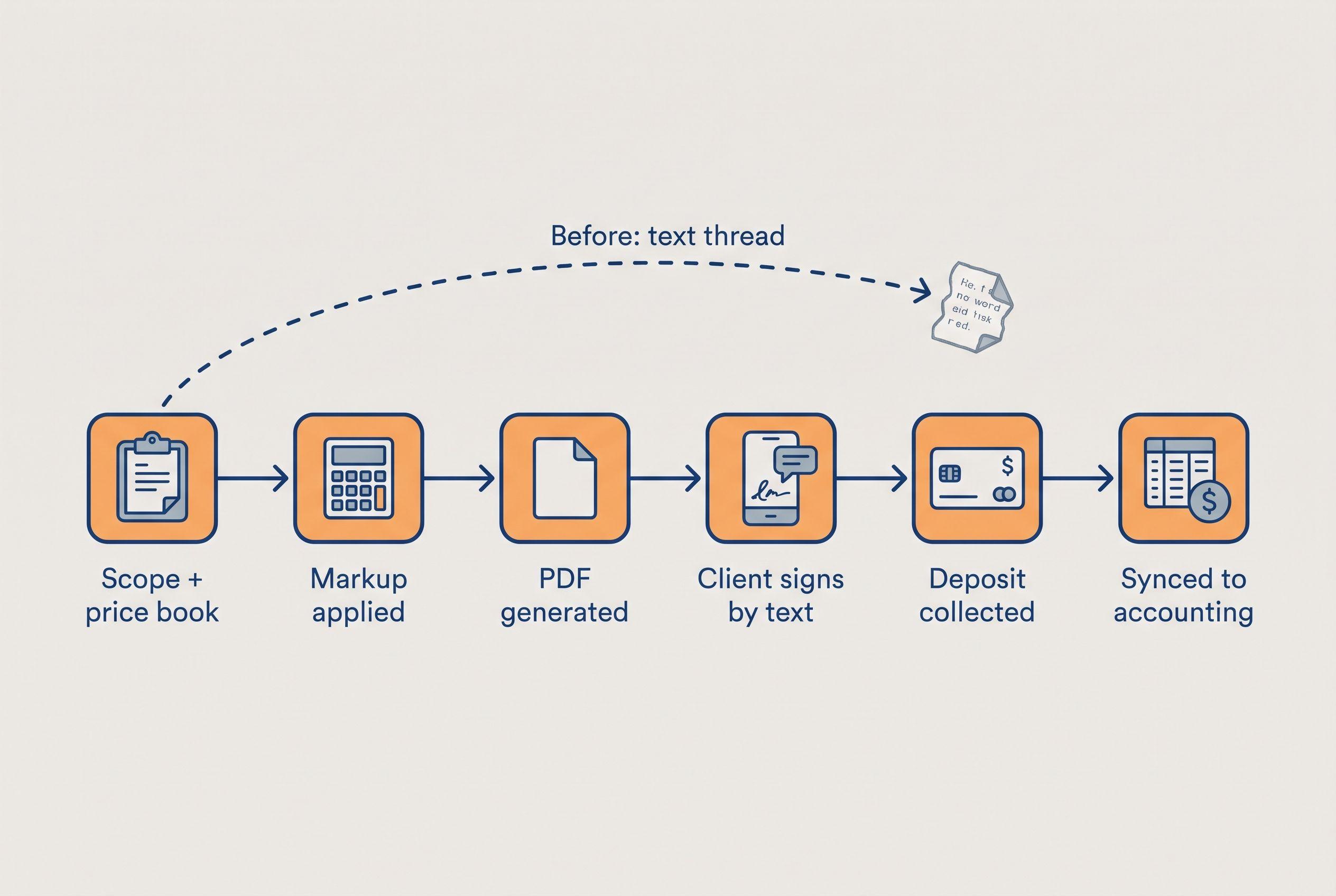
Leaving Buildertrend without losing a signed change order
Order matters here. If you cancel first and plan later, you'll end up rebuilding records from memory.
- Get the real numbers. Find your current invoice, your renewal date, and any notice period in the contract.
- Export everything before you touch the subscription. That means signed change orders, contracts, and client records. Do this one this week, before any renewal conversation. I've written a separate piece on saving your change orders before the account closes, because that's where people lose the most.
- Collect 5–10 real change orders, including a clean one, a messy one, and one that turned into an argument.
- Write down your pricing rules. Markup tiers, allowance handling, who's allowed to approve what.
- Get scoped and quoted against those real examples, not a feature list. Running your actual paperwork through the spec is how you catch the weird allowance rule or the approval step nobody mentioned before any code gets written, which is the cheapest time to find it.
- Run the new app alongside Buildertrend on one live job before you cancel anything.
- Downgrade or cancel at renewal, not halfway through a term you've already paid for.
What to hand whoever builds it
Whoever you hire, me or anyone else, give them this so the build doesn't turn into a guessing game:
- The sample change orders from step 3, with names redacted if you want
- Your price book, or the spreadsheet you use instead of one
- Your contract and change-order language
- Your QuickBooks item and customer list structure
- A one-paragraph description of how a client approves a change today, in your own words
If you're comparing developers, here's what to ask before you hire a developer. A good one will ask for most of that list before quoting. If they want to bill you for discovery first, take that as a warning.
The arithmetic, one more time
Keeping Buildertrend: $10,764–$17,964 over three years on the estimated range, and still billing in year four. Owning the change-order half: one flat fee, quoted after a short call, plus hosting and usage fees, and you own the code once it's paid off. Put your actual Buildertrend invoice next to those two numbers, along with the leak you counted earlier.
Then run the free estimator at free project estimator. It takes about ninety seconds. Submit it and you'll get a fixed quote within one business day. Attach your Buildertrend invoice and I'll tell you straight whether the build pays back or whether you should just keep renting.
P.S. If your Buildertrend quote is near $299 a month and you write a handful of change orders a year, don't build anything. Switch to a cheaper tool and keep the difference.
The follow-on question here is covered in Jobber Too Expensive? $10,764 Over 3 Years for 6 Trucks.
See a free demo of your replacement software
Book a short call and tell me what you run today. I build a demo of the replacement for free and show it to you on Zoom. The price is a flat fee, fixed in writing before you pay anything, and you own the code.
Book the callOr answer a few questions for a flat quoteFrequently asked questions
- How much does Buildertrend cost per month in 2026?
- Buildertrend doesn't publish its prices. Third-party roundups as of October 2026 estimate the Essential/Standard plans at about $299–$499 per month, often with a discounted first month, plus onboarding fees of $400–$1,500. Your quote depends on your annual construction volume, so it tends to go up as revenue grows.
- Is Buildertrend too expensive for a small remodeler?
- It depends on how much of it you use. If your team uses the scheduling, selections and client portal every day, the price can make sense. If change orders are the only feature you really rely on, you're paying for a lot of platform you don't open, and a cheaper tool or a small custom change-order app may be the better trade.
- What is a cheaper Buildertrend alternative for a small remodeler?
- JobTread publishes pricing around $159–$199 per month. Contractor Foreman advertises plans starting around $49 per month with unlimited users on most plans, and CPro360 lists tiers at $49, $99 and $199 per month. Before switching, check that the cheaper tool's change-order workflow matches how you actually price and get approvals.
- How much does custom change order software cost to build?
- A focused change-order app with a price-book builder, PDF generation, signature by text, Stripe deposits and QuickBooks sync is one flat fee, quoted after a short call and fixed in writing, and typically takes 2–4 weeks. A stripped-down version without integrations can take 1–2 weeks. Hosting and upkeep come on top, but there's no per-month license.
- What should I do before leaving Buildertrend?
- Export every signed change order, contract and client record before you change the subscription. Check your renewal date and notice period, then run any replacement alongside Buildertrend on one live job before you cancel. Cancel or downgrade at renewal, not partway through a term you've already paid for.
What would software built for your business look like?
Tell me what you run today on a short call. I build a demo of your replacement, free, and show it to you before you pay anything.
Part of these guides
Matt Brody
Founder, BuiltInWeeks
I build custom software for small and mid-sized businesses — the kind you own outright instead of renting by the seat. Fixed price, delivered in weeks, source code handed over at the end.
More about how I workKeep reading

Jobber Too Expensive? $10,764 Over 3 Years for 6 Trucks
Jobber's Grow plan costs a 6-truck plumbing shop $10,764 over three years. For most shops that isn't the problem. Here's the line-by-line math on subscription, card fees, seat caps and office workarounds, plus the narrow set of cases where building your own system actually pays back.
Read more
Monday.com Too Expensive? $3K–$17K Over 3 Years, by Seats
At 8 users, monday.com probably isn't too expensive. At 25 users on Pro, the 3-year bill is big enough that building your own app is worth pricing. Here's the seat math, the checklist I'd run before canceling anything, and the conditions where you should just keep paying.
Read more
ServiceTitan Too Expensive? $65K vs $166K Over 3 Years
At 12 techs, ServiceTitan works out to roughly $166K over three years on reported mid-tier pricing. At 4 techs on the cheapest plan, it's often the better deal. Here's the math at both sizes, a walk through one no-heat call from first ring to paid invoice, and what replacing it actually takes.
Read more