ServiceTitan Too Expensive? $65K vs $166K Over 3 Years

If you run 12 technicians, yes, ServiceTitan is probably too expensive for what your office actually uses. If you run 4 and you're on the entry plan, it probably isn't. Owning your software might not beat it at that size.
The reason is boring: ServiceTitan charges per technician, and a custom system doesn't. Every truck you add puts another line on the invoice. The software doesn't do anything more for that tech. You just pay for the extra head.
Below are the three-year numbers at both sizes, built from user-reported 2026 pricing. Then I walk one real-world job, a no-heat call, through every step where the money goes, and lay out what a replacement would do, where a human still signs off, and how you'd get off the platform without losing your history.
The three-year bill at 4 techs and 12 techs
ServiceTitan doesn't publish its prices. The figures below come from 2026 user-reported ranges compiled by third-party reviewers (WorkZen, Projul, FieldCamp, ServiceAgent and Local Call AI):
- Starter: $245–$300 per tech per month, billed annually
- Essentials: $300–$400 per tech per month
- The Works: $400–$500 per tech per month
- Implementation: $5,000 to $50,000+, one time
I go through each tier in more detail in my breakdown of ServiceTitan's per-tech pricing and setup fees. Here's what those numbers come to over 36 months:
| Scenario (illustrative arithmetic) | 4 techs | 12 techs |
|---|---|---|
| Starter, low end ($245/tech) + $5,000 implementation | $40,280 | $110,840 |
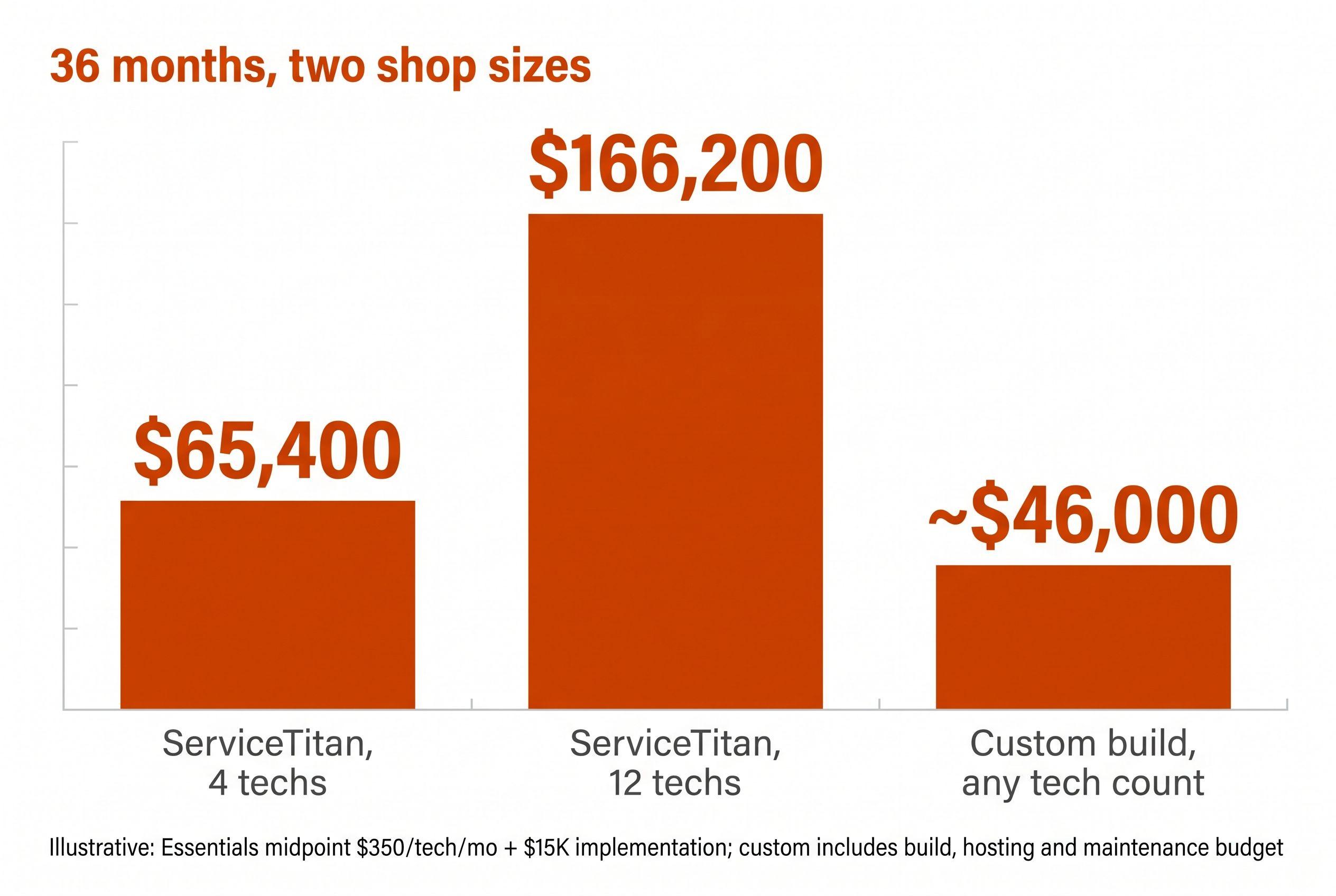
| Essentials, midpoint ($350/tech) + $15,000 implementation | $65,400 | $166,200 |
| Essentials midpoint, already implemented (forward cost only) | $50,400 | $151,200 |
None of that includes add-ons, payment processing or the hours your office loses to workarounds. It's the subscription and nothing else.
Look at the far column. A 12-tech HVAC shop on a mid-tier plan spends about $4,200 a month before anyone books a job. Hire your thirteenth tech and it goes up again. The software is doing the same work it did last month.
Before you read on, put your own seat count and plan into the calculator below. It takes about a minute and doesn't ask for your email.
Price your stack in two minutes
List the subscriptions you pay for and see what they cost over 3, 5 or 10 years next to owning the software. No email needed to see the number.
The closest thing I've built to this, and why I bring it up
I don't have a field service project I can show you, so I won't make one up. What I do have is a production pipeline with the same hard parts a dispatch system has. Work gets handed through several steps, software makes the routine calls, review gates stop bad output, and things have to keep moving when one piece breaks.
I built an automated SEO blog platform for a client. It pulls Google keyword data and ranks a dozen topic ideas at a time. Claude writes 2,500-plus-word drafts against a custom voice profile. Then Grok, Gemini and ChatGPT each review the draft, and a change only gets made when two of them agree on it. Every post goes through Sapling.ai before it can publish. Zapier pushes finished posts to Facebook and the Google Business profile, and the platform has its own analytics: heatmaps, cohort analysis and funnel tracking. (This is a real client project. I've generalized the details, and your results will vary.)
The payback was a content team they never had to hire. I'm describing it here for the design rule underneath: automation drafts the work and a check approves it before anything goes out. That's the rule I'd use for your dispatch board.
Pricing out three more years of doing nothing
Here's the same 36 months with a custom dispatch-to-payment system next to ServiceTitan. The custom column is deliberately pessimistic.
For a scheduling, dispatch, mobile job and invoicing system, I'd scope it as an advanced build, delivered in 4–6 weeks, with an AI intake layer as an option. The price is one flat fee, quoted after a short call and fixed in writing.
To be straight about the timeline: the core of it (the dispatch board, the mobile job app and invoicing) is what fits in 4–6 weeks. Three things push it out: mapping your data into QuickBooks, offline sync on the phones, and how clean your ServiceTitan export turns out to be. If those look heavy at scoping, I'd rather phase the AI intake and QuickBooks sync in after launch than pretend it all lands at once. You'll know which way it's going before you sign, and the history import gets written into the fixed scope, not discovered later.
| 3-year cost (illustrative) | ServiceTitan, 4 techs | ServiceTitan, 12 techs | Custom, any tech count |
|---|---|---|---|
| Subscription or flat fee | $50,400 | $151,200 | Flat fee, quoted after a short call |
| Implementation or migration | $15,000 | $15,000 | Scoped into the fixed price |
| Hosting, SMS and email usage | Included | Included | ~$9,000 (assumes $250/mo) |
| Changes and fixes budget | n/a | n/a | ~$12,000 (assumes $4,000/yr) |
| Total | $65,400 | $166,200 | Flat build fee + both allowances |
The hosting and maintenance numbers are my assumptions, not quotes. They depend on your SMS volume and on how much you change after launch. I padded both on purpose.
What's not counted on either side: card processing fees, SMS carrier registration, and third-party subscriptions like QuickBooks. And to be fair to ServiceTitan, the custom build covers dispatch through payment. It doesn't replace their marketing tools, call tracking or deeper reporting. If your office leans on those, price them in before you trust my column.
The table hides one thing. The custom number barely moves when you hire. Spread over more techs, its per-tech cost keeps falling. ServiceTitan's per-tech cost is the same at both sizes.
So at 12 techs, ServiceTitan costs roughly $166K over three years. Against one flat build fee plus running costs, owning wins by a wide margin. At 4 techs on Essentials, custom usually still comes out ahead. Compare it to the cheap end of Starter, though, about $40K over three years, and it's close enough that ServiceTitan often wins.
If that's your situation, I'm the wrong person to hire. Your bill is too small for the payback math. You'd be better off comparing lighter subscriptions. I walk through that decision in whether a small plumbing shop should build or stay on Housecall Pro, and the same reasoning applies to HVAC. The same goes if your marketing, financing and phones all run through ServiceTitan and your team knows the system well, or if what you really want is a full-time developer down the hall. A fixed-price build is none of those.
If you want the wider version of this math across other tools, here's my guide to what custom software actually costs.
Not sure which column you're in? Send me your actual invoice and I'll tell you.
See your software before you pay for it
Tell me what you run today on a short call. I build a demo of your replacement, free, and walk you through it. The price is fixed in writing before you pay anything.
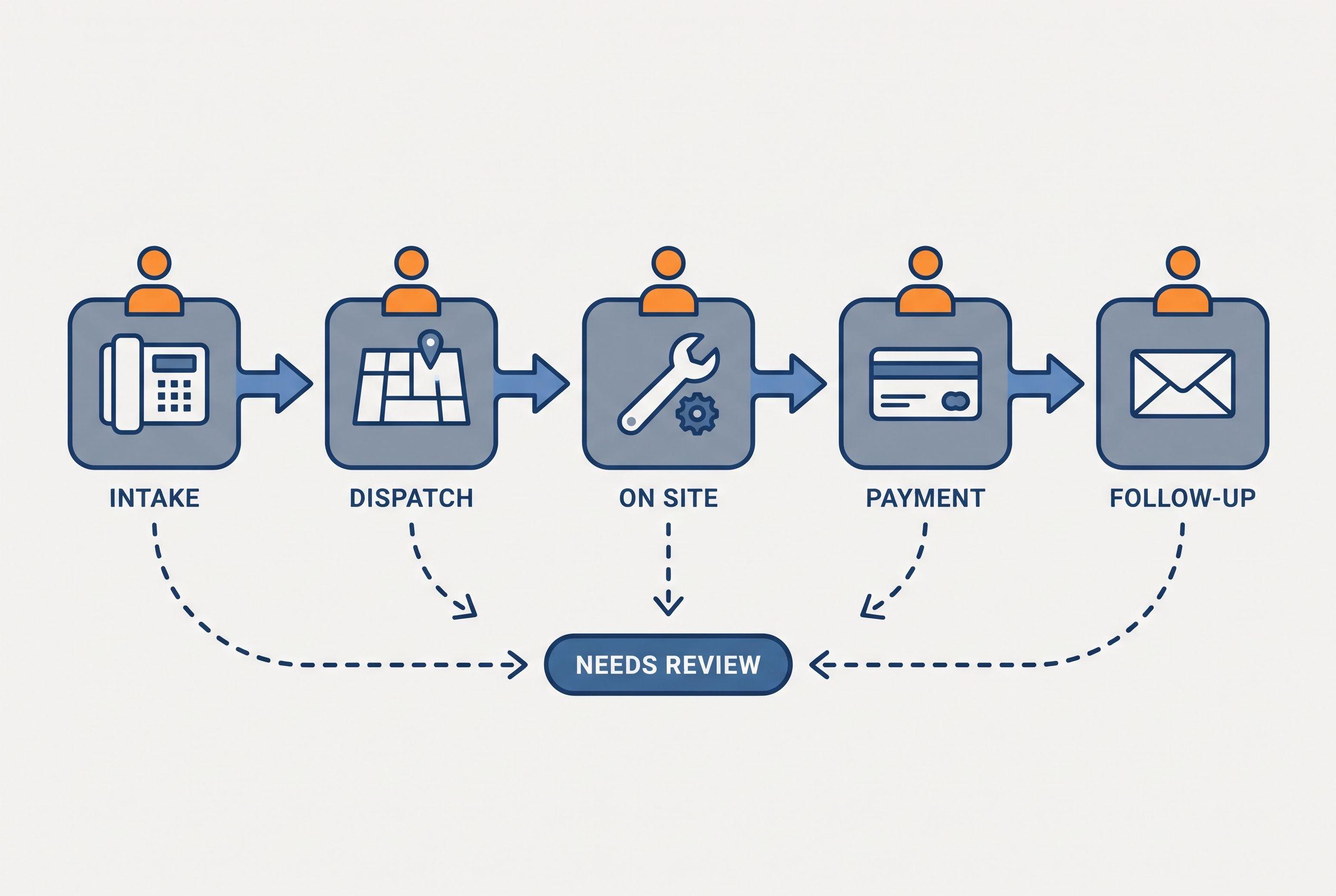
Teardown: one no-heat call, from first ring to paid invoice
It's January. A homeowner's furnace quits at 9 p.m. Here's what happens to that call, where the per-tech bill shows up, and what a system you own would do differently.
To be fair to ServiceTitan, it handles every step below. The problem for a small or mid-sized shop isn't that features are missing. It's that you pay per seat for a platform built for far bigger operations, when most small offices live in dispatch, invoicing and a few reports.
1. Intake: the call comes in
Today: The call goes to voicemail or an answering service. In the morning someone listens to it and types the job in by hand.
Custom: A Twilio number answers, texts the caller right away, and transcribes the voicemail. Claude reads the transcript and drafts a job ticket with the address, the equipment, the symptom and an urgency flag.
Human review: The draft lands in a dispatcher queue. Nothing gets booked or promised until a person approves it. The AI never quotes a price and never gives an arrival time.
Failure handling: If the address is missing or the model isn't confident, the ticket is flagged instead of guessed. If the AI service is down, the raw message still lands in the queue. The call never gets lost; you just lose the shortcut.
2. Dispatch: assigning the tech
Today: This is the feature you're paying for, per tech, every month, including for techs who only run in peak season.
Custom: A drag-and-drop board backed by Postgres on Supabase. Assigning a job texts the tech a link with the address, the history and any photos.
Failure handling: Twilio reports whether each text was delivered. If it wasn't, the job turns red on the board and the dispatcher calls the tech. Silent failures are the ones that cost you, so the system has to make every failure visible.
3. On site: diagnosis and options
Custom: A phone web app built in Next.js. The tech gets a checklist, takes photos, and shows good-better-best options pulled from your price book. The customer signs on the screen.
Failure handling: Basements and crawlspaces have no signal. Offline mode covers the checklist, notes and the customer's signature, and photos queue on the phone and upload once the tech has signal again. What it won't do offline is pull fresh job history or take a card payment. Honestly, this is one of the harder parts of the build. Phone browsers (iPhones especially) limit how much they'll store, and if the office edits a job while the tech is offline, somebody's change has to win. Those two things are scope drivers, and I test the dead-signal case on purpose, because it's where field apps usually break.
4. Invoice and payment
Custom: The customer pays by card on site or through a payment link. Stripe webhooks mark the job paid, and every charge carries an idempotency key, so a double tap on a bad connection can't charge anyone twice. Paid invoices sync to QuickBooks.
Human review: Each morning a short reconciliation list shows anything where Stripe and QuickBooks disagree. Your office manager clears it in a few minutes. Anything touching money gets a person's sign-off.
5. Follow-up
Custom: A review request after the job, plus reminders for maintenance agreements sent through SendGrid or Twilio. These are the jobs that feed next spring's schedule, and once the system is built they cost nothing per tech.
| Step | What a person still does | What happens when it breaks |
|---|---|---|
| Intake | Approves every drafted ticket | Raw message lands in the queue |
| Dispatch | Assigns the tech | Undelivered text turns the job red |
| On site | Tech confirms options with customer | Data saves on the phone, syncs later |
| Payment | Clears the morning mismatch list | Webhook retries, no double charges |
| Follow-up | Edits the message templates | Failed sends get logged and retried |
Getting off ServiceTitan without losing ten years of job history
This is where replacing ServiceTitan gets expensive if you rush it. Here's the order I'd do it in:
- Pull your contract first. Find the renewal date and the notice window, then plan the build backward from them. The cheapest migration lands on a renewal you were going to cancel anyway.
- Export everything you can, and get the export options in writing. That means customers, service locations, equipment records, job history, your price book, open invoices, maintenance agreements and attachments. Find out what's missing before you commit.
- Clean up in a staging environment. Merge duplicate customers, fix addresses, map the old fields to the new ones. Your live system stays untouched.
- Run a shadow week. Enter one tech's jobs in both systems. Don't make the whole office do double entry. That's how people come to hate the new tool before it launches.
- Cut over during shoulder season. For HVAC, that means spring or fall, never a July heat wave.
- Keep the old data searchable. Old jobs get imported into a read-only archive in Postgres, so "what did we put in at this address in 2019?" is still a ten-second lookup.
- Port your phone numbers early if any vendor's phone system holds your main line. Ports take longer than anyone expects.
Your time across the 4–6 weeks: one scoping call, a 30-minute review each week, and a final test pass with your dispatcher and one tech. That's it.
Why fixed scope matters here: projects usually run late because of unclear requirements, scope creep and slow feedback. That's why I write the scope down first. If something still runs over, that's my problem, because the price is fixed.
What the same money gets you elsewhere
- A US agency at an hourly rate: From what I see, blended agency rates in the US run $100–$200 an hour. A dispatch system at 300 hours (my illustrative estimate) comes to $30,000–$60,000, and with hourly billing every overrun is on you. Many agencies also charge for a discovery phase before you ever see a range.
- An offshore shop: The quote looks cheap. Then you add the time spent writing specs, reviewing work across time zones, and possibly paying someone else to rewrite it.
- A lighter subscription: Jobber and Housecall Pro are honest options for smaller shops. They're still priced per user, though, so the seat creep follows you. If you're looking at those, compare the ServiceTitan alternatives side by side first.
- A no-code stack: You can wire Airtable and Zapier together, but you'll end up paying per-seat and per-task fees at once.
With my builds, the code sits in your own repo from day one. When you make the final payment, the contract transfers ownership of the custom code and source to you. I keep only my generic reusable components, and third-party libraries and services keep their own license terms. You get handoff documentation, including a runbook for each failure case above, so any developer can take it over. Your data stays exportable because it's in your own Postgres database, not locked inside a vendor's platform.
Your shop, your tech count, your number
Run the estimator at free project estimator now. It's five questions and about ninety seconds. Send it over and you'll get a fixed quote within one business day.
P.S. The fastest payback here costs nothing: look up your ServiceTitan renewal date today. If it's more than eight weeks out, there's time to build, test and cut over before you're locked in for another year.
We wrote up ShopVOX Alternative separately — that's the version with the numbers in it.
See a free demo of your replacement software
Book a short call and tell me what you run today. I build a demo of the replacement for free and show it to you on Zoom. The price is a flat fee, fixed in writing before you pay anything, and you own the code.
Book the callOr answer a few questions for a flat quoteFrequently asked questions
- How much does ServiceTitan cost per technician in 2026?
- ServiceTitan doesn't publish official pricing. User-reported 2026 ranges compiled by third-party reviewers put Starter at $245–$300, Essentials at $300–$400 and The Works at $400–$500 per technician per month, billed annually, plus a one-time implementation fee reported between $5,000 and $50,000+.
- Is ServiceTitan worth it for a small HVAC company?
- It depends on your tech count and plan. At about 4 techs on the low end of Starter, the three-year cost is around $40K, and a custom build plus hosting and maintenance often won't beat it. At 12 techs on a mid-tier plan, it's about $166K over three years, and that's where the case for replacing it gets strong.
- What does it cost to replace ServiceTitan with custom software?
- A scheduling, dispatch, mobile job and invoicing system typically scopes as an advanced build over 4–6 weeks, with AI intake features as an option, for one flat fee quoted after a short call. Budget separately for hosting, SMS usage and ongoing changes. Those costs stay roughly flat no matter how many techs you add.
- Can I get my data out of ServiceTitan if I switch?
- Plan the export before you commit to anything. List what you need (customers, locations, equipment, job history, price book, open invoices, agreements and attachments), get the available export options in writing, and import into a staging environment first. Keeping old records in a read-only archive keeps your history searchable after cutover.
- How long does it take to switch off ServiceTitan?
- A focused replacement build runs 4–6 weeks. Add a shadow week running one tech's jobs in both systems, then cut over during a slow season. Start by checking your contract's renewal date and notice window so the cutover lines up with a renewal you were going to cancel.
What would software built for your business look like?
Tell me what you run today on a short call. I build a demo of your replacement, free, and show it to you before you pay anything.
Part of these guides
Matt Brody
Founder, BuiltInWeeks
I build custom software for small and mid-sized businesses — the kind you own outright instead of renting by the seat. Fixed price, delivered in weeks, source code handed over at the end.
More about how I workKeep reading

Cost to Replace ServiceTitan: One Flat Fee, Plus ~$150/Mo
Replacing ServiceTitan with software you own costs one flat build fee, quoted after a short call, and roughly $150 a month to run. Here's the line-by-line arithmetic, the three-year comparison against per-tech licensing, and the shops that should keep paying for it (or switch to Jobber).
Read more
Jobber Too Expensive? $10,764 Over 3 Years for 6 Trucks
Jobber's Grow plan costs a 6-truck plumbing shop $10,764 over three years. For most shops that isn't the problem. Here's the line-by-line math on subscription, card fees, seat caps and office workarounds, plus the narrow set of cases where building your own system actually pays back.
Read more
Monday.com Too Expensive? $3K–$17K Over 3 Years, by Seats
At 8 users, monday.com probably isn't too expensive. At 25 users on Pro, the 3-year bill is big enough that building your own app is worth pricing. Here's the seat math, the checklist I'd run before canceling anything, and the conditions where you should just keep paying.
Read more