Leaving Buildertrend? Save Change Orders Before You Cancel

A homeowner calls two years after closeout: "I never approved that $4,000 upgrade." You've got about a minute to pull up the signed change order, with the date, the amount and who approved it. If that made your stomach drop, this post is for you. If you're a solo remodeler on a small Buildertrend plan, it probably isn't. Skip down to "Four Conditions Where You Should Stay on Buildertrend."
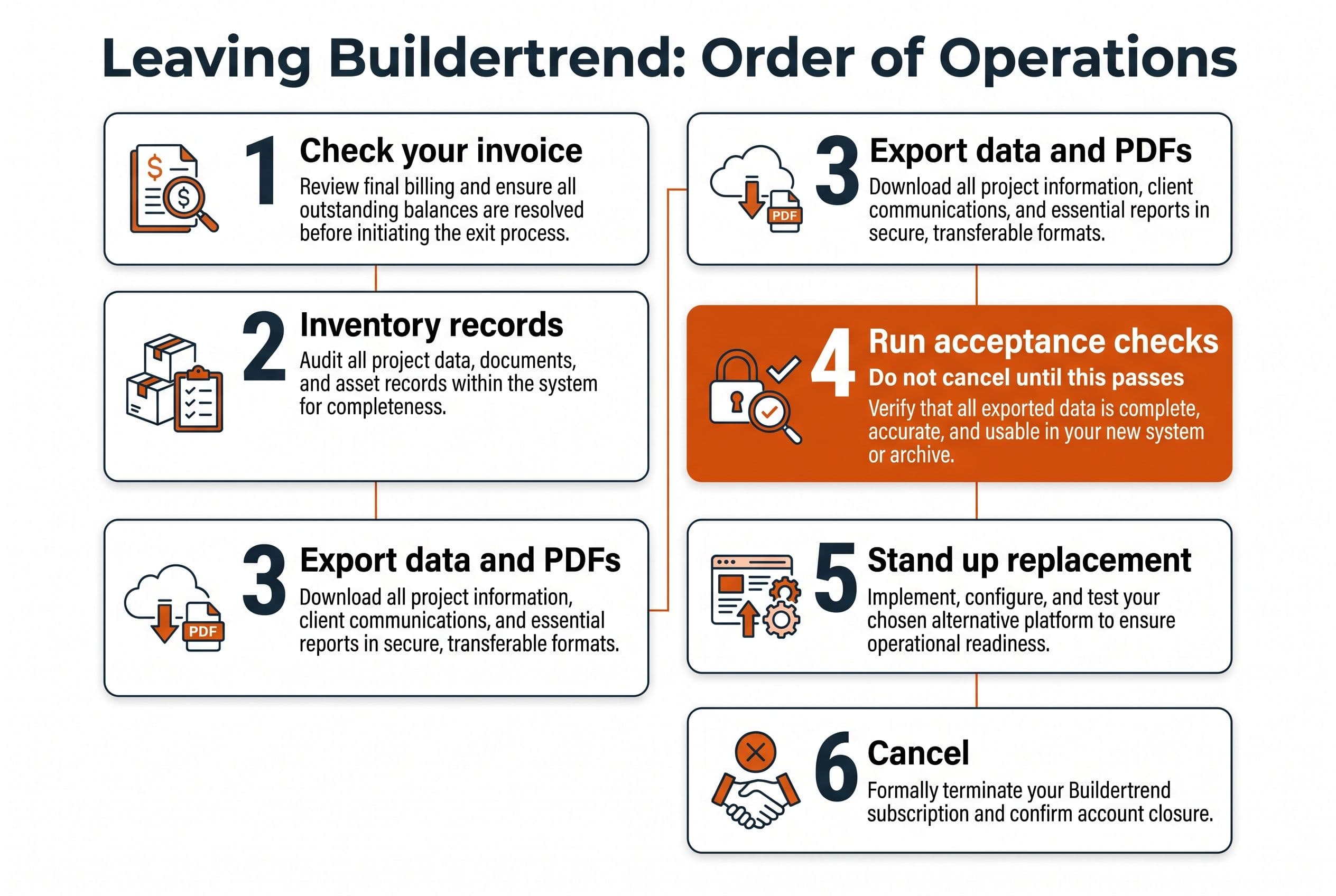
Here's the short answer. Export and verify everything first, build or buy the replacement second, and cancel last. If you cancel Buildertrend before you've proven you have every signed change order, with its approval date, amount and approver, you're betting your next billing dispute on a folder you haven't opened.
Most owners frame leaving Buildertrend as a software decision: which tool comes next. It's really a records decision. That homeowner doesn't care what scheduling app you switched to. They care whether you can pull up the signed approval in under a minute.
So the order of operations is the whole game:
- Decide whether leaving actually pays.
- Inventory what you have to keep.
- Export it into formats you control.
- Run acceptance checks against the live account.
- Stand up the replacement (or don't).
- Cancel.
Most people do step 1, jump to step 5, and find out what step 4 was for the hard way.
Leaving Buildertrend Starts With Your Own Invoice, Not a Feature List
Pull your last twelve months of Buildertrend invoices before you look at a single alternative. You want three numbers: the base plan, any add-ons, and what your team spends on workarounds the plan doesn't cover (the spreadsheet your PM keeps on the side, the second tool for takeoffs, the hours spent re-keying into QuickBooks).
Multiply the total by 36. That's what staying three more years costs you, before any price increase.
Here's an illustrative example, not Buildertrend's actual pricing (use your own invoice): if plan plus add-ons comes to $600 a month, three years is $21,600. If your bill is half that, the math changes a lot. If it's double, the conversation changes too.
If you'd rather not do that arithmetic on a napkin, the calculator below takes your current stack and shows what it costs over time. No form, no call.
Price your stack in two minutes
List the subscriptions you pay for and see what they cost over 3, 5 or 10 years next to owning the software. No email needed to see the number.
That number decides how much you can spend on the exit and still come out ahead. It doesn't tell you whether to leave. That depends on whether you can get your records out intact.
Why Change Orders Break When You Migrate Them
Job files are easy. A PDF is a PDF. You can move a few hundred gigabytes of plans, photos and invoices with a tool like Movebot, which at the time of writing publishes pricing at $0.75 or less per GB. Check that page before you budget, though. Pricing pages change.
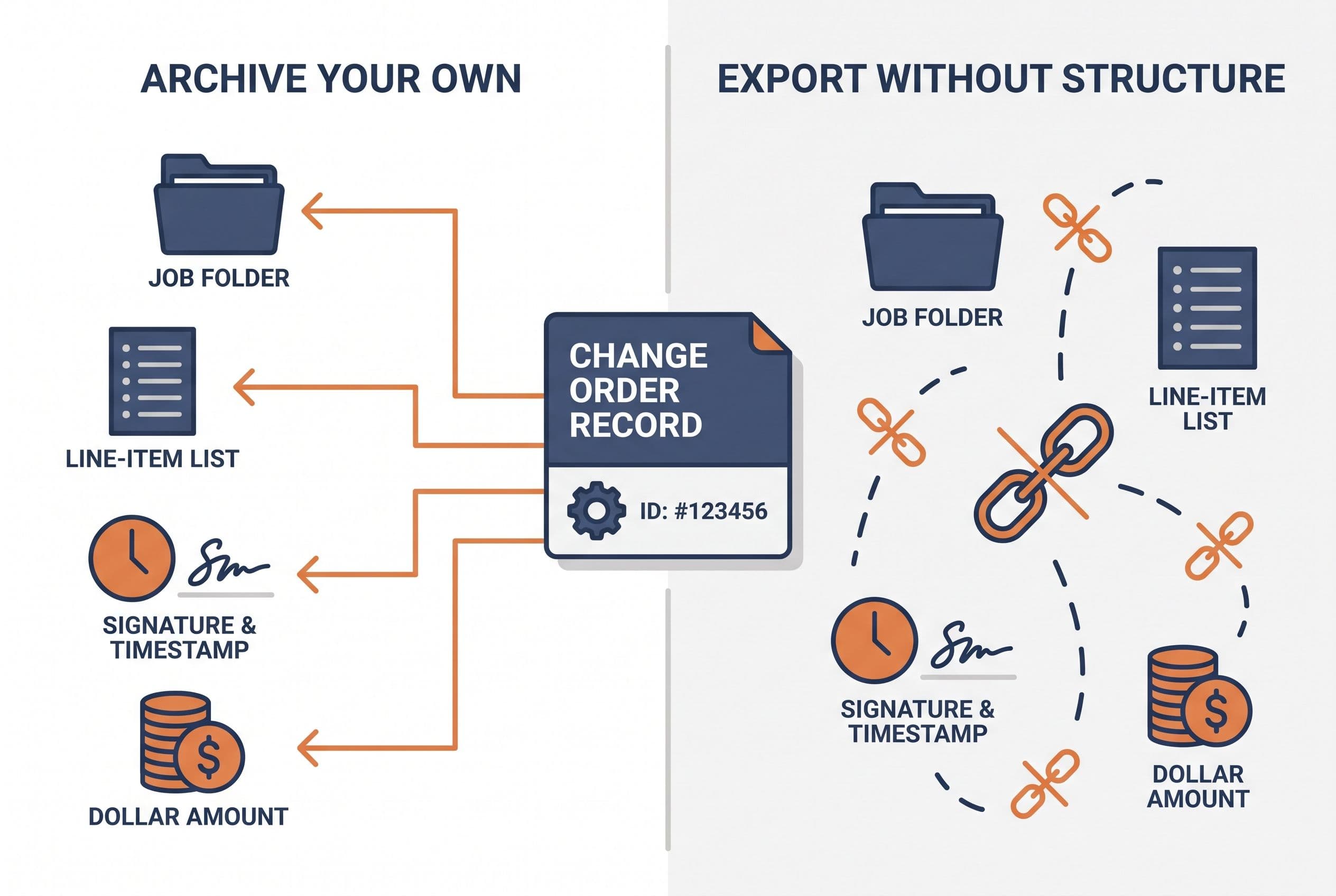
Change orders are a different thing. A change order in Buildertrend isn't one file. It's a record with relationships: it belongs to a job, it has line items, it has a status that changed over time, it was sent to someone, and someone approved it on a date. The signed PDF is the visible part. The approval trail (who, when, from where, and what version they saw) is what actually protects you.
When you export, those relationships tend to come apart. You get a spreadsheet of change orders over here and a folder of attachments over there. The thing linking a specific signature to a specific dollar amount on a specific job is now a filename convention, if you're lucky.
This isn't a Buildertrend-specific complaint. It's how migrations usually go wrong: the files make it across and the relationships between records don't. Data shaped for one system rarely drops cleanly into another, and the gaps don't show up on moving day. They show up later, as a change order nobody can tie to a signature.
Why does it keep happening? Because nobody defines what "done" means before they start moving data.
The structure problem, from my own kitchen table
This one's my own project, not a client's, and it's not a construction job. I'm telling it because it's the clearest lesson I've got about structure. My wife and I homeschool our four kids. We'd already taught two of them to read, so when our five-year-old was ready we knew the method. It just lived across more than a thousand pages of books and workbooks: scattered, slow, and hard to stay consistent with.
I built a web app that distills it into 50 structured lessons on a 100% phonics approach, about 15 minutes a day, parent and kid together. It replaced a shelf of workbooks with one clear path, it was built in weeks, and my family uses it every single day.
The code wasn't the hard part. Deciding the structure was. What counts as a lesson, what comes before what, where each story and audio file belongs. Your Buildertrend exit is the same problem with higher stakes: what counts as a job record, what has to stay attached to each change order, and what "complete" looks like. Get that right on paper and the build is quick. Skip it and you get a well-coded mess.
Four Conditions Where You Should Stay on Buildertrend
Run through these honestly. If any one of them is true, I'd renew and revisit later.
- Your bill is small. If three years of Buildertrend costs less than a careful exit plus a replacement, you lose money leaving. A solo remodeler on a modest plan is often here.
- Your clients live in the portal. If homeowners pay, approve selections and message you through it, and that's become part of your sales pitch, you're replacing a customer-facing product, not an internal tool. That's a bigger build.
- You're mid-project on several big jobs. Never migrate in the middle of open change orders on active jobs. Wait for a slow season or closeouts.
- The product actually handles your workflow. If your complaint is "it's expensive" and not "it doesn't do what we need," a cheaper subscription may be the right move, not custom software.
And plainly: if you want a developer embedded with your team long-term, adding features every month, don't hire me for this. I scope it, quote it fixed, ship it in weeks, and hand it off. That's a bad fit for an owner who wants a standing in-house tech person.
If none of those apply, keep reading. The side-by-side of tools is on our Buildertrend alternatives page, and I've written separately about what a lean V1 looks like for a small remodeler, down to which features I'd leave out.
Three Years of Renewing vs. Three Years After You Leave
This is the table that turns it into a decision. The Buildertrend column uses the illustrative $600/month from above; swap in your own number. The storage line assumes 200 GB of job files (also illustrative), priced at AWS S3 Standard's $0.023 per GB per month, the published rate at the time of writing.
| Line item (3 years) | Keep renewing | Archive only, then cheaper SaaS | Custom replacement you own |
|---|---|---|---|
| Subscription | $21,600 (illustrative) | Your new tool's plan × 36 | None for the core system |
| Read-only change order and job archive | Included while you pay | $2,500–$10,000 (simple build, 1–2 weeks) | Part of the build |
| Replacement build | — | — | $5,000–$15,000 (medium: roles, QuickBooks sync), 2–4 weeks |
| File transfer (200 GB via Movebot) | — | Up to $150 | Up to $150 |
| File storage (200 GB on S3) | Included | ~$166 | ~$166 |
| App hosting | Included | Small plan × 36 | Small plan × 36 |
| Seat increases as you hire | Depends on your plan's seat terms | Depends on the new tool | No per-seat license |
| Records if you stop paying | Ask in writing what access you keep | In your archive | In your database and repo |
A few things jump out.
The archive is the cheap, high-value move. Even if you go to another subscription, a read-only archive you own means your change order approval history never depends on a vendor again. That's the same logic behind keeping a searchable archive when you leave Zendesk: the old tickets matter more than the new inbox.
A full replacement only wins on a big enough bill. At $600/month in the illustrative case, a $5,000–$15,000 build pays back somewhere between roughly 8 and 25 months, and that's before hosting and upkeep. A system you own still has a hosting bill, dependency updates, and the occasional fix when the QuickBooks API changes. Count those. At $200/month it barely pays back inside three years once you count your own time. Stay put in that case.
What moves a quote inside those ranges is mostly what's in the table's labels: how many jobs and years of records you're bringing over, how many user roles you need, whether there's a QuickBooks sync, and whether homeowners need their own access.
Whatever lands, the quote's fixed. If the export turns out messier than we expected, that's my cost, not yours. And the final test pass is you running the acceptance table further down against your live account.
For comparison, YuSMP Group's 2026 SMB guide puts typical single-workflow custom tools at $15,000–$40,000, and published US agency rates run $100–$150 an hour or more (Divogue and Pineido, 2026). Hourly billing on a migration is the worst combination going: the vendor gets paid more every time the data turns out messier than expected. Offshore rates of $15–$70 an hour (Aalpha, 2026) look like a fix until you're the one checking whether 400 change orders kept their signatures.
If you want a second opinion on your actual numbers, send the bill. I'll tell you whether a replacement pays back, and if it doesn't, I'll say so.
Send us your software bill
Bring what you pay today. We'll tell you plainly whether a replacement would pay for itself, or whether you should keep renting.
The Buildertrend Data Migration Checklist
This is the step-by-step for the most common case: a builder or remodeler with a few years of closed jobs, a handful of active ones, and a bill big enough to justify leaving.
Before you export anything
- Ask Buildertrend support, in writing, what export options your plan includes, what format each comes out in, and what access you keep after cancellation. Save the reply.
- Ask your attorney or insurer how long you need to keep project records. Retention periods and statutes of repose vary by state and contract type. Don't guess.
- Pick a cutover window with no change orders out for signature.
- Write down your counts from inside the live account: total jobs, change orders per job, total approved change order value per job. These are your answer key.
The export itself
- Export change orders as structured data (CSV or spreadsheet) and as signed PDFs. You need both: the data for searching and totals, the PDFs as evidence.
- Export job files by job, keeping folder structure. Plans, photos, contracts, invoices, warranties, lien waivers.
- Capture approval metadata separately if it doesn't come with the PDF: approver name, date and time, method.
- Screenshot or print anything that won't export cleanly. Ugly, but it's evidence.
- Pull financial summaries per job so you can reconcile against QuickBooks or Xero later.
Where it lands
Put the raw export somewhere you control before it gets transformed. Plain cloud storage is fine: S3 at $0.023/GB/month or Google Cloud Storage Standard at $0.020 per GiB per month, both published rates at the time of writing. Then load the structured data into a real database (I use Postgres) so every change order links back to its job and its files.
Software Migration Acceptance Checks: Run These Before You Cancel
This section is why the checklist exists. Don't cancel until every line passes, checked against the live Buildertrend account while you can still log in.
| Check | Pass condition |
|---|---|
| Job count | Archive matches live account exactly |
| Change orders per job | Matches for every job, not a sample |
| Approved CO dollar total per job | Reconciles to the cent with the live account |
| Approval evidence | Every approved CO has a signed PDF or captured approver, date and time |
| File integrity | Every file opens; no zero-byte or truncated files |
| Spot audit | 10 random jobs opened side by side, old vs. new, by someone who worked them |
| Search | Your office manager finds a specific CO by customer name in under a minute |
| Access | Archive works after you log out of Buildertrend, on a second device |
The spot audit matters more than it looks. Counts can match while attachments sit on the wrong job. Have your PM or office manager do it, not the person who ran the export.
If something fails, fix it and re-run the whole table. That's annoying. It's a lot less annoying than paying for an extra month you didn't plan for, or losing a dispute.
What to Hand Whoever Builds the Replacement
Whether it's me, another shop, or a cheaper subscription's onboarding team, show up with this and the project gets scoped in one conversation instead of six:
- Your answer key: the job and change order counts and dollar totals from the live account.
- The raw export, untouched, plus where it's stored.
- Your three most painful workflows in plain words. Something like: "PM writes a CO on site, client approves on phone, office sees it in QuickBooks same day."
- What you're deliberately leaving behind. Every feature you don't rebuild is money saved.
- Who needs access: office, field, homeowners, subs.
- Your retention answer from your attorney or insurer.
If you're vetting a builder, the questions in what to ask before you hire a developer apply directly. The big ones: is the price fixed, where does the code live, and who owns it at the end?
Here's how I run it. The quote's fixed, like I said above, so a messy export is my problem, not yours. The code lives in your own repo from day one. The contract transfers ownership of the custom code and source to you on final payment (I keep only my generic reusable components; third-party libraries and services keep their own licenses). With the source and handoff documentation, any competent developer can take it over. Your time: one scoping call, a short weekly review, and a final test pass where you run the acceptance table above yourself.
If change order paperwork is the real headache, not just storing it but generating it, the approach in building document assembly for contracts and change orders usually belongs in the same scope.
Get the Number Before You Touch the Export
Get your fixed price with the free project estimator. Answer five questions about your archive and replacement, see your range on screen, and send it over if you want a fixed quote. You'll have it within one business day. No email wall, no discovery call before you see a number, no sales sequence afterward. Then you'll know exactly what leaving Buildertrend costs before you've cancelled anything.
P.S. If you only do one thing this month, write down your job and change order counts and totals from the live account. It takes an hour, costs nothing, and it's the answer key every other step depends on.
Want a real number for your own project?
Answer a few questions and get an instant price range and timeline. No call required, no obligation.
Get your instant estimateTalk through your software project with MattFrequently asked questions
- Can I export my change orders from Buildertrend before cancelling?
- Ask Buildertrend support in writing what your plan exports, in which formats, and what access you keep after you cancel. Export change orders as structured data and as signed PDFs, and capture approval details (approver, date, time) separately if they aren't in the PDF. Check everything against the live account before you cancel.
- How long should a contractor keep change orders and job files?
- It depends on your state, your contracts and your insurance. Statutes of repose and retention requirements differ, so ask your attorney or insurer for a specific number. Until you have that answer, keep every closed job's change orders and approvals in an archive you control.
- How much does it cost to migrate off Buildertrend?
- A read-only archive of change orders and job files usually falls in a simple build, $2,500–$10,000 delivered in 1–2 weeks. A full replacement with user roles and accounting sync is typically $5,000–$15,000 over 2–4 weeks. File transfer and storage are small by comparison: for example, 200 GB costs under about $5 a month on AWS S3 Standard.
- What should I check before cancelling Buildertrend?
- Confirm that job counts, change orders per job and approved dollar totals per job in your archive match the live account exactly. Make sure every approved change order has its signature evidence and every file opens. Have someone who worked the jobs spot-audit ten random jobs side by side.
- Should a small remodeler leave Buildertrend?
- Only if three years of the subscription costs clearly more than a careful exit plus the replacement. If your bill is small, your homeowners depend on the client portal, or the product already handles your workflow, renewing is usually the better call. Even so, building an archive you own is a cheap way to protect your records.
What would software built for your business look like?
Replacing a subscription, fixing software that fell short, or adding AI to your workflow? Talk through the scope with Matt.
Matt Brody
Founder, BuiltInWeeks
I build custom software for small and mid-sized businesses — the kind you own outright instead of renting by the seat. Fixed price, delivered in weeks, source code handed over at the end.
More about how I workKeep reading

Buildertrend Alternative for Small Remodeler: V1 Scope
I'd replace the change-order bottleneck, not rebuild an entire construction platform. Here's how I'd scope approvals, payment milestones, and a client portal—and check whether replacing Buildertrend pays.
Read more
Cost to Replace Zendesk: $5K–$20K, Archives and Upkeep
I'd budget $5,000–$20,000 for a scoped custom helpdesk build—not a clone of Zendesk. The real decision includes moving your ticket history, keeping attachments usable, and paying for upkeep after launch.
Read more
Airtable Alternative for Small Business: AI Intake Checks
I'd replace the document workflow before replacing every Airtable base. Here's how I decide whether AI intake deserves a custom build—and what has to stay under human control.
Read more