Cost to Replace Zendesk: $5K–$20K, Archives and Upkeep

I'd budget for the ticket history, not just the inbox
The cost to replace Zendesk starts at $5,000–$15,000 for a scoped multi-feature build, or $10,000–$20,000 for complex rules and real-time features. My published delivery windows are 2–4 weeks and 4–6 weeks respectively. Archive migration has to be scoped into that quote; hosting and ongoing maintenance belong in the ownership budget beside it.
That's a focused replacement. Not every Zendesk feature rebuilt under a different name.
For this teardown, I'll follow one illustrative workflow: a customer emails about a damaged order, attaches a photo, and needs a support agent to find the previous conversation before approving the next step. The failure isn't necessarily Zendesk. It's a setup where the agent still switches systems, hunts for attachments, and copies decisions into another record.
Start with your actual bill. Zendesk's published pricing lists Suite Team at $55 per agent per month, billed annually. Illustrative arithmetic: 20 agents cost $1,100 a month, or $13,200 a year, before extras. That's a subscription baseline, not a claim about your account.
I'd put your own seat count and add-ons beside that baseline before sizing a replacement.
Price your stack in two minutes
List the subscriptions you pay for and see what they cost over 3, 5 or 10 years next to owning the software. No email needed to see the number.
I have a useful lesson here from a different kind of build. My wife and I homeschool our four kids, and I built a phonics web app for my own family that turned more than a thousand pages of books and workbooks into 50 structured lessons, with hundreds of audio files. This is a real family project, not an anonymized client case study.
I built it in weeks, and my family uses it every day. I don't have a financial payback figure to attach to it; the relevant point is that the content and the path through it were the product—not just the screens.
The same scope distinction matters here. A working inbox without accessible customer history isn't a finished helpdesk replacement.
Follow one damaged-order email before quoting the replacement
Here's how I'd inspect that support workflow before quoting anything. This is hypothetical, not another project story.
The message arrives. The system needs to associate it with the right customer and conversation. A retry mustn't create another ticket. An uncertain match should go into a review queue, not silently attach a private complaint to the wrong account.
The agent checks the order. If the current setup forces someone to copy an order number into a separate system, I'd look at a read-only integration first. Replacing the whole helpdesk to fix one missing lookup is a bad trade.
The agent opens the damage photo. That requires more than a filename in an imported comment. The replacement needs the actual file, its relationship to the message, and permission checks before serving it.
The agent chooses the next action. I'd show the relevant order details and previous replies together. I'd keep refund or replacement approval with a person unless the business has explicitly defined and accepted an automated rule.
The customer gets a reply. Sending isn't the same as delivery. I'd specify visible send failures, retry behavior, and a way for an agent to intervene without accidentally sending the same response twice.
This is where the cost to replace Zendesk becomes concrete: customer matching, attachments, order access, approval rules, and reliable replies. Each is a testable piece of work.
If the real problem is choosing between a simpler subscription and a custom inbox, my breakdown of building versus buying a small-business helpdesk covers that earlier decision. I'd settle it before paying to move an archive.
Ticket rows are only part of the archive migration
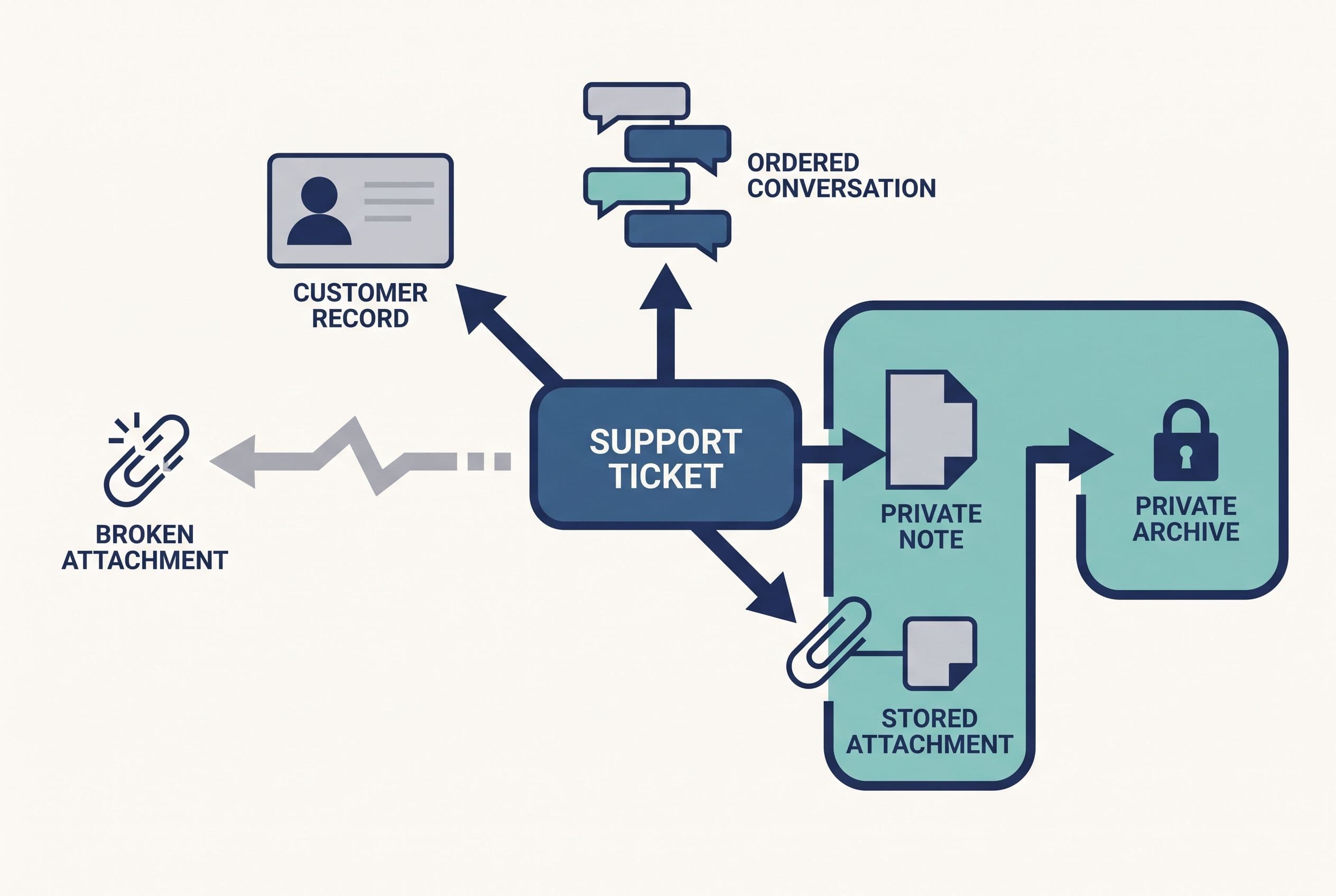
The Zendesk ticket archive migration cost depends on what “keep our history” actually means. Searchable reference material is a smaller job than recreating every historical event inside a new operational system.
I'd separate the archive into these deliverables:
| Archive component | What I'd scope | What makes it harder |
|---|---|---|
| Tickets and people | Stable IDs, customer links, status, dates | Duplicate identities and inconsistent fields |
| Conversation history | Message order, authors, public replies, internal notes | Missing metadata and visibility differences |
| Attachments | File copies, message links, access controls | Large files, inaccessible originals, duplicate downloads |
| Search | Agreed fields and representative searches | Expecting every old reporting feature to survive |
| Retention and deletion | Rules for live records, files and backups | Conflicting business or contractual requirements |
Helpdesk attachment migration deserves its own acceptance test. Copying a remote file address doesn't establish that the file will remain available after you cancel the source account. I'd verify the permitted export method, retrieve the files, record failures, and test access from the replacement.
My default scope would preserve the original ticket identifier alongside the new one. That gives an agent a way to trace an old reference without guessing which imported conversation it became.
I'd also separate internal notes from customer-visible replies during import and testing. A migration that mixes those up is worse than an inconvenient archive.
For a suitable build, I'd consider Postgres for ticket records and private object storage for attachments. That's an architecture choice, not a claim that a particular hosting plan meets your security requirements. Access rules, backups and deletion behavior still need explicit work.
Support data retention is an owner decision informed by your contracts and legal obligations. I wouldn't invent a retention period, and I wouldn't copy everything forever just because storage is available.
Put $39,600 of rent beside a complete ownership budget
At the illustrative 20-agent Suite Team baseline, staying put costs $39,600 over three years, assuming unchanged pricing and headcount. That's the number a replacement has to beat—not one month's invoice.
Here's a deliberately labeled planning model. The custom figures below are illustrative budget assumptions, not a quote or published maintenance package. The $15,000 implementation allowance sits within my medium-build range and includes the defined migration; the ongoing amounts are owner-held allowances to validate with providers.
| Three-year line item | Keep the illustrative Zendesk setup | Focused custom replacement |
|---|---|---|
| Base subscription: 20 × $55 × 36 | $39,600 | — |
| App and integration portion of implementation allowance | — | $12,000 |
| Archive and attachment migration portion | — | $3,000 |
| Hosting, file storage and backups: assumed $100 × 36 | — | $3,600 |
| Maintenance reserve: assumed $150 × 36 | — | $5,400 |
| Modeled total | $39,600 | $24,000 |
On those assumptions, the difference is $15,600 over three years. The $15,000 implementation allowance divided by the $850 monthly difference between subscription and ongoing ownership allowances gives a simple payback of about 18 months.
That isn't a savings promise. The model excludes overlap during cutover, taxes, financing, new features, paid add-ons, and staff time on either side. Add your actual amounts before deciding.
I haven't assigned dollars to the workaround either. Measure the time agents spend finding photos or copying order details, multiply it by your loaded labor cost, and keep that separate from cash savings. Time freed up doesn't automatically reduce payroll.
Keep Zendesk if it already handles the workflow, the bill is small, or an essential integration ecosystem would be expensive to leave. For example, three agents on the supplied $19 Foundational Support Team price total $2,052 over three years; don't hire me to replace that purely to save subscription money.
I'd use your actual invoice to check whether this comparison survives your seat count, extras, and renewal terms.
Send us your software bill
Bring what you pay today. We'll tell you plainly whether a replacement would pay for itself, or whether you should keep renting.
This is also why I separate implementation from ownership in what custom software actually costs. A cheap launch that leaves you funding an unfinished archive isn't cheap.
Cut the replacement scope before cutting the archive checks
I'd make the first version handle the damaged-order workflow from receipt to resolution: an email queue, customer matching, order lookup, private attachments, human approval, replies, and searchable history.
I'd skip rebuilding unused channels and decorative dashboards. I'd also ask whether older tickets can live in a read-only archive instead of becoming editable tickets in the new system. That can reduce migration complexity without throwing away useful evidence.
The cost to replace Zendesk rises when “simple inbox” turns into multiple brands, complicated routing, tenant separation, custom reporting, and every historical automation recreated exactly. Those are scope decisions, not little finishing touches.
My pricing structure is straightforward:
- Simple build: $2,500–$10,000, 1–2 weeks. A focused archive viewer might fit; that doesn't make it a full support replacement.
- Medium build: $5,000–$15,000, 2–4 weeks. Multiple features, integrations and user roles.
- Advanced build: $10,000–$20,000, 4–6 weeks. Complex rules, real-time features or multi-tenancy.
AI features multiply the applicable range by 1.25, within the overall $2,500–$25,000 envelope. I'd leave them out unless they solve a specific problem. A draft reply or suggested classification can help; a confident guess about a customer's refund entitlement can create another ticket.
If I included AI drafting, I'd require human review before sending, keep the original conversation accessible, and let the queue operate when the model service fails. The helpdesk can't stop because a suggestion didn't arrive.
A different subscription may still win. I'd compare the Zendesk replacement options against this narrow workflow rather than count feature checkboxes. Another SaaS product means less software upkeep for you, but migration and attachment checks don't disappear.
Hourly billing rewards slow work when the scope and acceptance criteria stay vague. I prefer a fixed deliverable; my guide to why software quotes use different pricing models explains the distinction I'd check before comparing bids.
Rehearse the import before moving the support address
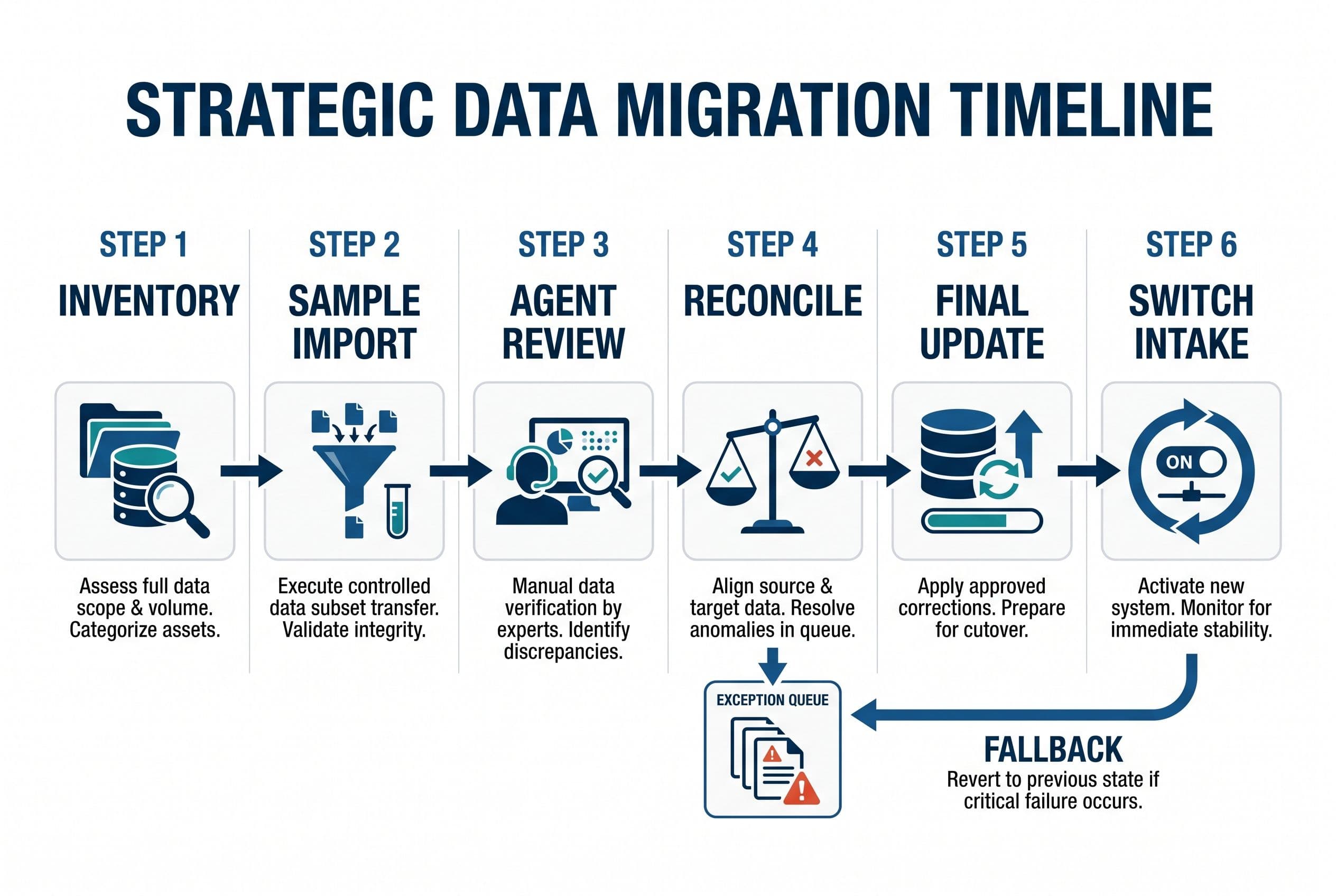
I wouldn't cancel Zendesk after seeing a successful sample import. I'd treat migration as a repeatable process with a visible failure report.
Here's the sequence I'd scope:
- Inventory the source. Confirm export access, ticket volume, attachment size, custom fields, integrations and account permissions. Check API rate limits before promising a transfer window.
- Import a representative sample. Include internal notes, long conversations, reopened tickets and awkward attachments—not just clean recent tickets.
- Have agents review it in a staging environment. They should find a customer, open the original evidence, distinguish private notes and follow the conversation in order.
- Reconcile the full import. Compare source and destination counts, inspect missing files, record exceptions and use file checksums where appropriate. Record counts alone don't prove usability.
- Rehearse the final update. Define how tickets changed during migration get copied across. Make reruns safe rather than creating duplicates.
- Switch intake with a fallback. Agree who watches incoming messages, what triggers a rollback, and where agents work if sending or routing breaks.
I'd keep the old account available until the agreed acceptance checks pass and renewal terms allow the exit. Any overlap belongs in your helpdesk migration budget.
For your involvement, I'd plan a scoping call, a short weekly review, and a final test pass with someone who handles tickets. You'll also need to provide account access and decide retention rules. I won't pretend those decisions can be outsourced to an import script.
The build windows aren't a guarantee that an inaccessible archive transfers on schedule. I'd surface those dependencies before fixing the delivery commitment.
Keep the archive usable after the subscription is gone
Custom support archive maintenance means patching dependencies, monitoring failed background jobs, checking backups, testing restores, and reviewing access when staff leave. It also means handling storage growth and deletion requests without leaving forgotten attachment copies behind.
I'd name an owner for each task in the handoff. “We have the source” isn't an operating plan.
The maintenance reserve in the comparison is just that: a reserve. A large archive, demanding recovery requirements, or frequent workflow changes may need more. Hosting bills also depend on stored files, traffic, backups and service choices; I wouldn't substitute a guessed platform price for those measurements.
My fixed price covers the agreed scope: overruns on that scope are my problem, not yours. New requirements get a separate decision rather than quietly becoming an open-ended invoice.
The code lives in your own repo from day one. On final payment, the contract transfers ownership of the custom code and source to you; I retain only generic reusable components, and third-party libraries and services keep their own license terms. With the source and handoff documentation, another developer can take over.
Put the illustrative $24,000 ownership budget beside the $39,600 subscription baseline, then run the same sum for your own build with my free project estimator at free project estimator. It takes about ninety seconds and shows the range on screen before any form—not an email gate hiding the number. If the arithmetic lands, submit the same form to get a fixed quote within one business day and turn the comparison into a defined scope.
Want a real number for your own project?
Answer a few questions and get an instant price range and timeline. No call required, no obligation.
Get your instant estimateTalk through your software project with MattFrequently asked questions
- How much does it cost to replace Zendesk with custom software?
- I publish fixed-price ranges of $5,000–$15,000 for medium builds and $10,000–$20,000 for advanced builds. A focused helpdesk replacement needs a defined workflow and archive scope before I can quote it. Hosting, maintenance and any cutover overlap also belong in the budget.
- What affects Zendesk ticket archive migration cost?
- I look at conversation history, custom fields, customer matching, internal-note visibility and attachment volume. A read-only searchable archive is a different job from recreating every historical event in an editable ticket system. Export access and failed-record handling also affect the scope.
- Can I keep helpdesk attachments after canceling Zendesk?
- I'd verify export access and copy the actual files before cancellation rather than rely on old attachment links. Each file needs its message relationship and appropriate access controls in the replacement. I'd test the archive and resolve missing-file exceptions before ending the source subscription.
- What does custom support archive maintenance include?
- I'd budget for dependency updates, storage, backup checks, restore tests, access reviews and failed-job monitoring. Retention and deletion rules need ongoing attention too. The right allowance depends on archive size, recovery requirements and how often the workflow changes.
- When is keeping Zendesk cheaper than replacing it?
- I'd keep Zendesk when the subscription bill is small, the workflow already fits, or essential integrations make leaving expensive. Compare three years of actual subscription costs with implementation, migration, hosting, maintenance and cutover overlap. Don't count staff time saved as guaranteed cash savings.
What would software built for your business look like?
Replacing a subscription, fixing software that fell short, or adding AI to your workflow? Talk through the scope with Matt.
Part of these guides
Matt Brody
Founder, BuiltInWeeks
I build custom software for small and mid-sized businesses — the kind you own outright instead of renting by the seat. Fixed price, delivered in weeks, source code handed over at the end.
More about how I workKeep reading

Zendesk Alternative for Small Business: AI Triage V1
I'd start with AI that sorts support tickets—not AI that sends customers unchecked answers. Here's how I'd scope the workflow, handle failures, and compare three years of subscription costs against a system you own.
Read more
Small Business Helpdesk Software: Build vs Zendesk
I'd buy Zendesk for standard support and build when resolving tickets means fighting your other systems. Here's the workflow, three-year arithmetic, and migration plan I'd use to make that decision.
Read more
Airtable Alternative for Small Business: AI Intake Checks
I'd replace the document workflow before replacing every Airtable base. Here's how I decide whether AI intake deserves a custom build—and what has to stay under human control.
Read more