Buildertrend Alternative for Small Remodeler: V1 Scope

My Buildertrend alternative would replace the approval bottleneck—not the whole platform
My starting scope: change orders, client approvals, and payment milestone visibility. For a focused app with integrations and user roles, my medium-build range is $5,000–$15,000, delivered in 2–4 weeks. That's a scope category, not a quote for replacing every Buildertrend feature.
If you're searching for a buildertrend alternative for small remodeler teams, I'd start with one question: what happens between a homeowner requesting a change and your office knowing it's approved and billable?
That's the workflow I'd tear apart first. Not scheduling. Not estimating. Not a dashboard nobody opens.
My proposed V1 would give your office a place to price the change, your homeowner a clear approval screen, and your project manager a reliable record of what can proceed. I'd leave accounting in QuickBooks and keep payment collection separate from approval.
The narrower Buildertrend replacement options matter here: replacing one failing workflow is a different job from replacing your construction management system.
The failure is usually between “looks good” and “approved”
Here's an illustrative workflow—not a claim about a particular Buildertrend account or a client project.
A homeowner requests a different tile. Someone discusses it by message. The office revises the price. The homeowner replies to an earlier version. Meanwhile, the project manager needs to know whether to order materials.
The problem isn't missing another message. It's missing an authoritative decision.
I'd inspect whether your current setup ties approval to an exact scope, price, and schedule impact. If those live in separate places, a notification saying “client approved” doesn't tell the crew enough.
I'd also check configuration before proposing code. If your existing subscription can handle this workflow with a cleaner setup, rebuilding it is a bad trade.
The replacement lesson I can point to comes from a different industry. I built a custom power dialer in React that replaced about $30,000 a year in Kixie licensing. The build cost $10,000, a third of that annual license bill, so it paid for itself in about four months on licensing arithmetic.
This was a real, anonymized client project; the figures are approximate, and results vary.
The dialer supported unlimited users, custom lead lists, and Zapier webhooks for follow-ups and updates to other systems. It shipped in weeks, with zero monthly licensing fees. That doesn't mean zero operating costs.
The relevant point isn't that a remodeler needs a dialer. It's that I replaced a defined workflow rather than copying every feature of the incumbent. My Kixie replacement approach follows that same boundary. The remodeler economics still need their own calculation.
Before I scope code, I'd trace one disputed change
I'd ask you to walk through a recent change order using redacted records. Where was it requested? Who priced it? Which version did the homeowner see? What told the office to bill it?
That reveals which problem you've actually got:
| What I find | What I'd investigate first | Likely direction |
|---|---|---|
| People aren't using the existing approval process | Permissions, training, and unnecessary steps | Fix the setup before replacing software |
| Approval arrives, but the office retypes everything | Available exports, APIs, and field mapping | Add a narrow integration |
| Scope revisions and approvals don't stay connected | Version history and approval rules | Build a focused change-order workflow |
| Scheduling, purchasing, and job costing all depend on the platform | Every dependency and its owner | Keep the suite or plan a larger migration |
I wouldn't call all four a Buildertrend replacement scope. The last one is a substantially different project.
For custom remodeler change order software, I'd want your actual pricing rules: markup treatment, tax handling, allowances, credits, and who can override a total. A developer shouldn't invent your business rules from a screenshot.
I'd also ask what counts as approval under your contract. A recorded button click isn't automatically the right legal process for every U.S. remodeler. Your contract requirements and applicable state rules should drive the implementation.
The broader discipline behind this is scoping an MVP that actually ships. A useful V1 closes a whole workflow; it doesn't collect a handful of unrelated features.
What keeping the subscription costs over three years
Before I recommend building, I'd price staying put.
I'd use your invoice. I'd separate the base subscription, any seat charges actually present, add-ons, and workarounds. I wouldn't assume Buildertrend bills per seat just because other software does.
Here's illustrative arithmetic, not a client result or a project quote. Every input below is an assumption for evaluating a narrow replacement:
| Three-year item | Keep the current setup | Build the focused replacement |
|---|---|---|
| Subscription: assumed $600/month | $21,600 | $0 for the replaced subscription |
| Removable add-ons: assumed $100/month | $3,600 | $0 |
| Fixed build, including migration | $0 | $10,000 |
| Hosting reserve: assumed $50/month | Included in subscription assumption | $1,800 |
| Independent maintenance reserve: assumed $150/month | $0 separately budgeted | $5,400 |
| Cash budget | $25,200 | $17,200 |
| Workaround time: assumed 4 hours/month at $50/hour | $7,200 | Not credited as guaranteed savings |
The build assumption includes importing agreed active-job data, mapping fields, and checking totals. It doesn't assume that years of attachments and historical conversations migrate themselves. The maintenance reserve is a planning allowance for outside support, not my service price or a promise that it covers every change.
On these assumptions, the cash difference is $8,000 over three years. Keeping the setup also consumes an illustrative $7,200 in staff time, but I wouldn't count that as cash saved unless it genuinely reduces spending. Custom software still needs administration.
This comparison only works if you can cancel the subscription and remove those add-ons. If you retain Buildertrend for scheduling or job costing, its bill belongs in the custom column too. Accounting and payment-processing costs that remain under either option stay outside this comparison; any differences need adding back.
Don't hire me for this if your bill is too small to repay the build, the product already handles your workflow, or your business depends on an ecosystem you can't leave. Keeping the SaaS wins in those cases.
I use the same separation of licensing and ownership costs in the seat-cost versus ownership calculation for a small-business CRM. A subscription invoice alone isn't the full comparison.
My V1 would stop a revised price from inheriting an old approval
If the math holds up, here's how I'd scope the most common case: a focused replacement for change requests and homeowner approvals.
The office drafts; a person authorizes sending
I'd give the office a draft containing the job, requested change, photos or attachments, itemized price, and schedule impact. A named staff member checks it before it reaches the homeowner.
I'd skip AI-generated prices in V1. An incorrect price attached to a convincing explanation is still an incorrect price.
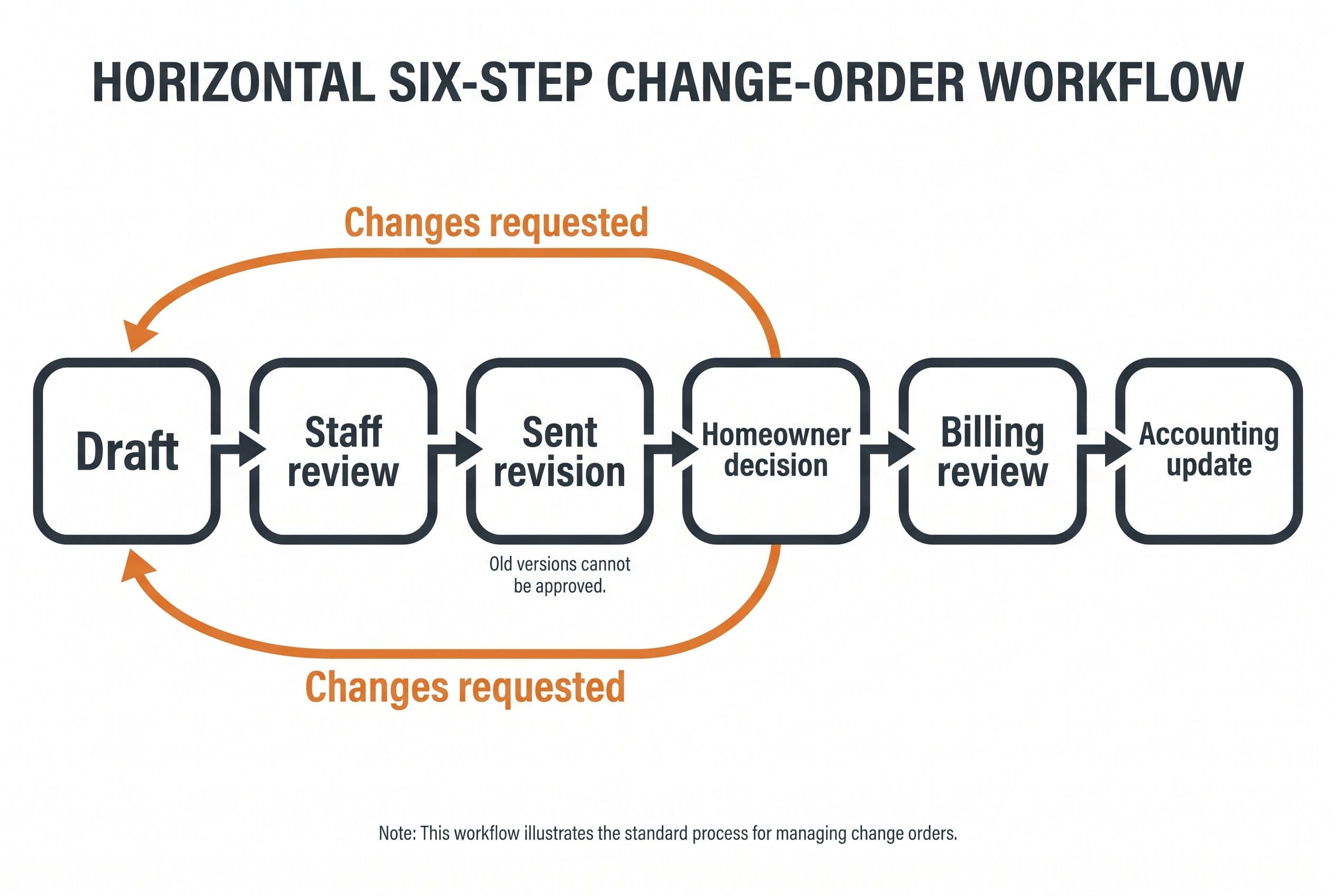
The approval states would be explicit: draft, sent, revision requested, approved, declined, or superseded. Changing the price or scope after sending creates a new revision. It never silently edits what someone already approved.
The homeowner approves a specific version
The remodeling client approval workflow would show the proposed change, total, schedule effect, and available decision. I'd record the approver, time, and exact revision, using an approval method agreed during scoping.
If two owners need to approve, that's a business rule—not a surprise to discover at launch. I'd settle it before quoting.
Access would be limited to the homeowner's own job. A forwarded link shouldn't give someone unrestricted access to another customer's documents.
The office controls what becomes payable
I'd keep construction payment milestones separate from change-order status. “Approved” doesn't automatically mean “charge the card.”
Your office would review whether an approved change becomes a separate invoice, adjusts an existing milestone, or waits for another contractual event. Only then would the system send the agreed accounting update.
For a remodeler client portal, I'd begin with pending decisions, approved changes, and payment milestone status. The same restraint applies to the first three screens of a custom client portal: each screen needs a job, not just a place in the menu.
I'd exclude full estimating, subcontractor bidding, payroll, procurement, and accounting from this V1. That's how a buildertrend alternative for small remodeler operations stays small enough to ship.
A failed notification must not become a lost approval
I'd treat failure handling as part of the fixed scope, not a maintenance surprise.
| Failure | What I'd build | Human responsibility |
|---|---|---|
| Approval email doesn't arrive | Delivery status and a resend path | Office confirms the contact details |
| Homeowner opens an old revision | Superseded notice pointing to the current version | Staff resolves any disagreement |
| Accounting update fails | Visible exception queue and retry controls | Office checks the rejected record |
| Payment event arrives twice | Duplicate-event protection | Staff reviews actual discrepancies |
| Homeowner disputes approval | Preserved revision and decision history | Owner handles the dispute |
For payment status, I'd use documented Stripe integration behavior rather than treating a browser confirmation screen as proof of payment. Webhooks need verification, duplicate handling, and reconciliation when something doesn't arrive as expected.
I'd also check QuickBooks integration access before promising a connection. Existing credentials don't prove the required data can be read or written.
My preferred design would keep workflow records in Postgres with source control and a staging environment for testing changes. The stack matters less than the acceptance tests: an old revision can't be approved, one homeowner can't see another job, and a failed integration can't disappear quietly.
I'd migrate active jobs before touching the archive
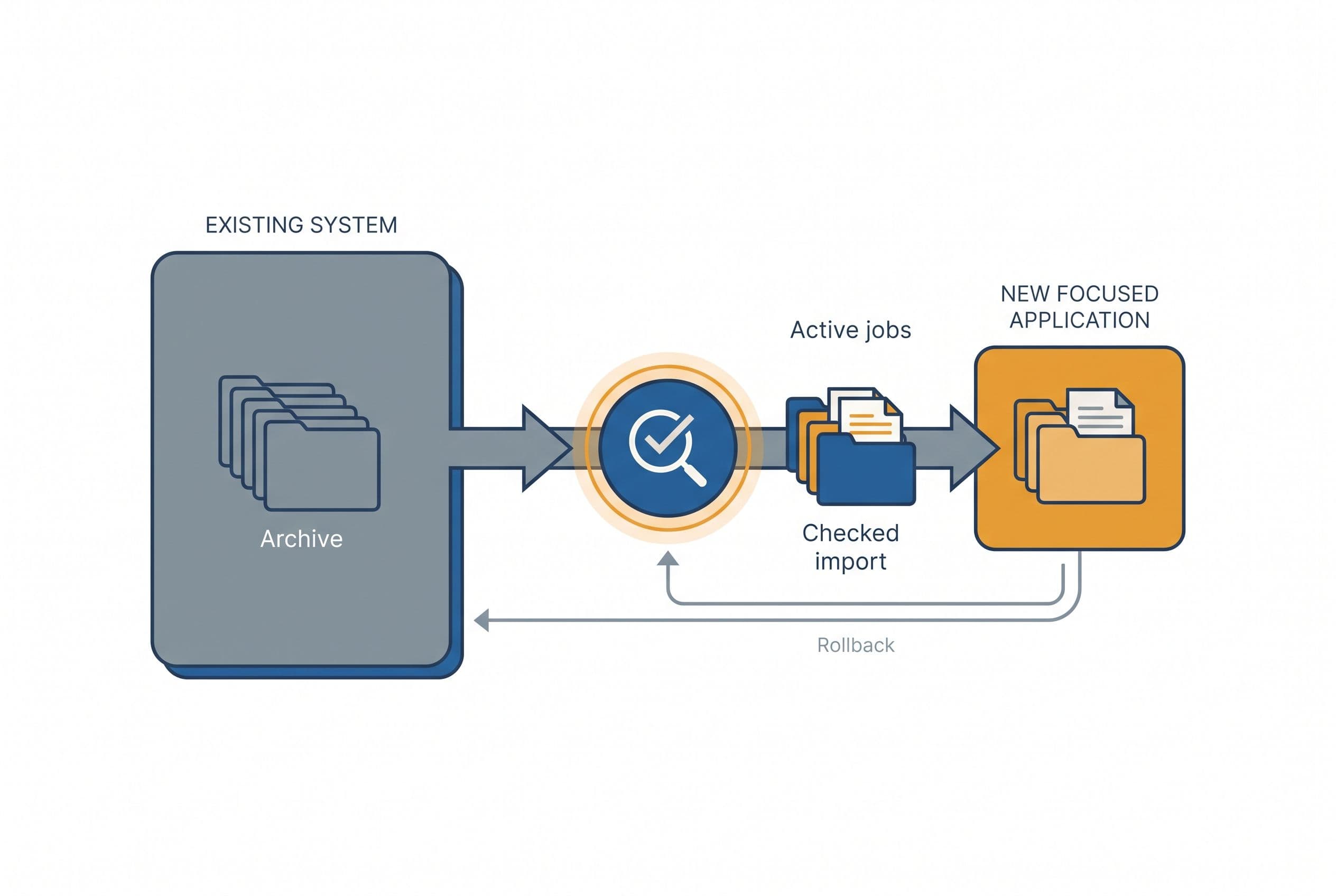
My migration sequence would start with evidence, not a cancellation notice:
- Inspect the export. Identify which jobs, contacts, attachments, approval records, and financial fields are actually available. I wouldn't promise undocumented API access.
- Map the active work. Agree how current job identifiers, pending changes, and payment milestones translate into the new app.
- Run a trial import. Reconcile totals and inspect attachments in staging. Missing records go on an exception list.
- Test a representative job. Your office runs a draft through review, approval, revision, and billing handoff before a homeowner depends on it.
- Set the cutover boundary. Decide where new changes are entered and prevent both systems from becoming competing records.
- Keep a rollback and archive plan. Preserve the export and required history. Cancel only after checking access, retention needs, and the renewal terms.
I'd budget temporary subscription overlap if the cutover needs it. That's not included in the illustrative table, and it reduces the savings.
For a medium build, I'd plan around a scoping call, a short weekly review, and your final test pass across the 2–4-week delivery window. You'd also need to supply exports and settle business rules. Dirty records or unavailable access can change the plan before I commit to a delivery date.
If you need real-time coordination, multiple businesses in one system, or complex permission rules, that may move into my advanced category: $10,000–$20,000 over 4–6 weeks. I'd narrow the first release before expanding it by default.
Bring one change order, your invoice, and the approval rules
To turn this Buildertrend replacement scope into a fixed quote, I'd need a redacted change order, your current invoice, a sample export, and a short account of who drafts, approves, bills, and corrects mistakes. I'd also need the list of functions you still rely on outside this workflow.
I don't need a months-long discovery phase that ends with a slide deck. I need enough evidence to draw a boundary and price it.
For the agreed scope, fixed price means overruns are my problem, not yours. Requested additions get priced separately rather than quietly becoming hourly work.
The code lives in your own repo from day one. The contract transfers ownership of the custom code and source on final payment; I retain only generic reusable components, and third-party libraries and services keep their own license terms. With the source and handoff documentation, any developer can take over.
The free project estimator at free project estimator doesn't put the number behind an email wall. There's no discovery call before a number and no sales sequence.
Answer five questions to see your range on screen, then send it over for a fixed quote within one business day.
Want a real number for your own project?
Answer a few questions and get an instant price range and timeline. No call required, no obligation.
Get your instant estimateTalk through your software project with MattFrequently asked questions
- What is a good Buildertrend alternative for a small remodeler?
- I'd start by checking whether you need a full construction platform or just a better change-order and approval workflow. A focused custom app can make sense when the subscription and workaround costs justify it. If you depend on the suite for scheduling, purchasing, and job costing, keeping it may be the better choice.
- How much does custom remodeler change order software cost?
- My medium-build range is $5,000–$15,000 over 2–4 weeks for an app with multiple features, integrations, and user roles. Migration quality, approval rules, and accounting connections determine whether your scope fits that category. Hosting and maintenance need separate operating budgets.
- What should a remodeling client approval workflow include?
- I'd include a reviewed scope, price, schedule impact, and approval tied to a specific revision. Changes after sending should create a new revision rather than overwrite the old one. Billing review should remain separate from homeowner approval.
- Can I migrate my Buildertrend data into custom software?
- I'd inspect a real export before committing to what can migrate. Active jobs, pending changes, attachments, and approval history need field mapping and reconciliation. Historical records may belong in an accessible archive rather than the new live workflow.
- Will I own the custom remodeler client portal?
- The code lives in your own repo from day one, and the contract transfers ownership of the custom code and source on final payment. I retain generic reusable components, while third-party libraries and services retain their own license terms. Source access and handoff documentation let another developer take over.
What would software built for your business look like?
Replacing a subscription, fixing software that fell short, or adding AI to your workflow? Talk through the scope with Matt.
Part of these guides
Matt Brody
Founder, BuiltInWeeks
I build custom software for small and mid-sized businesses — the kind you own outright instead of renting by the seat. Fixed price, delivered in weeks, source code handed over at the end.
More about how I workKeep reading

Small Business Helpdesk Software: Build vs Zendesk
I'd buy Zendesk for standard support and build when resolving tickets means fighting your other systems. Here's the workflow, three-year arithmetic, and migration plan I'd use to make that decision.
Read more
Aircall Alternative for Small Sales Team: Porting Checks
I'd pick the replacement only after checking whether your numbers, routing, and sales workflow can move safely. Here's the checklist I'd use before authorizing a port—and the three-year math that decides whether custom software belongs on your shortlist.
Read more
Document Assembly Software: Builder Costs $2.5K–$20K
I'd budget $2,500–$10,000 for focused change order document generation, or $5,000–$15,000 when approvals and integrations are part of the job. Here's the three-year arithmetic, including the costs that don't disappear when you own the code.
Read more