Aircall vs RingCentral: $20–$50 a Seat, and When to Build

If your phones are mostly sales and support reps making calls all day, pick Aircall. If you need one phone system for the whole company and outbound calling is just one part of it, pick RingCentral. And if you're paying for 20+ seats of Aircall's Professional plan mainly to get the Power Dialer, run the math on building your own, because that's the one case where owning it can come out cheaper than both.
Most teams should take that verdict and stop reading. The rest of this is for one person: you just got the renewal invoice for 25 Aircall Professional seats, it says $15,000 a year, and you know your reps really only use one feature. If that's you, keep going.
That's the short version of Aircall vs RingCentral. The rest of this post is the checklist I'd use to get there, the published prices, three years of costs at two team sizes, and the situations where building your own is the wrong call.
Aircall vs RingCentral side by side
These are public, checkable facts. Prices are the published annual-billing rates as they were listed when I wrote this. I haven't re-checked them against the live pages for this update, and both vendors change pricing often, so confirm them before you sign anything.
| Aircall | RingCentral (RingEX) | |
|---|---|---|
| Who it fits | Sales and support teams whose day is spent on calls | Whole-company phone systems: front desk, back office, field staff, plus reps |
| Pricing model | Per license per month, minimum 3 licenses | Per user per month |
| Entry plan | Essentials: $30/license/mo, with unlimited inbound, IVR, call recording, SMS, 250+ integrations | Core: $20/user/mo, with unlimited U.S./Canada calling, 25 SMS per user, 100 toll-free minutes |
| Step-up plan | Professional: $50/license/mo, which adds Power Dialer, smart routing, advanced analytics, AI conversation intelligence | Advanced: $25/user/mo, which adds auto call recording, call monitoring, Salesforce/HubSpot integrations, 100 SMS per user, 1,000 toll-free minutes |
| Best at | Fast routing, rep-level analytics, plugging into a CRM | Covering everyone in the company under one bill |
| Where it falls short | The dialer is only on the more expensive plan, so every seat pays for it | SMS and toll-free minutes are capped per user, and it's built as a phone system first, not a sales floor |
| What leaving costs | Porting your numbers, exporting recordings, rebuilding integrations | Same, plus moving everyone else who uses the phones |
Pricing sources: Aircall's pricing page and RingCentral's RingEX plans and pricing page.
Verdict by buyer:
- Outbound sales team, 3–15 reps, already on HubSpot or Salesforce: Aircall Professional.
- Office of 10–50 where only a few people make outbound calls: RingCentral Core or Advanced.
- 20+ reps paying $50 a seat for a dialer and fighting it every day: keep reading.
What your seat count costs on each plan
Here's the per-seat math done out. This is illustrative arithmetic using the published annual rates, with no taxes, add-on numbers, or international minutes included:
| Monthly plan cost | 5 reps | 10 reps | 25 reps |
|---|---|---|---|
| Aircall Essentials ($30) | $150 | $300 | $750 |
| Aircall Professional ($50) | $250 | $500 | $1,250 |
| RingCentral Core ($20) | $100 | $200 | $500 |
| RingCentral Advanced ($25) | $125 | $250 | $625 |
So at 25 reps, the gap between Aircall Professional and RingCentral Advanced is $625 a month, or $7,500 a year. That's more than a feature comparison. You're deciding whether the dialer and analytics are worth $7,500 a year to you.
Also check how many seats you're actually using. Idle seats are common after turnover: someone leaves, the seat stays, and on annual billing you keep paying for it until renewal. I don't have a phone-specific number for how often this happens, so don't take my word for it. Pull your own usage report and count.
If you want your own numbers before reading further, the calculator below takes your seat count and plan and shows you the yearly total. No form.
Price your stack in two minutes
List the subscriptions you pay for and see what they cost over 3, 5 or 10 years next to owning the software. No email needed to see the number.
Why there's a third column at all
Most "X vs Y" posts stop at two options. I add a third because I build software for a living, and I've seen a big pile of tools become one clear path that people use every day.
I'll be straight with you: the build story I can point to here isn't a dialer, and I'm not going to dress it up as one. The best example I have is my own family's, not a client's. My wife and I homeschool our four kids. We'd taught two of them to read using more than a thousand pages of books and workbooks. It worked, but it was scattered and hard to keep up with. So I built a web app that turns all of it into 50 structured lessons, about 15 minutes a day for a parent and kid together. It took weeks. It replaced a shelf of workbooks, and we use it every single day.
It didn't work because it had more features. It worked because it cut a thousand pages down to the path we actually follow. A sales floor is the same. Your reps spend their day in about three screens, and neither Aircall nor RingCentral was designed around your three.
Aircall on its own terms
Aircall is built for teams whose job is the phone. Its routing is the part I'd copy, not replace.
What you're actually paying for:
- Routing and IVR that ops people can set up themselves, without filing a ticket.
- 250+ integrations, so calls show up in HubSpot, Salesforce, Zendesk, or whatever CRM you already use.
- On Professional: a Power Dialer, smart routing, and AI conversation intelligence. That last one is the feature sales managers buy it for.
The downside is the pricing model. Per-seat licensing with a three-license minimum means the bill grows with headcount, not with how much your team calls. Your best rep and your newest hire cost the same, and so does the part-timer who makes six calls a week. The Power Dialer only comes with the $50 plan, so a team that just needs to get through a call list faster ends up paying for analytics and AI features on every seat.
So the problem isn't the product. It's paying $50 a seat for one feature. If you're already looking at the exit, I've put together what replacing Aircall actually involves, which covers what it does that you'd have to rebuild yourself.
RingCentral on its own terms
RingCentral is a phone system for the whole company. Outbound calling is one part of what it does, not its focus.
What you're actually paying for:
- One bill for everyone. The receptionist, the warehouse lead, the owner's cell, and the reps all sit on the same system.
- Unlimited U.S. and Canada calling from the $20 Core plan up.
- On Advanced: automatic recording, call monitoring, and native Salesforce and HubSpot integrations, for $25.
For a 30-person company where five people sell, RingCentral is usually the better choice. You'd be paying Aircall-level prices for people who just answer the phone.
Where it falls short for a real sales floor: the SMS and toll-free minutes are capped per user (25 SMS on Core, 100 on Advanced), and the whole product assumes calls come in. If your reps text leads all day or work through big callback lists, those caps start to matter.
The checklist that picks for you
Go through these in order. The first one that clearly applies to you usually settles it.
-
Does everyone in the company need a phone line, or only the people who sell and support? Everyone → RingCentral. Only the phone teams → Aircall, or build your own.
-
Is the Power Dialer the main reason you're looking at Aircall Professional? If yes, you're paying an extra $20 a seat each month for one feature. Write that number down.
-
Do your reps make more texts or more calls? Lots of texting → look closely at RingCentral's per-user SMS caps before you sign. On any platform, business texting in the U.S. needs A2P 10DLC registration with the carriers. Plan for that paperwork whichever option you pick.
-
How many of your current seats made a call last month? Pull the usage report. If a third of them are idle, fix that before you switch anything.
-
Is there a step in your process that no off-the-shelf tool handles? For example: a callback rule based on the lead's status in your system, a call script that changes by region, or a payout calculated from call outcomes. If you're paying someone to do it by hand in a spreadsheet, that's your strongest case for building.
Conditions that rule out building your own
Don't build a dialer if any of these are true:
- You have fewer than about 10 seats. That's under about $500 a month on any of these plans. On RingCentral Core or Aircall Essentials, the payback runs well past three years. On Aircall Professional it's closer to a coin flip once you add call minutes, and a coin flip isn't worth a few weeks of disruption. Keep renting.
- You need desk phones, a fax line, and video meetings all on one bill. RingCentral already does that, and rebuilding it would be a mistake.
- Your sales process lives inside Salesforce and your admin has built years of automation on it. Native integrations are worth paying for, so stay with what plugs in.
- You want a developer on staff for the long term. That's a hiring decision, not a project. I build things, hand them off, and move on. If what you need is a full-time employee, I'm not the right fit, and I'd rather tell you that now than after you've signed.
Three years of dialing, priced out
This is the cost of doing nothing: staying on the plan you have now. The figures are illustrative arithmetic from the published rates. For the custom build, I use my fixed-price ranges plus maintenance at 15–25% of the build cost per year. That's the planning number I use, not a law of nature. Maintenance is a real recurring yearly cost, and I scope the actual figure in the quote.
One thing up front, because it matters more than any table: my builds are fixed-price, quoted in writing before work starts. If I go over, that's my cost, not yours.
At 10 reps
| 3-year cost | Total |
|---|---|
| Aircall Professional | $18,000 |
| Aircall Essentials | $10,800 |
| RingCentral Advanced | $9,000 |
| RingCentral Core | $7,200 |
| Custom dialer: build $5,000–$15,000 + maintenance at 15–25%/yr + metered calling and hosting | $7,250–$26,250 + usage |
How I got the custom row: build cost + (build cost × 15–25% × 3 years). Low end: $5,000 + ($5,000 × 15% × 3) = $7,250. High end: $15,000 + ($15,000 × 25% × 3) = $26,250.
At 10 reps, renting usually wins. The cheapest custom build only roughly matches RingCentral Core over three years, and that's before you pay a single call minute. Building only makes sense here if you need a workflow nobody sells.
At 25 reps
| 3-year cost | Total |
|---|---|
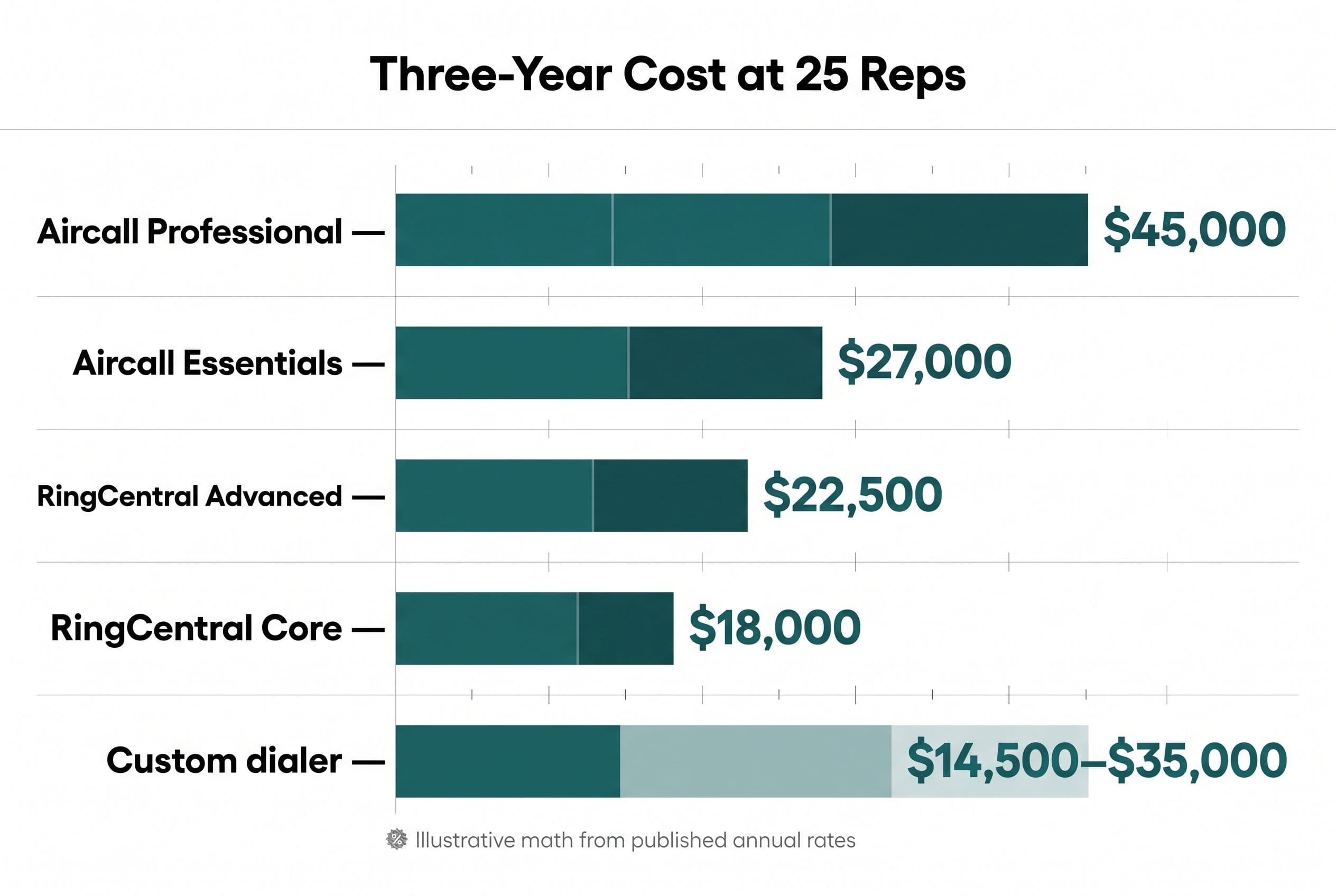
| Aircall Professional | $45,000 |
| Aircall Essentials | $27,000 |
| RingCentral Advanced | $22,500 |
| RingCentral Core | $18,000 |
| Custom dialer: build $10,000–$20,000 + maintenance at 15–25%/yr + metered calling and hosting | $14,500–$35,000 + usage |
Same formula: $10,000 + ($10,000 × 15% × 3) = $14,500 at the low end, and $20,000 + ($20,000 × 25% × 3) = $35,000 at the high end.
At 25 reps, the comparison is really Aircall Professional at $45,000 against a custom dialer. Even at the top of my range plus heavy maintenance, that's a $10,000 gap, but only before call minutes, and minutes are the line you need to check. A custom dialer doesn't remove the phone bill. It runs on Twilio, which charges by usage per minute and per message. You trade per-seat pricing for usage-based pricing.
The custom rows above don't include that usage, and if your reps are on the phone eight hours a day, it can eat the whole gap. Here's how to estimate it yourself: minutes per rep per day × number of reps × working days in a month × Twilio's published per-minute rate. Pull the minutes from your own call logs, not a guess. If that monthly number times 36 swallows the gap, stay on Aircall.
To be clear about when you should keep renting: if RingCentral Core already handles your calls, or your seat count is under about 10, stay where you are. Neither table makes a case for building in that situation.
For comparison, the usual agency quote for custom software is big enough and slow enough that most owners never consider building at all. At that kind of price the math never works. A focused dialer isn't that kind of project.
If your bill has more on it than seats, like add-on numbers, a separate texting tool, or a CRM connector you pay for on top, add those to your total. They belong in the comparison too.
Send us your software bill
Bring what you pay today. We'll tell you plainly whether a replacement would pay for itself, or whether you should keep renting.
What a custom dialer actually is (and what "Aircall vs Twilio" gets wrong)
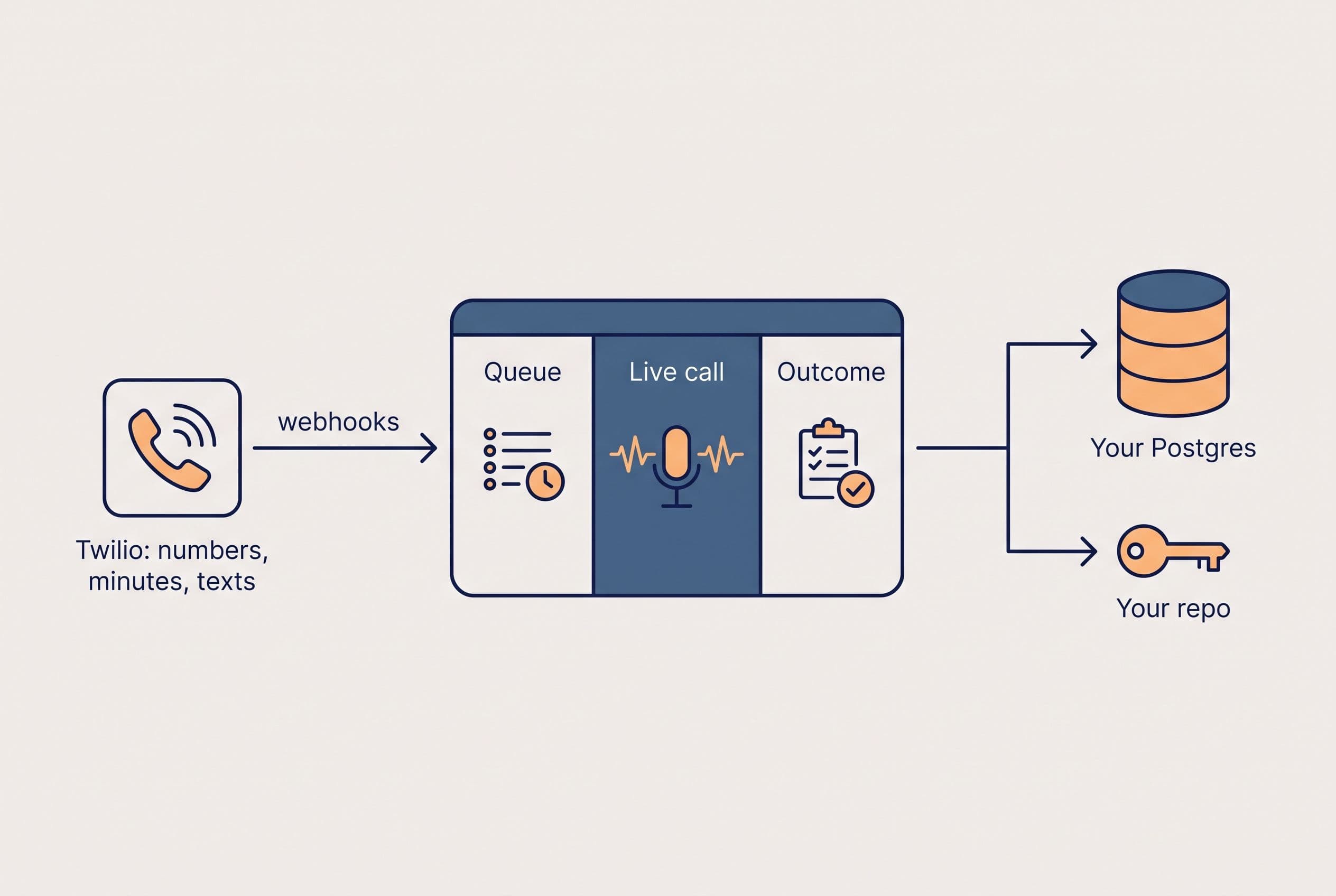
People search "Aircall vs Twilio" as if they're the same kind of thing. They aren't. Twilio is the phone infrastructure: numbers, minutes, texts, and webhooks that tell your app a call just happened. Aircall is a finished app. A good chunk of what you pay Aircall for is the app, not the minutes.
A custom dialer is that app, built around how your team actually works. Here's how I'd scope a typical one:
- The three screens your reps use: the call queue, the live-call view with the lead's history and script, and the disposition screen that logs the outcome.
- Telephony: Twilio Voice and Messaging, with recordings stored where you can export them.
- Stack: Next.js and TypeScript on Vercel, Postgres through Supabase, plus a sync to whatever CRM you already pay for.
- The rule nobody sells: the callback logic, routing, or payout calculation that currently lives in someone's spreadsheet.
- Compliance plumbing: recording-consent prompts that match the states you call (some require everyone on the call to consent), STIR/SHAKEN setup on your Twilio numbers so your calls don't show up as spam, the same A2P 10DLC paperwork mentioned above, and dialing rules that keep you on the right side of the TCPA. Aircall and RingCentral handle some of this for you. A custom build has to handle it on purpose, and it's part of the scope I quote. It's also why this isn't a weekend project.
That usually lands in the medium range, $5,000–$15,000 over 2–4 weeks. It moves into the advanced range ($10,000–$20,000, 4–6 weeks) if you need live supervisor monitoring or separate setups for multiple teams or offices. Where you land in a range comes down to a few things: how many integrations you need, how messy your CRM sync is, whether you need supervisor monitoring, how many teams or offices share it, and how much of the compliance work above applies to you. If you want AI call summaries, that adds about 25%, and the total tops out around $25,000. The same reasoning applies to the three-year math on a Zoho power dialer for rental callbacks, and that post includes a callback workflow worth comparing to yours. If you're trying to figure out the cost to replace Kixie specifically, I've broken that down in replacing Kixie with a dialer you own.
Your time on this: one scoping call, a short review each week, and a final test pass where your best rep tries to break it. Again, it's a fixed price, so if I go over, that's my cost, not yours. The code goes into your own repository from day one. When you make the final payment, the contract transfers ownership of the custom code and source to you. I keep only my generic reusable components, and Twilio and the libraries keep their own license terms. You get handoff documentation, so any developer can take it over.
What leaving either one actually involves
Switching phone systems is mostly paperwork, and one wrong field on a port request can stall the whole thing. Here's what to have in hand before you sign anything new:
- Your numbers. In the U.S., you have the right to port your business numbers to a new carrier. You'll need the account holder name, the service address exactly as the current carrier has it, your account number, the port-out PIN or passcode, a recent invoice, and a signed Letter of Authorization (LOA). Most failed ports come down to a mismatch on one of those, usually the account number, the PIN, or the address. I've written up the porting checks a small sales team should run first.
- Your recordings. Export them before you cancel, not after. Find out the format and whether call metadata comes with them.
- Your integrations. List every connection: CRM, helpdesk, any Zapier steps. Each one needs to be rebuilt or dropped on purpose.
- Your contract dates. Both vendors' best prices are for annual billing. Time any switch for your renewal date so you're not paying for both.
The step people most often skip is lining up the CRM side at the same time. If your phone data and lead data are about to live in different places, read how seat costs compare to owning your CRM code before you split them up. The broader case for owning your software instead of renting it covers the full trade, beyond phones.
What I'd pick, by team
- Small sales team, CRM-first, under 10 reps: Aircall Essentials, or Professional if the dialer clearly saves rep hours. Don't build anything.
- Mixed office where a handful of people make outbound calls: RingCentral Core. Move to Advanced only if you need recording and the Salesforce or HubSpot connection.
- 20+ reps on Aircall Professional with a spreadsheet doing work the software should: price a custom dialer on Twilio, and price your call minutes alongside it. At that size, it's the one option that can actually compete with the $45,000 three-year bill.
- Anyone happy with their current bill and process: keep it. Switching costs a few weeks of disruption, and that's only worth it if you get something back.
Do this next: open free project estimator and enter your seat count and the three screens your reps use all day. You'll see a price range on screen in about ninety seconds, before it asks who you are, and you'll get a fixed quote back within a business day. Either you'll know your current plan is fine, or you'll have a number to compare against $45,000.
P.S. If you have fewer than 10 seats, or RingCentral Core already covers your calls, don't bother with the estimator. Keep renting, cut your idle seats at renewal, and spend the money somewhere else.
Want a real number for your own project?
Answer a few questions and get an instant price range and timeline. No call required, no obligation.
Get your instant estimateTalk through your software project with MattFrequently asked questions
- Is Aircall or RingCentral cheaper?
- RingCentral is cheaper per seat: RingEX Core is $20 per user per month and Advanced is $25, billed annually. Aircall Essentials is $30 per license per month and Professional is $50, with a three-license minimum. At 25 reps, Aircall Professional costs $7,500 a year more than RingCentral Advanced.
- What is Aircall pricing per user per month?
- Aircall Essentials is $30 per license per month and Aircall Professional is $50 per license per month, both billed annually with a minimum of three licenses. The Power Dialer, smart routing, advanced analytics, and AI conversation intelligence are only on Professional.
- What's the difference between Aircall and Twilio?
- Twilio is the phone infrastructure: numbers, minutes, texts, and webhooks, billed by usage. Aircall is a finished calling app for sales and support teams, billed per seat. A custom dialer runs on Twilio, so you swap per-seat pricing for per-minute usage, but you still pay for the calls themselves.
- How much does a custom power dialer cost?
- A focused custom power dialer, with a call queue, live-call view, outcome logging, Twilio telephony, and a CRM sync, typically falls between $5,000 and $15,000 and takes 2–4 weeks. Live monitoring or multi-team setups push it to $10,000–$20,000 over 4–6 weeks. On top of that you pay Twilio usage, hosting, and ongoing maintenance.
- When should I build my own dialer instead of using Aircall?
- Building usually only pays off once you're around 20 or more reps on a $50-a-seat plan, or when there's a workflow no product handles that someone currently does by hand. Under about 10 seats, or if you need a full company phone system with desk phones and video, keep renting.
What would software built for your business look like?
Replacing a subscription, fixing software that fell short, or adding AI to your workflow? Talk through the scope with Matt.
Matt Brody
Founder, BuiltInWeeks
I build custom software for small and mid-sized businesses — the kind you own outright instead of renting by the seat. Fixed price, delivered in weeks, source code handed over at the end.
More about how I workKeep reading

Monday.com Too Expensive? $3K–$17K Over 3 Years, by Seats
At 8 users, monday.com probably isn't too expensive. At 25 users on Pro, the 3-year bill is in the same range as building your own app. Here's the seat math, the checklist I'd run before canceling anything, and the conditions where you should just keep paying.
Read more
Cost to Replace Airtable: $5K–$15K + $40/Mo Hosting
Replacing Airtable with an app you own usually costs $5,000–$15,000, takes 2–4 weeks, and runs about $40 a month to host. For plenty of teams it still doesn't pay back. Here's the seat math, a pre-flight checklist, and the conditions that should keep you renting.
Read more
Monday.com Alternative: ROI Math for Teams Over 15
At 20 paid seats, Monday.com Pro works out to $4,560 a year using the published annual-billing rate. I walk through a quote-to-job workflow, the three-year replacement math, and the migration work that decides whether owning the software is worth it.
Read more