Tableau with Salesforce: Why Nightly Exports Usually Win

You run Salesforce. You're paying for Tableau, or you've got a quote for it. Somebody asked in a meeting why the pipeline dashboard didn't match what Salesforce showed. Now you're stuck choosing between paying for "live" and living with a nightly export.
Here's my answer on Tableau Salesforce data refresh for most U.S. businesses with fewer than a few hundred users: nightly or hourly data is enough. With Tableau's native Salesforce connector, live sync isn't an option anyway. The better question is whether you should keep paying per seat just so people can look at numbers you already own.
Who this isn't for: if someone on your team really acts on a number within the hour, or you're already deep in CRM Analytics, skip ahead to the deal-breakers. You're probably in a different spot.
The native connector already made half this decision
From Tableau's docs and the sources I checked, the built-in Salesforce connector is extract-only. It doesn't support live connections. Atrium AI's 2024 comparison of CRM Analytics and Tableau says it plainly: you can schedule extracts as often as hourly, but you can't get real-time data over that connection. Connectors change, though, so check Tableau's Salesforce connector page for how your version behaves before you take my word or Atrium's.
So with the native connector, "live sync vs nightly exports" is really hourly vs nightly.
And extracts don't make dashboards slower. Usually it's the opposite. An extract is a stored, compressed copy of the data, built for fast reads, so it's usually faster than querying Salesforce live.
If you really need live data, you have three routes:
- a third-party driver
- a different Salesforce product (CRM Analytics or Data Cloud)
- your own pipeline
Every one of them costs something. I'll price them below.
What your Tableau seats cost before anyone opens a dashboard
Tableau Cloud charges per user per month, billed annually. These are the published list prices on Tableau's pricing page as I write this. They change, so confirm them before you budget off my table:
| Role | Standard Edition | Enterprise Edition |
|---|---|---|
| Viewer | $15/user/mo | $35/user/mo |
| Explorer | $42/user/mo | $70/user/mo |
| Creator | $75/user/mo | $115/user/mo |
Illustrative arithmetic. Say you have a 25-person sales org with 2 Creators, 3 Explorers and 20 Viewers:
- Standard: $150 + $126 + $300 = $576/month, or $6,912/year
- Enterprise: $230 + $210 + $700 = $1,140/month, or $13,680/year
That's on top of Salesforce. Sales Cloud Enterprise lists at $175 per user per month, billed annually (again, check Salesforce's pricing page for the current number), so the same 25 people cost $52,500 a year just to be in the CRM.
Every new hire who needs to see pipeline means another Viewer seat. It's the same seat creep I wrote about in the ROI math for Monday.com teams past 15 people. Different logo, same problem: the bill grows with your headcount, not with how much you use the data.
Before you read further, plug in your own seat counts and see what the number looks like for you.
Price your stack in two minutes
List the subscriptions you pay for and see what they cost over 3, 5 or 10 years next to owning the software. No email needed to see the number.
Why I'd build reporting into the system instead of bolting it on
I recently built an automated SEO blog platform for a client. (It's a real client project. I've generalized the details, and your results will vary.) It takes keyword research all the way to a published post. Claude writes the drafts, three other models review them for SEO, and a Zapier integration pushes finished posts to Facebook and the Google Business profile.
The part that matters here is that it ships with its own analytics. It tracks individual user actions and includes heatmaps, cohort analysis and funnel tracking. That reporting goes deeper on content performance than Google Analytics does on its own. The payback didn't come from cutting a license. It came from a content team the business never had to hire, plus reporting that answers the questions it actually asks.
That's a different kind of system from a Salesforce mirror, so don't read it as proof of a Salesforce build. The lesson for Salesforce reporting is the design idea: when reporting is part of the system, "how fresh is the data?" mostly stops being a question. You can't go all the way with Salesforce, because Salesforce stays your system of record. But you can get close by mirroring the data into a database you own and reporting from that. More on how below.
The freshness checklist: six questions before you pay for "live"
Answer these honestly. Most teams find out they're paying for freshness nobody uses.
- Does anyone act on this number within the hour? For example, a manager reassigning stale leads or a dispatcher routing jobs. If not, nightly is enough. Stop here.
- Is the dashboard reviewed on a schedule? Weekly pipeline reviews, monthly board decks and quarterly forecasts all run fine on a nightly export. "Live" in a Tuesday meeting is just a nicer word.
- Do you need to join Salesforce data with QuickBooks, Stripe or your ops system? If so, the native connector is the wrong layer. You need a database in the middle, whatever you do about freshness.
- How many people view it, and on which tier? Viewer seats are the line that grows. Count who opened a dashboard last month, not who has a login.
- How much API headroom does your org have left? Your admin can see API usage in Salesforce Setup. If your dialer, Zapier and marketing sync already use a lot of it, live querying is risky. (More on that below.)
- Who fixes it when the refresh fails at 2 a.m.? If the answer is "nobody, we find out at the 9 a.m. meeting," that's the real freshness problem. Paying for live won't fix it.
If you answered "no" to #1 and "yes" to #2, you have your answer: a scheduled extract or a Salesforce reporting nightly export. The rest of this post is about where that data should land and who you're paying to look at it.
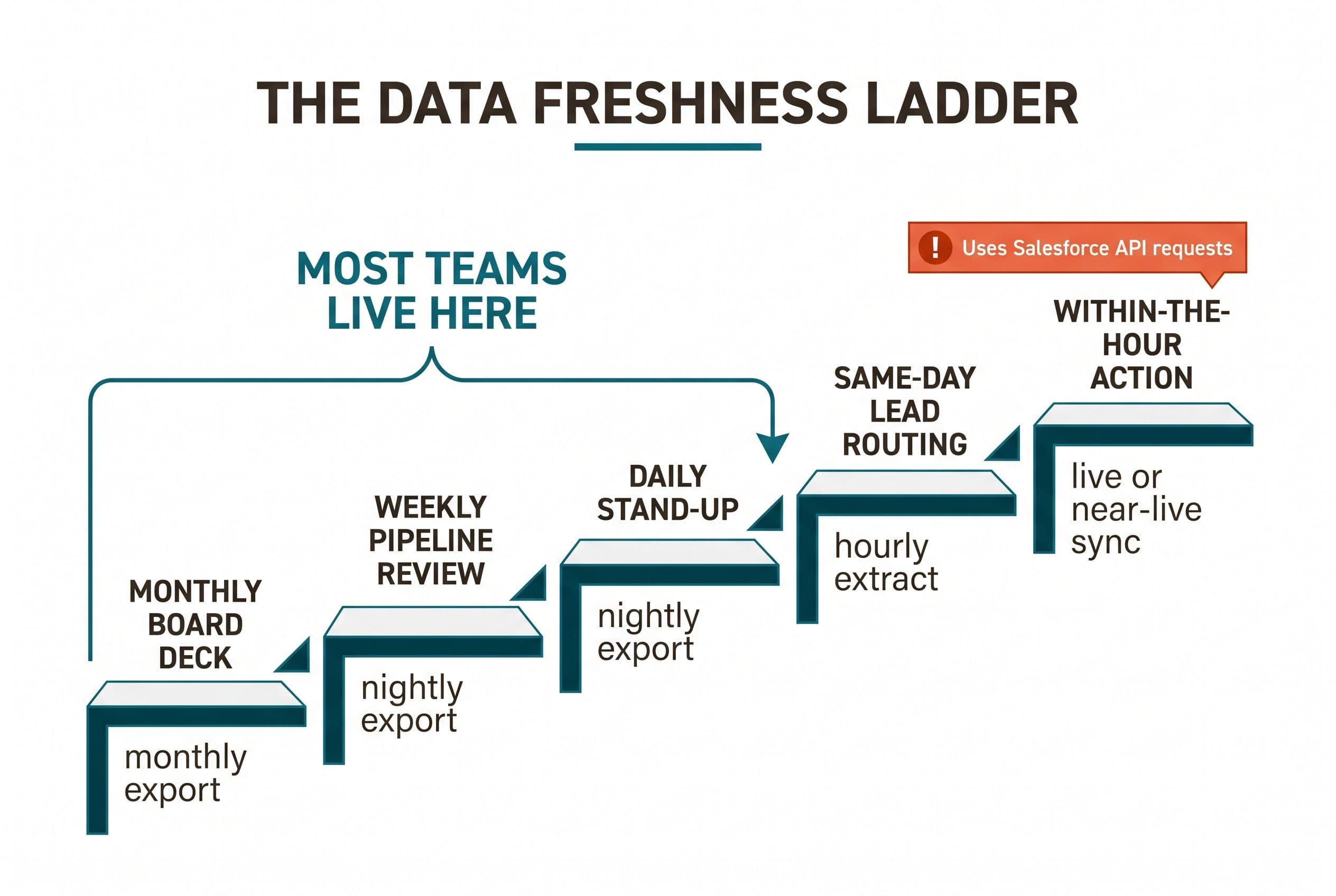
Tableau Salesforce data refresh options, side by side
| Option | Freshness | Pricing model | Where it breaks | Who it fits |
|---|---|---|---|---|
| Native Tableau extract | Hourly at best, usually nightly | Tableau per-seat, as above | No live data, and no easy joins with non-Salesforce data | Teams already on Tableau whose reviews follow a meeting schedule |
| Third-party live driver (e.g. CData) + Tableau Bridge | Near-live | Driver license plus Tableau seats | Every query uses Salesforce API requests | Teams with a real within-the-hour use case and spare API headroom |
| Nightly export into Postgres, any dashboard on top | Overnight | Hosting plus whatever dashboard you choose | Someone has to own the sync job | Teams joining Salesforce with finance or ops data |
| Custom dashboard on a mirrored Postgres | Minutes, if built for it | Fixed build plus hosting | You need a developer for changes | Teams with many viewers and a growing seat bill |
| Salesforce Data Cloud | Near-real-time | Data 360 Starter SKU at $60,000/year, extra Flex Credits at $500 per 100,000 | Price | Enterprises, not a 25-person sales team |
A few notes on the table.
The driver speed numbers come from the vendor. CData's own comparison says loading about 600,000 Salesforce records took 144 seconds with the native connector and 12 seconds with its ODBC driver, which also gives you a live connection. That may well be accurate. Still, test it on your own data before you treat it as a fact.
Bridge matters if the driver runs on your network. Tableau Bridge is a free, supported client that connects Tableau Cloud to data on a private network, for extract refreshes and live queries. Per that FAQ, each client handles up to 16 live queries, though how you set it up changes how far that goes. Either way, it's one more machine someone has to keep running.
Data Cloud is out of proportion for most SMBs. (Salesforce has been renaming it Data 360, which is why the SKU in the table carries that name. Same product.) Those are the list figures I found, and Salesforce reprices this one often, so get a current quote before you plan around them. Even so, the Starter SKU alone costs more than four years of the Enterprise Tableau bill in my example. Structured Salesforce data ingestion has been free since 2025, but the platform fee is still the platform fee.
Salesforce API limits are why "live" can break your other integrations
This is the line item nobody budgets for.
Salesforce spreads API load by limiting both concurrent and total API requests, and the exact allocation depends on your edition and licenses. Your admin can pull the numbers for your org. When a Tableau connection hits those limits, you get errors. Your other integrations draw on that same pool: the dialer logging calls, Zapier creating records, the marketing tool syncing contacts.
A live connection makes the dashboard one more API consumer, and an unpredictable one. Each filter click can become a query. Put 20 Viewers on the pipeline dashboard at 8:30 on Monday and your call-logging integration can start failing. Nobody will connect the two until someone notices a morning of calls never made it into the CRM.
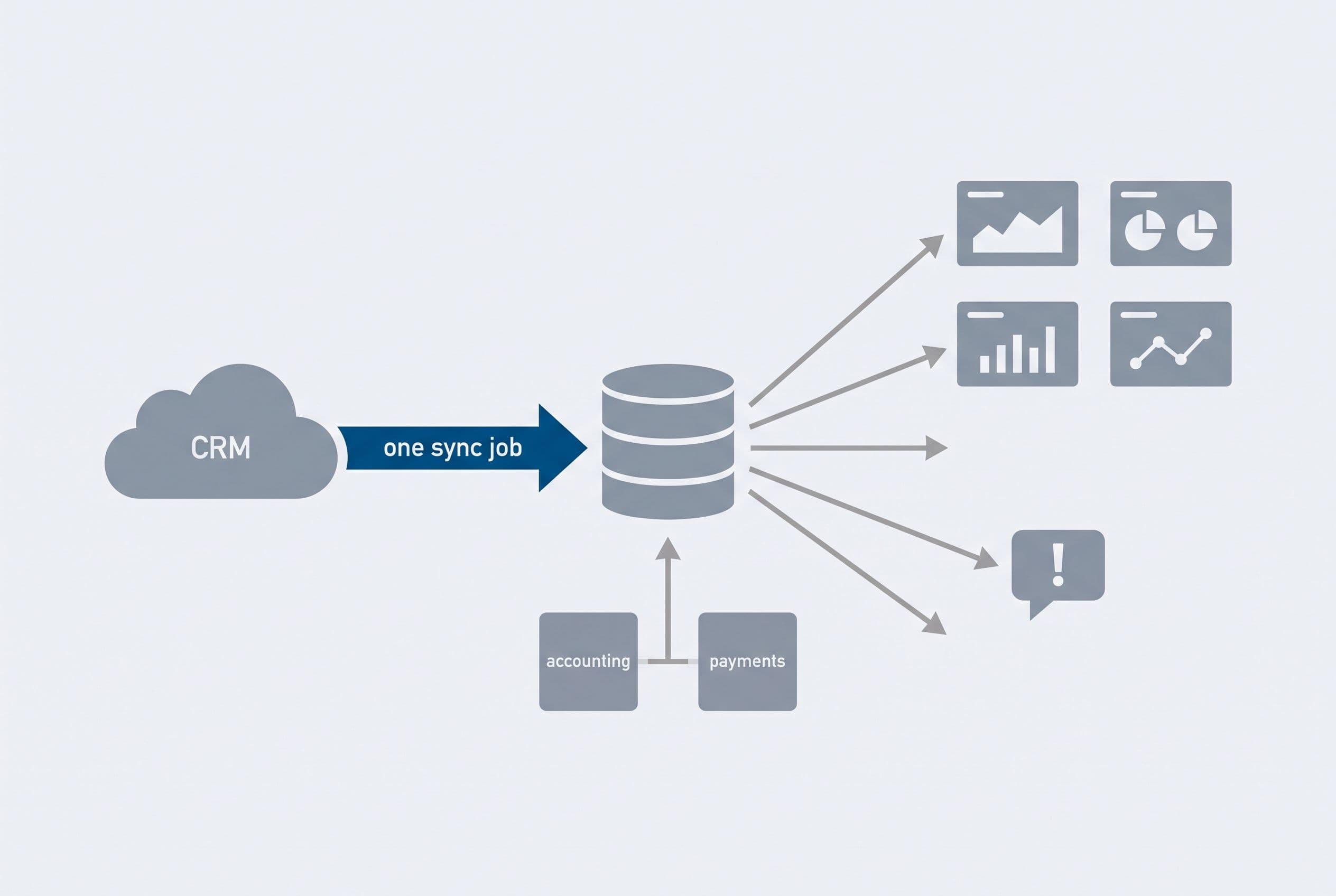
The mirror pattern fixes this, and it's how I'd build a custom Salesforce reporting dashboard:
- One sync job pulls the changes. That's a scheduled pull through the Salesforce API. Where your edition supports it, you can also subscribe to Salesforce's change events so updates arrive within minutes instead of overnight. Both still use API calls and have their own limits. The difference is you decide how many.
- The data lands in Postgres (I usually use Supabase), next to anything else you want to join it with: QuickBooks invoices, Stripe payments, job data.
- The dashboard reads Postgres, not Salesforce. I build it in Next.js with TypeScript and host it on Vercel. Fifty viewers don't add a single Salesforce API call over one viewer.
- Permissions get rebuilt on purpose. If a rep can only see their own deals in Salesforce, the dashboard needs logins and row-level rules that do the same. That's real work, and I scope it upfront rather than discovering it in week three.
- Alerts go to Slack when a number crosses a line you care about, so nobody has to sit on a dashboard waiting.
Your Salesforce API usage becomes predictable and stops depending on how many people look at the numbers. That's the real fix for the connector's limitations. Paying for "live" isn't.
Three years of leaving it alone, in dollars
Here's the same 25-person example run out three years. All of this is illustrative arithmetic. Tableau figures use the published prices above. The hosting and change budget are my assumptions, not quotes.
| Year 1 | Year 2 | Year 3 | 3-year total | |
|---|---|---|---|---|
| Tableau Standard (2 Creator / 3 Explorer / 20 Viewer) | $6,912 | $6,912 | $6,912 | $20,736 |
| Tableau Enterprise (same mix) | $13,680 | $13,680 | $13,680 | $41,040 |
| Custom dashboard: medium build ($5,000–$15,000) + assumed $600/yr hosting + one $2,500 change per year in years 2–3 | $5,600–$15,600 | $3,100 | $3,100 | $11,800–$21,800 |
Where you land in that build range comes down to a few things: how many systems you're joining (Salesforce alone vs. Salesforce plus QuickBooks plus Stripe), how many roles and row-level permissions you need, and how much history has to be backfilled into Postgres on day one. Fewer of each pushes you toward the bottom. All of them push you toward the top.
This table assumes headcount stays flat, and it rarely does. Add five Viewers a year and the Tableau rows climb while the custom row doesn't move. It also leaves out the hours someone spends exporting CSVs to join Salesforce data with QuickBooks by hand, because those hours belong in every row where the workaround still exists.
Now for the honest part. On Standard, at this size, it's roughly a wash at the top of my range. If your Tableau bill is a couple of Creators and a few Viewers on Standard, keep renting. The payback isn't there. The same goes if you've built years of workbooks your analysts depend on, or if your team really uses Tableau for ad hoc exploration rather than the same five charts every week. Tableau is very good at that.
The math changes when you're on Enterprise, when Viewer seats keep growing, or when the dashboard you actually need joins Salesforce with data Tableau can't easily reach. Upkeep counts too. I walked through the archive-and-maintenance side of this in what it really costs to replace Zendesk, and it applies to reporting just as much.
If you'd rather not run this math yourself, send me the bill and I'll do it.
Send us your software bill
Bring what you pay today. We'll tell you plainly whether a replacement would pay for itself, or whether you should keep renting.
Deal-breakers: when live sync, or a build, is the wrong call
Skip live sync if:
- No one acts on the data within an hour (go back to checklist question #1)
- Your org is already close to its API limits
- No one owns the driver, the Bridge machine or the failed-refresh alerts
Skip a custom build if:
- Your Tableau spend is small and stable. Look at the Standard row above: if your number is smaller than that, renting wins.
- You're deep in the Salesforce ecosystem, with CRM Analytics licenses and an admin who lives in them. Staying inside the platform is the better trade.
- You want a developer embedded with your team for years. I'm not that, and I'd say so on the first call. I scope a build, ship it in weeks and hand it off.
There's also one Salesforce cost a dashboard won't touch. If your real problem is the CRM itself, a reporting project is the wrong fix. Fixing or re-implementing Salesforce is a separate, usually much bigger project, and it's a different decision. The wider question of when to stop renting is covered in my guide to owning your software instead of renting it.
What to do this week
- Write down every decision the dashboard feeds and how fast each one has to happen. If nothing has to happen within an hour, switch your extract to nightly and you're done with the freshness question.
- Pull last month's dashboard viewers from Tableau's usage data. Flag the seats nobody opened. Since Tableau Cloud is billed annually, you usually can't drop them mid-term, so put your renewal date in the calendar today and cut them then.
- Ask your Salesforce admin for API usage over a normal week. Write down the peak.
- List the non-Salesforce data you keep joining by hand, such as QuickBooks, Stripe or your ops tool. That list is the scope of a custom dashboard.
- Price it. The free project estimator shows a range before it asks for anything.
If you do build, here's how I'd run it. A medium build like this one, with Salesforce sync, a couple of integrations and user roles, takes 2–4 weeks at a fixed price. More integrations, more permission rules or a big history backfill push it toward the long end, and I'll tell you which side you're on during scoping. Your part is one scoping call, a short weekly review and a final test pass. If the work runs over, that's my problem, not yours. The code goes into your repo from day one. When you make the final payment, the contract transfers ownership of the custom code and source to you. (I keep only my generic reusable components, and third-party libraries keep their own licenses.) With the source and the handoff documentation, any developer can take it over.
Here's what I think most teams actually need: not live, just the numbers right by 7 a.m., joined with the books, without paying per head to look at them.
If that's you, run the estimator. It's five questions and takes about ninety seconds. Your range shows on screen before any form, and I send a fixed quote back within one business day.
Want a real number for your own project?
Answer a few questions and get an instant price range and timeline. No call required, no obligation.
Get your instant estimateTalk through your software project with MattP.S. The fastest payback usually costs nothing: switch your Tableau extract to nightly and flag the Viewer seats nobody opened last month so you can drop them at renewal. Do that first, then see if the remaining bill is worth replacing.
Frequently asked questions
- Can Tableau connect live to Salesforce?
- Not with the native connector. Tableau's built-in Salesforce connector only supports extracts, which can be scheduled as often as hourly but aren't real-time. Getting live data takes a third-party driver, a different Salesforce product like CRM Analytics or Data Cloud, or your own sync pipeline.
- How often can a Tableau Salesforce extract refresh?
- Native connector extracts can be scheduled as often as hourly, according to Atrium AI's 2024 comparison. Most teams that review dashboards in weekly or monthly meetings do fine with a nightly refresh, which also uses fewer Salesforce API requests.
- Does Tableau count against Salesforce API limits?
- Yes. Salesforce limits both concurrent and total API requests, and Tableau connections draw from the same pool as your dialer, Zapier and marketing integrations. Hitting those limits causes errors, which is why live querying with many viewers is risky. Mirroring the data into a separate database avoids the problem.
- Is a custom Salesforce reporting dashboard cheaper than Tableau?
- It depends on seat count and edition. In an illustrative 25-person example, Tableau Standard costs about $20,700 over three years and Enterprise about $41,000. A custom dashboard is a $5,000–$15,000 fixed-price build plus hosting and occasional changes. A small, stable Tableau Standard bill usually isn't worth replacing; a growing Enterprise bill usually is.
- Do I need Salesforce Data Cloud for real-time reporting?
- Probably not if you're a small or mid-sized business. Data Cloud's Data 360 Starter SKU lists at $60,000 per year, which is more than most SMB dashboard needs justify. A scheduled sync into a Postgres database you own can deliver data within minutes for a small fraction of that.
What would software built for your business look like?
Replacing a subscription, fixing software that fell short, or adding AI to your workflow? Talk through the scope with Matt.
Matt Brody
Founder, BuiltInWeeks
I build custom software for small and mid-sized businesses — the kind you own outright instead of renting by the seat. Fixed price, delivered in weeks, source code handed over at the end.
More about how I workKeep reading

PhoneBurner Salesforce Integration: $340 a Rep, or Own It
Ten reps on PhoneBurner and Salesforce pay $40,800 a year in licenses, and the sync between them is usually where the data goes wrong. Here's one call followed from dial to Salesforce task: where the sync breaks, what an owned replacement does differently, and the three-year math on fixing it, renting it, or owning it.
Read more
Integrated Business Management Software: Dental Costs
I'd budget $5,000–$15,000 for a scoped dental operations app with integrations—not a replacement for your entire clinical system. Here's how I separate the build from migration, hosting, API access and maintenance, then compare it with three more years of renting.
Read more
Cost to Replace GoHighLevel: $10K–$25K, Then the Cutover
Replacing GoHighLevel with software you own costs $10K–$25K and takes 2–6 weeks to build. The build isn't the hard part. Getting your data, conversation history and phone numbers out is, and some businesses shouldn't leave at all. Here's the checklist, the three-year math, and the cutover plan.
Read more