PhoneBurner Salesforce Integration: $340 a Rep, or Own It

It's Monday. Your rep swears she worked her whole list on Friday. Salesforce shows a fraction of those calls, half the dispositions say "Other," and nobody can tell you where the rest went.
If you run a sales team on PhoneBurner and Salesforce, you've had that morning. If you've got fewer than 5 reps, skip down to the seat-bill section. Renting is probably your answer, and I'll say so there.
Ten reps on PhoneBurner Professional and Salesforce Sales Cloud Enterprise cost $340 per rep per month in licenses. That's $165 for the dialer and $175 for the CRM, both billed annually at current published rates. Before anyone dials a single minute, that's $40,800 a year.
The phoneburner salesforce integration is supposed to make that money work as one system. Usually it's where the data leaks out instead.
The connector itself mostly works. The trouble is that it syncs what it was designed to sync, and your sales process isn't the one it was designed around.
Below I follow one call through the whole loop (dial, disposition, CRM update, follow-up), mark where it breaks, and price the ways out. Fix the sync, keep renting, or own the dialer outright.
$340 a rep, billed twice for the same person
Here's what the loop costs at published 2026 pricing:
| Line item | Pricing model | Per rep / month | 10 reps / year |
|---|---|---|---|
| PhoneBurner Professional (includes Open API) | Per seat, billed annually | $165 | $19,800 |
| Salesforce Sales Cloud Enterprise (includes API access) | Per seat, billed annually | $175 | $21,000 |
| Combined | $340 | $40,800 |
Sources: PhoneBurner's published pricing (2026), which I'm reading as the annual-billing rate. If your contract shows a lower annual rate, every number below shrinks with it, so use your invoice. Salesforce Enterprise pricing as reported by Tech.co (2026). Some other sources list Enterprise lower than $175. Vendors change these pages without warning, so check both current prices before you lean on my totals.
Every rep you hire adds $4,080 a year across both tools. Hire three more and you're at an extra $12,240 a year, without a single new feature. That's seat creep. Your bill tracks your headcount, not how much you actually dial.
I'm treating Salesforce as fixed for this whole post. Ripping out a CRM is a different project with a different payback. The dialer half is the part you can actually move.
Put your own seat count into the calculator below and look at the dialer line by itself before you read further.
Price your stack in two minutes
List the subscriptions you pay for and see what they cost over 3, 5 or 10 years next to owning the software. No email needed to see the number.
Why I'd fix it with one path instead of a better connector
The project I'll point to has nothing to do with sales. It's real, it's my own family's, and no client or money was involved, so there's no payback math to show. What it shows is the pattern.
My wife and I homeschool our four kids. We'd already taught two of them to read, so we knew the process worked. It just meant working through more than a thousand pages of books and workbooks: scattered, slow, and hard to keep consistent.
So I built a web app that turns all of that into 50 structured lessons on a 100% phonics approach. A parent and kid use it together for about 15 minutes a day. It has over a dozen activity types, 49 original stories that get harder as you go, and hundreds of audio files so nobody has to guess at a pronunciation. I built it in weeks, and my family uses it every single day.
The point: a process that works but is spread across too many places gets abandoned. A rep working between PhoneBurner and Salesforce has the same problem as a parent with a shelf of workbooks. Your reps don't need a better bridge between the two screens. They need one path.
One call, followed from dial to Salesforce task
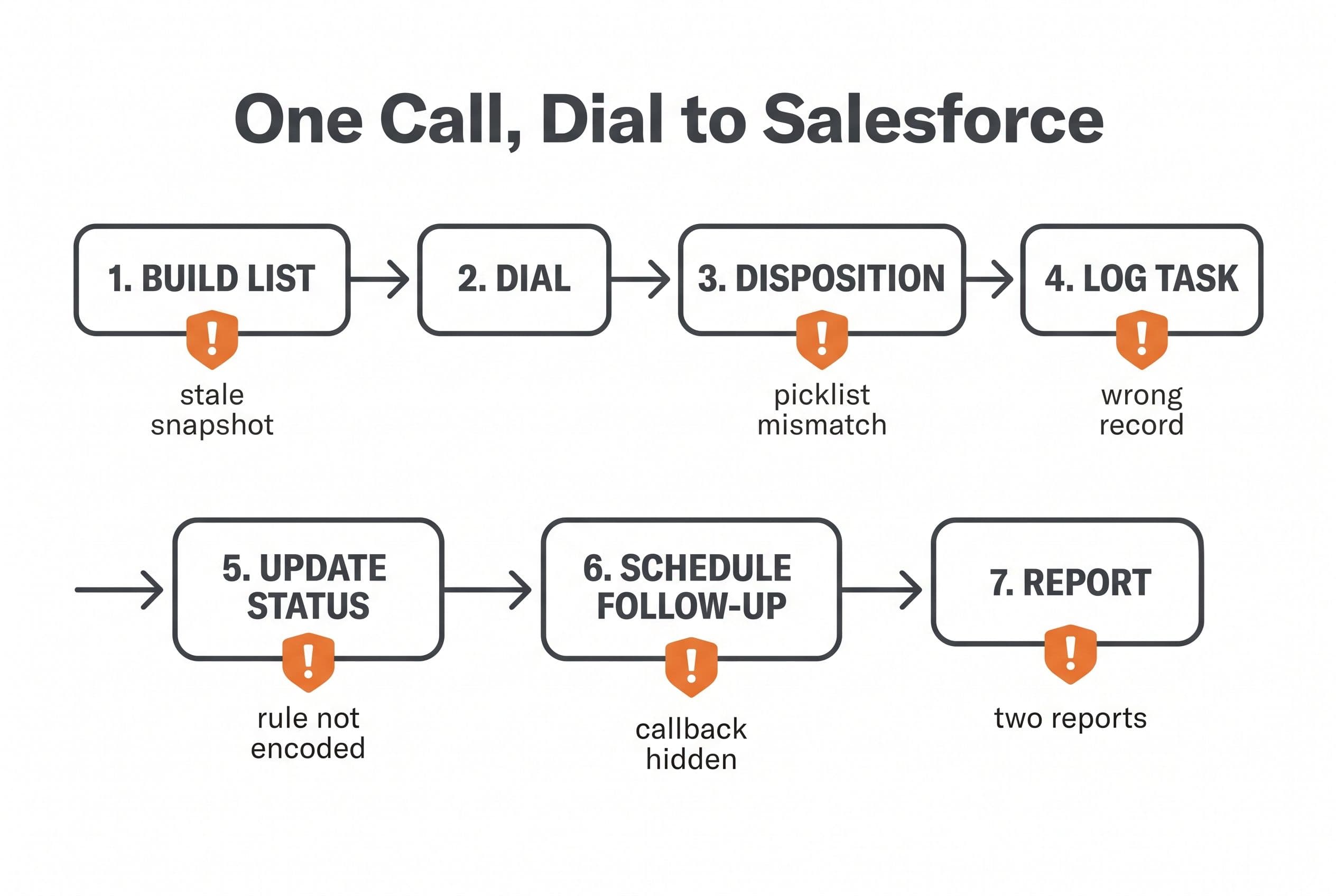
Here's the loop for a typical outbound team: lead list in Salesforce, reps dialing in PhoneBurner, results expected back in Salesforce. These are the failure points I'd check first on any dialer-to-CRM connector, PhoneBurner's included. Your setup may handle some of them already. Test them; don't assume either way.
| Step | What's supposed to happen | Where it typically breaks |
|---|---|---|
| 1. Build the call list | Pull the right leads from Salesforce | The list is a snapshot. A lead reassigned or closed mid-session still gets dialed. |
| 2. Rep dials and connects | Call goes out under the right caller ID | Usually fine. That's the part dialers are good at. |
| 3. Rep picks a disposition | Maps to your Salesforce picklist | Dialer dispositions don't match your picklist one-to-one. "Left VM, 2nd attempt" lands as a generic value. |
| 4. Activity logs to Salesforce | A Task lands on the correct record | Lead vs. Contact vs. duplicate. One phone number matching two records means the call goes to the wrong one. |
| 5. Status and next step update | Lead Status moves per your rules | Your rule ("three no-answers moves to nurture") lives in a manager's head, not in the connector. |
| 6. Follow-up gets scheduled | Rep and manager both see it | The callback lives in the dialer, and the manager looking at Salesforce can't see it. |
| 7. Reporting | One view of activity and pipeline | Connect rates sit in one tool and pipeline in the other. Someone stitches them together in a spreadsheet every Monday. |
Count the steps where a human has to fix something by hand. That's your real integration cost, and it never shows up on an invoice.
Why Salesforce call disposition sync drifts
This is mechanical, not mysterious.
Two systems both think they own the record. PhoneBurner keeps its own copy of the contact, and Salesforce keeps the real one. When a rep edits a phone number in the dialer and an admin merges duplicates in Salesforce on the same afternoon, one edit wins and nobody gets told which.
The field mapping is static, and your process isn't. You add a disposition value or a custom field in Salesforce, and the mapping in the connector stays where it was. The sync keeps running, just with less of the data you care about.
Salesforce can reject writes your reps never see. Validation rules, required fields, and Flow automation can all bounce an incoming Task or field update. The rep clicked "Interested" and moved on. The record never changed.
API rate limits are real. Salesforce gives every org a daily allocation of API requests. A busy dialing team, plus your marketing sync, plus anything you have wired through Zapier, all draw from the same pool.
None of this is unique to your team. Getting the sales process actually living inside the CRM is one of the most common things sales leaders say they struggle with, and lack of integration keeps showing up on the lists of reasons CRM projects fail.
The tools work fine individually. What breaks is the handoff between them.
Is it the sync, the dialer, or the seat bill?
Three different problems look the same from the sales floor. Here's how to tell them apart.
Test first. Pull 50 calls from last week in PhoneBurner. For each one, open the Salesforce record and check three things: did a Task land, is the disposition right, and did the status move the way your rules say it should? Write down the miss rate. It takes about an hour, and it beats any opinion, mine included.
Then match what you found:
- It's a sync problem if your reps like PhoneBurner, dial fast, and the misses are all in steps 3–6. Keep the dialer and build a small sync service against PhoneBurner's Open API (included on Professional) and the Salesforce API. That's a medium build for me: $5,000–$15,000, 2–4 weeks. It fixes the data. It doesn't touch your seat bill.
- It's a dialer-shape problem if your workflow needs something PhoneBurner was never built for: routing rules based on your custom fields, holds a manager has to approve, a callback cadence tied to deal stage. That's when owning the dialer makes sense.
- It's a seat problem if everything works and it just costs too much. Then look at cheaper rentals before you look at me. Salesforce has its own dialer add-on for click-to-dial and automatic logging. I've seen it quoted secondhand at a very low per-seat price, but I couldn't confirm that figure on Salesforce's own pricing page, outbound minutes get billed on top of the seat fee, and Salesforce has been steering customers toward partner telephony. So check the current price and confirm it's still sold to new customers before you plan around it. Aloware also sells a plan with a Salesforce integration; put its current per-user price next to your PhoneBurner invoice. I compare more of these on my PhoneBurner alternatives page.
If click-to-dial and automatic logging is genuinely all you need, price that add-on and close this tab. That's the honest answer.
Three years of the dialer seat vs. owning the loop
This is the number that tells you whether to do anything.
Every build price in this table is fixed, and the code lands in your repo either way.
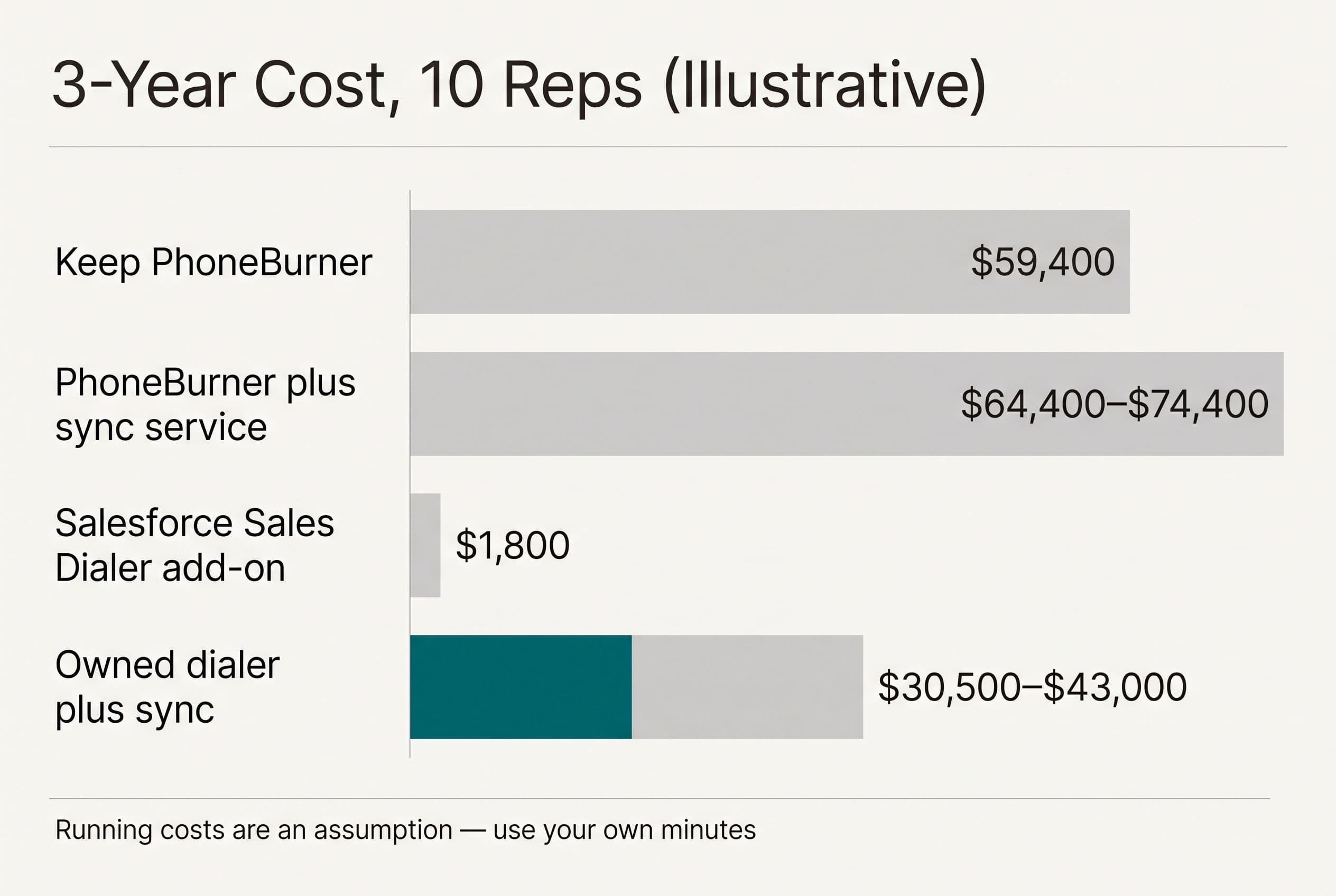
Illustrative arithmetic, not a quote. Ten reps, Salesforce kept in every scenario (so it's left out of the comparison). The running cost for the owned build is my assumption: $6,000 a year to cover Twilio voice minutes, phone number rental, call recording storage, transcription and AI calls if you add summaries, hosting, and occasional fixes. I'm not splitting that by line, because the biggest piece (minutes) depends entirely on how hard your team dials, and a team that dials all day can blow right past it. Pull your monthly minutes from PhoneBurner and swap in your own.
| 3-year cost, 10 reps | Year 1 | Years 2–3 | 3-year total |
|---|---|---|---|
| Keep renting PhoneBurner Professional | $19,800 | $39,600 | $59,400 |
| Keep PhoneBurner + custom sync service | $19,800 + $5K–$15K build | $39,600 + sync hosting | $64,400–$74,400 + hosting (build only; the sync service's own running cost isn't priced here) |
| Salesforce dialer add-on | Seat fee + per-minute charges | Seat fee + per-minute charges | Unverified. Could be the cheapest if its features cover you and it's still sold to new customers, but I couldn't confirm the price, so check Salesforce's pricing page |
| Owned dialer + sync, AI summaries, migration included | $12,500–$25,000 build + $6,000 | $12,000 | $30,500–$43,000 |
At ten reps, owning it saves roughly $16,400–$28,900 over three years and fixes the data problem too. Payback on the high end of the build comes in under two years. On the low end it's about a year.
Change the headcount and the answer changes:
- 20 reps: PhoneBurner runs $118,800 over three years. Telephony on the owned side climbs with your minutes, so plan on it rising with headcount, but the build cost doesn't. The gap gets wide.
- 5 reps: PhoneBurner runs $29,700 over three years, and the owned build doesn't clearly win. Stay with the subscription. Same goes if your team runs deep on AppExchange packages built around PhoneBurner's objects, or if the native connector already passes the 50-call test. Renting is the right call there, and I'd tell you so on the phone.
Compare the market, too. Most of the alternatives bill by the hour. Freelance Salesforce developers usually do, and agency integration work tends to get scoped as a bigger Salesforce project with an open-ended timeline. Hourly billing on a sync project pays the developer more the longer the bugs take to find. That's backwards.
I ran the same seat-versus-usage math on a power dialer for rental callbacks, and the break-even landed at a similar team size.
Want this table run with your real invoice and dialing minutes instead of my assumptions? That's exactly what the estimator at the end of this post does.
Send us your software bill
Bring what you pay today. We'll tell you plainly whether a replacement would pay for itself, or whether you should keep renting.
What the owned version does on every call
The build isn't exotic: Next.js and TypeScript for the rep's dialing screen, Postgres on Supabase as the system of record for calls, Twilio Voice for the telephony, and the Salesforce REST API for writes. The dialer checks each lead against Salesforce before it dials, or listens for changes through Change Data Capture so it isn't burning your daily API allocation on polling. Either way, step 1's snapshot problem goes away. A lead closed at 2:14 doesn't get dialed at 2:15.
Dispositions become your picklist, read straight from Salesforce, so the mapping can't go stale when you add a value. Call records still live in Postgres too, though, which is exactly why the nightly reconciliation job below exists.
The human stays on the disposition
If you add AI, the call recording gets transcribed and the model drafts two things: a short summary and a suggested disposition. The rep confirms or changes both with one click before anything is written to Salesforce. The AI never moves a Lead Status by itself.
Two changes get a second check: marking a lead Closed Lost and setting do-not-call. In the U.S., a missed do-not-call flag is a legal problem, not a data-quality one. So that flag writes immediately and gets shown to a manager in a review queue.
And do-not-call isn't the only rule outbound calling has to respect. Some states require every party's consent before you record a call, your lists need scrubbing against do-not-call registries, and your caller ID numbers need proper registration so carriers don't label you spam. I build the controls (consent prompts, scrub checks, registered numbers through Twilio). You and your lawyer own the compliance decisions. I'm a developer, not your counsel.
When a write fails at 4:55 on a Friday
This is the part connectors hide and owned builds have to get right:
- Every call gets a unique ID. Salesforce writes are upserts keyed on that ID, so a retry updates the same Task instead of creating a duplicate.
- Failed writes go into a queue, not into thin air. Each one retries with growing delays, and writes are batched to stay under your daily API allocation.
- After repeated failures, the item lands on a review screen showing the exact error ("required field Industry missing") and pings a Slack channel. A person fixes the record and replays it.
- Twilio status webhooks can arrive twice or out of order. The handler is idempotent, so the second one changes nothing.
- Every night a reconciliation job compares calls in Postgres against Tasks in Salesforce and flags any mismatch. You find drift on Tuesday, not at quarter close.
Price, weeks, and your hours
Real-time calling plus Salesforce sync is an advanced build: $10,000–$20,000 over 4–6 weeks, or $12,500–$25,000 with the AI summary layer. Your time: a scoping call, a 30-minute review each week, and a final test pass with two of your reps.
It's a fixed price, so if it runs over, that's my problem, not yours. The code lives in your own repo from day one. On final payment, the contract transfers ownership of the custom code and source to you. I keep only my generic reusable components, and Twilio, Salesforce, and open-source libraries keep their own license terms. With the source and handoff documentation, any developer can take it over.
So what happens after handoff when something breaks? Salesforce and Twilio both version their APIs and retire old ones on published notice, so every so often someone has to bump a version, rerun the tests, and fix whatever a new validation rule on your side bounced. In a normal year that's a handful of small jobs, not a project. It's what the "occasional fixes" in my running-cost assumption is for, and you can hand it to me as fixed-price work or give the docs to any developer you like.
If what you actually want is a developer embedded on your team for years, adding features every sprint, hire one. That's not what I sell, and a fixed-price build is the wrong shape for it.
Cutover steps that don't cost you a selling day
- Export everything first. Use PhoneBurner's Open API to pull call history, dispositions, and recordings into Postgres. Check your recording retention before you cancel anything.
- Write the disposition map. List every old PhoneBurner disposition next to the Salesforce value it becomes. This one-page doc stops most of the arguments later.
- Port your caller ID numbers. Start early, because carriers set the pace, not you. I covered the porting checks to run before you switch phone systems in detail.
- Build against a Salesforce sandbox, with a staging environment that never touches production records.
- Run in parallel. Two reps on the new dialer for a week while the rest stay on PhoneBurner. Compare the 50-call test results side by side.
- Cut over before the renewal date. PhoneBurner bills annually. Miss the renewal by a week and you've paid for another year of seats you won't use.
- Keep a read-only archive of the old history in Postgres, linked from the Salesforce record, so nobody loses context on a lead.
The one-page brief to hand any developer before code starts
Whether you hire me or someone else, show up with this and you'll cut the scoping time in half:
- Your 50-call test results, with the miss rate by step
- The disposition map from step 2
- Every Salesforce validation rule and Flow that fires on Lead, Contact, and Task
- Your routing and cadence rules, written out as plain sentences
- Current seat count, planned hires, and monthly dialing minutes
- Your PhoneBurner renewal date
If you're still weighing the broader decision, I've written the longer case for owning your software instead of renting it separately.
Here's the arithmetic this whole post has been building to. Ten reps pay $59,400 over three years for the dialer seat alone. An owned build with AI summaries and migration, plus my assumed running costs, comes to $30,500–$43,000, and you keep the code. Run the 50-call test, then put your seat count, dialing minutes, and miss rate into free project estimator. It'll run the same sum for your build in about ninety seconds, with the range on screen before it asks who you are. If the number works for you, the same form gets you a fixed quote within one business day.
Want a real number for your own project?
Answer a few questions and get an instant price range and timeline. No call required, no obligation.
Get your instant estimateTalk through your software project with MattP.S. Run the 50-call test this week, then bring the miss rate to the estimator. If the misses are rare and you've got fewer than 5 reps, don't buy a build. Keep PhoneBurner or price Salesforce's add-on.
Frequently asked questions
- Does PhoneBurner integrate with Salesforce?
- Yes. PhoneBurner connects to Salesforce, and its Professional plan ($165 per user per month, billed annually, at 2026 published pricing) includes Open API access for custom work. Whether the connector fits your process depends on how well your dispositions, validation rules and routing rules map onto it. Run a 50-call spot check against Salesforce records to find out.
- How much does a custom Salesforce dialer integration cost?
- A custom sync service that keeps PhoneBurner and fixes how data lands in Salesforce is a medium build at $5,000–$15,000 over 2–4 weeks. Replacing the dialer with an owned one that writes straight to Salesforce runs $10,000–$20,000 over 4–6 weeks, or $12,500–$25,000 with AI call summaries. Those are fixed prices. Most alternatives bill by the hour, and agency integration work tends to get scoped as a bigger Salesforce project with an open-ended timeline.
- Why are my call dispositions not syncing to Salesforce correctly?
- The usual causes: dialer dispositions that don't match your Salesforce picklist one-to-one, validation rules or Flows silently rejecting writes, duplicate Lead and Contact records sharing a phone number, and daily API request limits. Each system keeps its own copy of the record, so edits made on both sides drift apart.
- Is it cheaper to replace PhoneBurner with a custom dialer?
- It depends on seat count. In illustrative math with 10 reps, PhoneBurner Professional costs $59,400 over three years, while an owned dialer build plus assumed running costs comes to roughly $30,500–$43,000. With around 5 reps, the subscription usually wins. Salesforce's own dialer add-on may be cheaper if click-to-dial and auto-logging is all you need. I couldn't confirm its price when I wrote this, so check the current per-seat price and per-minute charges, and make sure it's still sold to new customers.
What would software built for your business look like?
Replacing a subscription, fixing software that fell short, or adding AI to your workflow? Talk through the scope with Matt.
Matt Brody
Founder, BuiltInWeeks
I build custom software for small and mid-sized businesses — the kind you own outright instead of renting by the seat. Fixed price, delivered in weeks, source code handed over at the end.
More about how I workKeep reading

Zoho Power Dialer: 3-Year Costs for Rental Callbacks
At the published rates cited here, 20 Zoho Voice Basic seats with the power dialer add-on total $31,680 over three years before other charges. I break down what a rental callback replacement would have to cost—and actually replace—to beat that.
Read more
Launch27 Pricing: $5K–$20K to Own a Multi-Crew Booking App
Launch27 starts at $75/month; replacing it isn't automatically a better deal. I walk through a recurring cleaning booking, the migration risks, and the three-year math behind owning a multi-crew app.
Read more
Launch27 vs ZenMaid: Flat $150/mo or Per-Cleaner Fees?
Launch27 charges a flat monthly fee. ZenMaid charges a base fee plus a fee for every cleaner you add. Here's a checklist for choosing between them, the three-year math on each, and the specific cases where owning your own booking system beats both.
Read more