Companies Similar to Calendly: 5 Picks and When to Build

Your Calendly renewal just landed, or a booking just vanished somewhere in your Zapier chain. Here's the short answer. If you're shopping for companies similar to Calendly because the bill went up or the booking page doesn't fit how you work, you probably don't need custom software. You need a tool with a different pricing model. Setmore, Acuity Scheduling, SimplyBook.me, Cal.com and Microsoft Bookings each fix a specific Calendly complaint, and most of them cost less than one lunch per month.
I build custom software for a living, and I'm telling you not to hire me for this one. The exception is when scheduling has quietly turned into the front door for your whole operation. That's a different problem, and I'll show you how to tell which one you've got.
The Decision You're Actually Making
Nobody searches for Calendly competitors for fun. You're here for one of three reasons:
- Cost. You pay per seat, and every new hire who takes bookings adds to the bill.
- Fit. The booking flow doesn't ask the questions you need, take a deposit the way you want, or send people to the right staff member.
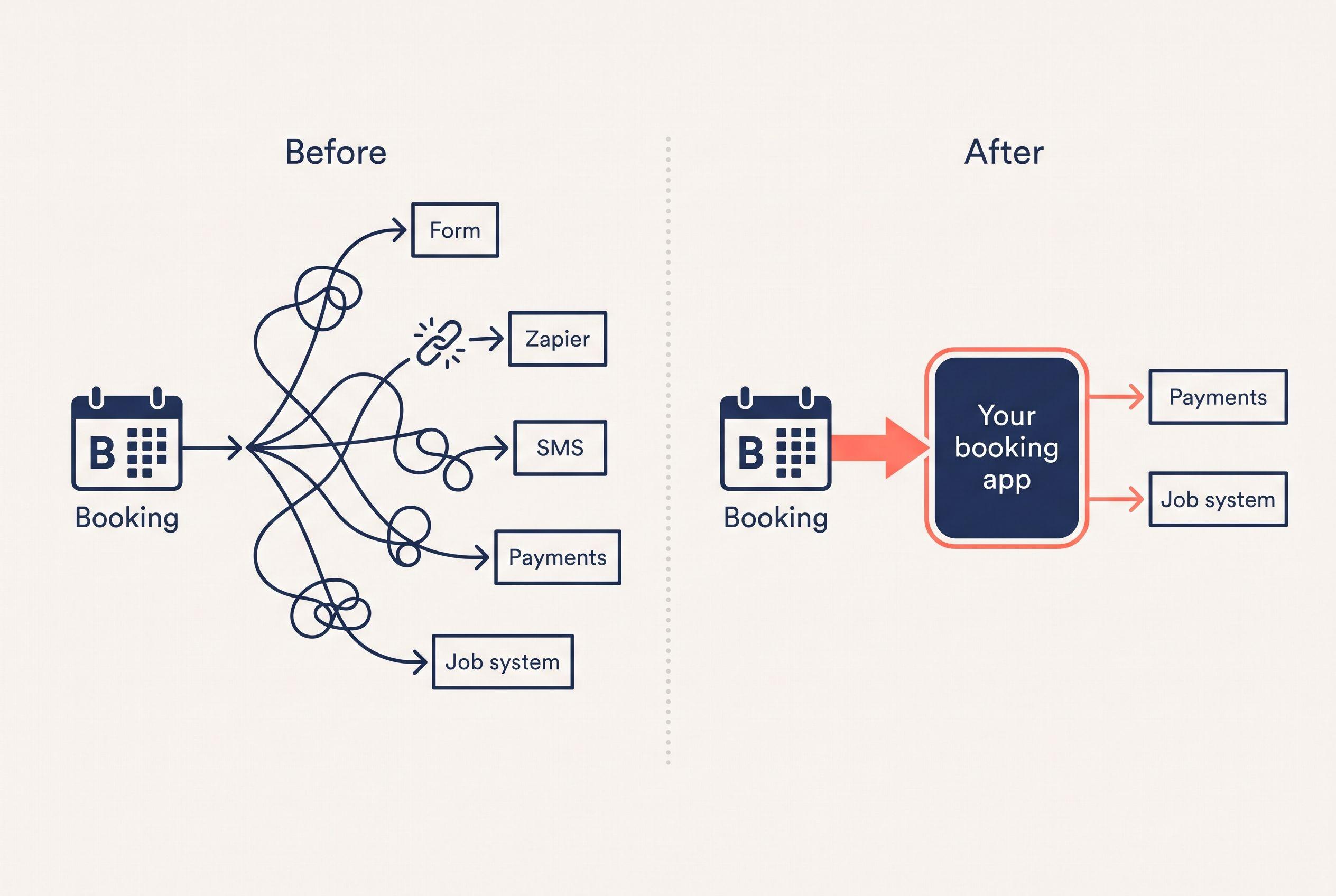
- Duct tape. Calendly works fine, but there's a Zapier chain behind it pushing bookings into your CRM, your invoicing and your dispatch board, and it breaks about once a month.
Reasons one and two usually get solved by switching tools. Reason three is where building starts to make sense. The rest of this post is a checklist for figuring out which reason is really yours.
What Calendly Pricing Per Seat Adds Up To
Calendly's Standard plan is $10 per seat per month billed annually, or $12 per seat billed monthly. That's the published pricing as I write this, so check Calendly's own page before you renew. It's cheap for one person. It's a per-seat model, though, so the bill follows your headcount, not your booking volume.
Here's some illustrative arithmetic on Standard:
| Seats taking bookings | Annual billing ($10/seat) | Monthly billing ($12/seat) |
|---|---|---|
| 3 | $360/yr | $432/yr |
| 10 | $1,200/yr | $1,440/yr |
| 25 | $3,000/yr | $3,600/yr |
Look at where you sit on that table. Then add whatever else you're paying to make Calendly talk to everything else: the Zapier plan, the SMS add-on, the form tool sitting in front of the booking page.
If you want to see your whole stack priced together rather than one tool at a time, the calculator below does that with no form and no call.
Price your stack in two minutes
List the subscriptions you pay for and see what they cost over 3, 5 or 10 years next to owning the software. No email needed to see the number.
So why would a builder bother writing about scheduling tools? Because I know what it feels like when a process lives in too many places. My wife and I homeschool our four kids. Teaching our five-year-old to read meant working through more than a thousand pages of books and workbooks. The method worked. It was also scattered, slow and hard to stick with. So I built a web app that boils it down to 50 structured lessons, about 15 minutes a day for a parent and kid together, with over a dozen activity types, 49 original stories and hundreds of audio files. It took weeks to build, and my family uses it every single day. (That's my own project, not a client's, and your results will vary.)
It's not a scheduling app, and I won't pretend it is. The lesson that carries over is narrower: custom software earns its cost when it replaces a scattered process with one clear path. It doesn't earn it by copying a $10 tool.
Five Scheduling Tools Like Calendly, Matched to the Problem
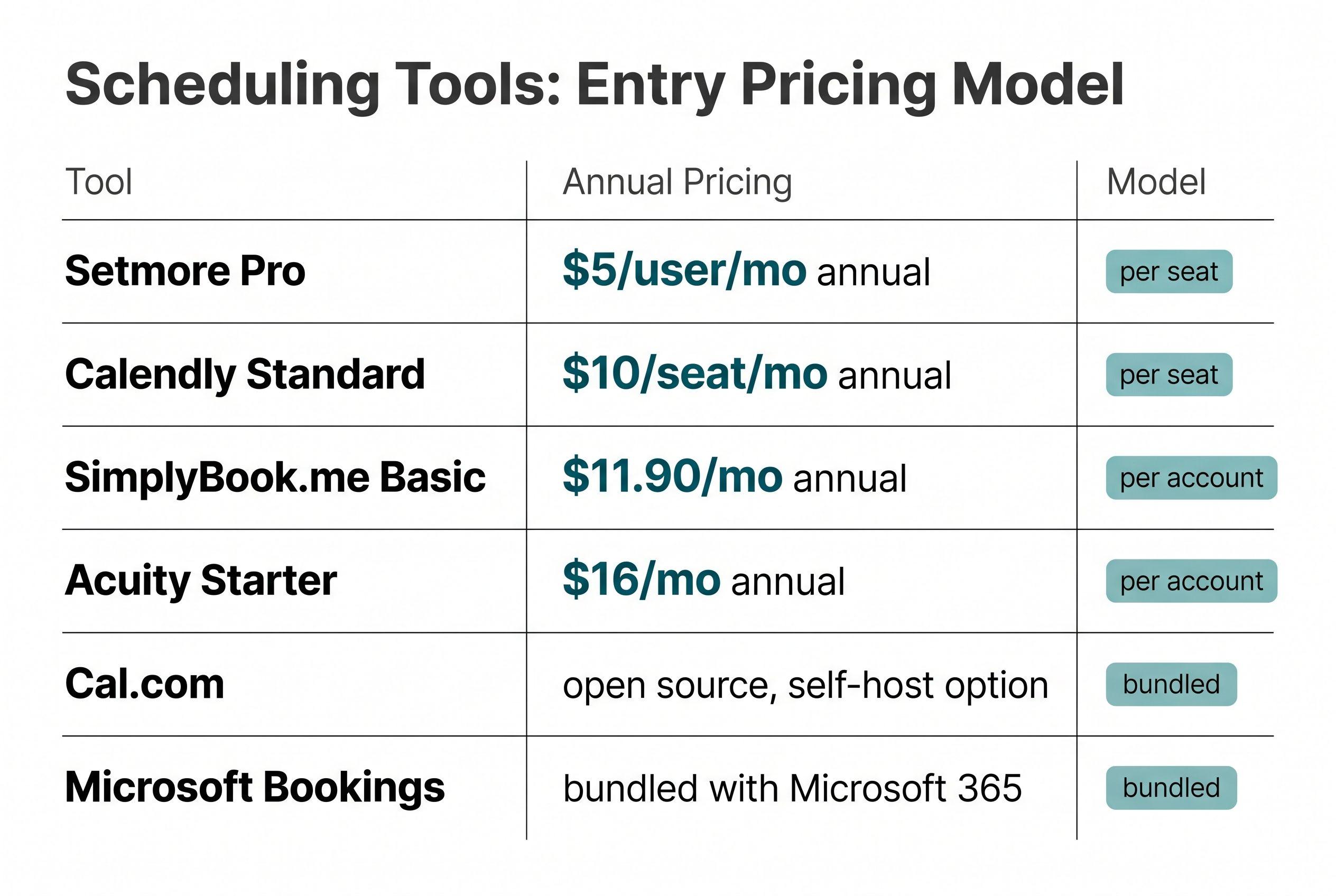
These are the five I'd look at first. The prices below are the published rates as I'm writing this. Vendors reshuffle their plans often (Setmore especially), so check each vendor's pricing page before you commit. Where I don't have a number, I describe the pricing model instead.
| Tool | Pricing model | Published entry price | Best fit | Where it falls short |
|---|---|---|---|---|
| Setmore | Per user | Pro: $5/user/mo annual, $12 monthly | Small teams on a tight budget | Less depth in routing and complex rules |
| Acuity Scheduling | Per account, tiered by staff calendars | Starter: $16/mo annual, $20 monthly | Solo practitioners and studios taking payments and intake forms | Higher tiers needed as staff calendars grow |
| SimplyBook.me | Tiered plans | Basic: $11.90/mo annual, $13.90 monthly | Service businesses wanting a booking site with lots of add-on features | Features spread across tiers and add-ons |
| Cal.com | Open source; hosted plans or self-host | Check current pricing | Teams wanting to own the data or customize | Self-hosting means you run it |
| Microsoft Bookings | Included with many Microsoft 365 business plans | Bundled | Shops already paying for Microsoft 365 | Basic compared to dedicated tools |
Setmore: the cheapest per-seat swap
If cost is your whole complaint, start here. At $5 per user billed annually, Setmore Pro is half Calendly Standard's annual rate. For a 10-person team that's the difference between $1,200 and $600 a year. It's still per-seat pricing, so the bill still grows when you hire. It just grows slower.
Acuity Scheduling: for client-facing service businesses
Acuity is built for people who book clients, not people who book meetings. Think intake forms, packages, payments at booking. If you're a therapist, trainer, salon or consultant, it fits better out of the box than Calendly does. The Starter plan suits one practitioner. More staff means a bigger tier.
SimplyBook.me: booking software for service business, with extras
SimplyBook.me works more like a booking website than a link you paste into an email. It's a solid fit if customers find you and book directly. The trade is complexity: lots of features, spread across plan tiers.
Cal.com: the "I want to own this" option
Cal.com is open source, which means you can self-host it. That's the closest you'll get to ownership without building anything. The catch is real: self-hosting means someone on your side handles updates, uptime and fixes. If nobody on your team wants that job, use their hosted plans.
Microsoft Bookings: the one you might already pay for
Before you buy anything, check your Microsoft 365 plan. Lots of businesses already have Bookings bundled and have never opened it. It's basic. Basic is fine if all you need is "pick a time, get a confirmation."
For a deeper side-by-side on replacing Calendly specifically, I keep a running breakdown of Calendly alternatives that goes tool by tool.
The Checklist: Rule Options In or Out
Answer these honestly. They'll tell you whether to switch, stay, or build.
1. How many people take bookings? Under five, per-seat pricing barely matters, so pick on features. Over twenty, pricing model starts to matter more than features.
2. Does a booking trigger work in other systems? If a booking just lands on a calendar, any tool above works. If it needs to create a job, a quote, an invoice or a dispatch slot, write down every system it touches.
3. How many Zapier or Make steps sit behind your booking page? Zero to two is normal. Five or more, with filters and paths, means you've built software already, just fragile software you don't own.
4. Do you need rules the tools can't express? Examples: "route to the tech whose service area covers this ZIP," "require a deposit only for new customers," "block booking until a photo is uploaded." Test your real rule in a free trial before you assume any tool handles it.
5. Does your customer data need to live somewhere you control? If yes, look hard at Cal.com self-hosted, or at a build.
6. Are you locked into an ecosystem? If you run on HubSpot or Salesforce and their meeting tools already connect to everything, leaving makes no sense. Stay put.
Disqualifying conditions for a custom build (any one of these means don't build):
- Your total scheduling-related spend is under a few hundred dollars a month.
- One of the five tools above handles your real rule in a trial.
- Your booking flow changes every few weeks and nobody owns the process.
- You want a developer on call indefinitely rather than a finished, handed-off system.
Three Years of Doing Nothing, in Dollars
Here's the honest version of the cost to replace Calendly, set next to staying. This is illustrative arithmetic, not a quote. Plug in your own seat count.
| Scenario (3 years) | Stay on Calendly Standard (annual) | Switch to Setmore Pro (annual) | Custom booking build (build + 3 years hosting) |
|---|---|---|---|
| 10 seats, booking only | $3,600 | $1,800 | $3,940–$13,600 |
| 25 seats, booking only | $9,000 | $4,500 | $3,940–$13,600 |
| 25 seats + Zapier chain + SMS add-on + manual re-entry | $9,000 plus those costs and staff hours | $4,500 plus those costs and staff hours | $6,440–$18,600 (integrations) |
Two assumptions to flag. First, hosting and email for a small custom booking app is a usage cost, not a seat cost. For illustration, I've assumed $40–$100 a month, or roughly $1,440–$3,600 over three years, and added that to the build price in the last column. It's an assumption, not a bill, and your real number depends on traffic. SMS is the part that moves most. Twilio charges per message, so that cost scales with how many reminders you send, and U.S. carrier registration (10DLC) adds its own fees and some lead time before you can send at all. Check Twilio's pricing page for your volume. Second, any later changes get quoted as their own fixed-price job.
Now read the table straight. For booking only, staying wins. Ten Calendly seats for three years cost $3,600, and switching to Setmore halves that. Even the cheapest build, once you count hosting, lands just above Calendly and well above Setmore. At 25 seats a low-end build can edge past Calendly, but it still loses to Setmore. If your bill is that size, or your CRM already owns scheduling, or Calendly already does what you need, keep renting and spend your time elsewhere.
The third row is where the math changes. The seat bill isn't the expensive part there. The expensive part is someone retyping bookings into your job system, a Zapier chain that fails silently, and customers who book the wrong service because the form can't ask the right question. That's the same pattern I worked through in the three-year seat math on Monday.com: the license is the cost you can see, and the workarounds are the costs you can't.
If you're not sure which row you're in, send me the bill and I'll tell you which one, in plain English, along with whether a tool switch fixes it.
Send us your software bill
Bring what you pay today. We'll tell you plainly whether a replacement would pay for itself, or whether you should keep renting.
Where Scheduling Stops Being a Scheduling Problem
This section is the reason a calendar link sometimes turns into a build.
For a lot of U.S. service businesses (cleaners, plumbers, HVAC, mobile groomers, home inspectors) the booking page isn't a meeting tool. It's the intake desk. One booking needs to:
- Capture the address and check it against a service area
- Price the job, or at least set a range, from what the customer picked
- Take a deposit through Stripe
- Assign a crew or tech based on skills, territory and capacity
- Send reminders by SMS through Twilio
- Create the job in whatever runs your day, whether that's Jobber, Housecall Pro or a spreadsheet
Calendly and its competitors do the time-slot part well. The rest gets bolted on with webhooks and Zapier. Every bolt is a place it can break, and every tool in the chain bills you separately.
If that list describes your business, the question isn't really "which Calendly alternative for service business?" anymore. It's whether your field-service platform should handle booking, or whether the booking flow should be the first piece you own. I walked through that exact fork in the cleaning-business version of this decision, and the same logic carries over to most trades.
Let me be blunt about who shouldn't call me. If you're a five-person consultancy and your problem is "Calendly costs $60 a month," don't hire me. Switch to Setmore this afternoon. If you're deep in Salesforce or HubSpot with their scheduling already wired into your pipeline, a custom booking app is a bad trade too. You'd be fighting your own ecosystem.
What a Custom Booking Build Looks Like From Your Side
Say you're in the third row. Here's what owning it actually involves.
Scope and price. A focused booking app with your intake questions, your rules and a staff calendar is a Simple build: $2,500–$10,000, 1–2 weeks. Add Stripe deposits, two-way calendar sync, SMS reminders and a push into your job system, and it becomes a Medium build: $5,000–$15,000, 2–4 weeks. Real-time dispatch across multiple locations with complex routing rules is Advanced: $10,000–$20,000, 4–6 weeks.
Where you land inside a range comes down to three things: how many systems the booking has to write to, whether it takes deposits, and how many staff calendars it has to respect. One calendar, no payments and nothing downstream sits at the bottom. Several calendars, deposits and a push into another system climbs toward the top.
What can push the timeline out. Those ranges assume your job system has an open API I can write to. That's not always a given. Jobber and Housecall Pro can require partner or app approval, and some platforms only open API access on certain plans. Two-way sync with Google or Outlook calendars means going through the provider's OAuth verification, which runs on their clock, not mine. And switching Stripe and Twilio from sandbox to live (including that 10DLC registration for SMS) adds its own wait. I'll flag every one of these on the scoping call, before you sign anything.
Stack. I'd typically build it on Next.js, TypeScript and Postgres through Supabase, hosted on Vercel. That's boring, well-documented technology that any competent developer can pick up later.
Your hours. One scoping call. A short review each week where you click through what got built. A final test pass where you try to break it with your real booking scenarios. That's it. You don't get months of discovery that produce a slide deck.
Risk. It's a fixed price. The quote you get back is the price in the contract, so if the build runs long, that's my problem, not yours. The code sits in your own repository from day one. On final payment, the contract transfers ownership of the custom code and source to you. I keep only my generic reusable components, and third-party services like Stripe and Twilio keep their own license terms. You get handoff documentation, so any developer can take it over if I get hit by a bus.
Compare that to how a lot of this work gets sold. Plenty of agencies quote a build like this hourly, with weeks of discovery before anyone writes a line of code. Offshore rates look cheap on paper until you count the rework and the back-and-forth. An hourly quote rewards slow work no matter where it comes from. If you want the bigger picture on owning your software instead of renting it, that guide covers the trade across every category, not just scheduling. And if you're weighing a custom scheduler specifically, the full cost breakdown for a custom Calendly replacement goes line by line.
Your Move This Week
Don't start with a vendor demo or a developer call. Start smaller.
This week, pull your last three months of bills for everything that touches a booking. That means Calendly, the Zapier plan, the SMS add-on, the form tool. Then write down the three screens your team actually lives in after a customer books. If the total is small and those screens are all inside one tool, switch to one of the five above and you're done.
If the total is bigger than you expected, or those three screens live in three different products, put it into the free project estimator. It takes about ninety seconds. It shows you the price range on screen before it asks who you are, and if you want a fixed quote, you'll have it back within a business day. No call required.
P.S. The fastest payback for most readers isn't a build. It's opening Microsoft 365 to see if you already pay for Bookings, or moving seats from Calendly to Setmore before your next renewal.
Want a real number for your own project?
Answer a few questions and get an instant price range and timeline. No call required, no obligation.
Get your instant estimateTalk through your software project with MattFrequently asked questions
- What companies are similar to Calendly?
- The closest Calendly competitors are Setmore, Acuity Scheduling, SimplyBook.me, Cal.com and Microsoft Bookings. Setmore is the cheapest per-seat option, Acuity fits client-facing service businesses, SimplyBook.me works like a booking website, Cal.com is open source and can be self-hosted, and Microsoft Bookings is bundled with many Microsoft 365 business plans.
- How much does Calendly cost per seat in 2026?
- Calendly's Standard plan is $10 per seat per month billed annually, or $12 per seat billed monthly. Because it's per-seat pricing, a 10-person team on annual billing pays $1,200 a year and a 25-person team pays $3,000 a year before any add-ons or integration tools.
- What is the cheapest alternative to Calendly?
- Among paid plans with published pricing, Setmore Pro is the cheapest at $5 per user per month billed annually, half of Calendly Standard's annual rate. If you already pay for a Microsoft 365 business plan, check whether Microsoft Bookings is included before buying anything.
- How much does it cost to replace Calendly with custom software?
- A focused custom booking app is typically a Simple build at $2,500–$10,000 delivered in 1–2 weeks. Adding Stripe deposits, calendar sync, SMS reminders and a connection to your job system usually makes it a Medium build at $5,000–$15,000 over 2–4 weeks. For booking-only use with a small team, staying on Calendly or switching to a cheaper tool is almost always the better deal.
- What is the best Calendly alternative for a service business?
- For a solo practitioner or studio taking payments and intake forms, Acuity Scheduling is usually the best fit. For trades and home-service businesses where a booking has to check service areas, take deposits and create jobs, look at whether your field-service platform handles booking well, or whether a custom booking flow connected to your existing tools makes more sense.
What would software built for your business look like?
Replacing a subscription, fixing software that fell short, or adding AI to your workflow? Talk through the scope with Matt.
Matt Brody
Founder, BuiltInWeeks
I build custom software for small and mid-sized businesses — the kind you own outright instead of renting by the seat. Fixed price, delivered in weeks, source code handed over at the end.
More about how I workKeep reading

Monday.com Too Expensive? $3K–$17K Over 3 Years, by Seats
At 8 users, monday.com probably isn't too expensive. At 25 users on Pro, the 3-year bill is in the same range as building your own app. Here's the seat math, the checklist I'd run before canceling anything, and the conditions where you should just keep paying.
Read more
Cost to Replace Airtable: $5K–$15K + $40/Mo Hosting
Replacing Airtable with an app you own usually costs $5,000–$15,000, takes 2–4 weeks, and runs about $40 a month to host. For plenty of teams it still doesn't pay back. Here's the seat math, a pre-flight checklist, and the conditions that should keep you renting.
Read more
Alternative Calendly: Custom Scheduler Costs $2.5K–$20K
I price custom schedulers from $2,500–$20,000 before AI features, but replacing a cheap booking link rarely pays. Here's the arithmetic, the scope that moves the quote, and the recurring costs that don't disappear when you own the code.
Read more