Mobile App Development Cost Breakdown: $2,500–$25,000

My app ranges start at $2,500—not an open hourly tab
My mobile app development cost breakdown starts at $2,500–$20,000 for a scoped business build, with AI features taking the overall ceiling to $25,000. Delivery runs from 1–6 weeks depending on complexity. Those aren't blanket prices for every native iOS and Android product someone could dream up.
For an owner replacing disappointing software, I'd first price the workflow—not two app-store listings and a wishlist.
| My build category | Fixed-price range | Delivery | Scope that fits |
|---|---|---|---|
| Simple | $2,500–$10,000 | 1–2 weeks | Focused record-management app or basic dashboard |
| Medium | $5,000–$15,000 | 2–4 weeks | Multiple features, integrations, user roles |
| Advanced | $10,000–$20,000 | 4–6 weeks | Real-time features, multiple customer accounts, complex rules |
| AI features | Base range multiplied by 1.25 | Confirmed against scope | Combined pricing envelope across non-AI and AI builds: $2,500–$25,000 |
The ranges overlap because complexity isn't a screen count. A plain-looking screen that must reconcile conflicting offline edits can take more work than several ordinary forms.
Here's a real replacement I built: a React power dialer that replaced a Kixie contract costing about $30,000 a year. The build cost $10,000, so licensing-only payback was about four months.
This is a real, anonymized client project; the subscription figure is approximate, and results vary.
The business was hitting customization limits, clunky workflows, and a climbing bill. I built unlimited users, rep-assigned lead lists, single-lead calling or up to 10 lines at once, SMS templates, voicemail drops, and Zapier webhooks for follow-ups and updates. It shipped in weeks, with no monthly licensing fees for the custom software, and the reps spent less time clicking and more time closing.
That isn't a native-mobile case study, and zero licensing fees doesn't mean zero operating costs. It's evidence for the budgeting question I'd ask first: what expensive workflow are we replacing? My Kixie replacement breakdown covers that particular choice.
Follow one job from assignment to invoice
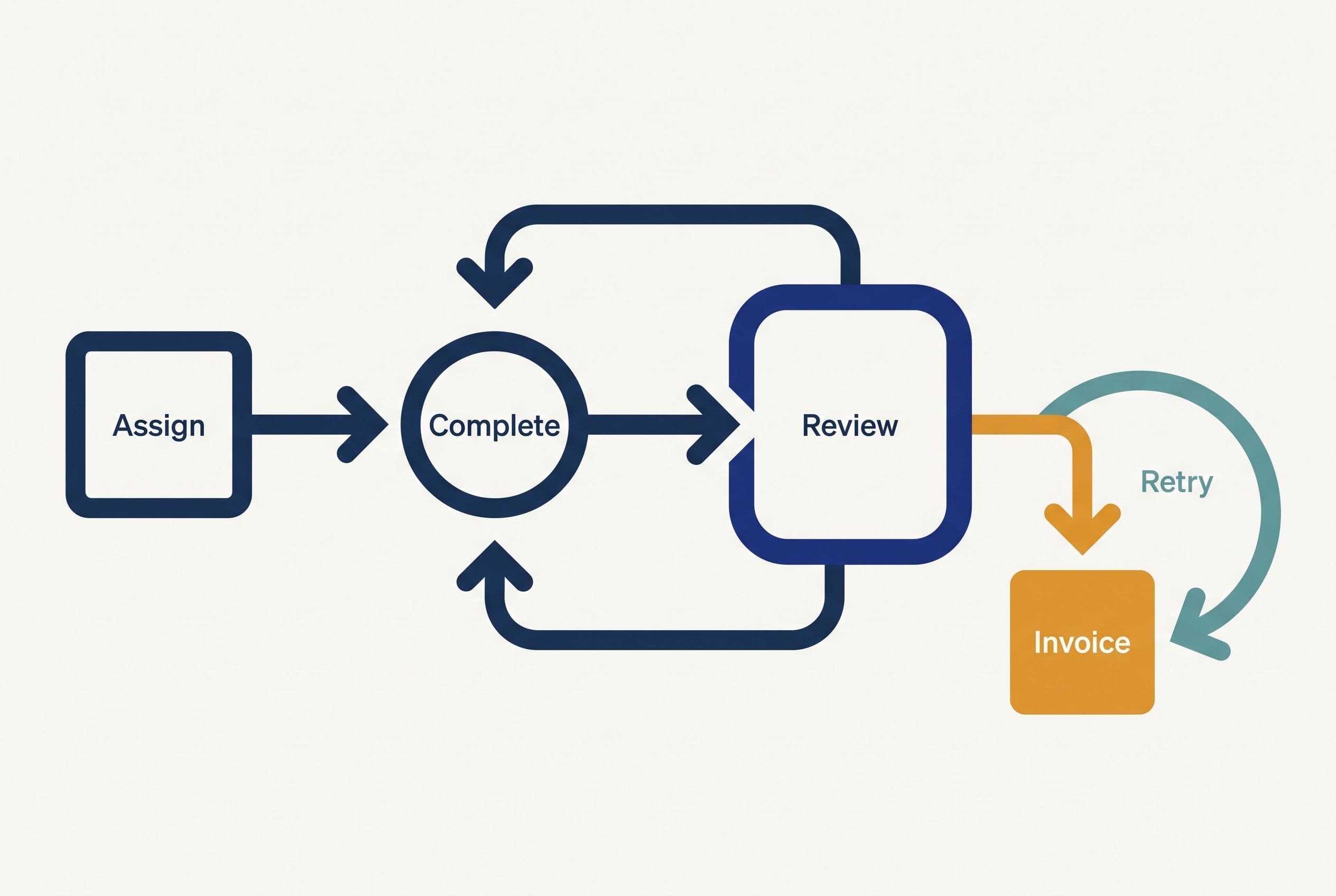
For the rest of this app development cost breakdown, I'll use an illustrative field-service workflow—not another client story: dispatch assigns a job, a technician completes it on a phone, and the office approves it for invoicing.
Suppose the current subscription stores the appointment, but the technician sends photos separately and the office retypes completion details into QuickBooks. The software hasn't removed the handoff. It's scattered it.
I'd trace each step before choosing a stack:
| Workflow step | Illustrative current failure | What I'd scope instead |
|---|---|---|
| Dispatch assigns work | Changes get buried in separate messages | Assigned-job list with visible status |
| Technician opens the job | Instructions live in another system | Job details and attachments in one view |
| Technician records completion | Photos and notes arrive separately | Completion form linked to the job |
| Office checks the work | Missing information surfaces at invoice time | Human review queue with return-for-correction |
| Office sends the invoice | Someone retypes approved details | Approved handoff to QuickBooks |
| A connection fails | Nobody knows whether the update went through | Visible failure state, retry, and duplicate protection |
I'd use React for the interface and consider Postgres for the shared job records. The tools aren't the expensive decision. The rules are.
Can a technician change a job after office approval? Can dispatch reassign it while someone is editing? Does the invoice use the originally quoted amount or the completed-work amount?
Those answers move a mobile app development cost estimate more than button colors.
I'd also keep the accounting boundary narrow. The app should pass approved information to QuickBooks, not become a homemade accounting package. I cover that boundary in my breakdown of replacing repeated data entry with an integration.
Price three more years of the broken handoff first
Before I recommend a replacement, I put the cost of doing nothing beside it. Otherwise, a cheaper-looking build can still be a bad purchase.
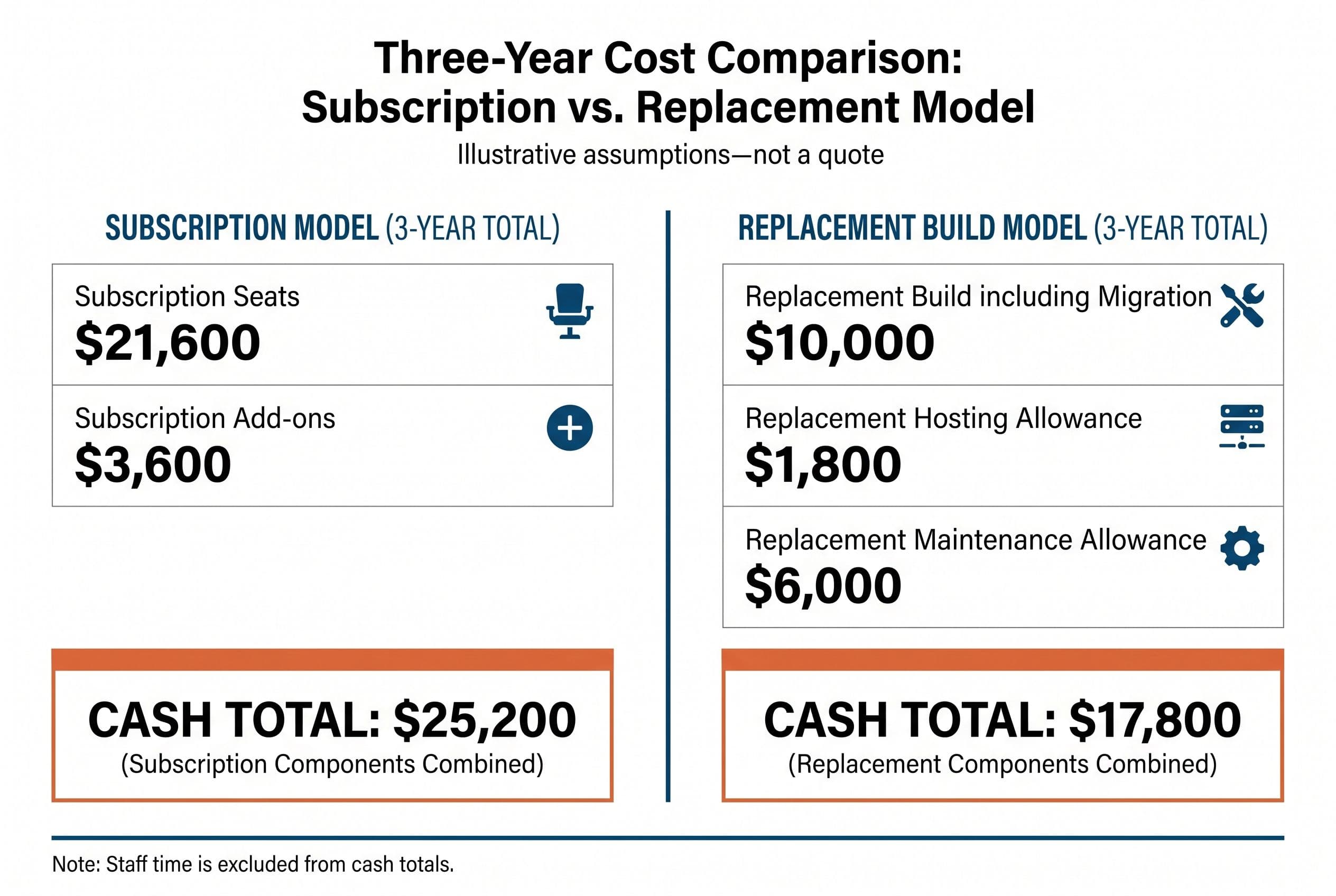
The following is illustrative arithmetic, not a vendor price list, client result, or quote. Assume the current subscription costs $600 a month across seats, add-ons cost $100 a month, and avoidable office work consumes $300 a month of staff time.
For the replacement, assume a $10,000 build including a bounded migration. Set aside $50 a month for hosting and storage and $2,000 a year for maintenance. Those operating amounts are planning allowances—not published service prices or my maintenance offer.
| Three-year cost | Keep the subscription | Build the scoped replacement |
|---|---|---|
| Current seats: $600 × 36 | $21,600 | — |
| Current add-ons: $100 × 36 | $3,600 | — |
| Build, including bounded migration | — | $10,000 |
| Hosting/storage allowance: $50 × 36 | — | $1,800 |
| Maintenance allowance: $2,000 × 3 | — | $6,000 |
| Cash total | $25,200 | $17,800 |
| Current workaround time: $300 × 36 | $10,800 | Not credited as guaranteed savings |
| Current cash plus workaround burden | $36,000 | $17,800 plus remaining staff effort |
On these assumptions, replacement saves $7,400 in cash over three years. I wouldn't quietly add all $10,800 of staff time to guaranteed savings: someone still reviews completed jobs, and saved hours aren't automatically reduced payroll.
This model assumes flat seat counts and prices, retirement of the old subscription, and no paid overlap. If an annual contract forces overlap, I add it. If maintenance, integration usage, or data cleanup exceeds the allowance, the advantage shrinks.
Staying with SaaS wins when the bill is too small, the product already handles the workflow, or an ecosystem dependency makes leaving impractical. Don't hire me to recreate a working subscription just to say you own an app.
For a deeper exit check, I'd use the three-year build-versus-buy comparison before approving migration. The broader budgeting framework is in what custom software actually costs.
A $10,000 workflow build, line by line
Now the proposed build has something to beat. Here's how I'd structure a hypothetical $10,000 medium build, targeting 2–4 weeks after scope and access are settled.
These are illustrative allocations within one fixed-price package, not separately advertised services. This example assumes a mobile-friendly web app, online operation, one business, technician and office roles, and one bounded accounting handoff.
| Included work | Illustrative allocation | What acceptance looks like |
|---|---|---|
| Workflow definition and phone interface | $2,500 | Assignment, job details, completion, and review screens match agreed tasks |
| Records, access, and approval rules | $2,500 | Users see permitted jobs; approval gates the invoice handoff |
| Integration and bounded migration | $2,500 | Agreed fields import correctly; approved records transfer without duplicate invoices |
| Failure testing, deployment, and handoff | $2,500 | Agreed device tests pass; recovery paths and operating notes are delivered |
| Total | $10,000 | Written acceptance checklist completed |
I'd define “bounded migration” in the quote: which export, which fields, what history, and what condition the data must be in. It doesn't mean untangling every spreadsheet the business has ever created.
Testing isn't the loose change left after development. I include permission checks, failed uploads, rejected accounting requests, and repeated button taps because those are ordinary working conditions.
I'd expect your involvement to be a scoping call, supplying exports and account access, a short weekly review, and a final test pass through the actual workflow. Someone on your side must answer business-rule questions; I can't decide your invoicing policy from a screenshot.
Hourly billing rewards additional hours even when the owner needs a finished result. Agencies that put five people on a two-person job make that worse. I quote a defined outcome instead: overruns inside the agreed scope are my problem, not yours. New scope gets a separate decision before work starts.
A phone screen isn't the same purchase as a native app
For this workflow, I'd start with a mobile web app if technicians can stay online and browser capabilities cover the job. Opening a link on a phone can be enough.
I'd change that recommendation if the work needs dependable offline operation, specific device integrations, or background behavior that the target mobile browsers can't support adequately. “It should feel like an app” isn't a sufficient requirement.
| Choice | Why I'd consider it | What changes the budget |
|---|---|---|
| Mobile-friendly web app | Internal staff can use a browser | Responsive layouts and testing on agreed phones |
| Installable web app | Home-screen access is useful | Browser support and any agreed offline behavior |
| Cross-platform native app | Store distribution or native capabilities matter | Native modules, builds, device testing, store submissions |
| Separate native apps | Platform-specific requirements justify them | Separate implementation and release work |
I wouldn't pretend every option fits the same quote. My published ranges apply to work I can scope and deliver within them; they aren't a promise to build an unrestricted native product for $20,000.
For store distribution, the supplied published fees are $99 per year for the Apple Developer Program and $25 once for Google Play developer registration. Those fees are small compared with the development and release work. Store review also sits outside my control.
Hosting is another line, not a synonym for maintenance. AWS Amplify's published hosting pricing includes usage-based charges beyond the free tier: $0.01 per build minute, $0.15 per GB served, and $0.023 per GB stored. Those unit prices alone don't establish your complete operating bill.
I'd base that estimate on attachment volume, traffic, database needs, backups, and paid integrations. My native-versus-web app comparison goes further on the platform decision.
Offline edits and failed invoices are where cheap quotes crack
The happy path is straightforward: complete the form, approve the job, send the invoice data. I'd inspect the unhappy path before signing off on any app development cost estimate.
No signal. Does the app save a draft locally, queue an upload, or require connectivity? Full offline support means dealing with synchronization and conflicting edits—not adding a little “offline” badge.
Upload interrupted. The interface must distinguish a saved note from a photo still waiting to upload. I'd avoid marking the job ready for approval when required evidence is missing.
QuickBooks request rejected. API rate limits, expired credentials, and invalid fields need different responses. I'd show the office what failed, retain the approved record, and make retries safe against duplicate creation.
AI gets the work summary wrong. If AI turns technician notes into a draft summary, I'd keep office approval before anything customer-facing or financial. Failed generation should leave the original notes available for manual completion—not block the job.
That AI feature isn't required for the core workflow. I'd skip it until the assignment-to-invoice path works, then price it using the 1.25 multiplier if it's worth adding. I use AI-assisted development to ship software; that doesn't mean every app needs an AI feature.
For migration, I'd follow this sequence:
- Inspect a sample export before committing to the import scope.
- Map customers, jobs, attachments, and statuses; flag missing relationships for human review.
- Import into a staging environment and reconcile counts and representative records.
- Run assignment, completion, correction, approval, and invoice tests with your team.
- Agree the cutover point, handle intervening changes, and document the rollback decision.
- Retire the old subscription only after the required data and workflow have been checked.
Scope gets cheaper when I remove unnecessary behavior: historical data that can stay in an archive, a second approval chain nobody uses, or native distribution without a native requirement. It gets dangerous when a quote says “integration included” without specifying what happens on failure.
Put $17,800 beside your subscription's three-year total
The broader market is a different purchase. Clutch's 2026 App Development Pricing Guide reports an average project cost of $90,780.11 and a typical timeline of about 11 months.
I wouldn't use that average as your budget—or pretend my focused workflow build is identical to the projects behind it. A broad agency engagement can make sense for a larger product. A lower offshore quote can make sense too, but only if acceptance tests, communication, and handoff are strong enough that you're not buying a rewrite afterward.
For this replacement, I'd want the quote to name the screens, roles, integration direction, migration boundaries, supported devices, and failure behavior. That's what makes fixed price app development meaningful.
The code lives in your own repo from day one. On final payment, the contract transfers ownership of the custom code and source to you; I retain only generic reusable components, and third-party libraries and services retain their own license terms. With the source and handoff documentation, another developer can take over.
A useful mobile app development cost calculator shouldn't hide the number to harvest your email. My guide to the calculator's scope inputs explains what moves the range; the free project estimator shows that range before asking who you are.
In the illustrative arithmetic here, $17,800 to build and run for three years sits against $25,200 in subscription payments, before crediting any recovered office time. Your invoice and scope might produce the opposite answer.
Run your own numbers through free project estimator: in about ninety seconds, the estimator does the same sum for your build, with the range on screen before any form. If the arithmetic lands, submit that same form for a fixed quote within one business day.
I wrote up Estimate Software Development Cost separately — that's the version with the numbers in it.
There's a longer answer to that in Software Project Cost Estimation.
Want a real number for your own project?
Answer a few questions and get an instant price range and timeline. No call required, no obligation.
Get your instant estimateTalk through your software project with MattFrequently asked questions
- How much does it cost to build an app for a small business?
- I quote simple builds at $2,500–$10,000, medium builds at $5,000–$15,000, and advanced builds at $10,000–$20,000. AI features multiply the applicable range by 1.25, with an overall ceiling of $25,000. These ranges cover scoped business builds, not every possible native mobile product.
- What should a mobile app development cost breakdown include?
- I include workflow definition, interface work, records and permissions, integrations, migration, testing, deployment, and handoff. Hosting, maintenance, third-party usage, and store fees need separate visibility. The quote should also specify failure handling and acceptance tests.
- Is a mobile web app cheaper than a native app?
- For a focused internal workflow, I'd usually assess a mobile web app first because it can avoid separate store-release work. Native development may be justified by device access, background behavior, or offline requirements. I'd confirm those requirements before comparing quotes.
- How long does fixed price app development take?
- My published delivery ranges are 1–2 weeks for simple builds, 2–4 weeks for medium builds, and 4–6 weeks for advanced builds. I confirm timing against scope, access, and dependencies. External store review isn't a delivery date I can control.
- Will a mobile app development cost calculator show the price without my email?
- My free estimator shows the range on screen before any form and takes about ninety seconds. If the range makes sense, submitting the same form returns a fixed quote within one business day.
What would software built for your business look like?
Replacing a subscription, fixing software that fell short, or adding AI to your workflow? Talk through the scope with Matt.
Part of these guides
Matt Brody
Founder, BuiltInWeeks
I build custom software for small and mid-sized businesses — the kind you own outright instead of renting by the seat. Fixed price, delivered in weeks, source code handed over at the end.
More about how I workKeep reading

CRM App for Small Business: Native vs Web App ($2.5K–$80K+)
A native CRM app can add $30K–$80K to your project. A progressive web app gets you 90% of the same functionality for a fraction of that. Here's how to decide which one your team actually needs — and what each option really costs.
Read more
App Development Cost Calculator: $2.5K–$25K Fixed-Price Breakdown
Most app development cost calculators exist to harvest your email. Ours shows the range on screen in about 90 seconds. Here's how the pricing actually works, what moves the number, and why we quote fixed prices instead of hourly rates.
Read more
Software Project Cost Estimation: Why Quotes Vary 5x
A fivefold gap between software quotes usually means you're buying different scopes, different risk, or different staffing models. I’ll walk through a publishing workflow to show which costs belong in the quote—and which cheap estimates quietly leave out.
Read more