Intuit Field Service Management: Verify Before You Move

Don't move your dispatch board on an unverified shutdown claim
I can't substantiate that Intuit Field Service Management is gone from the supplied sources. In fact, Fourlane's 2026 page still publishes licensing information. That doesn't prove every account or integration remains supported, but it doesn't support a blanket shutdown claim either.
If you're searching for “intuit field service management discontinued,” I'd separate three questions: Is your service ending? Is your QuickBooks connection changing? Or is the product simply no longer doing the job you need?
Those require different moves.
Fourlane's 2026 Intuit Field Service Management page lists additional users at $35 per user per month for 1–10 users, with tiered discounts, and says one license is included with QuickBooks Desktop Enterprise. The Corrigo purchasing FAQ is another place I'd start checking purchasing arrangements—not evidence of a promised support period.
Before moving anything, I'd ask your provider for written confirmation of:
- Your exact product, account and QuickBooks edition.
- Whether any termination notice applies to your account.
- Which functions stop working, and when.
- How long exports and historical records remain accessible.
- Whether your existing connector will continue to receive support.
Then I'd price your actual exposure. Illustrative seat math: five paid additional users at the published $35 rate cost $175 a month, or $6,300 over three years. That's before QuickBooks, other add-ons or the time spent fixing records; it isn't a complete operating budget.
I'd put your own seat count and subscription stack through the calculator before treating a replacement as a saving.
Price your stack in two minutes
List the subscriptions you pay for and see what they cost over 3, 5 or 10 years next to owning the software. No email needed to see the number.
Trace one service call from the phone to the books
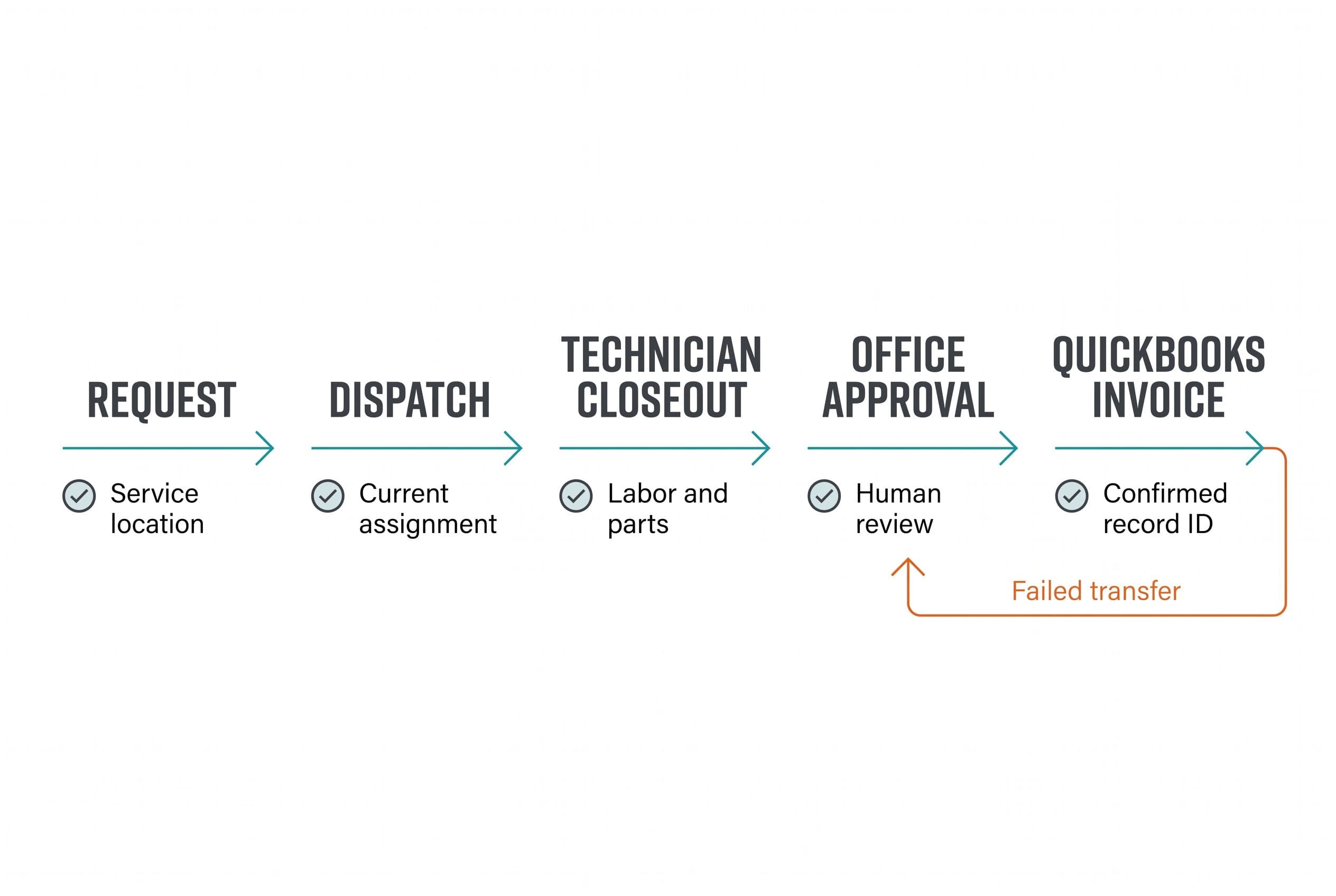
I'd evaluate an Intuit FSM replacement by following one workflow: request → dispatch → technician closeout → office approval → QuickBooks invoice. A prettier calendar doesn't tell me whether that chain works.
Here's an illustrative service call, not a client story. A customer reports a failed unit, the dispatcher books a visit, the technician records labor and parts, and the office prepares the invoice.
The diagnostic is what crosses each boundary:
| Handoff | What I'd inspect | Failure to test for |
|---|---|---|
| Request to dispatch | Customer, service address, equipment and access notes | Billing address mistaken for service location |
| Dispatch to technician | Assignment, appointment window and job history | A reassigned job stays on the wrong person's screen |
| Technician to office | Labor, parts, photos and completion notes | “Complete” arrives without billable details |
| Office to QuickBooks | Customer mapping, items, tax treatment and invoice state | Duplicate customer or wrong accounting item |
| QuickBooks back to dispatch | Accounting record ID and sync result | Office assumes an invoice exists when the transfer failed |
These aren't claims that Intuit Field Service Management fails every test. They're the tests I'd run against your current setup and every proposed replacement.
My own reason for starting with the workflow comes from a different kind of build. My wife and I homeschool our four kids; we'd taught two to read, and preparing to teach our five-year-old meant working through more than a thousand pages of books and workbooks again.
I built a web app with 50 structured, fully phonics-based lessons for a parent and child together, about 15 minutes a day. It was built in weeks, replaced a shelf of workbooks with one clear path, and my family uses it every day.
That's a real family project, not an anonymized field-service client case study. I don't have a subscription-saving figure for it. The relevant point is narrower: I built around the sequence we actually needed, rather than reproducing every page as a separate feature.
For a service business, I'd apply that same scope discipline to the job-to-invoice sequence. For the broader industry context, I cover what custom software looks like in your industry beyond this particular accounting connection.
“QuickBooks integration” isn't an acceptance test
The first technical question I'd ask is whether you're on QuickBooks Desktop or QuickBooks Online. A product advertising Online sync isn't automatically a replacement for your Desktop workflow.
I'd also ask which system owns each record. QuickBooks might remain the accounting authority while the field-service app controls appointments and job status. Without that boundary, two systems can keep overwriting each other's changes.
Here's how I'd diagnose the failure before deciding to rebuild:
- Inspect one completed job. Compare what the technician entered with what reached the office and QuickBooks.
- Identify the break. Is information missing, mapped incorrectly, delayed or duplicated?
- Check configuration before code. A bad item mapping doesn't justify replacing dispatch software.
- Repeat with an exception. Try a canceled visit, a return trip and a customer with multiple service locations.
- Confirm recovery. Can the office see the error and fix it without recreating the job?
If the same equipment history keeps getting copied between spreadsheets, that deserves its own scope decision. I break down whether an equipment log should be a separate tool rather than automatically turning it into a full dispatch rebuild.
For a custom connection, I'd require stored external record IDs, a visible error queue and duplicate protection. If QuickBooks accepts an invoice but the reply gets lost, retrying must not create another invoice.
API rate limits and expired credentials need explicit handling too. A failed transfer should stay pending with a reason and a safe retry path—not disappear behind a green “connected” badge.
Put three years of invoices and workarounds beside the build
Doing nothing has two different meanings here. If your Intuit Field Service Management account remains supported, it's the cost of staying. If you've received a confirmed termination notice, staying isn't a viable option; the comparison becomes another subscription versus a build.
I'd use the following worksheet before choosing either. This is illustrative arithmetic, not a project quote or a claim about your current bill. Subscription prices come from the supplied 2026 research; migration and operating allowances below are planning assumptions, not BuiltInWeeks service prices.
| Three-year line item | Keep the current setup, if supported | Focused custom replacement |
|---|---|---|
| Field-service licensing | Five additional users × $35 × 36 = $6,300 | No separate per-seat license for the custom code |
| Build | None | $5,000–$15,000 medium-build range |
| Migration labor allowance | $0 for no move | Assumed $2,000 |
| Hosting allowance | Included here only in existing subscription | Assumed $100/month × 36 = $3,600 |
| Maintenance allowance | Not separately modeled | Assumed $200/month × 36 = $7,200 |
| Workaround labor | Assumed 4 hours/week × $30/hour × 156 weeks = $18,720 | Unknown until the replacement is tested |
| Modeled subtotal | $25,020 including assumed workaround labor | $17,800–$27,800 before remaining workaround labor |
Both columns exclude the QuickBooks subscription, taxes and any other services you retain. I'd add your actual add-ons to the relevant column, and replace every assumed allowance with a scoped number before approving a project.
The $18,720 labor figure isn't cash you automatically get back. It represents assumed staff capacity consumed by the workaround. If that time isn't actually being spent—or the replacement doesn't remove it—the benefit disappears.
Even in this example, custom doesn't automatically win. Its upper subtotal exceeds the current setup before counting residual admin work. At the lower end, there's room for payback, but only if the workflow changes deliver it.
I'd tell you to keep renting if the subscription is small, the product already handles your workflow, or leaving its ecosystem creates more work than it removes. I wouldn't take a custom replacement job just to eliminate a modest bill that buys you a functioning operation.
If you'd rather use actual charges than assumptions, send the software bill and I'll assess whether replacement has a credible payback case.
Send us your software bill
Bring what you pay today. We'll tell you plainly whether a replacement would pay for itself, or whether you should keep renting.
Another subscription may be the right QuickBooks replacement
For a straightforward U.S. service shop, I'd trial existing field service management platforms before commissioning software. The trial should use the workflow above, not a salesperson's prepared demo.
The supplied September 2026 pricing research gives these starting points:
| Option | Published plan and billing | Three-year subscription arithmetic |
|---|---|---|
| Repair-CRM Grow | $89/month, up to five users | $3,204 |
| Jobber Connect | $199/month monthly billing, up to five users; QuickBooks Online sync included | $7,164 |
| Jobber Connect | $149/month equivalent with annual billing | $5,364 |
| Housecall Pro Essentials | $189/month monthly billing, up to five users | $6,804 |
| Housecall Pro Essentials | $149/month equivalent with annual billing | $5,364 |
These totals assume unchanged prices and exclude migration, add-ons, tax and staff time. I'd reconfirm every plan's limits and connector eligibility before signing.
For sources, Repair-CRM's pricing comparison, ScanManifold's 2026 Jobber pricing breakdown and Projul's 2026 Housecall Pro pricing analysis supply comparison context. The latter two are third-party analyses, not contractual offers from the vendors.
I'd include Jobber and Housecall Pro on a shortlist for a small QuickBooks Online shop. If either falls short in testing, my breakdowns of alternatives to Jobber and alternatives to Housecall Pro help frame the next comparison.
I'd evaluate Repair-CRM against the same acceptance tests; the lower published bill doesn't establish connector fit by itself.
A QuickBooks field service management alternative should earn its place by moving a real job correctly. I'd compare build-versus-buy costs by team size once those operational tests pass, because cheap software that forces a second dispatch spreadsheet isn't the cheaper workflow.
Build the missing handoff—not a whole accounting system
If those trials fail on a business-specific workflow, here's how I'd scope a custom Intuit FSM replacement: keep QuickBooks for accounting, and build only the operational path it doesn't cover.
My first version would need a clear boundary:
- Customer and service-location records.
- Job creation and a dispatch board.
- Technician access with appropriate user roles.
- Labor, parts and completion capture.
- An office approval queue.
- A QuickBooks transfer queue with visible failures and safe retries.
Human review stays before invoice creation. The office needs to resolve missing parts, disputed labor and unusual charges before those records enter the books.
If AI has a useful role, I'd keep it narrow: turning technician notes into a draft job summary or flagging missing information. I wouldn't let it invent parts, choose tax treatment or post financial records without approval. When it fails, the original notes must remain available and manual entry must still work.
I might use Next.js for the interface and Postgres for the operational records, but the stack isn't the acceptance criterion. A technician losing connectivity is. If offline work matters, I need explicit rules for local storage, pending uploads and conflicting edits; that's additional scope, not a checkbox.
For custom field service software cost, my published fixed-price ranges are:
| Build scope | Fixed-price range | Delivery range |
|---|---|---|
| Simple: focused dashboard or basic CRUD tool | $2,500–$10,000 | 1–2 weeks |
| Medium: multiple features, integrations and roles | $5,000–$15,000 | 2–4 weeks |
| Advanced: real-time features or complex rules | $10,000–$20,000 | 4–6 weeks |
AI features multiply the applicable range by 1.25; the overall envelope is $2,500–$25,000. A field-service replacement isn't automatically a medium build: connector requirements, offline behavior and migration complexity determine the scope.
For an agreed build, I'd plan your involvement around a scoping call, a short weekly review and a final test pass. Someone from your business also needs to approve data mappings and exceptions; I won't pretend migration requires no attention.
Move open jobs without losing the billing trail
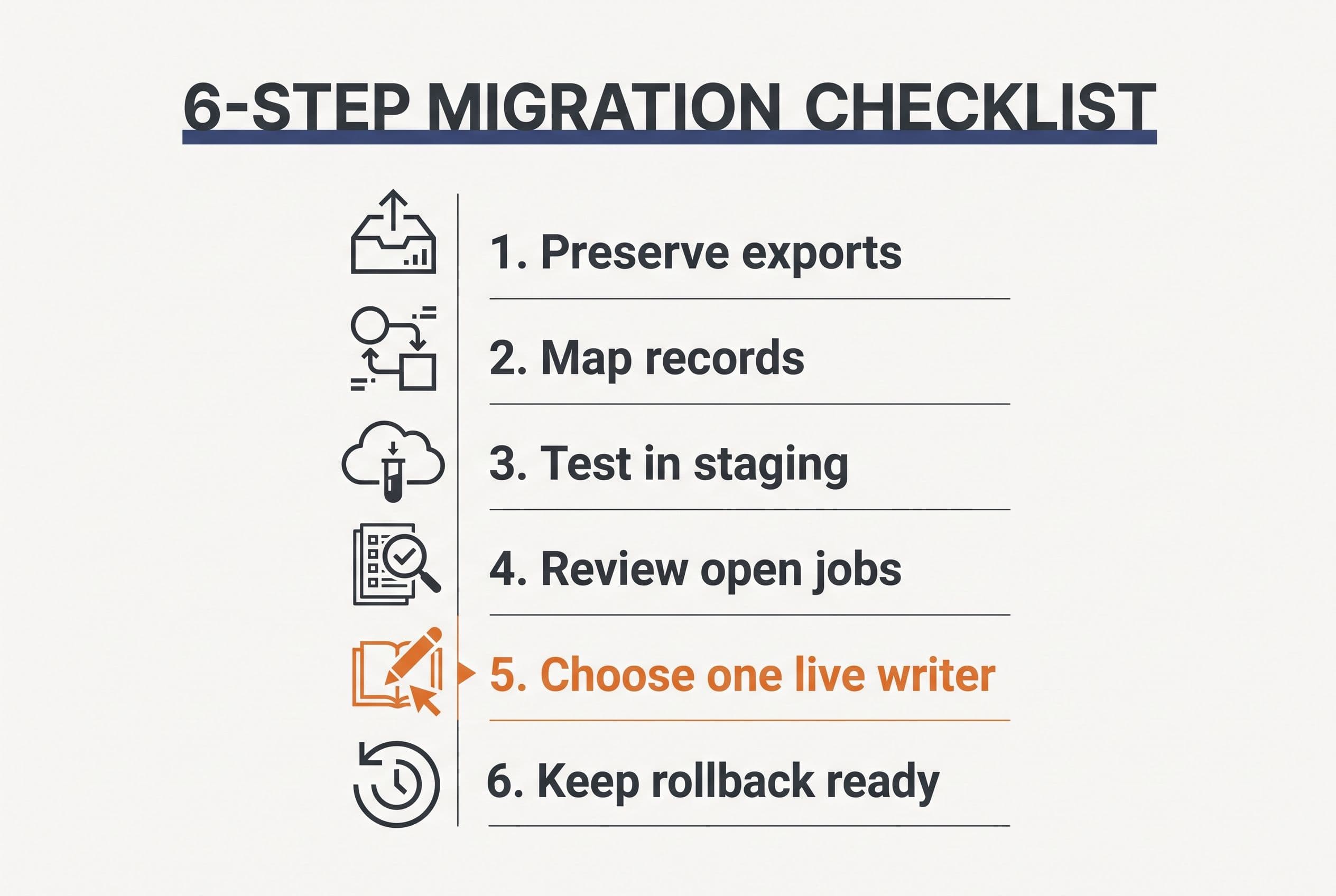
Once a replacement passes the workflow tests, I'd migrate in stages—not cancel Intuit Field Service Management and hope the export was complete.
First, preserve the source. Export the available customers, locations, equipment, open jobs, history and attachments while access still works. Check what's missing before committing to a cutover date.
Next, map and rehearse. Hand the developer sample exports, QuickBooks edition details, item mappings, role permissions and examples of failed transfers. Keep credentials out of shared documents. Run imports in a staging environment and retain the original IDs so records can be traced back.
Then, reconcile with people who know the work. The dispatcher checks open assignments; the office checks customer links, unbilled work and accounting totals. Imported rows alone don't prove a successful migration.
Finally, choose one live writer. Set a cutover point for new jobs and invoice transfers. Keep the old system read-only where access terms permit, and define a rollback decision before go-live so two systems don't both create invoices.
I quote the agreed scope at a fixed price: overruns on that scope are my problem, not yours. Added scope needs an explicit decision, not a surprise invoice.
The code lives in your own repo from day one. The contract transfers ownership of the custom code and source on final payment; I retain only generic reusable components, and third-party libraries and services retain their own license terms. With the source and handoff documentation, another developer can take over.
That's the difference between buying a replacement and buying another dependency. I don't need months of paid discovery to show you a starting range.
Use the free project estimator at free project estimator: answer five questions and see the range on screen—no email wall, no discovery call before a number, no sales sequence. Send it over if you want a fixed quote within one business day, so you can make the replacement decision with a number in hand.
Want a real number for your own project?
Answer a few questions and get an instant price range and timeline. No call required, no obligation.
Get your instant estimateTalk through your software project with MattFrequently asked questions
- Is Intuit Field Service Management discontinued?
- The supplied sources don't establish a blanket discontinuation; Fourlane still publishes licensing information in 2026. That listing doesn't guarantee support for your specific account. Ask your provider for written confirmation of account status, connector support and export access before migrating.
- What is a good Intuit FSM replacement for QuickBooks?
- I'd trial Jobber or Housecall Pro for a straightforward QuickBooks Online service workflow, and evaluate Repair-CRM against the same requirements. Confirm the exact plan and integration coverage. QuickBooks Desktop users need a separate compatibility check.
- How much does custom field service software cost?
- My medium builds cost $5,000–$15,000 and take 2–4 weeks; advanced builds cost $10,000–$20,000 and take 4–6 weeks. Connector requirements, offline work and complex rules determine the scope. Migration, hosting and maintenance also belong in the ownership budget.
- Can I keep QuickBooks when replacing field service software?
- Yes, if the replacement supports your QuickBooks edition and required accounting workflow. I'd keep accounting in QuickBooks, define which system controls each record, and test customer mapping, invoice creation, failures and retries before go-live.
What would software built for your business look like?
Replacing a subscription, fixing software that fell short, or adding AI to your workflow? Talk through the scope with Matt.
Part of these guides
Matt Brody
Founder, BuiltInWeeks
I build custom software for small and mid-sized businesses — the kind you own outright instead of renting by the seat. Fixed price, delivered in weeks, source code handed over at the end.
More about how I workKeep reading

Field Service Management: Build vs Buy Costs by Team Size
I'd usually buy for a small crew, compare the three-year bill as seats grow, and build only the workflows that justify ownership. Here's the arithmetic—including migration, hosting, APIs, and maintenance that cheap build quotes leave out.
Read more
ServiceTitan Pricing in 2026: $245–$500/Tech + Setup
For an illustrative 10-technician business, reported ServiceTitan rates work out to $29,400–$60,000 a year before implementation and extras. I separate that subscription math from the build, migration, hosting, API, and maintenance costs of owning a narrower replacement.
Read more
Jobber Alternative for HVAC Contractors: Fix Dispatch
I'd replace the dispatch rules before I'd replace your entire field-service system. Here's my checklist for deciding whether to keep Jobber, add a focused scheduling tool, or build software you own.
Read more