Cost to Replace Housecall Pro: $8K–$20K, Then $50–$150/Mo

You hired your ninth tech and your Housecall Pro bill went up $35 a month. Then you hired your tenth and it went up again.
Here's the short answer. Replacing Housecall Pro with a custom app you own costs $8,000–$20,000 to build and roughly $50–$150 a month to run. That covers scheduling, dispatch, quotes, invoicing and payments, and it's live in 2–6 weeks.
If you've got fewer than ten users, you probably shouldn't build. Keep reading anyway, because I'll show you where that line falls.
That's what it costs. Whether it's worth it is a separate question, and the answer comes down to how many people you put on the subscription over the next three years. For some shops the build pays for itself. For a lot of small ones it doesn't.
Your crew size decides this, so start with the seat math
Housecall Pro's pricing is tiered, and each tier comes with a seat limit. Here are the published rates as of September 2026:
| Plan | Billed annually | Month-to-month | Users included |
|---|---|---|---|
| Basic | $59/mo | $79/mo | 1 |
| Essentials | $149/mo | $189/mo | Up to 5 |
| Max | $299/mo | $329/mo | Up to 8, then $35/mo per extra user |
Housecall Pro changes its plans and seat rules from time to time, so check that page before you trust my math. If the numbers have moved, re-run everything below against the current price sheet.
Those entry prices are fair. I'm not going to pretend otherwise. The trouble is in the last column: every tech you add past eight costs another $35 a month, and you keep paying it as long as you have them. That's seat creep. Your software bill grows with headcount, even though the work running through the system grows at its own pace.
Here's what that looks like on the Max plan, billed annually, before add-ons. This is illustrative arithmetic from the published rates:
- 12 users: $299 + (4 × $35) = $439/mo → $5,268/yr
- 20 users: $299 + (12 × $35) = $719/mo → $8,628/yr
- 30 users: $299 + (22 × $35) = $1,069/mo → $12,828/yr
That's the starting point. Your real bill is whatever's on your last invoice: add-ons, payment processing, and the Zapier subscription you pay for because two of your tools won't talk to each other.
If you'd rather not work this out by hand, put your seat count and add-ons into the calculator below. There's no form and no call.
Price your stack in two minutes
List the subscriptions you pay for and see what they cost over 3, 5 or 10 years next to owning the software. No email needed to see the number.
The payback math from a build I actually shipped
I haven't shipped a Housecall Pro replacement that I can point you to, so I won't pretend these numbers transfer one-for-one. The build I can show you replaced a different per-seat tool, and the payback math works the same way.
The client was paying for Kixie, a popular sales dialer, at about $30,000 a year. They kept hitting its limits: not much room to customize, clunky workflows, and a price that kept going up. I built them a custom power dialer in React. Reps can call one lead at a time or dial up to 10 lines at once and only get connected when someone picks up. It has unlimited users, lead lists you can assign to any rep, SMS templates, one-click voicemail drops, Zapier webhooks that fire off follow-ups, and real analytics on connect rates and rep performance.
The build cost $10,000. That's a third of one year of Kixie licensing, so it paid for itself in about four months. It's faster than the tool it replaced, it does more, and there's no monthly license fee. (This is a real client project. I've generalized the details and rounded the numbers, and your results will vary.)
Now the honest part. A 12-person crew on Housecall Pro isn't paying $30K a year. It's paying closer to $5K. So the payback period isn't four months. It's measured in years, and sometimes the build never pays back at all. That's why the next section matters more than my story does.
Three years of staying on Housecall Pro, priced against a build
Two things make this comparison work. A custom build has no per-seat pricing, so your 30th tech costs the same as your 3rd. And the build price depends on how complicated your workflow is, not how many people use it.
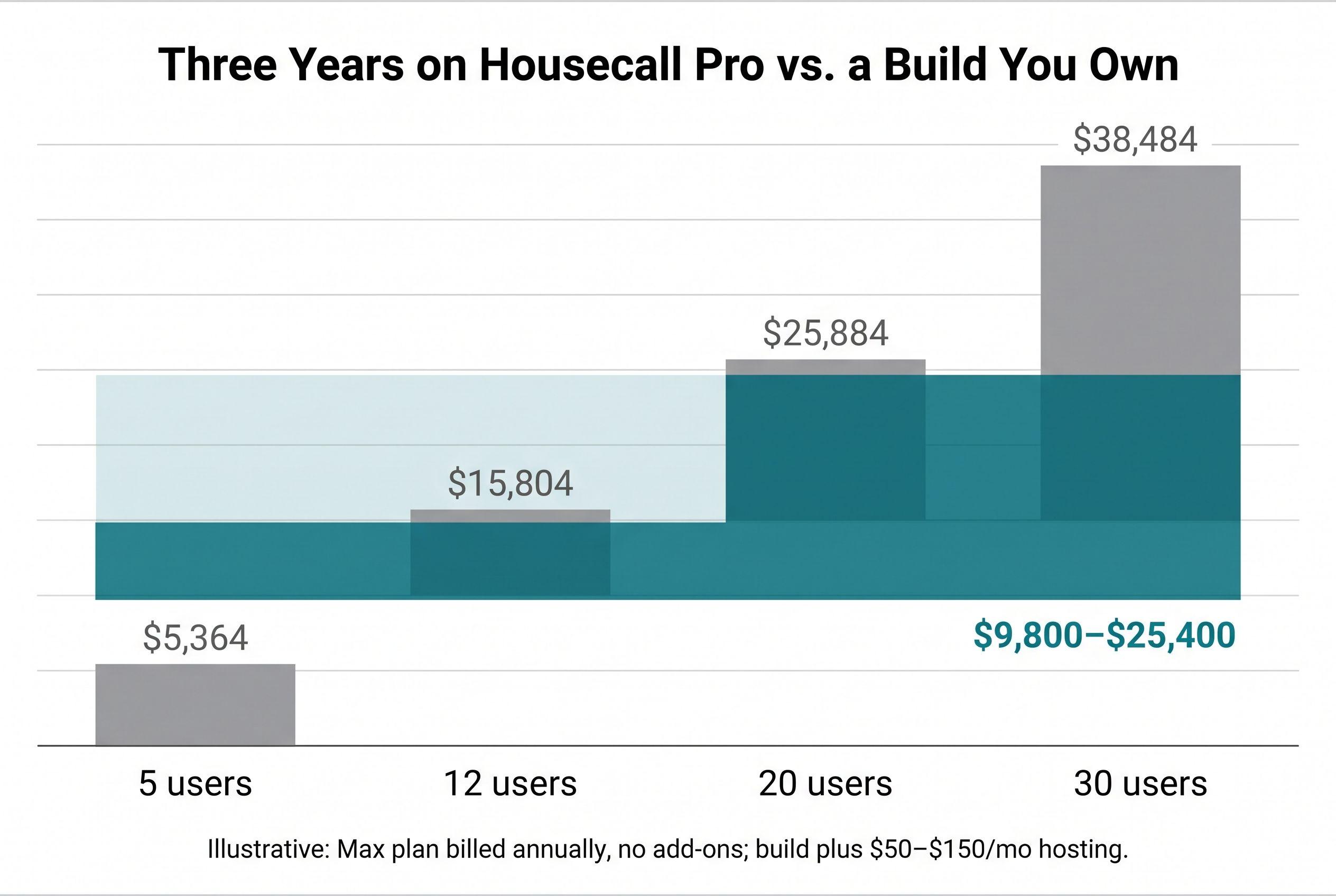
Illustrative three-year math. Housecall Pro is shown on the Max plan billed annually (Essentials for the 5-user row), with no add-ons. The custom column is an $8K–$20K build plus $50–$150/mo hosting over 36 months:
| Crew size | Housecall Pro, 3 years | Custom build, 3 years | Who wins by year 3 |
|---|---|---|---|
| 5 users (Essentials) | $5,364 | $9,800–$25,400 | Housecall Pro, easily |
| 12 users | $15,804 | $9,800–$25,400 | Toss-up. Workflow decides it |
| 20 users | $25,884 | $9,800–$25,400 | Leans build on hosting alone. Toss-up once you budget maintenance |
| 30 users | $38,484 | $9,800–$25,400 | The build, and the gap grows every year |
Want a more cautious number? Hosting isn't the only thing you'll pay for after launch. Dependency updates, the odd bug fix, and the feature you'll decide you need in year two all cost money. A conservative way to plan for that is to set aside 15–25% of the build cost per year. That's a planning cushion, not a quote. On a $15,000 build it's $2,250–$3,750 a year, which puts the three-year total at $21,750–$26,250.
Run that against the table and it's sobering. At 20 users, Housecall Pro costs $25,884 over three years, so the build saves you about $4K at the low end and costs you more at the high end. Call it a toss-up. At 30 users the build wins clearly. At 12 users it usually doesn't.
And if you pay Housecall Pro month-to-month, every number in that Housecall Pro column goes up.
When staying wins: if you're under about ten users and Housecall Pro already handles the way you work, keep renting. A three-year bill around $5K–$6K can't justify a build. The same goes if your business depends on the bundled extras, like built-in marketing, financing offers and review requests. You'd have to rebuild those or buy them from somebody else, and that wipes out the savings.
If you've run the numbers and your invoice has more lines on it than the plan price (extra seats, add-ons, a patchwork of tools you've connected to fill gaps), send it to me. I'll read it and tell you straight whether a replacement pays back.
See your software before you pay for it
Tell me what you run today on a short call. I build a demo of your replacement, free, and walk you through it. The price is fixed in writing before you pay anything.
What pushes a Housecall Pro replacement from $8K toward $20K
The cost doesn't depend on how many users you have. It depends on how many moving parts the app has. Here's how the pieces stack up against my fixed-price tiers. The tiers overlap on purpose: a lean advanced build can come in under a loaded medium one.
| What you need | Where it lands |
|---|---|
| Customer list, job scheduling, dispatch board, quote → invoice | Medium build: $8K–$15K, 2–4 weeks |
| Card payments and deposits through Stripe | Small add, mostly wiring and testing |
| Appointment reminders and "on my way" texts via Twilio | Small add; the ongoing cost is per message |
| Two-way sync with QuickBooks or Xero | This is where the hours go. Accounting sync is fussy |
| Tech mobile view: photos, checklists, signatures | Moderate. Has to work with one hand on a ladder |
| Recurring service plans, multi-location, role permissions | Advanced build: $10K–$20K, 4–6 weeks |
| AI features (e.g., drafting quotes from job photos) | Multiply the range by 1.25, capped at $25K |
I build these on Next.js with TypeScript, a Postgres database through Supabase, and hosting on Vercel. The $50–$150 a month is my estimate of the running cost for hosting, the database, and usage-based SMS and email. It assumes paid entry-level plans on Vercel and Supabase. What pushes it past $150? Heavy text volume is the big one. More people on the Vercel team plan or a bigger Supabase tier will move it too. Card processing fees are separate. Stripe charges per transaction, and so does any built-in processor, so compare your effective rate on both sides.
Three things make it cheaper:
- Copying the 20% of Housecall Pro you actually use, not the 80% you've never opened
- Having clean customer data to start from
- One person on your side who can answer "how does a job actually move?" in one sitting
Three things make it blow up:
- Adding features halfway through the build
- Migrating ten years of messy job history nobody's going to look at
- Trying to rebuild the marketing suite along with the operations side
Your part of the work: a scoping call, a 30-minute review each week, and a final test pass where one of your techs runs real jobs through the app. The price is fixed, so if it runs over, that's my problem, not yours.
Here's how ownership works, plainly. The repository sits in your account from day one, so you can see every commit while I'm building. Ownership of the custom code and source transfers to you on final payment (I keep my generic reusable components, and third-party libraries keep their own licenses). The hosting, database, Stripe, Twilio and domain accounts should be in your name too, not mine. With the handoff documentation, any developer can pick it up from there.
The Housecall Pro customer export check to run this week
Do this before you cancel anything. It's free and it takes an afternoon.
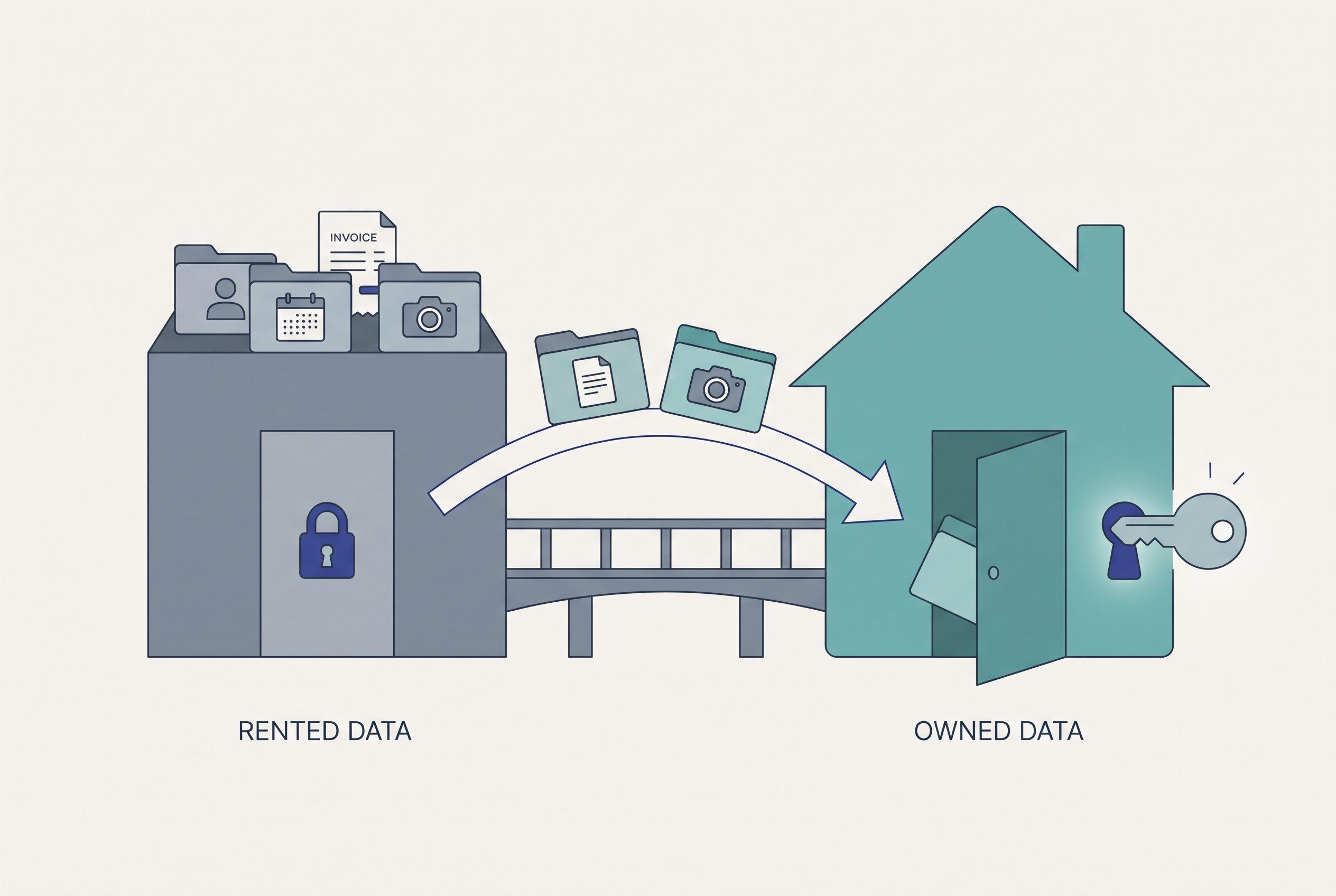
Switching from Housecall Pro is only as clean as your data export. Whatever comes out cleanly costs almost nothing to migrate. Whatever doesn't come out is the real migration cost, and you want to find that out before you sign anything.
- Export your customer list to CSV while you're still subscribed. Check it for names, service addresses, phone numbers, emails, tags and notes.
- Check job history, estimates and invoices separately. Customer lists are usually the easiest part of any field-service export. History is where the gaps show up.
- Look for attachments. Job photos, signed estimates, PDFs. Find out whether they come out in bulk or one at a time.
- Write down your recurring service plans by hand if they don't export in a usable form. Your recurring revenue lives there, so don't assume they'll carry over.
- Store a dated copy somewhere you control. Do this even if you stay. Owning a copy of your own customer data shouldn't be optional.
When I do a cutover, the old system stays live while the new one runs alongside it, and you don't cancel until the record counts match. Canceling first and migrating second is how shops lose a season of service history.
Go or no-go: the checklist
Run through this honestly. If most of the go column fits you, a build is worth pricing. If anything in the no-go column fits, stop there.
Go signals:
- You're on Max with 20+ users, or you're past 12 and still hiring
- You're paying for add-ons, or for Zapier connections that cover gaps in the software
- Your workflow doesn't fit the software. A cleaning company assigning rotating teams to recurring homes is the classic case, and I've written up what a cleaning-specific build costs and covers
- Your customer export came out clean (see above)
- Someone on your side can give an hour a week for 2–6 weeks
No-go conditions:
- Fewer than ten users, and the product already does what you need
- You depend on bundled financing or marketing tools you'd have to replace with another subscription
- Your real complaint is price at a solo-operator size. Switching subscriptions is cheaper than building. Jobber's Core plan, for example, was listed at $29/mo billed annually or $49 month-to-month for one user as of October 2026 (check Jobber's pricing page for the current number, since it changes). Compare it on our Jobber alternatives page before you spend anything on a build
One more, and I'll be direct about it: if what you want is a developer embedded in your business for years, shipping something new every week, don't hire me for this. I scope it, build it, and hand it off with docs any developer can work from. That's why the price is fixed. If you need a permanent in-house developer, hire one.
For the wider list of options, including the off-the-shelf ones, I keep a running breakdown of Housecall Pro alternatives.
What the same budget buys from an agency, or by the hour
A custom home services app costs more at a traditional shop, and it's not hard to see why.
- Agencies: you're paying for a discovery phase, a project manager, a designer, a account lead and the developers, plus the months it takes to coordinate all of them. That overhead is built into every quote, whether your app needs it or not. A small field-service app doesn't.
- Hourly: divide your budget by whatever rate you're quoted and look at how few hours that actually buys. Hourly billing also means nobody makes more money by finishing sooner. A "discovery phase" can eat half those hours and leave you with a slide deck.
- Offshore: the quote looks cheap. Then you count the time zones, the rework, and the developer you eventually hire to fix it.
An agency makes sense for an enterprise platform with compliance reviews and a dozen stakeholders. For a 20-tech HVAC or plumbing company, it's five people billing for a job two can do. The plumbing version of this decision has its own wrinkles, and I covered them in whether a small plumbing company should build or keep renting. If you're weighing a bigger, all-in-one platform instead, the cutover is harder, and the GoHighLevel replacement math walks through it.
For the full picture across project types, here's what custom software actually costs, and if you're still deciding whether to own anything at all, start with owning your software instead of renting it.
Get your number before you talk to anyone
Run the free project estimator now. It's five questions and takes about ninety seconds, and the price range shows up on screen before any form asks who you are. Check it against the three-year column you just worked out for your crew size.
If the number works, send it over. You'll get a written fixed quote within one business day, with no call needed to get it. The scoping call only happens once you decide to go ahead. Getting the quote costs nothing, and if you say no, you don't owe me anything.
P.S. Run the estimator. It takes ninety seconds, shows your price range before it asks for your name, and tells you whether a build beats three more years of Housecall Pro for your crew size. If you've got fewer than ten users, it'll probably say stay. That's a good answer to get for free.
See a free demo of your replacement software
Book a short call and tell me what you run today. I build a demo of the replacement for free and show it to you on Zoom. The price is a flat fee, fixed in writing before you pay anything, and you own the code.
Book the callOr get a rough price range from the estimatorFrequently asked questions
- How much does it cost to replace Housecall Pro with custom software?
- A custom replacement covering scheduling, dispatch, quotes, invoicing and payments typically runs $8,000–$20,000 as a fixed-price build, delivered in 2–6 weeks. After launch, hosting, database and usage-based SMS usually come to around $50–$150 a month. AI features raise the build range by about 25%.
- How much does Housecall Pro cost per month in 2026?
- As of September 2026, Housecall Pro lists Basic at $59/month billed annually ($79 month-to-month) for one user, Essentials at $149/month annually ($189 monthly) for up to five users, and Max at $299/month annually ($329 monthly) for up to eight users. Each user past eight on Max adds $35/month. Add-ons and payment processing are on top of that.
- Is it cheaper to build my own field service app than pay for Housecall Pro?
- It depends mostly on crew size. Under about ten users, Housecall Pro is usually cheaper over three years. Around 12 users it's a toss-up. At 20 or more users, a build without per-seat pricing usually comes out ahead by year three, and the gap keeps growing as you hire.
- How do I export my customers from Housecall Pro before switching?
- Export your customer list to CSV while your subscription is still active, then check job history, invoices, estimates and attachments separately, because those are where gaps usually show up. Write down any recurring service plans that don't export cleanly. Keep a dated copy somewhere you control, and don't cancel until the new system's record counts match.
- How long does switching from Housecall Pro take?
- A focused custom build typically takes 2–4 weeks, and one with recurring plans, multi-location support or role permissions takes 4–6 weeks. Run the old and new systems side by side for a short overlap and only cancel once the data reconciles. Your time involved is mainly a scoping call, a short weekly review and a final test pass.
What would software built for your business look like?
Tell me what you run today on a short call. I build a demo of your replacement, free, and show it to you before you pay anything.
Part of these guides
Matt Brody
Founder, BuiltInWeeks
I build custom software for small and mid-sized businesses — the kind you own outright instead of renting by the seat. Fixed price, delivered in weeks, source code handed over at the end.
More about how I workKeep reading

Cost to Replace ServiceTitan: $10K–$25K Plus ~$150/Mo
Replacing ServiceTitan with software you own costs $10K–$25K to build and roughly $150 a month to run. Here's the line-by-line arithmetic, the three-year comparison against per-tech licensing, and the shops that should keep paying for it (or switch to Jobber).
Read more
Housecall Pro Alternative for Small Plumbing Company: Build?
Most small plumbing shops should keep renting. A plumbing company with 8 or more users and workflows that don't fit the software should run the numbers. Here's the checklist I use, the conditions that rule a build out, and three years of seat math laid out so you can check it.
Read more
Cost to Replace GoHighLevel: $10K–$25K, Then the Cutover
Replacing GoHighLevel with software you own costs $10K–$25K and takes 2–6 weeks to build. The build isn't the hard part. Getting your data, conversation history and phone numbers out is, and some businesses shouldn't leave at all. Here's the checklist, the three-year math, and the cutover plan.
Read more