Best Landscaping Business Software: 3-Year Cost by Crew Size

It's Monday night, Tuesday's a washout, and your office manager is about to spend the evening dragging every recurring visit onto days that are already full. If you run one to three crews, the best landscaping business software is probably a subscription you already know the name of. On published 2026 pricing, the entry plans run about $4,600 to $10,700 over three years. They climb to about $18,000 if you step up to Service Autopilot's Pro Plus, and that's before its sign-up fee or any extra users. Past roughly ten users, or once that Monday night lives in a spreadsheet, the math changes. That's when owning your own system is worth pricing.
Below: the five options side by side, what each one really costs over three years, and a teardown of the one workflow that shows you which camp you're in.
Five options for a lawn and landscape company, one table
| Who it fits | Pricing model (published) | Workflow it handles best | Where it falls short for a landscaper | |
|---|---|---|---|---|
| A custom build you own | Crews of 10+ users, or any shop whose workflow the off-the-shelf tools don't handle | Flat fee, quoted after a short call. Then hosting in your name | Whatever your week looks like: your routes, your contracts, your rain days | Costs more up front than a sign-up. Not worth it for a small bill |
| Jobber (Connect) | Small crews, up to 5 users | $149/mo billed annually for up to 5 users; extra users $29/mo each | Quoting, scheduling and invoicing for a small team | Per-seat creep: every hire past the band adds to the bill |
| LMN (Starter) | One office or crew lead plus a five-person crew roster | $297/mo billed monthly; 1 office/crew lead licence + 5 crew member licences | Landscape contractor software with crew licences built into the plan | Highest per-month entry among the small-crew options here |
| Arborgold (Starter) | Owners who want the most in the box at the lowest listed price | $129/mo billed annually ($149 billed monthly) | CRM, estimating, scheduling, dispatch, routing, invoicing and crew time tracking in one plan | Check which features the higher plans hold back before you commit |
| Service Autopilot (Pro Plus) | Established operators who want automation and job costing | $499/mo billed annually, plus a sign-up fee they don't publish | Automation workflows, automatic route planning, job costing | Highest entry price here, and the total isn't knowable until you call them |
Verdict by buyer:
- One or two trucks, owner in the field: Arborgold or Jobber. Stop reading and go sign up.
- Three to five crews and an office manager: Jobber or LMN, depending on whether estimating or seat count matters more to you.
- Bigger route density, automation already on your wishlist: Service Autopilot, if the sign-up fee doesn't kill it.
- Ten-plus users, multiple contract types, workarounds everywhere: price a custom build.
Full disclosure: we build custom software for a living, so row one is our own work. To keep it fair, every row uses the same columns, every competitor figure comes from that vendor's published pricing page (verified October–November 2026), and the verdict lines above tell most small operators to just buy one of the products.
Three things people ask us first. Cost: a flat fee, quoted after a short call, fixed in writing before you pay anything. Will it fit you: you see a demo of your own workflow before you decide. What if we disappear: the code lives in your own repo from day one, and a developer who knows Next.js and Postgres can pick it up.
The seat math nobody puts on the pricing page
Pricing gets slippery once you grow. Here's Jobber at ten users, using its own published figures (illustrative arithmetic). We're assuming the Connect plan is billed annually and all five extra users are billed at the $29/mo add-on rate every month. Check Jobber's pricing page for how your account bills extras:
- Connect plan: $149/mo
- Five extra users × $29: $145/mo
- Total: $294/mo, or $10,584 over three years. That's nearly double, and you didn't add a single feature.
That's per-seat licensing in one line. Your bill tracks how many people you hire, not how much the software does for you. Every new crew lead who needs the app on their phone is another line on the invoice.
Want that math for your own subscriptions, with your own seat count?
Price your stack in two minutes
List the subscriptions you pay for and see what they cost over 3, 5 or 10 years next to owning the software. No email needed to see the number.
Why mostly-accurate crew software is worse than none on route day
Here's the project that shapes how we think about all this. It isn't landscaping. But it's the same problem every landscaping office has.
An auction company photographs every lot before a sale, and each file had to be renamed by hand to its lot number. The owner called it mind-numbing work. The renaming tool he'd tried got a lot of them wrong, and in his business a wrong lot number is worse than no tool at all. (This is a real project; we've kept the business unnamed.)
We built a Windows app that points at a folder of photos, reads the lot number off the tag in each photo with AI vision, renames everything, and flags any lot it couldn't read instead of guessing.
Why tell a landscaper about auction photos? Because the lesson carries over. Software that's right most of the time and quietly wrong the rest is a liability. A skipped property on Thursday's route, or a monthly-contract customer billed for a visit that didn't happen, costs you more than the minutes the tool saved. Good crew software flags what it isn't sure about and hands that to a person.
Our closest proof isn't from landscaping, and that's a fair reason to doubt us. It's also why the demo is free. Here's the one next step: book a short call, tell us what you run today and where your rain day breaks, and we'll build a free demo of your replacement and show it to you before you pay anything. If it isn't right, you walk away and owe nothing. If you go ahead, the price is a flat fee, fixed in writing.
Each product on its own terms
None of these is a bad product. Each one is right for somebody.
Jobber
Jobber's Connect plan covers up to five users at $149 a month billed annually. For a small lawn care outfit that needs quotes, a calendar and invoices that go out the same day, that's hard to beat. If you're under five users and it does what you need, keep it. The pain starts with seat creep as you grow. We've laid out what replacing Jobber actually involves if you're past that point.
LMN
LMN's Starter plan is $297 a month billed monthly and comes with one office/crew lead licence and five crew member licences. If you already think in terms of an office lead plus a crew roster, the plan matches how you're set up. Want estimating and crew access in one place, with no fiddly per-user add-ons at that size? It's a reasonable buy.
Arborgold
Arborgold Starter is $129 a month billed annually ($149 monthly) and lists CRM, estimating, scheduling, dispatch, routing, invoicing and crew time tracking in the entry plan. That's the most bundled feature list at the lowest listed price in this comparison. For a one- or two-truck operation, it may be the best lawn care software value on this list.
Service Autopilot
Service Autopilot Pro Plus is $499 a month billed annually, plus a sign-up fee they don't publish, and includes one business user and five mobile users. You're paying for automation workflows, automatic route planning and job costing. If those are the three things keeping you up at night, it's built for you. Get the sign-up fee in writing before you sign anything.
If you're shopping beyond landscaping-specific tools, the same seat-versus-feature trade shows up in the gap between Housecall Pro and ServiceTitan over three years, just bigger.
Three years of renting next to three years of owning
This is the section that decides it. All subscription figures come from published 2026 pricing. Anything marked illustrative is our arithmetic, so plug in your own numbers.
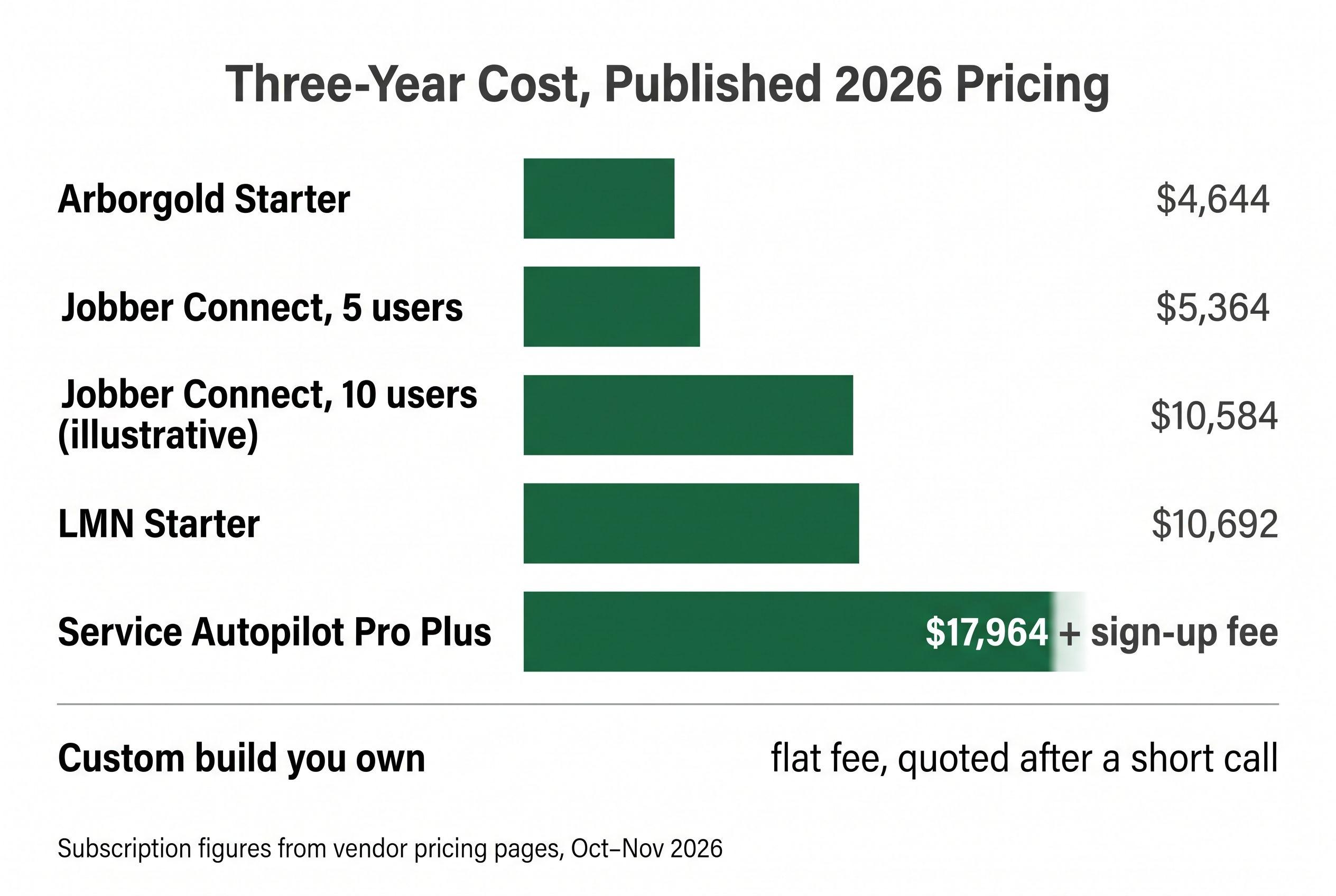
| Option | Year 1 | 3-year total | What's not in that number |
|---|---|---|---|
| Arborgold Starter (annual) | $1,548 | $4,644 | Higher-plan features, any add-ons |
| Jobber Connect, up to 5 users | $1,788 | $5,364 | Extra users |
| Jobber Connect, 10 users (illustrative; extras assumed at $29/mo each) | $3,528 | $10,584 | Add-ons beyond seats |
| LMN Starter | $3,564 | $10,692 | Licences past the plan's six |
| Service Autopilot Pro Plus | $5,988 | $17,964 + sign-up fee | Sign-up fee (unpublished), extra users |
| Custom build you own | Flat fee, quoted after a short call | Flat fee + hosting | Hosting billed to you, usage-based; maintenance is optional and your call |
What that table can't show is the workaround cost: the spreadsheet next to the scheduler, the group text to crew leads, the office manager re-keying invoices into QuickBooks. Illustrative arithmetic: if your office spends 3 hours a week on rain-day reshuffles and re-keying across a 30-week season, at $25 an hour, that's $2,250 a year, or $6,750 over three years. That cost sits on top of the subscription, and it never shows up on a vendor's pricing page.
Compare the other ways to buy the same software. Custom-build shops that publish field service pricing tend to put even a first version in five figures and a few months of work (Modall, March 2026). US agencies bill by the hour, and offshore firms bill less per hour, which looks cheap until you count the rewrite. Hourly billing pays the vendor for slow work. Our build is one flat fee, fixed in writing before you pay anything, so any overrun is our problem, not yours. For the wider picture, here's what custom software actually costs.
When staying wins: if your bill is the Arborgold or Jobber entry plan, the payback math on a custom build won't come back in any reasonable time. Keep renting. Same if your whole operation already lives inside one vendor's ecosystem and the product handles the workflow that matters. If what you want is a developer embedded in your business for years, we're the wrong hire too. We build it, hand it off, and come back when you call. The same logic runs through our breakdown of seat costs versus owning your code.
One honest note on ROI claims. Field service software vendors put out big first-year ROI claims for small and mid-sized service firms, with payback inside months. Those are vendor claims, and they're about getting off paper and whiteboards, not about which tool you pick. If you're still on paper, any of the products above will get you most of that.
If those numbers line up with what you're paying now, the cheapest next step is the same one: book the call and see the replacement before you spend anything.
See your software before you pay for it
Tell me what you run today on a short call. I build a demo of your replacement, free, and walk you through it. The price is fixed in writing before you pay anything.
Teardown: the Tuesday rain-out
Pick one workflow and you'll know which camp you're in. For lawn and landscape companies, it's the rain day.
What happens today
It's Monday night and the forecast says Tuesday's a washout. Here's the usual sequence:
- The owner decides Tuesday is off.
- The office moves every recurring visit, one at a time or in batches, onto days that are already full.
- Somebody texts customers, or doesn't, and the phone rings Wednesday.
- Crew leads get a new route by group text and call the office anyway.
- Weekly-billed and monthly-contract customers get handled differently, and someone has to remember which is which so nobody gets double-billed or skipped.
Where it breaks
Whichever tool you're on, the failure points tend to be the same: Wednesday quietly gets overloaded, a property falls off the route and nobody notices until the customer calls, and the billing rules for per-visit versus monthly customers live in the office manager's head. If your current tool already handles all five steps cleanly, that's your reason to stay. If even two of them get patched with a spreadsheet next to the scheduler, keep reading.
What a replacement does instead
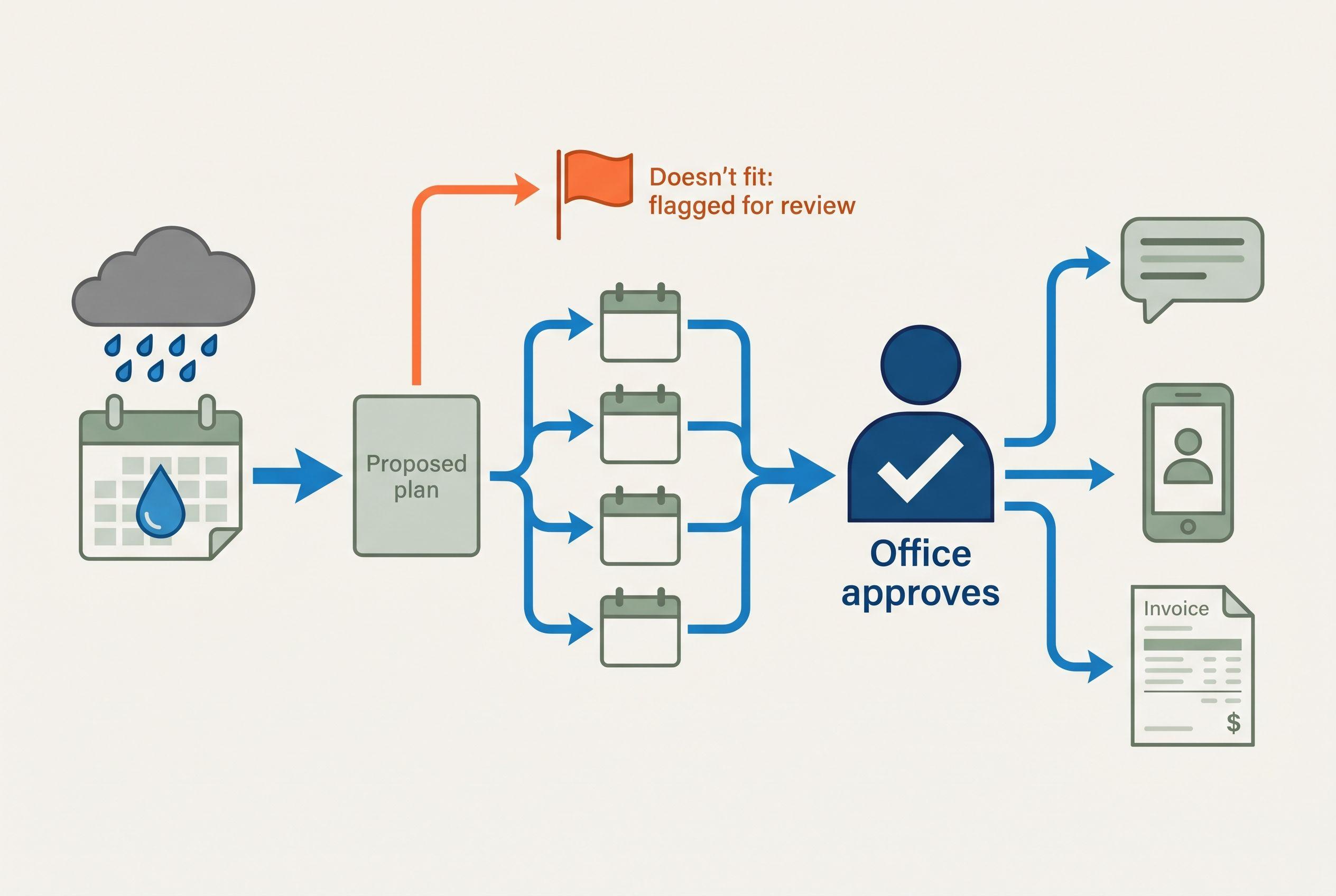
- One rain-day action. Pick the day. The system proposes a push plan: shift every route a day, or spread Tuesday across Wednesday to Saturday based on each crew's hours.
- Human review before anything goes out. The office sees the proposed plan, drags the exceptions, and approves it. Nothing gets texted until a person says yes.
- Customer texts through Twilio, with Twilio's delivery-status webhooks feeding back a list of texts that bounced, so the office calls those few instead of all of them. (Business texting in the US needs carrier registration, known as A2P 10DLC, and that approval runs on the carriers' clock, not ours. We start that paperwork early.)
- Billing follows the contract. Per-visit customers get invoiced only when the visit is marked done; monthly contracts aren't touched. Cards on file run through Stripe, and everything syncs to QuickBooks as the book of record. Most landscapers already run their books in accounting software, so we build around it, not over it.
Failure handling: flag, don't guess
Same rule as the auction app. If the reshuffle can't fit every property inside crew capacity, the leftovers land on a flagged list. They don't get silently stacked onto Friday. If the forecast clears by 6 a.m., one undo puts the original routes back.
There's an AI piece too, and it's modest on purpose. A crew lead snaps a photo or leaves a voice note at a property; AI drafts the visit note or a follow-up estimate line ("aeration recommended, front lawn"), and the office approves it before the customer ever sees it. Plenty of landscaping pros haven't touched AI tools yet, and plenty think it could change routing, scheduling and crew management. Our view: use it where a person checks the output, and nowhere else.
Switching systems without losing your spring
Implementation is where these projects stall. Granum's 2026 State of Digital Technology Adoption in Landscape & Tree Care found training and implementation came up again and again when respondents named their biggest challenge. Software built around the way your crews already work cuts the training part down. The migration part still takes a plan:
- Export everything first. Customers, properties, recurring schedules, open estimates, unpaid invoices. Check your current tool's data export before you cancel anything.
- Clean it. Duplicate customers and dead properties come out before the move, not after.
- Review the mapping with us. You confirm which old field becomes which new one, especially contract types.
- Run in parallel. For lawn care, the off-season is the time. Both systems run for one cycle and you compare.
- Cut over, keep the old account through one billing cycle, then cancel.
Your part: a short call, the demo, a short weekly review, and a final test pass. You get a first draft you can use two weeks after signing. That's a draft, not the finished system: the integrations and the edge cases get built out with you from there. It's built on standard parts (Next.js, Postgres via Supabase), and the code lives in your own repo from day one. The contract transfers ownership of the custom code and source to you on final payment. We keep only our generic reusable components, and third-party services keep their own licence terms. With the source and handoff documentation, a developer who knows Next.js and Postgres can pick it up after us.
What we'd pick for each kind of lawn and landscape operator
- One truck, owner mowing and quoting: Arborgold Starter or Jobber. Don't overthink it.
- Two to five crews, owner in the field, office manager part-time: Jobber Connect while you're under five users; LMN if crew licences and estimating are the priority. For estimating specifically, our take on why the same job gets quoted five different ways is worth reading before you choose landscaping estimating software.
- Five-plus crews, full-time office, automation on the wishlist: Service Autopilot, if the all-in price holds up once you get the sign-up fee.
- Ten-plus users, multiple locations, or a rain-day process that lives in a spreadsheet: price the custom build. That's where seat creep and workaround hours stack up fastest. You can see what custom software looks like in your industry across other trades too.
Here's the number to check yourself against: $17,964 for three years of Service Autopilot's Pro Plus plan before its sign-up fee, or $10,584 for Jobber at ten users. Put your own three-year total next to it, then add the workaround hours. If that's clearly bigger than a one-time build, there's one next step: book a short call and tell us what you run. We'll show you a free demo of your replacement before you pay a cent, and give you a flat price in writing. If it isn't right, you owe nothing. The code ends up yours, not rented. Not ready to talk yet? free project estimator.
P.S. The quickest payback is usually the rain day. If that's the workflow eating your office's Tuesdays, start the call there.
See a free demo of your replacement software
Book a short call and tell me what you run today. I build a demo of the replacement for free and show it to you on Zoom. The price is a flat fee, fixed in writing before you pay anything, and you own the code.
Book the callOr answer a few questions for a flat quoteFrequently asked questions
- What is the best landscaping business software for a small crew?
- For one or two trucks, an entry plan from Arborgold ($129/month billed annually) or Jobber Connect ($149/month billed annually for up to five users) covers quoting, scheduling and invoicing at the lowest published prices. Custom software isn't worth it at that size. Look at a custom build once you pass about ten users or your workflow keeps forcing spreadsheet workarounds.
- How much does landscaping software cost over three years?
- On published 2026 pricing, entry plans run about $4,644 (Arborgold Starter, annual) to $17,964 (Service Autopilot Pro Plus, plus an unpublished sign-up fee) over three years. Jobber at ten users comes to about $10,584 if every extra user is billed at its $29 add-on rate. Those totals don't include add-ons or the staff hours spent on workarounds.
- Does landscaping software work with QuickBooks?
- Most landscapers already run their books in accounting software, so don't buy a field tool until you've checked how it syncs invoices and payments with yours. A custom build can treat QuickBooks as the book of record and sync to it directly. We build around your books, not over them.
- When should a landscaping company build its own software instead of subscribing?
- When the three-year subscription bill plus workaround hours is clearly bigger than a one-time build, and the off-the-shelf tools don't handle a workflow that matters to you, like rain-day reshuffles across mixed contract types. If you're on a small entry plan that already does what you need, keep renting.
- How do I switch landscaping software without disrupting the season?
- Export customers, properties, recurring schedules, open estimates and unpaid invoices first, then clean out duplicates. Run both systems in parallel for one cycle, ideally in the off-season. Keep the old account through one billing cycle after you cut over, then cancel.
What would software built for your business look like?
Tell me what you run today on a short call. I build a demo of your replacement, free, and show it to you before you pay anything.
Part of these guides
Matt Brody
Founder, BuiltInWeeks
I build custom software for small and mid-sized businesses — the kind you own outright instead of renting by the seat. Fixed price, delivered in weeks, source code handed over at the end.
More about how I workKeep reading

ShopVOX Alternative: 5 Sign Shop Options, Priced Out
Most sign shops looking for a shopVOX alternative don't need different software. They need to know which part of their workflow is actually breaking. Here's a checklist, five options compared on public pricing, and three-year math you can redo with your own seat count.
Read more
Zoho Power Dialer: 3-Year Costs for Rental Callbacks
At the published rates cited here, 20 Zoho Voice Basic seats with the power dialer add-on total $31,680 over three years before other charges. I break down what a rental callback replacement would have to cost—and actually replace—to beat that.
Read more
Project Estimation Software: Why Agencies Quote 5 Ways
Five quotes can describe five different jobs, even when you sent everyone the same brief. I walk through a request-to-quote workflow, show where the numbers split, and compare three years of renting against a scoped replacement.
Read more