Field Service Management Platforms: What $500/Mo Buys

At $500 a month, I'd buy a working dispatch workflow—not more features
$500 a month is $18,000 over three years. That's enough to make a focused custom build worth comparing, but it doesn't automatically make one the better buy.
My starting position: if your field service management software handles scheduling, technician updates, and invoicing without duplicate entry, keep renting. If your office still rebuilds the day's schedule in a spreadsheet, the subscription price isn't the whole bill.
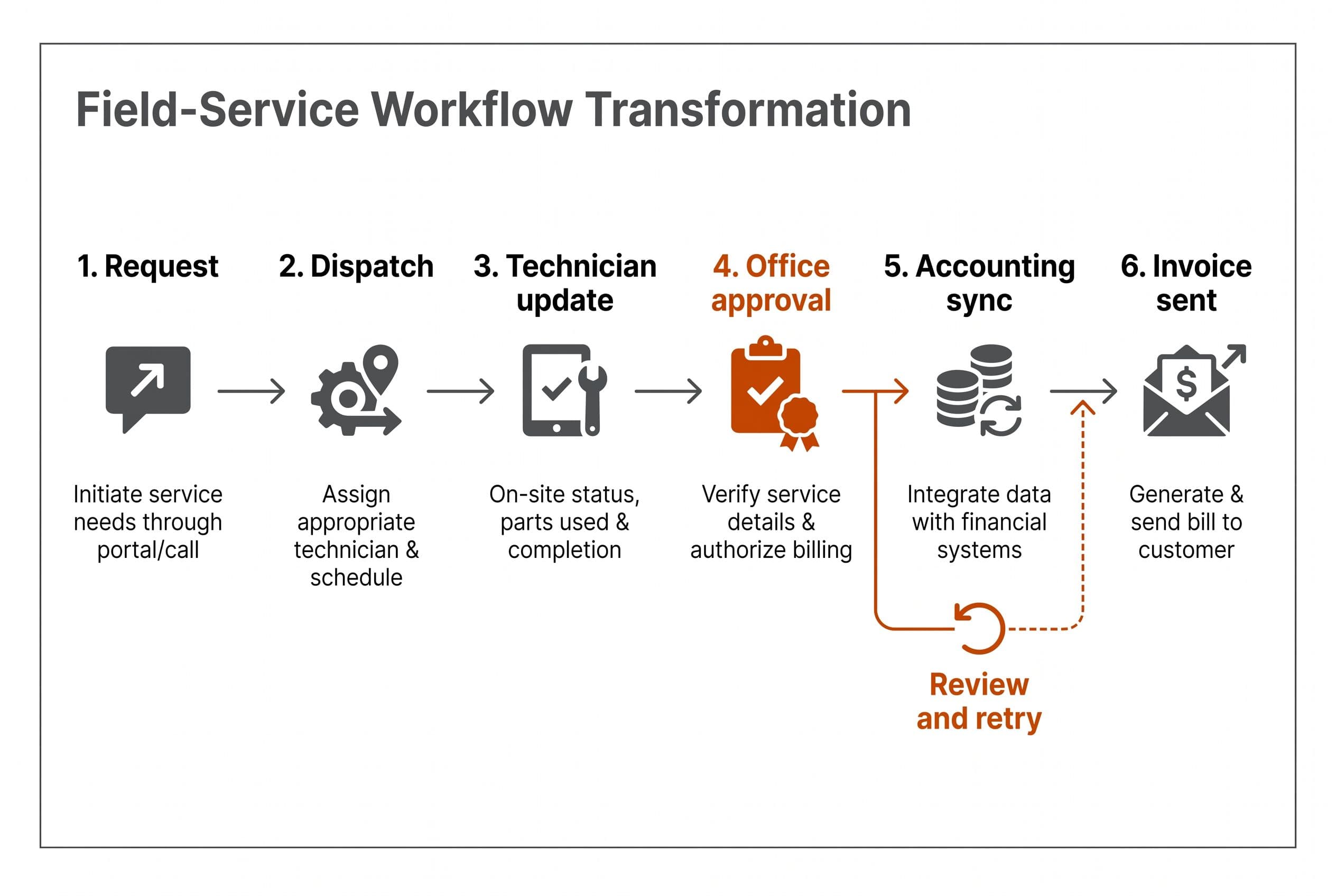
For this field service software comparison in 2026, I'm following one illustrative workflow: a customer requests service, the office dispatches a technician, the technician finishes the job, and accounting sends the invoice. No invented contractor success story. Just the handoffs I'd test before recommending software.
Here's what the options actually are:
- Packaged field service management platforms: a vendor's workflow, subscription terms, and supported integrations. You configure what the product allows.
- A custom integration: a bridge around a specific failure while the existing platform stays in place.
- A custom replacement: the screens, rules, and connections your operation needs, with responsibility for keeping them running.
I'm not proposing a ServiceTitan clone for a small-build budget. I'd scope the part your business actually uses.
One real project explains that distinction. I built an automated SEO blog platform that takes keyword research through drafting, multi-model review, images, publishing, and distribution through Zapier. It also includes its own analytics. This is a real client project, described without naming the client; it isn't a field-service implementation.
The result was automated publishing without a content team behind it. I haven't supplied a build price or previous operating bill for that project, so I can't honestly calculate its payback. What carries over is the engineering approach: connect an entire workflow instead of shipping one impressive screen and leaving the handoffs manual.
Follow one service call before comparing plan names
My decision criteria are dispatch fit, technician usability, invoice accuracy, failure recovery, data portability, and total cost. In that order. A cheaper subscription doesn't help if the office can't tell which jobs need attention.
For the illustrative service call, I'd ask each vendor to demonstrate the same sequence with sample data:
| Workflow step | What I'd test | What would make me question the fit |
|---|---|---|
| Request arrives | Capture the customer, location, problem, and preferred window | The office retypes an email into multiple systems |
| Dispatcher assigns it | Check availability, required skills, and existing commitments | A calendar accepts an assignment the crew can't fulfill |
| Technician gets the job | Show the address, history, instructions, and current status | Critical details arrive separately by text |
| Work gets completed | Record notes, photos, time, and materials | Missing information doesn't block invoice preparation |
| Office reviews charges | Flag exceptions and approve the bill | A disputed charge goes straight to the customer |
| Accounting receives it | Create or update the correct invoice once | Retrying a failed sync produces a duplicate |
I'd give special attention to the boundary between “technician finished” and “ready to invoice.” Those aren't always the same state.
A job can be physically complete but still need a purchase receipt, a warranty decision, or approval for work outside the estimate. I'd want a visible review queue—not a hidden note somebody has to remember to open.
That distinction applies whether you buy or build. My wider guide to what custom software looks like in your industry covers how those operational differences change the software scope.
Field service software comparison: plans and the invoice handoff
The supplied pricing research gives these starting points. These are plan prices, not verified all-in quotes for your workflow. I haven't verified that every figure is current or available under the listed terms. Before using them in a budget, I'd check the vendor's current quote page or sales contract for user counts, annual commitments, plan gates, taxes, and add-ons.
| Option | Pricing available for this comparison | My deciding test |
|---|---|---|
| Jobber Connect | $149/month for up to five users on monthly billing; $99/month on annual billing | Can this plan carry the sample job through office approval without another tracker? |
| Housecall Pro Essentials | $189/month for up to five users on monthly billing; $149/month on annual billing | Does the actual plan support the communications and accounting handoffs you need? |
| Workiz Standard | $275/month for up to five users; extra users approximately $40–$45/month, according to third-party reporting | What happens to the total as technicians and office users are added? |
| Field Ascend | $13/user/month, with all features included and no setup fee, according to its published offer | Do its workflow depth and field experience fit your operation? |
| ServiceTitan | No verified plan price supplied for this comparison | Does the written quote justify the operational scope you're buying? |
| My focused custom build | Medium: $5,000–$15,000, 2–4 weeks; advanced: $10,000–$20,000, 4–6 weeks | Can I bound the replacement without recreating an entire commercial platform? |
For the pricing trail, ScanManifold's 2026 Jobber pricing breakdown and Projul's 2026 Housecall Pro analysis provide plan context. Workiz figures here come from the supplied third-party research, including ServiceAgent's pricing coverage. Field Ascend describes its offer on its small-business software page.
Those lower-priced plans matter. A $500 budget isn't a reason to spend $500. I'd first investigate whether keeping Jobber and fixing one handoff or extending rather than replacing Housecall Pro solves the problem.
For a ServiceTitan vs Jobber vs custom decision, I'd compare the proposed operating setup—not pretend they're equivalent packages. My ServiceTitan pricing breakdown helps separate the quoted subscription from the broader commitment; the replacement options for ServiceTitan address what you can realistically leave behind.
Per-seat licensing isn't inherently dishonest. Selling a low entry price while keeping the required add-ons and extra seats out of the conversation is the problem. I want the invoice for your actual crew.
The $500 subscription becomes $18,000 before workarounds
Here's where I'd price doing nothing before choosing a replacement.
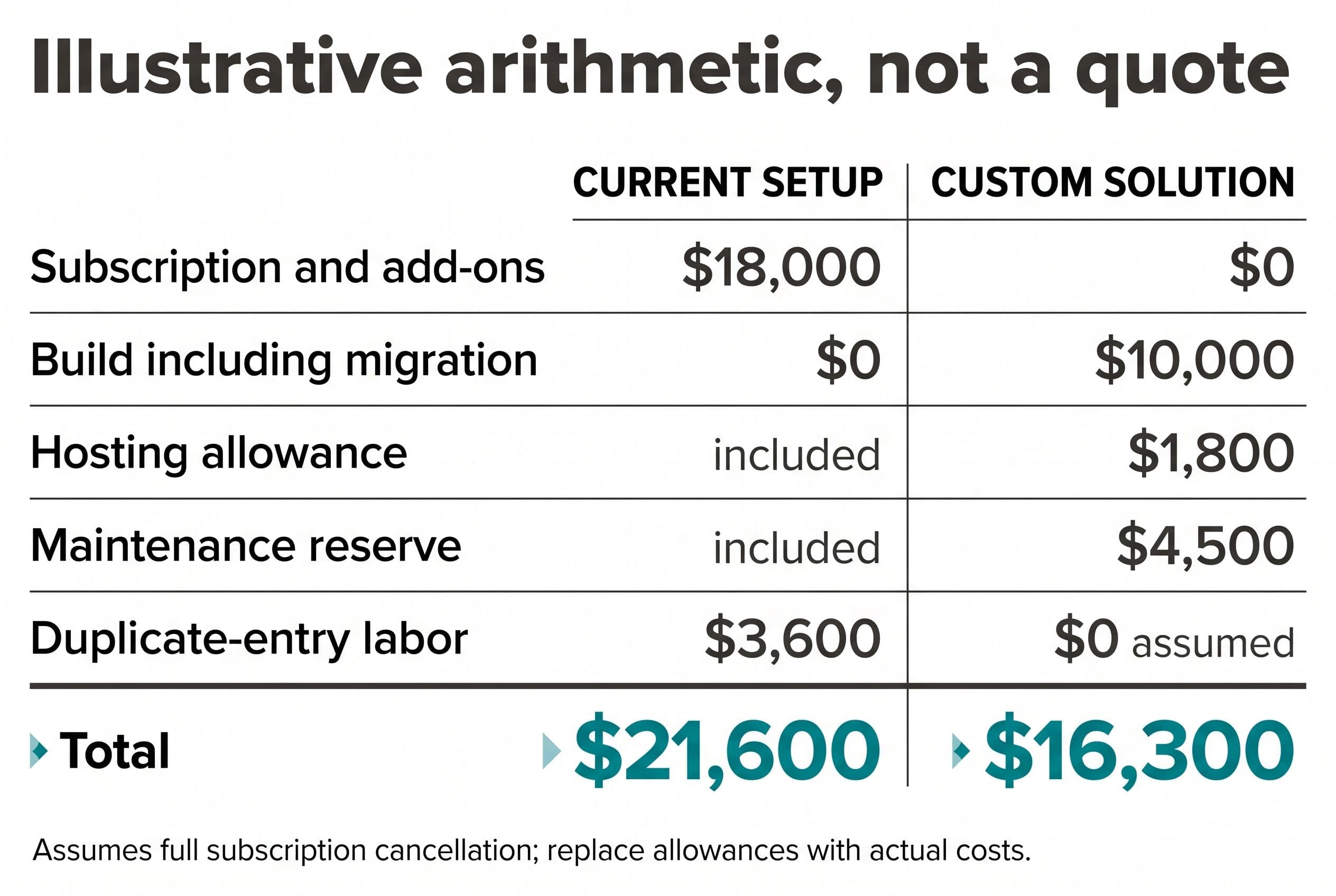
The following is illustrative arithmetic, not a client result or a vendor quote. Assume the current bill is $400/month for seats and $100/month for add-ons. Assume the remaining duplicate entry costs another $100/month in staff time—a placeholder to replace with your own hours and loaded labor cost.
For the custom side, assume a focused $10,000 build with migration included in that scope. I also allow a hypothetical $50/month third-party hosting budget and a $1,500 annual maintenance reserve. Neither operating allowance is a BuiltInWeeks service quote or a named provider's price.
| Three-year cost | Keep the current setup | Focused custom replacement |
|---|---|---|
| Subscription seats | $14,400 | $0 |
| Subscription add-ons | $3,600 | $0 |
| Build and included migration | $0 | $10,000 |
| Third-party hosting allowance | Included in subscription assumption | $1,800 |
| Maintenance reserve | Vendor maintenance included | $4,500 |
| Remaining duplicate-entry labor | $3,600 | $0 assumed for this specific task |
| Total | $21,600 | $16,300 |
That leaves $5,300 in modeled savings, but only $1,700 before counting reclaimed staff time. The labor line isn't cash you can automatically take out of payroll. It's capacity, and it only belongs in the comparison if the replacement actually removes that task.
The custom model also assumes the old subscription and its add-ons can be canceled completely. Retained subscriptions, parallel-running charges, payment processing, messaging usage, taxes, or extra migration work must be added where they differ. Flat pricing and no new feature requests are assumptions too—not forecasts.
Staying with SaaS wins when the bill is too small for that margin, the product already handles the workflow, or an ecosystem dependency prevents cancellation. Don't hire me to replace a working, inexpensive scheduler just because owning code sounds better.
This is the same distinction I make in comparing CRM seat costs with code ownership: replacing a bill and moving it somewhere else aren't the same thing.
The failed accounting sync matters more than the dashboard
Now I'd choose a path based on where that service call actually breaks.
| Path | When I'd pick it | The trade I'd accept |
|---|---|---|
| Configure the existing platform | The needed behavior already exists in the subscribed plan | You keep the vendor's rules and recurring bill |
| Add a narrow integration | Dispatch works, but the accounting handoff fails | You retain the subscription and maintain the bridge |
| Replace the bounded workflow | Several handoffs require duplicate entry and the data can leave | You fund a build and take on software upkeep |
Suppose the technician marks the sample job complete, but QuickBooks doesn't receive the invoice. I'd want the failure visible to the office, with a retry action and enough detail to fix the cause.
Technically, I'd separate job completion from accounting delivery. A stored sync record would hold a durable invoice-operation identifier, the destination reference when known, and delivery status. Webhooks would trigger processing; duplicate-event checks would stop the same event from starting fresh work. API rate limits would delay a retry rather than quietly discard the work.
But webhook deduplication isn't delivery idempotency. The accounting API can create an invoice and then time out before returning its reference. I'd reuse that operation identifier across retries and use destination-supported idempotency where available. If the outcome's uncertain, I'd reconcile it against the accounting system before retrying invoice creation. If I can't establish what happened, it stays in the review queue—not in a blind retry loop.
Human review stays in the workflow. The office approves unusual charges before sending, and unresolved sync failures stay in an exception queue with an owner. Nobody should need to inspect source code to learn why an invoice is missing.
An AI integration could turn technician notes into a draft service summary or suggest missing information. I'd keep it out of the final billing decision. A person would approve the draft; if the model failed or returned unusable output, the original notes and manual entry would remain available.
That's a possible scope, not a claim about something I've built for a field-service client. AI features multiply my published build range by 1.25, so I'd skip them unless they remove enough work to justify the extra cost.
A plain review queue often beats another clever feature.
Replace dispatch without losing the open jobs
If replacement wins, I'd start with migration constraints—not screen designs. Bad source data doesn't become clean because it lands in Postgres.
Here's how I'd scope the move:
- Inspect a sample export. Customers, service addresses, open jobs, notes, attachments, invoice references, and relationships. I'd check what the current contract and tools actually let you export.
- Name the system of record. QuickBooks might remain responsible for accounting while the new app owns scheduling and job status. Two editable versions of the same invoice invite trouble.
- Build the narrow loop. Request, assignment, technician update, office approval, accounting handoff. I'd defer secondary reporting until the core records are dependable.
- Rehearse in a staging environment. Import sample records and test duplicates, missing addresses, reassignment, rejected charges, lost connectivity, and failed integrations.
- Run a controlled cutover. Reconcile open jobs, define which system receives new work, import the final changes, and keep a rollback plan with clear triggers.
- Hand off the operating instructions. Backups, restore steps, failed-sync handling, access management, and escalation all belong in the documentation.
Offline work deserves a separate scope conversation. Showing yesterday's job details without a connection isn't the same as accepting edits offline and resolving conflicts when the technician reconnects. I'd test the real field requirement before quoting it as a basic web app.
For a bounded medium build, my published delivery range is 2–4 weeks; advanced work is 4–6 weeks. Those aren't promises to reproduce every feature in established field service management platforms.
I'd keep offline edits, mobile app store builds, complex role matrices, historical attachment migration, advanced reporting, and multi-branch dispatch rules outside either baseline unless they're explicitly scoped and priced. “Advanced” doesn't mean everything's included. I'd also separate SMS usage and payment-processing fees from the build price; adding those integrations needs its own scope check.
Your planned involvement is a scoping call, a short weekly review, and a final test pass. You also need someone who can supply exports and approve how records map. If permissions or data cleanup require more of your time, I'd put that in the scope rather than bury it.
Put $16,300 beside your actual three-year bill
My pick at $500/month depends on the handoff, not the logo. I'd keep the subscription if it works, add a bridge if one connection is broken, and build only when the replacement has a bounded scope and defensible payback.
The custom option also needs a fair comparison. Modall's 2026 custom field-service cost guide places an MVP at $30,000–$50,000 and two to three months. That's another provider's benchmark, not my pricing—and it doesn't establish identical scope. My lower published ranges apply to focused builds, not every capability a larger implementation might include.
I use AI-assisted development to ship production software in weeks, but I still have to test permissions, retries, and migration. Hourly billing that rewards slow work doesn't make those checks better. Neither does a paid discovery phase that produces a slide deck before showing a range.
My free project estimator at free project estimator shows the range on screen before asking who you are. That matters because you should be able to reject the economics without becoming a sales lead.
For an agreed fixed-price scope, overruns are my problem, not yours. The code lives in your own repo from day one. On final payment, the contract transfers ownership of the custom code and source to you; I retain only generic reusable components, and third-party libraries and services retain their own license terms. With the source and handoff documentation, another developer can take over.
Compare the illustrative $16,300 build-and-upkeep total with the $18,000 you're paying at $500/month, then run your own numbers through the estimator. It does the same sum for your build in about ninety seconds, with the range on screen before any form. If the arithmetic lands, the same form returns a fixed quote within one business day.
Want a real number for your own project?
Answer a few questions and get an instant price range and timeline. No call required, no obligation.
Get your instant estimateTalk through your software project with MattFrequently asked questions
- What field service management platforms fit a $500 monthly budget?
- The supplied pricing research lists Jobber Connect, Housecall Pro Essentials, and Workiz Standard below $500/month for their stated five-user plans. I'd verify the full bill for your crew, including add-ons and billing commitments, before choosing.
- Is custom field service management software cheaper than SaaS?
- Sometimes, but I wouldn't assume it. A $500 monthly subscription costs $18,000 over three years; a custom comparison must include the build, migration, hosting, maintenance, and any services you still need.
- How much does custom field service management software cost?
- My medium builds are $5,000–$15,000 with delivery in 2–4 weeks; advanced builds are $10,000–$20,000 in 4–6 weeks. Those ranges cover agreed, bounded scopes—not a full replacement of every feature in a large commercial platform. AI features multiply the range by 1.25.
- Should I choose ServiceTitan, Jobber, or custom software?
- I'd test the same request-to-invoice workflow in each option and compare written all-in quotes. Keep a packaged platform if it handles that workflow well; consider an integration for one broken handoff or custom software when several failures justify the replacement cost.
- Can AI automate field service invoicing?
- I'd use AI to draft service summaries or flag missing information, not approve charges independently. Human approval, original technician notes, manual fallback, and visible accounting-sync failures should remain part of the workflow.
What would software built for your business look like?
Replacing a subscription, fixing software that fell short, or adding AI to your workflow? Talk through the scope with Matt.
Part of these guides
Matt Brody
Founder, BuiltInWeeks
I build custom software for small and mid-sized businesses — the kind you own outright instead of renting by the seat. Fixed price, delivered in weeks, source code handed over at the end.
More about how I workKeep reading

FSM Software Cost in 2026: Custom Builds $2,500–$25,000
I'd replace field service software only when the subscription and workarounds justify owning the replacement. Here's my pricing, the scope that moves it, and a three-year comparison where keeping the subscription actually wins.
Read more
ServiceTitan Pricing in 2026: $245–$500/Tech + Setup
For an illustrative 10-technician business, reported ServiceTitan rates work out to $29,400–$60,000 a year before implementation and extras. I separate that subscription math from the build, migration, hosting, API, and maintenance costs of owning a narrower replacement.
Read more
Cloud Based Field Service Management Software: DIY Cost
I'd budget $5,000–$15,000 for a focused dispatch app with integrations, not a clone of an entire field service suite. Here's how I'd price the workflow, account for cloud costs, and decide whether replacing the subscription makes sense.
Read more